
Blog

  • The Ultimate IP Camera Buying Guide – 2025 Edition

    The Ultimate IP Camera Buying Guide – 2025 Edition

    The Ultimate IP Camera Buying Guide - VueVille.com

    We love IP cameras and home security – we built our own DIY home security camera system after countless hours of in-depth research. All of this hard work has given us a very deep understanding of the IP camera market, the selection process and any other questions you may face on your journey.


    [wpsm_titlebox title=”Contents” style=”main”][contents h2 h3][/wpsm_titlebox]

    A quick note: As an Amazon Associate I earn from qualifying purchases. This post contains affiliate link(s). An affiliate link means I may earn advertising or referral fees if you make a purchase through my link, at no extra cost to you.


    Whom is this guide for?

    Are you looking for an IP camera for your home? This guide is for anybody that is stepping into the world of modern home security cameras. Maybe you own a legacy analogue CCTV system that you want to replace with an IP camera system that is accessible over the Internet. More experienced enthusiasts may also benefit from the DIY framework that we have built for approaching Home Security and Home Automation.

    This guide will help you answer the most common questions we get on this topic:

    • What is an IP Camera and why do I need one?
    • Why should I choose an IP camera system instead of a traditional DVR system?
    • What are the different types of IP Cameras?
    • Which are the major IP camera brands?
    • How do I choose an IP Camera?
    • Which are the best IP cameras for home security?
    • Do I need a Network Video Recorder (NVR)?
    • Where to buy IP Cameras from

    What is an IP Camera?

    An IP camera is a digital camera that operates on the principles of Internet Protocol (IP) networks instead of analogue electric signals. The Internet is an example of an IP network and uses the IPv4 protocol. IP cameras are also called network cameras for this reason.

    The industry standard protocols for IP cameras are the Open Network Video Interface Forum (ONVIF) specification and the Real Time Streaming Protocol (RTSP).

    [easyazon_image align=”center” height=”500″ identifier=”B08F568BH1″ locale=”US” src=”https://m.media-amazon.com/images/I/31GlYl4pkaL._SL500_.jpg” tag=”vueville.com-eaz-20″ width=”500″]

    Analogue surveillance cameras are always centralised – they require a central controlling and data recording device – what you and I know as a DVR (Digital Video Recorder). The DVR is called so because it records the analogue video feeds from the cameras to a hard drive and is thus digital; not because the cameras themselves are ‘digital’.

    With IP cameras, a revolution was unleashed on the world of CCTV. IP cameras by nature are capable of operating independently – in fact most IP cameras have a built-in mini-computer. They can operate either in centralised or decentralised modes, or both (if the camera is powerful enough).

    • In centralised mode, IP cameras are connected to and controlled by a Network Video Recorder (NVR). Since the cameras operate on networking protocols, they can only communicate with other networking devices. This is why an NVR is needed and not just a DVR. The IP cameras are connected to the NVR either directly or indirectly through Ethernet network cables or wirelessly through Wi-Fi.
    • In decentralised mode, IP cameras are not connected to an NVR that controls them. Each IP camera is like an independent networking device. They have their own IP address and can be accessed by any other device on your Local Area Network (LAN).
    • Most decent IP cameras can operate simultaneously in both modes. They can be part of an NVR system and at the same time be directly accessible by any other networking device on your LAN.

    Why should I choose an IP camera system instead of a traditional DVR system?

    An IP camera based security system has numerous advantages over the traditional analogue CCTV:

    1. Lets you receive alerts (email and push notifications) on mobile devices anywhere in the world.
    2. IP cameras have very advanced motion analysis algorithms that help cut down on false alerts(line detection, intrusion detection, etc.).
    3. Digital video with intelligent markers for alerts makes it much easier to review footage.
    4. Becomes part of your home automation network as it works with home automation sub-systems such as lighting and doorbells.
    5. More flexibility in installation locations as they are able to work over Wi-Fi or Powerline.

    What are the different types of IP Cameras?

    Our favourite way of categorising IP cameras is based on the form factor. Another way is by focal length flexibility – the camera’s ability to change its lens’ focal length. Yet another way is by lens aperture type. We will explore all 3 methods below.

    IP cameras by form factor

    Bullet Cameras

    [easyazon_image align=”center” height=”500″ identifier=”B08F568BH1″ locale=”US” src=”https://m.media-amazon.com/images/I/31GlYl4pkaL._SL500_.jpg” tag=”vueville.com-eaz-20″ width=”500″]

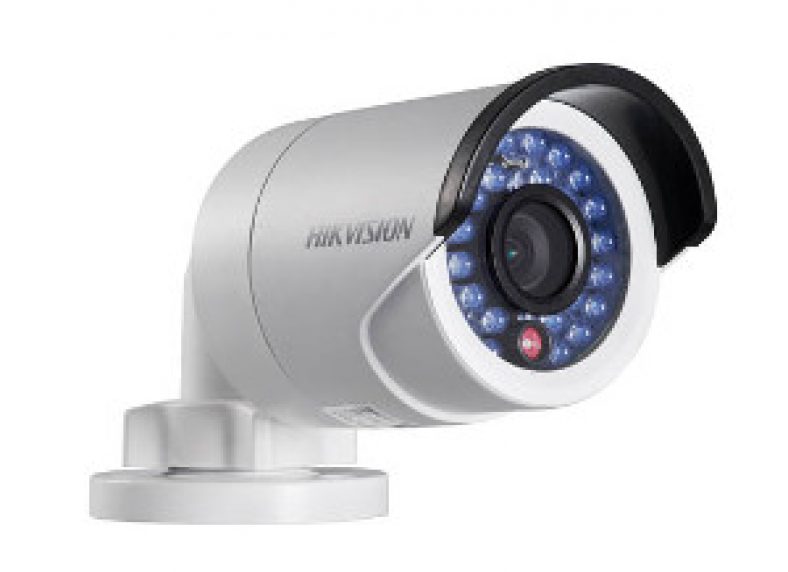
    This is the most recognisable CCTV camera shape. They are called bullets because of their cylindrical shape. Typically the cheapest type of IP cameras you can find. Not very vandal-resistant but offer tons of flexibility in installation positions and adjustment afterwards.

    Dome Cameras

    [easyazon_image align=”center” height=”500″ identifier=”B077Y52782″ locale=”US” src=”https://m.media-amazon.com/images/I/41GcBO8PYFL.jpg” tag=”vueville.com-eaz-boipc18-20″ width=”500″]

    Preferred in commercial settings, these are highly vandal-resistant and more weather-proof than bullets by virtue of their installation position. Installation is trickier and adjustment afterwards can be quite limited as well unless you choose one with three-axis adjustment.

    Turret-style cameras

    [easyazon_image align=”center” height=”500″ identifier=”B08135WDZW” locale=”US” src=”https://m.media-amazon.com/images/I/31Ea0pBsW7L._SL500_.jpg” tag=”vueville.com-eaz-boipc18-20″ width=”500″]

    More discreet than the domes, these are even more vandal-resistant. More and more companies are launching mini-dome or turret style cameras these days.

    Indoor cube cameras

    [easyazon_image align=”center” height=”364″ identifier=”B07QL9QL2R” locale=”US” src=”https://m.media-amazon.com/images/I/31lIbueTJaL._SL500_.jpg” tag=”vueville.com-eaz-20″ width=”500″]

    These are designed to be installed in a corner of the ceiling or placed on a flat surface. Usually comes with built-in microphones and speakers, so can also be used as baby monitors, or as door-phones.

    IP cameras by focal length flexibility

    Another way of categorising IP cameras is based on their focal length flexibility. The amount of zoom available depends on the various focal lengths a camera sports. Also the focal length decides the Field of View (FoV) of the camera. For long alleys, a camera with a narrow FoV is fine, for eg. a lens of 6mm focal length. For a backyard, you would need a wide FoV, such as that offered by a lens of 2.8mm focal length. Of course, the disadvantage with a wide-angle lens is that there will be distortion of the image near the edges.

    Look at the difference between the images from a 2.8mm camera lens and a 4mm camera lens.

    DS-2CD3332-I - 2.8mm - VueVille.com
    Image with a 2.8mm lens
    DS-2CD3332-I - 4mm - VueVille.com
    Image with a 4mm lens

    So the various types of IP cameras by focal length flexibility are:

    Fixed focus cameras

    These use a lens set to a single focal length and hence the field of view is fixed. This keeps the cost down but makes the camera selection (or in some cases, the lens to be installed) even more critical.

    Manual variable focus cameras

    These cameras have a range of focal lens, such as 2.8mm to 12mm. You can change these at any time by adjusting the lens in the camera. Of course the flexibility means you pay more.

    Motorized cameras, Pan-Tilt-Zoom (PTZ)

    These cameras are motorized in all the axes of motion. You may also find Pan-Tilt (PT) cameras which have a fixed focus. Typically, these are the most expensive cameras that the DIY security enthusiast can purchase.

    IP cameras by lens aperture type

    Yet another way of looking at cameras is based on the type of lens used. Aperture is the size of the lens opening that lets light onto the camera CCD or CMOS sensor. The aperture of the lens defines how much light is allowed onto the light sensor. Wider the opening or aperture, higher is the light that is let in. Narrower the aperture, lesser is the light let in.

    So the different types of cameras according to aperture type are:

    1. Fixed aperture
    2. Motorized variable aperture
      • Auto-Iris
      • Precise-Iris (P-Iris)

    For applications where zooming in rapidly is needed, such as number plate recognition at day and night, automatic motorized aperture control is hugely beneficial.

    Which are the major IP camera brands?

    We have limited our reviews to brands that are available to consumers like us, and not those that are marketed mainly to system integrators and installers.

    Reolink

    Reolink has become a strong contender for affordable yet powerful IP cameras that can be added to any DIY CCTV system.

    Amcrest

    Amcrest is a relative new-comer to the IP camera industry. However, what matters is that it was started by the same guys who founded Foscam. While Foscam was never in the same league as Hikvision, they were the popular choice of the uninformed masses. Amcrest seems to have learnt the hard lessons from Foscam’s experience as their products are of much higher quality.

    Axis

    Axis invented the IP camera when they launched the Neteye200 , the world’s first network camera. Started in 1984, Axis is now owned by Canon.

    Samsung

    Samsung has been in the network camera business for a long time and has recently launched their consumer oriented series called the SmartCam series. This fits in nicely with their acquisition of the SmartThings home automation brand.

    Vivotek

    A Taiwanese company established in 2001, Vivotek is a highly respected network camera manufacturer. Catering to the enthusiast and high-end sections of the market, superior hardware and impeccable software quality comes at a higher price.

    D-Link

    D-Link was established in 1986 in Taiwan. Its stronghold has traditionally been networking products, so no surprise then that they are quite big in network camera solutions too. They make a huge range of cameras for everything from large corporations down to the single consumer.

    Hikvision

    Headquartered in Hangzhou, China Hikvision was established in 2001. It has since shot up to the no.1 position globally for Network Cameras sales with a market share of 18.9%.

    Although Hikvision used to be a good choice for DIY-ers, the issue if its close relationship to the Chinese government and the recent US bans have led us to stop recommending this brand.

    Dahua

    Just like Hikvision, Dahua was also founded in 2001 in Hangzhou, China.

    We do not recommend Dahua either for the same reasons listed for Hikvision above.

    How do I choose an IP camera?

    The most important point we would like to stress is that you need to know exactly what you want before you spend your hard earned cash. This means you need to have a plan for how you are going to use your surveillance system. Let’s break it down one by one:

    STEP 1: Plan where the cameras will be installed

    You should have a good think about where you are going to install your cameras. The type of cameras you need depends on where you are installing them:

    Indoor IP cameras:

    Any outdoor camera can be easily used inside too. However with indoor cameras you have the choice of installing covert or hidden spy cameras which are perfect for recording a break-in without the criminals noticing.

    Check out our top recommendations for indoor IP cameras and spy cameras.

    Outdoor IP cameras:

    Having installed bullet style cameras and then having to adjust them constantly, these are best for their unmatched flexibility. Being the classic CCTV shape, they are also popular choices as deterrents. These are however quite vulnerable to being knocked off target and hence not best for exposed areas. Discreet installation under eaves is what we recommend for bullet style cameras.

    Dome style cameras are more difficult to install, and even more difficult to adjust once installed. However they are highly resistant to vandalism and the weather.

    PTZ cameras are of course highly desirable but more expensive than other types of IP cameras.

    Check out our top recommendations for outdoor IP cameras.

    Features to look for

    IP protocols support – Make sure the camera supports the ONVIF and RTSP protocols. This will ensure compatibility with NVRs and other home automation equipment in the future.

    Power-over-Ethernet
    Instead of running a separate power cable and ethernet cable to each camera, the Power-over-Ethernet feature allows you to transmit power over the data cable itself. This is hugely convenient as you can use ethernet cable runs of up to 100 feet. You can use a PoE enabled switch, check out the [easyazon_link identifier=”B00BP0SSAS” locale=”US” tag=”vueville.com-eaz-20″]TP-Link TL-SG1008P[/easyazon_link] on Amazon.

    Make sure it supports the 802.3af Power-over-Ethernet standard and the 802.3at standard for PTZ cameras. The 802.3at standard supports higher power ratings that are needed for motorized cameras.

    Weatherproofing
    Make sure outdoor cameras are at least IP66 compatible. It may also be worth adding an extra layer of sealant around the camera to provide extra protection.

    Resolution
    With analogues cameras, you would judge resolution by the ‘number of TV lines’ (TVL) or ‘lines of resolution’. With digital IP cameras, resolution is specified by the number of pixels. Currently we recommend a minimum of 2 MegaPixels. 3MP is the standard but 4MP cameras are quickly becoming mainstream.

    Infrared
    Most IP cameras have built-in Infra Red(IR) illumination. The most common ring type LEDs tend to fade after a year or so and are found in entry level models. EXIR LEDs are stronger and more long-lasting. In any case you will need [easyazon_link identifier=”B075F7NV56″ locale=”US” tag=”vueville.com-eaz-20″]external IR illumination[/easyazon_link] because the IR produced by cameras generally tend to be have a flashlight effect and are effective only in enclosed spaces. Another issue with built-in IR is that flies and spiders are attracted to the IR hence blocking the camera’s view or frequently setting off motion detection alerts.

    On-board storage
    Most IP cameras these days have SD card slots that support capacities of up to 128 GB. This is an excellent alternative to an NVR of you are looking at just 1 or 2 cameras.

    Wireless
    We do not recommend using WiFi for IP cameras simply because you cannot get the same reliability as with a wired connection. But for just 1 or 2 cameras in a network, wireless is an acceptable solution. Consider powerline networking as it is far more reliable and supports higher network speeds.

    Which brand of IP camera do I choose?

    Look at our latest recommendations for outdoor and indoor IP cameras.

    Which are the best IP cameras for home security?

    Read our in-depth round-up reviews of the best indoor and outdoor IP cameras.

    Do I need a Network Video Recorder (NVR)?

    As we learnt earlier, most IP cameras are capable of working without an NVR. Some have onboard SD card storage that can be used for motion detection snapshots and video clips.

    Yet, there are many advantages to having an NVR record the video streams from your IP Cameras:

    • 24/7 continuous recording of multiple cameras is possible for say 1 month.
    • You have a backup of video footage in case your camera is damaged/destroyed/stolen.
    • You can live-view your cameras from a single interface. Trust us, when you have 4 cameras you do not want to log into each camera one-by-one.
    • You can simultaneously play back video streams from multiple cameras – quicker manual reviews!

    So if you are just starting out with 1 or 2 IP cameras, and they have onboard storage, you do not need an NVR. However with more IP cameras, we recommend getting a compatible NVR.

    If you want a set-and-forget system, go for cameras and an NVR from the same manufacturer. This will make installation and setup a breeze as the systems were designed to work with each other. A bonus is that NVRs from the major brands will support any IP camera that supports the ONVIF protocol.

    Read: Best all-in-one DIY NVR & IP Camera Kits

    How do I build my own DIY CCTV system?

    Now that you know the basics, have a look at this detailed description of our DIY CCTV system and our home network. It should give you a good idea of how to set up everything.

    Where can I buy IP cameras from?

    Just as with almost everything else we buy online, we recommend Amazon. This is because of the wide range of products, competitive pricing and the ease of returns if needed. The Amazon product links on this website are automatically customized to the right Amazon store for your geographic location. Just remember to check for warranty information before purchasing, as some sellers offer grey market imports without warranty.
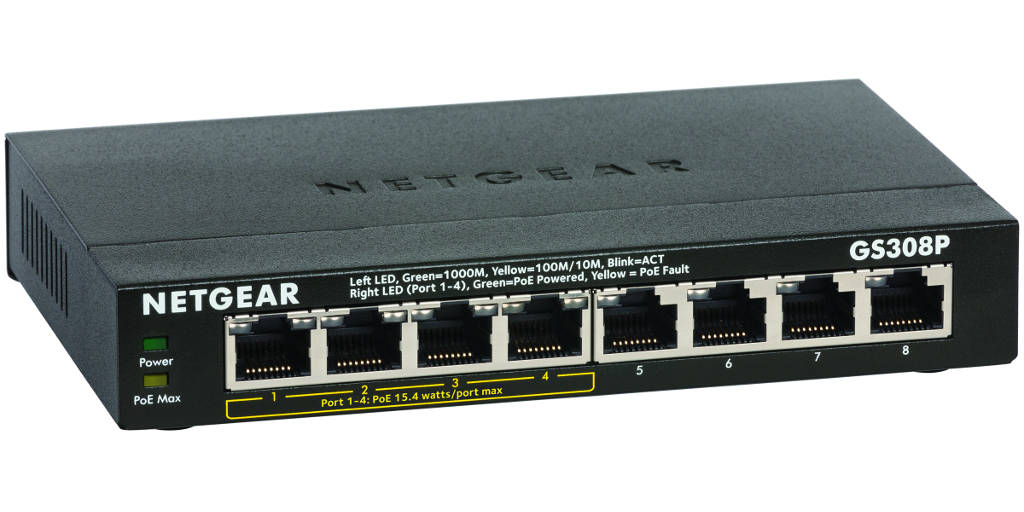
  • Review: Netgear ProSAFE GS308P 8-Port Gigabit PoE Switch

    Review: Netgear ProSAFE GS308P 8-Port Gigabit PoE Switch

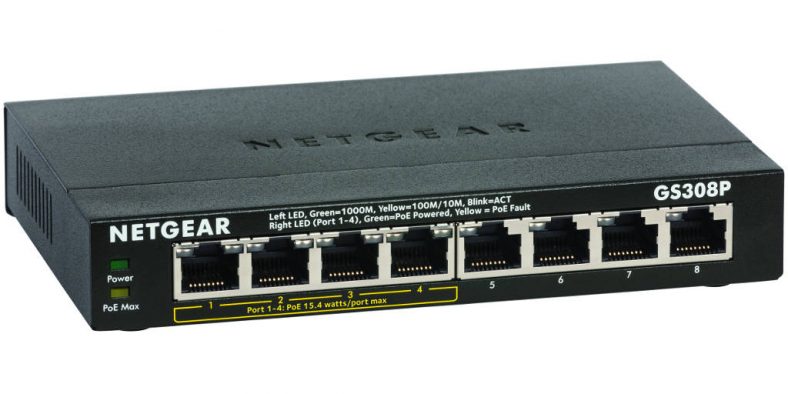
    Today we look at the Netgear ProSAFE GS308P 8-Port Gigabit PoE un-managed switch. Belonging to the latest Netgear 300 series of SOHO switches, this is one of the most popular consumer networking switches at the moment.

    In the UK, the same switch is known as the Netgear ProSAFE GS308P-100UKS. Is it the best 8 port gigabit switch you can get right now? Let’s see how it compares with our current favourite, its closest competitor, the TP-Link TL-SG1008p 8-port Gigabit PoE switch that we reviewed and tested extensively.

    Netgear ProSAFE GS308P 8-Port Gigabit PoE Switch Review - VueVille.com
    This little switch is an absolute workhorse, and has served me for over 5 years now

    [wpsm_toplist]

    [text-blocks id=”5527″]

    Netgear Gigabit PoE Switches

    Netgear are one of the most widely respected networking companies and for good reason. Their networking products are well-built, reliable and have solid performance.

    Netgear even overtook HP as the largest enterprise networking provider with 29% market share world-wide.

    For the DIY home automation and security expert, Netgear makes some very attractive PoE (Power over Ethernet) enabled switches – both managed and unmanaged. However the feature-rich product line-up can also be quite confusing! So let’s understand where the GS308P-100NAS sits in Netgear’s product portfolio.

    Netgear ProSAFE GS308P-100NAS

    This switch belongs to Netgear’s ‘SOHO Ethernet Switch Series’. These switches are aimed at the prosumer and small office end of the market where a strong blend of features and performance are required.

    Netgear ProSAFE GS308P Review - Network - VueVille.com

    Because they need to be plug-and-play with no setup required, the SOHO switches are of the unmanaged variety. This means that you cannot set up advanced features such as routing and configure networking protocols, as features such as VLANs, QoS, and IGMP Snooping are not available. However, at the DIY level this is usually not an issue.

    If you need an 8 port managed PoE gigabit ethernet switch, we recommend the Netgear GS108PE Web Managed (Plus) switch which supports VLANs, QoS, and IGMP Snooping.

    Main specifications

    [table id=17 /]

    For more information, please refer to the official datasheet.

    PoE features

    The most important PoE feature that you should look for in a switch is 802.3af compatibility. 802.3af compatible devices have the ability to auto-negotiate the voltage that they need from a PoE power source. A maximum of 48V is possible under the standard. The GS308P has the following PoE features:

    • IEEE 802.3af compliant – auto detects and switches voltage as needed
    • Supports PoE power up to 15.4W for each PoE port
    • Supports PoE power up to 53W for all PoE ports

    The one feature that the TP-Link has and the Netgear doesn’t is prioritised ports for PoE. Also note that Ubiquiti wifi access points will not work with this switch. This is not Netgear’s fault but rather Ubiquiti’s because their PoE implementation is not standards compliant.

    What’s in the box

    The GS308P packaging consist of the following:

    • 8-Port Gigabit Ethernet Switch with 4-Port PoE (GS308P)
    • Power Adapter
    • Quick Installation Guide
    • Wall-mount kit

    Look and Feel

    Just like the TP-Link TL-SG1008P PoE switch, the Netgear GS308P has an all-metallic chassis. This together with the fanless design helps it to stay cool even when all 4 PoE ports are drawing the maximum possible 53W.

    Installation

    The retail packaging comes with a wall mounting kit and the switch itself is wall-mountable. Again, just like the TP-Link TL-SG1008P, the Netgear is an unmanaged switch and therefore is plug-and-play. If you need a rack mountable switch, you will need to go for the larger 24-port GS324 model.

    Operation

    The switch is fanless and is silent during operation. The thermal output of 205.20 BTU during maximum utilisation and 0.95 BTU on standby is also very good despite the fanless design. There is an auto power down feature and the standby power consumtion of 0.28W is very good. Note that there is no on/off button on the device itself.

    Verdict

    Where to buy

    [easyazon_link identifier=”B016XIU1HE” locale=”US” tag=”vueville.com-eaz-20″]View on your local Amazon Website[/easyazon_link]

    Also consider

    Nearest alternative:

    [easyazon_image align=”center” height=”500″ identifier=”B00BP0SSAS” locale=”US” src=”https://m.media-amazon.com/images/I/316oSWRkMkL._SL500_.jpg” tag=”vueville.com-eaz-20″ width=”500″]

    We hope you enjoyed this review. Let us know your thoughts and experiences. Also don’t forget to sign up for our monthly newsletter below!

  • The Ultimate Home Automation Guide – 2025 Edition

    The Ultimate Home Automation Guide – 2025 Edition

    Why should I automate my home? Which home automation technology should I use? Should I go wired or wireless? Will it work with my Nest thermostat? How should I secure my home? These are some of the questions that we also had before we started researching the home automation and security market. In this article we attempt to make sense of it all and present what we think is the best framework for building your Home Automation (HA) system.

    Home Automation - VueVille.com
    [wpsm_titlebox title=”Contents” style=”main”][contents h2 h3][/wpsm_titlebox]

    What is Home Automation?

    Home Automation is everything you can set up in your home with the goal of making your home smart.

    How do you achieve it? By automating things that you would normally have to do yourself:

    • Bedtime scene – When you go to bed, you would simply activate the bedtime scene and the following would automatically take place: turn off lights across the home, close the blinds, turn down the heating, lock all the doors and activate the burglar alarm.
    • Sunrise scene – When the sun rises the next morning, your weather station would trigger the blinds to open, turn on the heating, play your favourite radio station, and even make you a cup of coffee!
    • Home security – Someone’s at the gate and is opening it, your PTZ camera zooms in to see who it is.
    • Presence detection – Lights can come on in a room when someone enters and then switch off automatically when the person leaves. Perfect for large family homes!
    • Heating – You could also turn down the heating in a room if a window is left open for more than 5 minutes, and send a message to a family member reminding them to close the window.

    The possibilities are endless; limited only by your imagination. Essentially you can create “If This Then That (IFTTT)” type of actions where one event triggers a sequence of others.

    Home automation is not new, in fact it has been around since the 60s. However it is only recently that DIY home automation has become affordable and at the same time reliable enough for everyday use. Just about anyone today can easily achieve results that rival professional installations that would have cost thousands in the past. Also, the use of wireless Radio Frequency (RF) technology makes it far easier to install in an existing house, as there are no wires to run.

    Just as with most new technologies, there is a bewildering number of devices and eco-systems on the market. Making sense of them is not easy if you are just starting out and that’s where we come in. We have been following the industry closely and want to help you build your smart home.

    Home Automation products do not all talk to each other – the issue of protocols

    Have a look at the bewildering variety of HA products and technologies on the market – how can you make sense of it all? What we need is a framework to understand which product is right for which application.

    Firstly, it is important to understand that not all HA products can communicate with each other. This is because not all companies use the same communication protocols, whether they be wired or wireless. This is the biggest challenge that faces the prospective HA buyer. Let’s look at the various communication protocols that exist today:

    [table id=15 /]

    So in order to ensure you have an HA system that works seamlessly, you need to ensure all parts of your system either use the same communication protocol or have bridges/plugins that allow them to talk to each other. What you do not want is isolated sub-systems such as security and lighting that do not talk to each other and thus will need to be controlled separately. Many beginners who do not think through their HA strategy find themselves in this boat at some point.

    This is what the uninformed yet enthusiastic beginner usually does: start out with WeMo power plugs, add some Philips Hue bulbs later, and finally add a Samsung IP Camera – and then wonder how you are going to integrate all these devices into a seamless whole. Most of these devices are based on WiFi, and this is what makes them easy to add to your existing home network. All you need is a WiFi router. However the lack of a controller hub, and thus centralised control and monitoring, is their biggest drawback.

    What does this mean practically? You may need 4 different apps to control your 4 different sub-systems! It is not impossible to integrate all of these sub-systems and make them work together, but it would be far more cost effective to think through and plan your HA strategy carefully first.

    Our recommended approach – use a Home Automation Controller Hub

    Our recommended approach is to use a controller hub. A central controller will be the brains of the HA system. All the sensors and sub-systems such as lighting report to the controller and in turn get instructions from it. The controller can be configured and monitored from a computer, or via apps on a smartphone or tablet. Examples of controllers are a Raspberry Pi running Home Assistant, [easyazon_link identifier=”B07D19VVTX” locale=”US” tag=”vueville.com-eaz-20″]Hubitat Elevation[/easyazon_link][easyazon_link identifier=”B08TWDNQ5Q” locale=”US” tag=”vueville.com-eaz-20″]Aeotec Smart Home Hub[/easyazon_link], Hubitat Elevation, [easyazon_link identifier=”B07FJGGWJL” locale=”US” tag=”vueville.com-eaz-20″]Samsung SmartThings[/easyazon_link] etc.

    Most off-the-shelf controllers are designed primarily for a particular HA protocol, but will support certain other protocols too, either by default or by way of add-ons/extender modules. For example, popular controllers such as the Hubitat supports the Z-Wave, Zigbee and Wi-Fi protocols. However when you choose a controller, you are still investing into an eco-system and thus need to choose wisely.

    Consider your current needs (say, lighting control) and future needs (multi-zone heating, security, IP cameras etc.), then choose a main protocol and system that will meet most if not all those needs. Or in other words, there should be a good range of products that use your main chosen protocol (such as Z-Wave).

    There is a fully DIY route as well – and this is what I have done: Build your own controller using a computer, a Raspberry Pi, or a NAS and then running home automation software on them (either commercial or open-source). My primary home automation controller is the Home Assistant software running on a Raspberry Pi 4.

    I also have a laptop running Windows 10 Pro with the HomeSeer HS4 software – this supports some older Z-Wave devices that Home Assistant doesn’t recognise.

    This is a perfect setup for those who want to tinker and really get into the nuts and bolts of home automation. But I don’t recommend this for beginners. So see my recommendations below.

    Choosing your Home Automation Sub-Systems

    By sub-systems we are referring to the parts that make up your HA system such as lighting, heating, security etc. You can either create the sub-system yourself by picking and choosing elements or choose an off-the-shelf proprietary sub-system. Let’s take the example of the lighting sub-system:

    • Creating the lighting sub-system yourself would mean installing relays and dimmers behind your existing light switches (eg. Fibaro dimmers).
    • Using an off-the-shelf system such as the Philips Hue bulbs means that you simply replace your existing bulbs with the Philips Hue bulbs and you are set to go.

    Here are some examples of proprietary sub-systems:

    [table id=16 /]

    Home Automation & Home Security

    Home automation (HA) and security go hand in hand. Home security is best viewed as a vital part of a well-planned home automation system. If you are just starting out, you may be interested only in home security and have no intention of automating your home at present. But you should choose your home security system in such a way that you can always make it part of a home automation system if you choose to in the future.

    Our Recommended Home Automation Protocol

    ZWave

    The ZWave platform is the most promising due to the large number of products available from a multitude of suppliers at reasonable prices. The intense competition among ZWave product suppliers is to our benefit as consumers. The latest version of the protocol called ZWave Plus further cements its position as the industry leading HA protocol. This protocol is backwards compatible which means you dont have to worry about your existing devices being made obsolete when you upgrade the HA controller.

    Recommended Smart Home Automation Systems

    If you want a smart home automation system that is capable, reliable but requires the least investment of time, there is no one solution that I can recommend whole-heartedly. The reason is that there is a learning curve for every platform. The simple ones such as Vera Plus lack the ability to create complex events. The ones that can create complex events have a steep learning curve. Still my first system was the Vera Plus and in a year I out-grew it. I wouldn’t use the Samsung SmartThings though – too many compromises and reliability is an issue.

    If you want a smart home automation system that is flexible and reliable, check out the[easyazon_link identifier=”B08TWDNQ5Q” locale=”US” tag=”vueville.com-eaz-20″]Aeotec Smart Home Hub[/easyazon_link] [easyazon_link identifier=”B07D19VVTX” locale=”US” tag=”vueville.com-eaz-20″]Hubitat Elevation[/easyazon_link] or Aeotec Smart Home Hub.

    If you want a smart home automation system that is very powerful, super-reliable, requires some investment of time, don’t want to spend much money (<$100), have a laptop to spare or know how to build a Pi, just go with the excellent free Home Assistant software. This is what I have done, and I haven’t looked back.

    Next Steps

    Now check out how I built our own DIY smart home automation system. Also see The Ultimate IP Camera Buying Guide if you are interested in learning the basics of IP cameras.


  • Buyer’s Guide: Network Camera Comparison Chart

    Buyer’s Guide: Network Camera Comparison Chart

    Are you wondering how you should go about choosing the right network camera for your home? Network cameras (or IP cameras) are the most important components of a CCTV security system, and you need to make sure you select cameras that are suited to the areas you want to monitor in and around your home.

    There are so many network cameras out there, all with a dizzying array of features, not to mention applications. This is why we decided to build the ultimate comparison table for IP cameras. The table below lets you compare the features of the most popular IP cameras from manufacturers such as Hikvision, Dahua, etc. You can filter using the feature dropdown boxes, search for a specific feature such as built-in IR, or sort these cameras by any column. So you can quickly narrow the list down to the IP cameras that have the features you are looking for. We have also explained the comparison criteria in detail just below the table.

    We think the most important features that you should look for in an IP cameras are in the comparison table below. Just below the table, you will also find detailed explanations of each of the columns of this table. Let us know if we can improve this tool in any way!

    IP Camera Comparison table/matrix:

    Start by filtering the table by using the dropdown boxes or the search box. Simply click on the required column header to sort by that criteria. To reset the table, just reload this page by clicking your browser’s refresh button or pressing F5 on your keyboard.

    [table id=14 responsive=scroll /]

    IP Cameras – Explanation of technical terms:

    Category: We have grouped the IP Cameras into categories so that you can easily drilldown to the exact type of camera you are after.

    Price: To provide you with up-to-date prices, we have linked the cameras to Amazon. Please note that this is an affiliate link which will provide us a commission if you decide to buy from Amazon.

    Company:This is the camera manufacturer – we have listed cameras from Hikvision, Dahua and Reolink at the moment.

    Product line:Manufacturers often use distinctive titles for their product families – this can be a useful way to filter out cameras that do not appeal to you.

    Status:Tells you whether the camera is a current model or has been phased out.

    Model:Each manufacturer has their own system of nomenclature. Here is a guide to the naming system used by Hikvision.

    MP:The number of megapixels the camera’s sensor has.

    IR:IR stands for infrared, most of the cheaper cameras use ring style LEDs but the EXIR LEDs are brighter and have a higher range.

    Focus:This column refers to the amount of flight the camera lens has, this maybe either a fixed iris, a manual iris which can be changed, an auto iris which is motorized and responds to the light levels in the scene, or the most desirable P-iris(precise-iris) which uses a motorized lens with additional software to improve the video quality.

    PTZ:Indicates whether the camera has a Pan Tilt Zoom feature.

    PoE:Indicates whether the camera supports Power-over-Ethernet.

    Snapshots:Indicates whether the camera supports taking image snapshots.

    IR-cut filter:Good quality cameras have an automatic IR cut filter, which lets the camera produce true colour video during the daytime and high quality night time videos. A camera without this filter can only ever have one of the two, not both.

    WDR:Stands for Wide Dynamic Range. WDR is desirable as it enhances the darker parts of the scene without blowing out the brighter parts of the scene.

    Hikvision IP Camera Model Naming Convention

    Please refer to the Hikvision product guide to understand the model naming convention.

    [text-blocks id=”earnings-disclaimer-incl-hivision-dahua”]

  • 15 Best-Selling Wireless Spy Cameras

    15 Best-Selling Wireless Spy Cameras

    [text-blocks id=”8897″]
    Have you ever wondered what happens when you leave the pets alone at home? Or whether your nanny is taking good care of your baby? Or whether your office is secure when you are not around? Is someone vandalising your property? If so, you should be interested in wireless spy cameras.

    Wireless spy cameras come in two forms:

    1. A single integrated unit that combines the camera lens and the wireless transmitter into one package. Often disguised as an everyday household object such as a clock, light bulb, speakers etc.
    2. Separate lens and wireless transmitter parts connected by a wire. Meant for installation in tight spaces and where the observed parties may suspect that a hidden camera is present in the room.

    The Best-selling Wireless Spy Cameras

    [wpsm_box type=”yellow” float=”none” text_align=”left”]
    Check out our 2020 Recommendations for the Best Spy Cameras
    [/wpsm_box]

    Relohas 1080p Covert IP Camera

    [easyazon_image align=”center” height=”500″ identifier=”B07VDL1H3F” locale=”US” src=”https://m.media-amazon.com/images/I/516CTLx-vwL.jpg” tag=”vueville.com-eaz-20″ width=”500″]

    The Relohas covert camera is a small wonder. It is an IP camera that packs 1080p FullHD resolution, WiFi, and a microSD card slot. The camera sensor is separated from the rest of the camera which allows you to easily position the sensor unit in the desired position. Thanks to Wi-Fi, you can access the video stream or recorded clips without physically accessing it.

    There are four different recording modes:

    1. Full-Time Recording Mode: Just insert the microSD card, and the mini cam will go into 24-hour loop recording, Wi-Fi is not needed for this mode
    2. Timed Recording Mode: The camera records for a specified time period.
    3. Motion detection Mode: The camera records clips only when it detects motion
    4. Phone Recording: On-demand recording using the smartphone app

    The spy camera also sports InfraRed lamps so that you get crystal clear night vision. An 800mAh built-in rechargeable battery powers the camera through even when there’s no power.

    Full specs:
    – 1080P HD video, H.264
    – Free Apps for iOS and Android, view and hear remotely from anywhere
    – Quick setup within minutes, no complicated settings needed
    – MicroSD DVR supports cards up to 128GB (SD Card not included)
    – Motion record/alerts via Push Notifications/Email/FTP
    – Fully compatible connectivity, works over Wi-Fi

    [easyazon_link identifier=”B07VDL1H3F” locale=”US” tag=”vueville.com-eaz-20″]View on Amazon[/easyazon_link]

    HZTCAM Mini Portable Wifi Hidden Camera

    [easyazon_image align=”center” height=”500″ identifier=”B07Y361KQR” locale=”US” src=”https://m.media-amazon.com/images/I/511rOxisRjL.jpg” tag=”vueville.com-eaz-20″ width=”500″]

    This IP spy camera is one of the smallest we have seen. Yet, it has all the features of a good wireless spy camera. The camera base has a strong magnet which you can use to attach to any metallic surface. PLug in the USB cable for power and twist the camera into position. That’s it you are set!

    The 1080p sensor, 2.4 GHz Wi-Fi, IR night vision range of 6 metres, built-in battery, 128GB microSD card support and push notifications alerts make this spy camera a solid performer.

    Main specs:
    – Flexible base for aiming camera
    – Android/iOS apps available
    – 1080p 30FPS with audio recording
    – 150° wide-angle lens, 16 feet IR night vision range
    – Motion detection, loop recording
    – Record while charging
    – Built-in 350mAh battery
    – Power supply:Input 100-240V, Output DC 5V 1A
    – Up to 128GB micro SD Card (class 10 above suggested for smoother video)

    [easyazon_link identifier=”B07Y361KQR” locale=”US” tag=”vueville.com-eaz-20″]View on Amazon[/easyazon_link]

    Wireless Nanny Cam Clock With Superb IR Night Vision

    [easyazon_image align=”center” height=”500″ identifier=”B07XHNMRCD” locale=”US” src=”https://m.media-amazon.com/images/I/51owpx3SAUL.jpg” tag=”vueville.com-eaz-20″ width=”500″]

    Want to keep an eye on your nanny as she keeps an eye on your kid? This clock is a well disguised nanny camera that you can connect to over Wi-Fi and check in on. View live streaming video on the smartphone app. You won’t miss anything when you are not looking because the spy camera can take a microSD card to capture motion detection clips. 24/7 recording is possible with AC power. But even a power failure won’t stop this thing, it has a 5 hour battery built-in. And yes insert an AA battery for the clock to work!

    Main specs:
    – Video resolution: 1080p FullHD
    – WiFi details: 2.4 GHz 802.11n WiFi
    – Supports up to 32GB SD card (Memory card not included)
    – 10 powerful IR LEDs
    – iOS & Android supported
    – Charging voltage:DC-5V
    – Battery life:2-5 hours
    – Mini 5Pin USB

    [easyazon_link identifier=”B07XHNMRCD” locale=”US” tag=”vueville.com-eaz-20″]View on Amazon[/easyazon_link]

    1080p FullHD Wireless Hidden Nanny Charger Spy Camera

    [easyazon_image align=”center” height=”500″ identifier=”B07MXGPH7Z” locale=”US” src=”https://m.media-amazon.com/images/I/41uoYsDBRkL.jpg” tag=”vueville.com-eaz-20″ width=”500″]

    This USB charger looks normal enough, but underneath lurks a monster of a spy camera. It is essentially an IP camera that packs 1080p FullHD resolution, WiFi, and a microSD card slot. Yes you can charge two USB devices while the spy camera is recording motion detection based video. The wide-angle lens can capture everything in a 90° field of view. When the SD card gets full, it will overwrite the oldest footage and keep going.

    Main specs:
    – Image Sensor Dimensions Φ 0.74 x 1 in
    – Main Unit Dimensions(W x D x H mm) 3.7 x 2.87 x 0.94 in
    – High-Resolution 1080p HD video streaming, H.264, MPEG4, MJPEG configurable stream.
    – 3-D Digital Noise Reduction (3-D DNR), Get exceptional image quality and video with less noise.
    – Loop recording, motion detection recording, continuous recording
    – Push notifications
    – Works over Wi-Fi b/g/n.
    – MicroSD card slot up to 128GB, playback via our app or software.
    – Free app for iOS & Android smartphones/tablets.

    [easyazon_link identifier=”B07MXGPH7Z” locale=”US” tag=”vueville.com-eaz-20″]View on Amazon[/easyazon_link]

    1080p Full HD Spy Cam Mini Wireless

    [easyazon_image align=”center” height=”500″ identifier=”B07SQYCQL4″ locale=”US” src=”https://m.media-amazon.com/images/I/41SxQRFSPaL.jpg” tag=”vueville.com-eaz-20″ width=”500″]

    This tiny cube packs a powerful punch for something that’s the same size as an Apple Watch! Measuring just 1.65 inches across, you can use this as a wearable spy cam, a drone camera or pretty much anywhere you can think of. The 380mAh built-in rechargeable battery makes this possible. Add a 64GB SD card and you have a 24/7 continuous recording wireless spy camera.

    Main specs:
    – Real-time Video Recording Video Resolution 1080P/720P/640P/480P
    – Size: 1.65×1.65×0.45 inch
    – Video coding :H.264+
    – Night resolution: 720P
    – Infrared night vision: 18ft night vision infrared light
    – Battery type: Built-in 380mAh rechargeable lithium battery
    – Storage card: support up to 64GB Micro SD card TF card
    – Motion detection or continuous recording
    – Net weight: 18g
    – Interface Micro USB: 5V 1A
    – Free app for iOS & Android smartphones/tablets.

    [easyazon_link identifier=”B07SQYCQL4″ locale=”US” tag=”vueville.com-eaz-20″]View on Amazon[/easyazon_link]

    USB Charging Station Wireless Spy Camera

    [easyazon_image align=”center” height=”500″ identifier=”B07ZLZK9JM” locale=”US” src=”https://m.media-amazon.com/images/I/51zdnD+Ud2L.jpg” tag=”vueville.com-eaz-20″ width=”500″]

    This innocuous looking 5-port USB charging tower conceals a powerful 1080p camera that you can wirelessly access from a smartphone. A standout feature is the ability to define activity zones for motion detection just like more expensive IP cameras like a [easyazon_link identifier=”B07C5JWK4K” locale=”US” tag=”vueville.com-eaz-20″]Reolink RLC-410[/easyazon_link].

    Main specs:
    – Real-time Video Recording Video Resolution 1080P/720P/640P/480P
    – Discrete Hidden Spy Camera with 1080P HD Clarity
    – Adaptive 5-Port USB Charging Hub
    – Motion Detection with push-alert message
    – Overcharge and Over-Surge Protection
    – Wireless 2.4 GHz Support
    – Wide-Angle Viewing and Recording Lens
    – Free app for iOS & Android smartphones/tablets

    [easyazon_link identifier=”B07ZLZK9JM” locale=”US” tag=”vueville.com-eaz-20″]View on Amazon[/easyazon_link]

    FUVISION Motion Activated Smoke Detector Nanny Spy Camera

    [easyazon_image align=”center” height=”500″ identifier=”B07W1XZ8NV” locale=”US” src=”https://m.media-amazon.com/images/I/41UwE5RSpnL.jpg” tag=”vueville.com-eaz-20″ width=”500″]

    A dummy smoke detector that houses a 1080p Full HD camera and can run on battery power for 180 days? Sounds great, right? A concealed 125 degree fish-eye camera lens gives a full view of the room and the no-glow IR LEDs give superior night vision. The 6000mAh battery takes only 5 hours to charge up.

    Main specs:
    – Real-time Video Recording Video Resolution 1080P/720P/640P/480P
    – Built-in Wi-Fi allows you to control, view, and stream video from smartphone anywhere in the world
    – It has a concealed 125 degree bottom viewing angle camera lens
    – PIR Motion captured video records when you need it most
    – Battery operates for up to 180 days(Standby time)
    – Instant alerts to iOS and Android devices
    – Built-in “No Glow” night vision LEDs inside for seeing up to 30 feet in darkness
    – 1080P HD live view mode with push alarm notification
    – Data and Time Stamping
    – Free app for iOS & Android smartphones/tablets.

    [easyazon_link identifier=”B07W1XZ8NV” locale=”US” tag=”vueville.com-eaz-20″]View on Amazon[/easyazon_link]

    Toughsty Mini Portable P2P Wifi IP Camera

    [easyazon_image align=”center” height=”500″ identifier=”B074GWL8KC” locale=”US” src=”https://m.media-amazon.com/images/I/51hPtYfgbgL.jpg” tag=”vueville.com-eaz-20″ width=”500″]

    The Toughsty portable WiFi camera also supports both connecting to a WiFi network or directly to a mobile device using a P2P WiFi connection. IT however supports only a maximum 32 GB SD card.

    Main specifications:
    – Video Resolution: 640×480 @ 25/30fps, Video Format: AVI
    – Real-time Audio & Video Recording, Microphone Built-in
    – IR Night Vision
    – Supports Wifi Wireless Network Connection
    – Supports iPhone, iPad or Android Tablet/Smartphone, P2P Live View
    – Supports Tablet/Smartphone Remote Recording
    – Min. illumination:2 Lux
    – Max. 32GB SD Card supported
    – Rechargeable Battery Built-in, Supports recording and charging at the same time, works off external power supply also
    – Operating Back-up Battery Life Time: 45 minutes
    – Charging Time for Back-up Battery: 1.5 hours
    – Back-up Battery Capacity: 2600mAh, Outlet Power Supply: DC 5V 500mA
    – Power Consumption:<10W, Working Temperature:0°C to 40°C

    [easyazon_link identifier=”B074GWL8KC” locale=”US” tag=”vueville.com-eaz-20″]View on Amazon[/easyazon_link]

    Eyerayo P2P WiFi Wall Clock Hidden Spy Camera

    [easyazon_image align=”center” height=”300″ identifier=”B0058O6160″ locale=”US” src=”https://images-na.ssl-images-amazon.com/images/I/413CnC7WxoL.jpg” width=”300″ tag=”vueville.com-eaz-20″]

    This wall clock is a perfect cover for keeping an eye on the nanny or for general security purposes in your home or office.

    Main specifications:
    – Discreet appearance
    – Made of high quality, durable materials
    – 720p Video Resolution, AVI & JPG format support
    – Audio recording supported, WAV format
    – Wireless Distance: <50m
    – Interface Type: Mini USB
    – External micro-SD/TF card supported
    – Power Source: DC 5V / 300~500mA
    – Android, iOS smartphones supported
    – Dimensions: ( 4.5 x 30)cm / ( 1.77 x 11.81 )” (H x Dia)

    [easyazon_link identifier=”B0058O6160″ locale=”US” tag=”vueville.com-eaz-20″]View on Amazon[/easyazon_link]

    Taozhi Wifi Spy Camera

    [easyazon_image align=”center” height=”500″ identifier=”B07PQFJ9L5″ locale=”US” src=”https://m.media-amazon.com/images/I/41WR2T2u34L.jpg” tag=”vueville.com-eaz-20″ width=”500″]

    This device is another ingenious way of concealing a spy camera. The lens is separated from the main body of the camera, making the lens incredibly small. The bulk of the camera is in the connected body which houses the built-in 600mAh battery, the microSD card, the USB port, the reset button and action LEDs.

    Main specifications:
    – Records video with audio and can take snapshots.
    – Supports WiFi for wireless connectivity.
    – Wi-Fi effective radius: 30M
    – Record on motion detection supported, range 6 metres.
    – Ultra clear hidden lens OV9712.
    – H.264 encoding feature that allows more storage space.
    – All day recording possible.
    – Supports remotely video playback with an internal Battery Capacity of 2400mAh.
    – Max. 32GB SD Card supported.
    – Image Sensor:5.0 mega pixels CMOS.
    – 720p resolution, video format: ASF/AVI, compression codec H.264.
    – Wide-angle 90° coverage.
    – Mobile phone operation systems supported: Android/iOS.
    – Video coding: H.264 resolution: 1920*1080P/1080*720/640*480
    – Video frame Rate: 15-30fps
    – Storage: Micro SD card, up to 128g(not included)
    – Operating system: Windows/Mac OS X/Android/iOS
    – Recording time: 140 minutes
    – Battery charging time: 2.5 hours (with a 2A plug)

    [easyazon_link identifier=”B07PQFJ9L5″ locale=”US” tag=”vueville.com-eaz-20″]View on Amazon[/easyazon_link]

    EsiCam Cute Panda 1080p HD Pan-Tilt Wireless Remote Hidden Surveillance IP Camera

    [easyazon_image align=”center” height=”500″ identifier=”B0775R5P7S” locale=”US” src=”https://m.media-amazon.com/images/I/41jFc401WDL.jpg” tag=”vueville.com-eaz-20″ width=”500″]

    The EsiCam Panda Camera is perfect for using in the nursery thanks to its cute appearance. Whether you want to use it as a baby monitor, or a spy camera, the 1080p resolution and the built-in IR LEDs make it the perfect fit. The presence of a real IR cut filter sets it apart from other cheap IP spy cameras. This means you get a true colour image during daytime and a high quality night vision video in the dark.

    Main specifications:
    – Cute Panda design, easy to hide in the home, office or other places.
    – Easy Install anywhere with bracket, table mount, ceiling mount, wall mount
    – 2.0 Megapixel 1080p HD clear image; Standard H.264 video compression. Supports WPS function.
    – Micro SD card recording enabled – support max. 32GB SD card.
    – 112° viewing angle (horizontal); 4x Digital zoom.
    – Supports WiFi (IEEE 802.11 b/g/n) and QR code login.
    – Two-Way audio; Built-in Microphone and speaker.
    – Motion detection supported.
    – Remote live video streaming with pan (345°), tilt (65º)
    – P2P technology, plug and play, no configuration required.
    – App push notifications.
    – Remote firmware upgrade.
    – 6 pcs infrared LEDs, night vision distance: 10 meters, 24 hours day and night monitoring, IR-CUT switch.
    – Supports IE, Chrome, Firefox, Safari, Opera, etc.
    – Support Android /iOS system mobile devices; remote real-time monitoring (25 fps, 720P HD images)

    [easyazon_link identifier=”B0775R5P7S” locale=”US” tag=”vueville.com-eaz-20″]View on Amazon[/easyazon_link]

    P2P Wifi Pinhole Hidden Alarm Clock Camera

    [easyazon_image align=”center” height=”500″ identifier=”B07WSGS2RV” locale=”US” src=”https://m.media-amazon.com/images/I/51kfgzPSkrL.jpg” tag=”vueville.com-eaz-20″ width=”500″]

    This alarm clock spy camera has several unique features – the 1080p sensor producing excellent quality video and images, the immense 150 degree wide-angle lens, and the ability to send email alerts on motion detection.

    Main Specifications:
    – New and improved hardware – 1080p HD video, smoother video quality, excellent low-light view
    – 150° wide-angle lens, IR Night Vision, Wifi wireless connectivity
    – Supports iPhone, Android phones
    – Motion detection with email alerts
    – 2200mAh Rechargeable Battery Built-in, supports recording and charging at the same time
    – Video compression format: H.264

    [easyazon_link identifier=”B07WSGS2RV” locale=”US” tag=”vueville.com-eaz-20″]View on Amazon[/easyazon_link]

    Wireless Spy Camera in PIR Motion Detector (WF-450)

    [easyazon_image align=”center” height=”500″ identifier=”B0057HBPSW” locale=”US” src=”https://m.media-amazon.com/images/I/41pLf-NpQgL.jpg” tag=”vueville.com-eaz-20″ width=”500″]

    The mini HD wireless spy camera is a 2MP 1080p spy camera camouflaged inside a rather innocuous looking home PIR sensor. The type of device that most people wouldn’t give a second thought to. It supports WiFi, and an effective wireless radius of 49ft. What is really interesting though is that it supports both ONVIF and RTSP protocols along with an Ethernet port. This lets you use it with a standard NVR or BlueIris software. It has a 3.7mm pinhole lens, and the features are all reflective of a much more expensive device.

    Main specifications:
    – Image sensor: IMX323 Sony Chip
    – Lens: HD professional 3.7mm pinhole lens
    – Video compression: H.264 High profile, JPEG capture
    – Bit rate: 32Kbps~8Mbps
    – Image resolution: 1080p
    – Frame rate : 25fps, 30fps
    – 940nm InfraRed LEDs night vision

    [easyazon_link identifier=”B0057HBPSW” locale=”US” tag=”vueville.com-eaz-20″]View on Amazon[/easyazon_link]

    OLTEC P2P Wifi 1080p IP Camera Bulb Hidden Camera

    [easyazon_image align=”center” height=”500″ identifier=”B07DFM4N2B” locale=”US” src=”https://m.media-amazon.com/images/I/51oWZCPLqWL.jpg” tag=”vueville.com-eaz-20″ width=”500″]

    This well-reviewed IP camera is hidden inside a bulb, yes a real bulb that will light up albeit only from the mobile app. It is an IP camera and supports WiFi. The 360 degree fish eye lens gives you a surround view of the room.

    It has built-in IR LEDs for night vision and supports motion detection alerts. It also has a remote that you can use to activate recording manually. It also supports a maximum 64GB SD card which provides a local recording option. You can connect to the bulb and watch realtime video or make it record motion detection clips onto the SD card. It can also send push notifications to the smartphone app.

    Main specifications:
    – E27 bulb base
    – Supports both Access Point(AP) mode and WiFi mode.
    – Remote access by SmartPhones(Android)/ iPhone/ iPad/ Notepads/ Notebooks/ PC/ Mac.
    – Uses industrial grade processor, TI-DM365.
    – 2 megapixel image sensor, H.264 compression, HD960P resolution, 3.6mm Len installed, 90 degree viewing angle.
    – Fast WiFi, IEEE 802.11b/g/n.
    – 36pcs IR LEDs (940nm wavelength), night vision distance 10 meters, Motion Dection (distance 5 meters).
    – Supports both email alerts and mobile push alerts.
    – Micro-SD card of up to 64GB supported, a 32GB card can store 12 days worth of video files.

    [easyazon_link identifier=”B07DFM4N2B” locale=”US” tag=”vueville.com-eaz-20″]View on Amazon[/easyazon_link]

    Wireless Spy Camera with WiFi in Computer Speakers

    [easyazon_image align=”center” height=”300″ identifier=”B0058IC0N4″ locale=”US” src=”https://images-na.ssl-images-amazon.com/images/I/31jGzUESljL.jpg” width=”300″ tag=”vueville.com-eaz-20″]

    This IP spy camera comes in the form of standard PC speakers. The 1.3 MP, 720P camera supports fast wireless-N speeds. The IR cut filter enables proper night vision.

    [easyazon_link identifier=”B0058IC0N4″ locale=”US” tag=”vueville.com-eaz-20″]View on Amazon[/easyazon_link]

    Spy camera Applications

    Home Security

    • Is someone in the home stealing things? It’s difficult to accuse family members without proof.
    • Do you suspect someone of vandalising your car or property? Maybe there are some unruly kids in the neighbourhood but their parents just won’t take your word for it.
    • In the case of a robbery or break-in, video footage can be instrumental in the police catching the bad guys.

    Child Safety

    • Keep an eye on the babysitter or nanny.
    • Use your camera as a baby monitor.

    Pet Safety

    • Are you worried about leaving your pets alone at home?
    • Do you suspect your pets are hurting themselves while you are away?

    Office Security

    • Have things gone missing from your desk?
    • Are employees helping themselves to things they shouldn’t?

    Remember that you should not use hidden cameras for any illegal purpose. Generally the law permits their use within your home or your office if you are an employer. But you should not point them at neighbours’ properties or use it in areas where there is a reasonable expectation of privacy such as changing areas or bathrooms. In the UK, the Data protection Act and the Human Rights Act may govern the usage of such devices. For more information refer to the UK Government’s guide to using domestic CCTV.

    What to look for in a Hidden Camera

    Which hidden camera should you purchase? This depends on where you intend to place the hidden camera. There are certain features you should look for in a wireless spy camera based on the application:

    • Hidden cameras for the home: Home video surveillance is very popular these days with advanced cameras being so affordable. Analyse the room you want to place the camera in and make sure you get a good view. Cameras with wide-angle lens are preferable so that you can cover as wide an area as possible. You should go for the cameras that are disguised as everyday objects – the Panda cam for a nursery, a Wall Clock camera, a Desk Clock camera or Computer Speakers Camera for the home office. Motion detection email alerts are essential so that the camera records only when required. Battery powered cameras will suffice for motion detection but it is best to get one that can work of a wall power outlet. This will give you the option of 24/7 recording as well.
    • Nanny cams: These cameras need to be either everyday objects or have separate lens units that you can hide along with other objects,say, on a shelf. Extended recording capability and battery capacity are desirable. Motion detection is less important here.
    • Night vision cameras: If you know the surveillance area will have low light, you need to look for night vision capability. Infrared (IR) LEDs that produce light waves that the eye cannot see are used for this purpose. Standard ring LEDs are okay but EXIR LEDs are better as they produce more light than standard SMD LEDs. Night vision cameras that have a real IR filter are desirable as this will produce truer colours during daytime.
    • Micro cameras: These are also called pinhole cameras. They are extremely small and hence will not have very high resolutions or fancy features. You will probably find that these have separate lens and wireless transmitter units. The transmitter units will be much larger than the camera part due to the built-in batteries and the transmitter components.

    We have not mentioned the prices of the cameras in this article. This is because the selling price varies day-to-day and also depends on the deals available. You can click on the ‘View on Amazon’ link to see the current offer price and check out detailed user reviews.

    Conclusion

    These were the best-selling wireless spy cameras based on sales data from Amazon USA. We found a wide range of spy cameras in the top-sellers list, from micro cameras to those disguised as everyday items. If you found this list useful, please let us know by leaving a comment below.

  • How we built our DIY Home Security Camera System

    How we built our DIY Home Security Camera System

    How we built our DIY home security camera CCTV system - 2023 Network Map - VueVille
    Our DIY Smart Home Network Map in 2025

    A few years ago, my wife and I decided to get a CCTV security system. We didn’t know much about home security or security cameras at that point. But we wanted to be check in on our home while we were away.

    If we were not DIY-crazy, we would have probably gone the Easy-DIY route and bought an all-in-one home security kit from Ring or Simplisafe.

    But we felt deep unease about these brands storing our video footage on the cloud, especially indoor videos. Cloud-reliant security cameras were getting hacked left, right and center. Some companies even offered up video clips to cops without warrants! Moreover, many useful features of these cameras such as advanced motion detection were locked behind monthly paid subscription plans. Even basic things like being able to review recorded clips, which you would expect is a given.

    So while the upfront costs looked low, ongoing costs would quickly balloon. This is the downside of the subscription-based model of business that most security camera companies are turning to these days. Don’t get me wrong, cloud backup is fine and serves as off-site backup. But having it shoved down our throats and having to pay for it is simply unacceptable.

    But being the DIY and tech-crazy people we are, we decided to do it ourself – the ProDIY way, learning by doing, using excellent stand-alone IP cameras (like the Reolink E1 Pro), and high-quality yet affordable prosumer networking gear (like Ubiquiti’s Unifi range).

    Today, we have a DIY CCTV home security camera system that we chose and set up ourselves based on months of research. It is ultra-reliable and has highly useful features such as interfacing fully with our Home Assistant-based home automation system, yet is very affordable.

    We often get questions about our DIY CCTV setup, such as how we are able to view our home security cameras securely from anywhere in the world. So we thought we would share our journey with you, our readers.

    We will list our complete security camera setup and how we are able to safely and securely connect to our home from just about anywhere. Also we will go into not just a list of the different devices that form the system, but also how they all come together to help us achieve our specific security goals.

    [wpsm_titlebox title=”Contents” style=”main”][contents h2 h3][/wpsm_titlebox]

    A quick note: As an Amazon Associate I earn from qualifying purchases. This post contains affiliate link(s). An affiliate link means I may earn advertising or referral fees if you make a purchase through my link, at no extra cost to you.


    Our DIY Home Security Camera System goals were:

    1. Be able to simultaneously view multiple cameras on a single screen. This could be from a tablet while indoors and from our mobile phones and laptops remotely.
    2. Be able to record motion-detection clips and have the option to at record at least 2 weeks worth of 24/7 video footage.
    3. Be able to inform my home automation system whenever motion was detected so that I could take action such as turning on lights
    4. Get motion detection alerts by email with snapshots within seconds of the intrusion.
    5. High enough resolution to get a clear picture at day or night.
    6. Our privacy is paramount. All camera footage needs to be stored locally. No cloud-reliant stuff for us! We do not want to port forward cameras leaving the entire network vulnerable to hackers and botnets.
    7. Push notifications – a nice to have if it doesn’t compromise network security.
    8. The system should be flexible enough to grow and change according to our evolving needs.
    9. All of this should not break the bank! No monthly fees, no ongoing cloud subscriptions.

    The End Result:
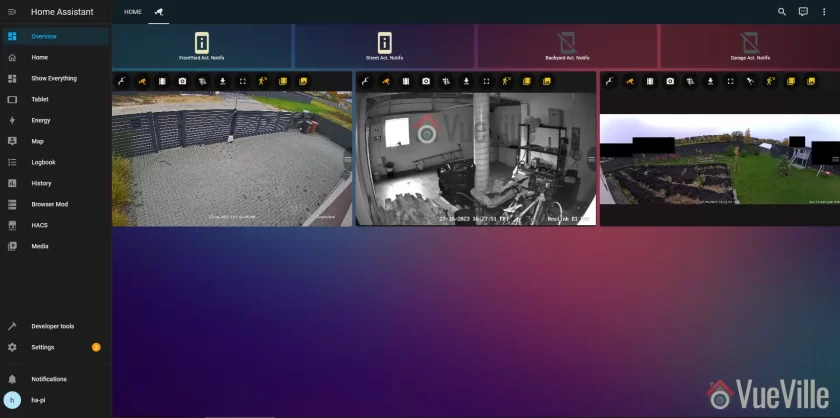
    Here is a screenshot of how we live-view our IP cameras from our laptops, tablets and on the TV:

    How we built our DIY home security camera CCTV system - Camera Dashboard - VueVille
    Our DIY Home Security System – Frigate Lovelace Cards in a Home Assistant Dashboard

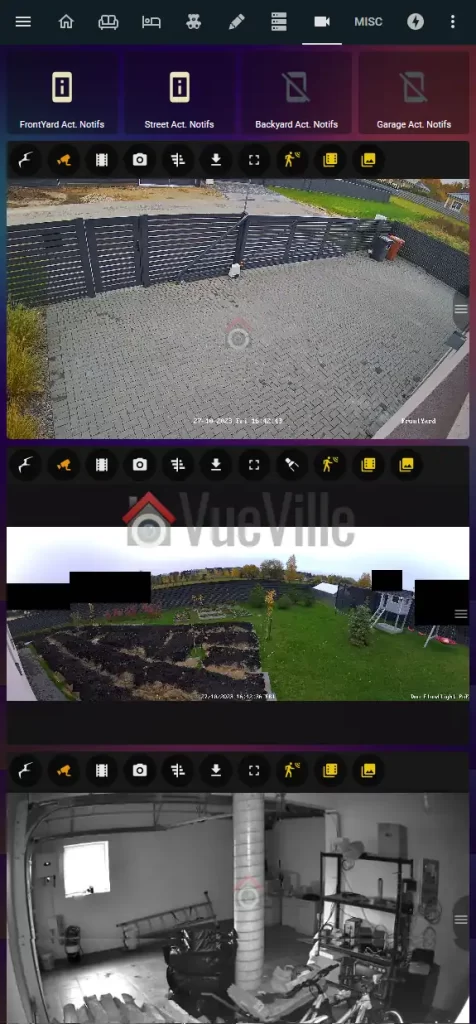
    We can also access the cameras from our smartphones using the Home Assistant mobile app which loads the same dashboard, or the tinyCAM Monitor Pro app.

    How we built our DIY home security camera CCTV system - Mobile Dashboard - VueVille
    Home Assistant Mobile App

    So how does it work? My primary NVR software is Frigate NVR running on an Intel NUC mini-PC. Frigate pulls the RTSP streams of all the IP cameras and performs AI motion detection on it.

    Whenever it detects any of the configured objects of my choice (person/car/van/cat/dog), it informs our Home Assistant home automation system which can then send a push notification, turn on external lights through Shelly relays, turn on the Reolink Duo’s floodlights or siren alarm, send mobile notifications, pop up a video clip on a tablet, anything I can think of really.

    In the past I used HomeSeer HS3 and so I connected QNAP’s now phased-out Surveillance Station directly to my Homeseer HS3 system. But I have since then switched entirely from Homeseer to Home Assistant.

    Now let’s see what the security camera system part of our smart home network looks like (also see this separate blog post that details how we are building our DIY Smart Home Automation system)


    Our DIY Home Security System Network Setup

    A topology is a representation of how a system is connected together. Network topologies may be either physical or logical. A physical network topology shows the actual physical layout and the connections between different elements. A logical network topology shows how they are functionally linked to each other.

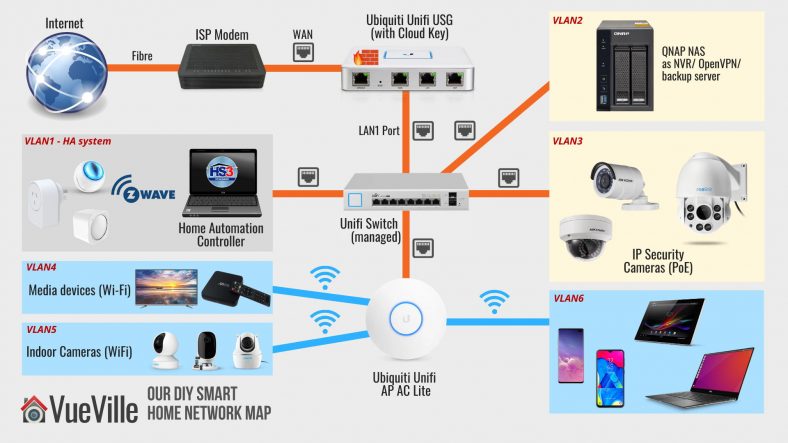
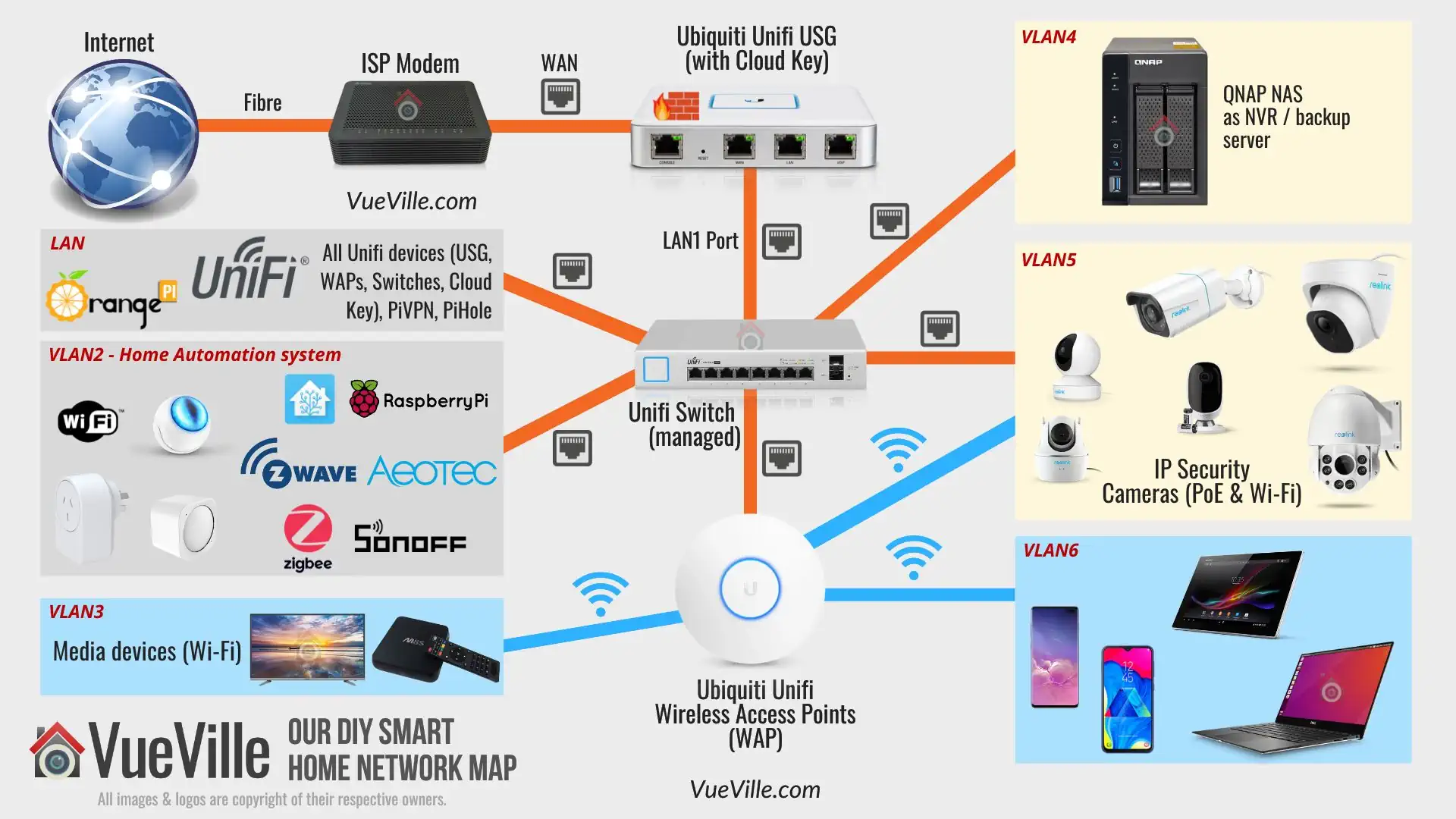
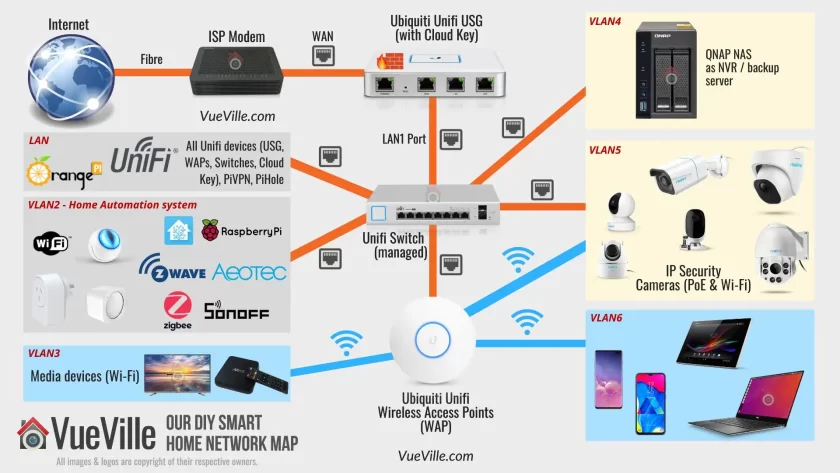
    Here’s a physical map of our entire smart home network. For a reliable and scalable surveillance system, you got to have the right network set up to support it. So let’s begin there.

    How we built our DIY home security camera CCTV system - 2023 Network Map - VueVille
    Our DIY Smart Home Network Map in 2025

    The first thing you will notice is that there are a lot of different network components, and that devices are nicely siloed off into neat compartments (LAN, VLAN2, VLAN3…etc.).

    Most people just connect a Wi-Fi router to the ISP modem and call it a day. If you are just using a couple of wireless cameras, that will probably do.

    But for our Pro-DIY system that is security and privacy-focused, we need to go further. We need to be able to defend our network from hackers and botnets. For this we need a strong and powerful hardware firewall.

    We need to be able to isolate security cameras so that they cannot ‘dial home’ or leak data outside our network. Any device in our network we do not trust (like most Chinese security cameras) shouldn’t be able to access sensitive personal devices like laptops and mobile phones of its own volition. For this we need the ability to create Virtual LAN (VLAN) networks.

    Every consumer Wi-Fi router has a built-in firewall that offers basic protection. But they are often not very customizable. For example, in most cases you can’t create your own firewall rules. And most of them cannot create VLANs. So after dabbling with overpriced ‘prosumer’ ASUS router for some time and failing to get what I need, I switched to enterprise standard networking gear. I went with Ubiquiti’s Unifi range.

    We have a large home and getting reliable Wi-Fi throughout has been an issue. I had realized we needed multiple Wi-Fi access points. But the house is already wired for gigabit Ethernet. So this was another reason to skip the consumer-grade mesh networks and just go with a reliable established enterprise brand.

    Also when your network gets large and you have multiple devices (router, switches, Access points), it becomes difficult and time-consuming to configure and manage multiple devices.

    Here are the advantages of the Ubiquiti Unifi line of enterprise class networking gear:

    1. Enterprise-grade hardware with higher reliability
    2. Central management dashboard
    3. Seamless Wi-Fi mesh network with Ethernet back-haul
    4. Affordably priced
    5. Ability to create VLANs

    The easiest way to understand Unifi’s product line is this: a typical Wi-Fi router like Asus or Netgear is an all-in-one device.

    There’s a router, a firewall, and Wi-Fi access point all rolled into one device for convenience. However this means that your Wi-Fi coverage is limited to the area where the router resides. Also if you want advanced features such as VLANs, you are usually out of luck.

    Also if one function (like the wireless radio) fails, the entire network fails and you have to junk the whole device. Not great for redundancy or your wallet. I speak from experience – over the years I have amassed a cupboard full of various consumer-level Wi-Fi routers with busted Wi-Fi that are otherwise perfectly fine.


    Full equipment description

    How we built our DIY home security camera CCTV system - 2025 Network Map - VueVille
    Our DIY Smart Home Network Map in 2025

    The Network Hardware

    Starting from the top left of the network map, we have a symmetric 1 Gbps up/down fibre broadband connection. So the first device is the ISP fibre-optic modem which we cannot avoid. However, everything after that point is of our own choice and design.

    After the ISP modem, comes the Unifi Security Gateway (or USG). This is our hardware firewall which serves as the DHCP router for the whole network and also manages all the VLANs. The USG has a Dual-Core 500 MHz processor with 512MB RAM. It can handle up to 1,000,000 packets per second. It can handle our 1 Gbps fibre broadband connection at full speed, but only without extra security features turned on like Deep Packet Inspection (DPI), Intrusion Detection System (IDS) or Intrusion Prevention System (IPS). If I turn these on, the throughput drops to a measly 85 Mbps. The USG is more than 5 years old now and as you can guess, obsolete. The WAN failover has been forever broken, and it has not received newer features like WIreguard VPN or WAN load balancing which the UDM now has.

    That’s why I don’t recommend the Unifi USG any more (they are also getting increasingly difficult to buy!). Unifi has released something else that I recommend now – the UDM product range comprising of three models:

    1. Unifi Dream Machine (UDM)
    2. Unifi Dream Machine Pro (UDM-Pro)
    3. Unifi Dream Machine Special Edition (UDM-SE)

    The UDM range combines the USG, a managed network switch and the Unifi OS network management software into a single device. The UDM is the baby of the trio and is a direct replacement of an existing Wi-Fi router because it also includes a Wi-Fi Access Point.

    The UDM-Pro and SE models are more powerful, are rack-mountable and so may be a better fit if you plan to use a server rack or cabinet. But note these don’t have built-in Wi-Fi.

    But hey what about the Unifi Dream Router (UDR)? I’d say give it a miss, because its a cut-down version of the UDM – less powerful CPU that makes it more like the USG than the UDM.

    Ubiquiti UniFi wireless Dream Machine | UDM-US, single band
    ×
    Product prices and availability are accurate as of the date/time indicated and are subject to change. Any price and availability information displayed on https://www.amazon.com/ at the time of purchase will apply to the purchase of this product.

    Unifi Dream Machine (UDM)

    Check Amazon Price*

    UBIQUITI UNIFI Dream Machine Special Edition
    ×
    Product prices and availability are accurate as of the date/time indicated and are subject to change. Any price and availability information displayed on https://www.amazon.com/ at the time of purchase will apply to the purchase of this product.

    Unifi Dream Machine Special Edition (UDM-SE)

    Check Amazon Price*

    (* = affiliate link / image source: Amazon Associates Program)

    The UDM SE/Pro can perform Intrusion Detection and Prevention at up to 3.5 Gbps line speed, which is far superior to that of the USG’s 85 Mbps or even the UDM’s 850 Mbps. But for most home users, the UDM will be enough.

    One key difference between the UDM SE and UDM Pro models is that the SE has PoE support. This removes the need to get a separate PoE switch.

    Read more here: Unifi UDM vs. UDM Pro and USM-SE vs. UDM-Pro.

    Back to the layout: The ISP modem plugs into the USG’s WAN1 port (WAN port in the UDM SE/Pro). The USG has only two physical LAN ports – LAN1 and LAN2 (the UDM SE/Pro have 8). Each port can be used to create a unique sub-net, but I use only the USG’s LAN1 port for my network – I will refer to this as LAN. The Unifi system uses a central management portal for all device configuration and logging. The UDM SE/Pro have this built-in, but the USG doesn’t. So you will have to run it off a computer but only when you need to configure devices.

    So you can see why its better to go with the UDM SE. If you still want to use the USG (it is cheaper), you can get a [easyazon_link identifier=”B017T2QB22″ locale=”US” tag=”vueville.com-eaz-20″]Cloud Key[/easyazon_link], a small PoE device that hosts the controller software and logs network statistics locally 24/7. I don’t want a computer running all the time, but I like to log all the data I can. So I went for the Cloud Key.

    As mentioned in our goals earlier, we didn’t want to forward ports from the cameras to the Internet. The alternative to forwarding ports from the camera to the router and exposing them to the Internet, is to create a VPN connection to your home network so that you can dial in securely. For this you need an Internet-facing device in your home network that can act as a VPN server.

    The Unifi UDM Pro and SE support OpenVPN & Wireguard. So that’s the way forward.

    But I am still stuck on the old USG which doesn’t support either of these protocols. QNAP has built into their NAS a VPN server app that supports all the major VPN protocols. In the beginning, I used our QNAP TS-253A NAS as the VPN server for the entire home network. But again I quickly learnt that exposing a NAS server to the Internet is risky.

    So I have the excellent open-source free PiVPN running on an [easyazon_link identifier=”B0B973214J” locale=”US” tag=”vueville.com-eaz-20″]Orange Pi Zero[/easyazon_link] that also runs PiHole on my network. I chose the Wireguard protocol as it requires less resources than the OpenVPN protocol.

    The Pi Zero’s Wireguard port is forwarded to the Unifi USG. No other ports are forwarded. The USG is configured with Dynamic DNS (DDNS) and so is always accessible from the internet using a friendly name, instead of the public dynamic IP address which ISPs change every so often. I use the excellent and free Afraid.org service.

    We use the official Wireguard VPN client on our Android phones or laptops to connect to our home network, the Orange Pi Zero acting as the Wireguard server for the entire home network. This lets us access all our network resources as if we never left home, live-viewing and reviewing recorded footage is so easy.

    Moving to the center of the network map, we reach the network switch.

    If you just want to create VLANs for Wi-Fi devices you don’t need a managed Ethernet switch – the Unifi wireless access points (WAP) can do that. But to create Ethernet-based VLANs, you need a managed switch. The UDMs have a built-in managed switch but I needed to get a separate one.

    I created separate VLANs for Home Automation gear (Raspberry Pi4 running Home Assistant), and IP cameras using the excellent Unifi firewall rules feature. See the links below to learn how to do this. Yes you can have both wired and wireless devices in the same VLAN!

    Related: How to create a separate VLAN for wired Ethernet devices

    Related: How to create a separate VLAN for Wi-Fi devices

    Of course you can also follow the guides above to assign wired and wireless devices to the same VLAN as I have.

    Note: If you get the Unifi USG or the UDM Pro, you will need a separate PoE switch. This is because the USG and UDM Pro don’t have PoE support.

    With the UDM SE/Pro you get 8 managed ports, so one of them can be connected to a PoE switch. If you want to further managed each port of the PoE switch you will need to go for a managed option like the Unifi US-8-60W I got (image below). This is an 8-Port fully managed 802.3af PoE Gigabit switch. It has a fan-less design and thus is silent in operation.

    The switching capacity is up to 8 Gbps total, and it can provide up to 15W output per PoE port. I use one of the PoE ports to power the Unifi Cloud Key.

    If you do not mind all the ports of your PoE switch being unmanaged and ending up in a single VLAN, you just need an unmanaged PoE switch like the TP-Link SG1008 I have detailed below.

    The Unifi Wi-Fi Access Points (WAP) are widely acclaimed for solid wireless performance. I use the Unifi 6 Lite and U6 Pro in my home. The U6 Lite is an 802.11ax AX1500 Dual-band WAP, it can do up to 300 Mbps in the 2.4GHz band and up to 1.2 Gbps in the 5GHz band simultaneously. The U6 Pro is an AX5400 WAP ups those figures to 573.5Mbps in the 2.4 GHz band and 4.8 Gbps in the 5GHz band.

    Ubiquiti UniFi 6 Lite Access Point | US Model | PoE Adapter not Included (U6-Lite-US)
    ×
    Product prices and availability are accurate as of the date/time indicated and are subject to change. Any price and availability information displayed on https://www.amazon.com/ at the time of purchase will apply to the purchase of this product.

    U6 Lite

    Check Amazon Price*

    Ubiquiti UniFi 6 Pro Access Point | US Model, Wireless | PoE Adapter not Included (U6-Pro-US)
    ×
    Product prices and availability are accurate as of the date/time indicated and are subject to change. Any price and availability information displayed on https://www.amazon.com/ at the time of purchase will apply to the purchase of this product.

    U6 Pro

    Check Amazon Price*

    Ubiquiti - UniFi 6,Wireless Long-Range Access Point | US Model | PoE Adapter not Included (U6-LR-US),tri_band
    ×
    Product prices and availability are accurate as of the date/time indicated and are subject to change. Any price and availability information displayed on https://www.amazon.com/ at the time of purchase will apply to the purchase of this product.

    U6 Long-Range

    Check Amazon Price*

    Ubiquiti Dual Band IEEE 802.11a/b/g 5.30 Gbit/s Wireless Access Point - Indoor/Outdoor
    ×
    Product prices and availability are accurate as of the date/time indicated and are subject to change. Any price and availability information displayed on https://www.amazon.com/ at the time of purchase will apply to the purchase of this product.

    U6 Mesh

    Check Amazon Price*

    (* = affiliate link / image source: Amazon Associates Program)

    You can power these WAPs via standard 802.3af PoE (the UDM-SE has 8 such ports) or Ubiuiti’s proprietary 24V PoE (if you are already invested in their older equipment).

    I am able to create separate Wi-Fi VLANs for my personal devices (VLAN6), media devices (VLAN3) and also add the security cameras into the same VLAN as the wired cameras (VLAN5). This is possible because the Unifi WAPs support VLANs. I am very happy with these WAPs, my 200 sq. m home is fully covered with just 2 of these.

    I no longer experience dropped frames on my Wi-Fi cameras and overall responsiveness while browsing on our WiFi6 devices (such as the Samsung Galaxy S20) has improved noticeably.

    The DIY Security Camera System

    Outdoor IP Cameras

    We use mostly Reolink cameras and a few Hikvision cameras, all recording on motion detection to a Network Attached Storage (NAS) system from QNAP. They are connected to the TP-Link PoE switch which in turn is connected to the Unifi Managed Switch.

    I created a VLAN (numbered as VLAN5) to group both wired and wireless cameras together. The Unifi WAPs and the Unifi managed switch work seamlessly to make this possible using the Unifi controller web interface. The Unifi USG firewall then allows me to then set up strict firewall rules on what these cameras can and cannot do in my network.

    For example, the Hikvisions cannot phone home to their Chinese manufacturer, they cannot access the Internet, they cannot even initiate any connection outside of the VLAN they are in. They can only respond to ONVIF and RTSP connection requests (using port number access controls on the Unifi USG). That’s what an advanced enterprise-grade firewall like the Unifi USG can do.

    Please note that Hikvision and Dahua along with their associated brands are now banned from the USA. Brands like Lorex which are white-labelled Dahuas are also banned. So I do not recommend buying these brands.

    For a long time, I had only Hikivison outdoor cameras. But recently we added 2 more cameras:

    If you need just a standard IP camera (without floodlights), check out my current recommendations for the best outdoor IP cameras without a paid subscription or ongoing fees, here’s a preview of my top picks:

    BUDGET 4K PICK
    Reolink RLC-820A
    [easyazon_image align=”center” height=”160″ identifier=”B08135WDZW” locale=”US” src=”https://m.media-amazon.com/images/I/31Ea0pBsW7L._SL160_.jpg” tag=”vueville.com-eaz-fbox-20″ width=”160″]
    [easyazon_link identifier=”B08135WDZW” locale=”US” tag=”vueville.com-eaz-fbox-20″]Check Amazon Price[/easyazon_link]
    BEST 4K OVERALL
    Amcrest IP8M-T2669EW
    [easyazon_image align=”center” height=”160″ identifier=”B08CWGJY37″ locale=”US” src=”https://m.media-amazon.com/images/I/41pfNMA4UtL._SL160_.jpg” tag=”vueville.com-eaz-fbox-20″ width=”160″]
    [easyazon_link identifier=”B08CWGJY37″ locale=”US” tag=”vueville.com-eaz-fbox-20″]Check Amazon Price[/easyazon_link]
    BEST 4K PTZ
    Reolink RLC-823A
    [easyazon_image align=”center” height=”160″ identifier=”B095H2BBWZ” locale=”US” src=”https://m.media-amazon.com/images/I/31Hde2DPoQL._SL160_.jpg” tag=”vueville.com-eaz-fbox-20″ width=”160″]
    [easyazon_link identifier=”B095H2BBWZ” locale=”US” tag=”vueville.com-eaz-fbox-20″]Check Amazon Price[/easyazon_link]

    Indoor IP Cameras

    We have quite a few indoor security cameras, the latest being the Reolink E1 Pro. This is a Wi-Fi camera that also has an Ethernet port, and we use it as our baby monitor camera.

    Check out my current recommendations for the best indoor IP cameras without a paid subscription or ongoing fees, here’s a preview of my top picks:

    BEST BUDGET
    Amcrest ASH21
    Amcrest 1080P WiFi Camera Indoor, Nanny Cam, Dog Camera, Sound & Baby Monitor, Human & Pet Detection, Motion-Tracking, Phone App, Pan/Tilt Wireless IP Camera, Night Vision, Smart Home ASH21-W
    ×
    Product prices and availability are accurate as of the date/time indicated and are subject to change. Any price and availability information displayed on https://www.amazon.com/ at the time of purchase will apply to the purchase of this product.
    1080p (2MP) sensor
    Wi-Fi / Ethernet
    Person Detection
    Pan-Tilt, Auto-tracking
    BEST OVERALL
    Amcrest IP4M-1041
    Amcrest 4MP ProHD Indoor WiFi, Security IP Camera with Pan/Tilt, Two-Way Audio, Night Vision, Remote Viewing, 4-Megapixel @30FPS, Wide 90° FOV, IP4M-1041W (White)
    ×
    Product prices and availability are accurate as of the date/time indicated and are subject to change. Any price and availability information displayed on https://www.amazon.com/ at the time of purchase will apply to the purchase of this product.
    4MP sensor
    Wi-Fi / Ethernet
    Object detection
    Pan-Tilt, Auto-tracking
    BEST PREMIUM
    Reolink E1 Zoom
    REOLINK Smart 4K UHD Pan & Tilt Dual-Band Wi-Fi 6 Indoor Security Camera with 3X Optical Zoom, Auto-Tracking, People/Pet Detection, Crying Sound Detection, Privacy Mode, and Bluetooth Setup, E1 Zoom
    ×
    Product prices and availability are accurate as of the date/time indicated and are subject to change. Any price and availability information displayed on https://www.amazon.com/ at the time of purchase will apply to the purchase of this product.
    5 MP sensor
    Dual-band Wi-Fi
    Optical zoom

    Other Switches I use

    If you get the UDM SE model, you need to consider the below section only if its onboard 8 managed PoE ports are not sufficient for your home.

    With the UDM Pro or USG, like me, you will need a separate PoE switch like the Unifi US-8-60W I mentioned above or the ones below.

    TP-Link TL-SG1008P V4 | 8 Port Gigabit PoE Switch | 4 PoE+ Ports @64W | Desktop | Plug & Play | Sturdy Metal w/ Shielded Ports | Fanless | Limited Lifetime Protection | QoS & IGMP Snooping | Unmanaged
    ×
    Product prices and availability are accurate as of the date/time indicated and are subject to change. Any price and availability information displayed on https://www.amazon.com/ at the time of purchase will apply to the purchase of this product.

    TP-Link TL-SG1008P – 8 Port Gigabit Unmanaged PoE Switch

    Check Amazon Price*

    (* = affiliate link / image source: Amazon Associates Program)

    The TP-Link TL-SG1008P Gigabit PoE switch powers the PoE cameras, and is connected to the Unifi Managed Switch. Note that this is an unmanaged switch. Read our review of this capable little switch.

    Netgear 8-port Gigabit Unmanaged Switch

    NETGEAR 8-Port Gigabit Ethernet Unmanaged Essentials Switch (GS308) - Home Network Hub, Office Ethernet Splitter, Plug-and-Play, Silent Operation, Desktop or Wall Mount
    ×
    Product prices and availability are accurate as of the date/time indicated and are subject to change. Any price and availability information displayed on https://www.amazon.com/ at the time of purchase will apply to the purchase of this product.

    NETGEAR GS308 – 8 Port Gigabit Unmanaged Switch

    Check Amazon Price*

    (* = affiliate link / image source: Amazon Associates Program)

    You can never have enough Ethernet ports! The Netgear GS-308 8-port gigabit switch is an unmanaged switch. This means there are no settings to configure, it is truly plug and play. It has a sturdy metal chassis, auto-sensing 10/100/1000 Mbps port support and excellent real-world performance.

    It also has LED activity, link speed and status LEDs per port. I have been using it for over 6 months now and it has been super reliable. Highly recommended plug and play switch for setting up your home surveillance network!

    DIY Network Attached Storage (NAS) NVR

    QNAP NAS TS-253A with 2x 8TB WD Red hard drives

    Now let’s move on to the NVR where the camera footage is recorded. You could take one of 3 Pro-DIY routes for recording video streams from your cameras:

    1. use an IP camera and NVR kit
    2. use a NAS as the NVR.
    3. use a PC as your NVR using NVR software like BlueIris

    The main reason we went for the NAS is because it allows us to integrate the security cameras with our Home Assistant-based home automation system without needing a powerful energy-guzzling computer to run BlueIris software 24/7.

    Read: EasyDIY or ProDIY – The VueVille Smart Home DIY Framework

    NAS devices today are much more than just network storage, they are more like mini-servers. Generally they run their own Linux-based operating system that is accessed through a web browser.

    Common uses for a NAS are centralized network storage, as a backup target, as a VPN client/server, and as a DLNA server for streaming your media across the house to multiple devices.

    Synology and QNAP make NAS models that have powerful software running on them which makes them more like computers than dumb hard drives. But since they use Linux and specialized software, they can do a lot of things far more efficiently. So we use the NAS as the NVR, a VPN server, backing up our laptops, phones, and as a DLNA server. All for a few watts of energy usage.

    The QNAP TS-253A we chose is an affordable yet powerful NAS that is the hub of our surveillance system and an integral part of our home automation system.

    We settled on the QNAP because it had more powerful hardware, more features such as HDMI out ports, and 2 extra camera licenses over the nearest comparable Synology model. Both Synology and QNAP are great brands though.

    My TS-253A has been discontinued, so check out my latest recommendations for the best NAS models to use as NVRs:

    BEST 2-BAY
    QNAP TS-262
    QNAP Turbo NAS TS-262-4G SAN/NAS Storage System
    ×
    Product prices and availability are accurate as of the date/time indicated and are subject to change. Any price and availability information displayed on https://www.amazon.com/ at the time of purchase will apply to the purchase of this product.
    2 drive bays
    4 GB RAM
    8 camera licences included
    Smart motion detection
    HDMI 2.0 port
    BEST 4-BAY
    QNAP TS-462
    QNAP TS-462-4G-US 4 Bay Multimedia Desktop NAS with Intel Celeron Dual-core Processor with M.2 PCIe Slots and PCIe expandability and 2.5GbE (2.5G/1G/100M) Network Connectivity (Diskless)
    ×
    Product prices and availability are accurate as of the date/time indicated and are subject to change. Any price and availability information displayed on https://www.amazon.com/ at the time of purchase will apply to the purchase of this product.
    4 drive bays
    4 GB RAM
    8 camera licences included
    Smart motion detection
    HDMI 2.0 port
    BEST 8-BAY
    QNAP TS-873A
    QNAP TS-873A-8G 8 Bay High-Performance NAS with 2 x 2.5GbE Ports and Two PCIe Gen3 Slots
    ×
    Product prices and availability are accurate as of the date/time indicated and are subject to change. Any price and availability information displayed on https://www.amazon.com/ at the time of purchase will apply to the purchase of this product.
    8 drive bays
    8 GB RAM
    8 camera licences included
    Smart motion detection
    HDMI 2.0 port

    (* = affiliate link / image source: Amazon Associates Program)

    The QNAP NAS has a built-in NVR software called Surveillance Station. So the QNAP records full resolution video streams from my IP cameras to its internal hard drives. You could get a dedicated NVR but as I said, we had other uses for the NAS.

    QNAP now also have an alternative free NAS NVR app called QNAP QVR Pro which grants you 8 IP camera channels regardless of how many channels your NAS originally came with. Here’s a rundown of QVR Pro and how it compares to QNAP’s standard Surveillance Station software. This is incredible value and I highly recommend trying it out.

    Related: QNAP TS-253A Hands-on Review
    Related: How to set up your own DIY NAS NVR using QNAP Surveillance Station

    I have set up my NAS hard drives with RAID-1 drive mirroring. This gives me peace of mind in case a hard drive fails. If 1 of the hard drives fail, the system will carry on working as usual, and I just need to replace the failed drive with a new one. Zero interruptions because my NAS supports hot-swapping of disks.

    For the hard drives, I currently use 8TB WD NAS drives (model [easyazon_link identifier=”B07D3MWMNZ” locale=”US” tag=”vueville.com-eaz-20″]WD80EFAX[/easyazon_link]). When I got my drives 2 years ago, life was simple, there were only two choices in the WD NAS range – WD Red and Red Pro. Both were CMR based drives so I went for the cheaper Red drives.

    After the SMR-CMR scandal, WD made the Red line SMR-only, spun off the CMR Red drives into a new product line called Red Plus, and Red Pro remained a CMR-only line.

    Strangely in doing this, WD renamed my 8TB drives from Red to Red Plus, but without changing the model number WD80EFAX. So the next time I replace my drives, I will be extra careful to buy CMR drives only.

    So check out my recommended surveillance hard drives for both NAS NVRs and dedicated NVRs.

    (* = affiliate link / image source: Amazon Associates Program)

    Accessing the security camera system while at home

    The QNAP NAS Surveillance Station can be accessed either via the web interface or the Windows QNAP QVR client software that you saw above in the screenshot.

    The tinyCAM Monitor Pro app on our smartphones are all configured using the local IP address of the QNAP NAS and Hikvision cameras. At home, we just open the app and it simply works. No fuss. No hassles.

    Accessing the security camera system from outside the home

    Outside our home network, I simply need to connect to the VPN server (running on the the Orange Pi Zero as mentioned earlier), and all the apps and the QVR client on the laptop simply continue to work. This is the detailed process: So I use the Wireguard client on my laptop or phone to connect to the Wireguard server on the Pi Zero. Once connected, my PC is virtually part of our home network.

    So none of our IP cameras are exposed to the Internet. The Pi Zero running Wireguard server is though, but this is a far better option because the Wireguard server is built for this purpose and has attack defeat measures such as IP exclusion, automatic IP bans based on rules etc. which the IP cameras simply don’t have.

    Also the VPN server allows me to access the data on my QNAP NAS without hassle – my laptop or smartphone will think that they are in the local network. So all network drives automatically re-connect and the experience is seamless in terms of recently used files etc.

    External IR Illuminators

    Univivi IR Illuminator 90 Degree Wide Angle 8-LEDs IR Infrared Light 850nm Infrared Illuminator for Night Vision IP67 Waterproof Outdoor for Security Cameras
    ×
    Product prices and availability are accurate as of the date/time indicated and are subject to change. Any price and availability information displayed on https://www.amazon.com/ at the time of purchase will apply to the purchase of this product.

    Check Amazon Price*

    Two basic IR illuminators for the backyard and 12V power adaptors that have lasted nearly a year now and are still going strong. These are of the 60 degree coverage variety, and you can also get wide-angle illuminators.

    Ethernet Cables

    Ultra Spec Cables 100ft Cat5e Outdoor Waterproof Ethernet Cable Direct Burial Shielded (Pure Copper)
    ×
    Product prices and availability are accurate as of the date/time indicated and are subject to change. Any price and availability information displayed on https://www.amazon.com/ at the time of purchase will apply to the purchase of this product.

    Check Amazon Price*

    For Ethernet cables that run outside the home, I recommend using cables that are designed specially for this purpose – outdoor heavy-duty burial-grade CAT-5e or CAT-6 Ethernet cables.

    This will ensure that you do not face issues with the cables such as breakage, little animals chewing the cables etc. Ensure that the cables are 100% pure copper and not the cheaper and inferior Copper Clad Aluminium(CCA) variety.

    UPS

    CyberPower EC650LCD Ecologic Battery Backup & Surge Protector UPS System, 650VA/390W, 8 Outlets, ECO Mode, Compact Uninterruptible Power Supply
    ×
    Product prices and availability are accurate as of the date/time indicated and are subject to change. Any price and availability information displayed on https://www.amazon.com/ at the time of purchase will apply to the purchase of this product.

    Check Amazon Price*

    A CyberPower BRICs BR650ELCD (Line-interactive UPS – 390W/650 VA) to protect and power the entire system (13% load for all the above kit + a couple of other devices). I got a cheap yet reliable UPS which is officially compatible with the QNAP NAS.

    If the power fails or supply voltage is outside the tolerance, it informs the NAS which is programmed to shut down gracefully. I also have a schedule to turn it on automatically every morning, which ensures the NAS will turn itself on the next morning if the power fails and it shuts down.

    I believe the UPS has paid for itself. On several occasions, the NAS has informed me that it had shut down as instructed by the UPS.

    Miscellaneous

    SANDISK 64GB Ultra microSDXC UHS-I Memory Card with Adapter - Up to 140MB/s, C10, U1, Full HD, A1, MicroSD Card - SDSQUAB-064G-GN6MA
    ×
    Product prices and availability are accurate as of the date/time indicated and are subject to change. Any price and availability information displayed on https://www.amazon.com/ at the time of purchase will apply to the purchase of this product.

    Check Amazon Price*

    64GB SD cards for all the cameras. 128 GB SD cards should also work but some cameras are a bit picky about which 128GB cards they will accept.

    Make sure you use at least a Class 10 speed card so that you don’t suffer from dropped frames in the recordings. I use the SD cards to record motion detection alert clips. This is then yet another location where the clips are backed up.

    Software

    The QNAP NAS comes with the free QVR Pro app. It supports all the features a good NVR has and it works very well.

    We use tinyCam Monitor PRO app on Samsung Galaxy S9, Samsung Galaxy A5, Samsung Galaxy M10S and a Nexus 7 tablet. The tablet is our dedicated IP camera monitoring screen running the Imperihome Android app.


    Storage capacity needed for QNAP Surveillance Station

    Initially I recorded all my 3 external IP cameras 24/7 at 6Mbps bitrate and 10fps. This meant that the 1.5TB that I had set aside was good for 8-10 days of CCTV footage for all 3 cameras put together.

    But I have since realized I don’t really need 24/7 recording and that replacing hard drives every year or so is no fun. Modern surveillance hard drives are rated for no more than 1 year of continuous operation. So now I just use alarm recording which places markers on the QVR Pro timeline so that I can jump directly to motion events.

    The amount of storage you need depends on the quality and frame per second settings. After 3 years of experimenting with various quality settings, I have settled at 2Mbps and 6fps as we couldn’t see any improvement with higher settings.

    I have also set the QVR Pro app on the QNAP to use only 1.5 TB (out of the 3TB available). So it automatically overwrites older recordings to maintain the 1.5TB quota. You can also specify number of days instead.


    Conclusion

    We hope this article gives you an insight into how you can set up your own DIY home security camera system. If you have any questions at all, please do not hesitate to get in touch through the comments field below.

  • Hands-on Review: Amcrest ProHD 1080p Wireless Indoor IP PTZ Camera (IP2M-841)

    Hands-on Review: Amcrest ProHD 1080p Wireless Indoor IP PTZ Camera (IP2M-841)

    Are you looking for a reliable wireless security camera that can act as a baby monitor, a nanny camera, or just to talk to your dog while you are away? The Amcrest ProHD IP2M-841 Wireless Indoor IP Security Camera is what you need: a feature-rich network camera which has great video quality, excellent night vision and crystal clear two-way audio capability. I have been using it for over a year now and here is a hands-on review based on my experience of using it day in and day out.

    [wpsm_column size=”two-third”]
    This indoor IP camera has all the features I recommend in an indoor security camera like live streaming, 24/7 recording, and playback features that you can access either locally or remotely via the camera’s web interface or the Amcrest smartphone apps. The stand-out feature is of course Pan-Tilt which lets you look around for a 360 degree view. It can record video, sound and images to an SD card in the camera, to a Network Attached Storage (NAS) or to the cloud. FTP support for alert snapshot images is also present.
    [/wpsm_column]

    [wpsm_column size=”one-third” position=”last”]
    Amcrest ProHD IP2M-841B Wireless Indoor Pan-Tilt IP Security Camera - Front View - VueVille.com

    [easyazon_link identifier=”B0145OQTPG” locale=”US” tag=”vueville.com-eaz-20″]Check Price on Amazon[/easyazon_link]

    [/wpsm_column]

    [wpsm_toplist]
    [text-blocks id=”5527″ slug=”earning-disclaimer”]

    Making sense of the Amcrest naming convention

    If like me, you have been struggling to figure out which Amcrest camera you really need or what the letters and digits in the model number mean, simply refer to our easy-to-use guide to Amcrest cameras. It has a comprehensive list of all the Amcrest security cameras, neatly categorized by indoor/outdoor use and features such as WiFi, PoE.

    Briefly this camera has two models based on the colour. Check out the [easyazon_link identifier=”B0145OQTPG” locale=”US” tag=”vueville.com-eaz-20″]IP2M-841B[/easyazon_link] on Amazon for the black colour model and [easyazon_link identifier=”B0145OQXCK” locale=”US” tag=”vueville.com-eaz-20″]IP2M-841W[/easyazon_link] on Amazon for the white colour model.

    What is the Amcrest ProHD IP2M-841 suitable for?

    [easyazon_image align=”center” height=”510″ identifier=”B0145OQTPG” tag=”vueville.com-eaz-20″ locale=”US” src=”https://www.vueville.com/wp-content/uploads/2016/12/Amcrest-ProHD-IP2M-841B-Wireless-Indoor-Pan-Tilt-IP-Security-Camera-Front-View-VueVille.com_.jpg” width=”765″]
    The Amcrest ProHD IP2M-841 is a versatile surveillance device and its applications are only limited by your imagination! The most common residential indoor security camera applications are:

    • As a baby monitor in a nursery (it supports 2-way audio), this is what I use it for
    • As a nanny monitor for peace of mind (it is discreet and small enough to be hidden),
    • General home security – monitor and secure rooms, hallways, corridors, access and exit points, guesthouses, garages and outhouses (the pan-tilt function gives you installation flexibility).

    The common business uses for this sort of IP camera are:

    • Monitor and secure office areas, stores, warehouses etc.,
    • Observe employees and customers,
    • As a visible deterrent against criminal activities.

    What’s in the box – Unboxing

    [easyazon_image align=”center” height=”510″ identifier=”B0145OQTPG” tag=”vueville.com-eaz-20″ locale=”US” src=”https://www.vueville.com/wp-content/uploads/2016/12/Amcrest-ProHD-IP2M-841B-Wireless-Indoor-Pan-Tilt-IP-Security-Camera-Box-Angled-View-VueVille.com_.jpg” width=”765″]

    [easyazon_image align=”center” height=”510″ identifier=”B0145OQTPG” tag=”vueville.com-eaz-20″ locale=”US” src=”https://www.vueville.com/wp-content/uploads/2016/12/Amcrest-ProHD-IP2M-841B-Wireless-Indoor-Pan-Tilt-IP-Security-Camera-Box-Contents-VueVille.com_.jpg” width=”765″]

    Main specifications

    [table id=12 responsive=scroll /]

    Camera Design

    [easyazon_image align=”center” height=”510″ identifier=”B0145OQTPG” tag=”vueville.com-eaz-20″ locale=”US” src=”https://www.vueville.com/wp-content/uploads/2016/12/Amcrest-ProHD-IP2M-841B-Wireless-Indoor-Pan-Tilt-IP-Security-Camera-Front-Angled-View-VueVille.com_.jpg” width=”765″]

    [easyazon_image align=”center” height=”510″ identifier=”B0145OQTPG” tag=”vueville.com-eaz-20″ locale=”US” src=”https://www.vueville.com/wp-content/uploads/2016/12/Amcrest-ProHD-IP2M-841B-Wireless-Indoor-Pan-Tilt-IP-Security-Camera-Side-View-VueVille.com_.jpg” width=”765″]

    [easyazon_image align=”center” height=”510″ identifier=”B0145OQTPG” tag=”vueville.com-eaz-20″ locale=”US” src=”https://www.vueville.com/wp-content/uploads/2016/12/Amcrest-ProHD-IP2M-841B-Wireless-Indoor-Pan-Tilt-IP-Security-Camera-Back-View-VueVille.com_.jpg” width=”765″]

    Installation

    Amcrest claims that this camera is a doddle to set up and we agree. The camera has a standard camera tripod screw hole (1/4-20 UNC thread) for mounting. The mounting bracket should be able to take at least 3 times the weight of the camera.

    Also note that this camera has alarm in and out connections. This means you can use a PIR sensor with this camera instead of relying on software based image detection. Using a PIR will drastically reduce the number of false alerts you may get with just image based motion detection.

    Using the Alarm Out connection, you can then make the camera trigger another device to take action such as start recording, send email or push alerts, or execute home automation tasks such as turn on outdoor and indoor lights.

    Software Setup

    For initial setup, you have to hook up the camera to a power source and connect it to your router via an ethernet cable. The username and password are both ‘admin’. The camera will prompt you to change these, which is an excellent security measure and we commend Amcrest for taking this step. Too many IP cameras connected to the internet still have the default login details and this is an open invitation for hackers, especially if simple port forwarding is in place.

    The web administration portal is elegant and thoughtfully laid out with all the options you expect in the right places. However the interface uses an NPAPI plugin like almost all inexpensive security cameras which work only with Internet Explorer and Firefox. It does not work on the Chrome browser but this is not strictly the camera’s fault. Google has decided not to support this plugin in Chrome. Just as other security camera manufacturers will soon have to, we expect Amcrest will redesign the web interface from the ground up in HTML5 to overcome such browser limitations.

    Amcrest ProHD IP2M-841 Wireless Indoor Pan-Tilt IP Security Camera Admin Page
    The Web Administration page is thoughtfully designed and easy to use

    The rest of the setup process is where some users seem to get tripped up. So we have provided our own little overview of how to set up the Amcrest ProHD 1080p camera. Depending on how you want to use the camera, there are different routes to completing the setup process:

    Local viewing only (unless you port forward):

    1. Ethernet cable using IP Config tool, then WiFi, then apps:
      1. Ethernet cable, IP config tool, change camera’s IP address to your sub-net so that you can access the web setup page.
      2. Login to web admin page and add WiFi details.
      3. Install apps on phone, add camera in phone apps:
    2. Without ethernet cable or IP config tool, using only WiFi:
      1. Install smartphone apps.
      2. Scan the QR code and add camera to the app.

    Local and Remote viewing, without using Port forwarding:

    1. P2P setup:
      1. Connect the camera to your router via ethernet or WiFi(Method 2 above has to be performed first if connecting through WiFi).
      2. Add camera either via Serial No. or the QR code.
    2. Amcrest Cloud setup for recording video clips and snapshots to the cloud
      1. Connect the camera to your router via ethernet or WiFi(Method 2 above has to be performed first if connecting through WiFi)
      2. Visit www.Amcrest.com/Cloud to add the camera to your cloud account
    3. Web Access setup (essentially the same as Method 1 but using Amcrest’s servers instead):
      1. Connect the camera to your router via ethernet or WiFi(Method 2 above has to be performed first if connecting through WiFi)
      2. Visit www.AmcrestView.com to add the camera to your cloud account

    Once the initial setup is complete, you can switch to using the camera’s built-in WiFi.
    Here’s a video that walks you through one way of setting up the camera:
    [wpsm_video]http://www.youtube.com/embed/OA_UPFfoE_U[/wpsm_video]

    Camera Features

    Hardware

    The Amcrest ProHD IP2M-841 has a 2 Megapixel sensor which lets you record at 1920×1080 resolution and 30 frames per second(fps). This is perfect for home surveillance because you get that much more clarity and sharpness in the recorded videos and images.

    The on-board IR has a good range of 10 metres which is standard for this class of IP camera. The lens fitted to the camera has a focal length of 4mm which provides a very good 90 degree field of view. The camera’s pan and tilt functions allow you to point the camera at the area or object of interest.

    The camera is capable of recording up to a bitrate of 8Mbps. We recommend a minimum of 4Mbps for ensuring you get a good level of detail. The IP2M-841 supports Wi-Fi upto 802.11g speeds of 54 Mbps. This is more than enough for the camera’s video stream to be sent wirelessly so faster protocols such as 802.11n or ac are not necessary.

    What we really like about this camera is that it has an SD card slot, so you have the option of using this camera in a standalone manner. It doesn’t have to be connected to a network device for recording alert videos or images.

    Two-way audio is present and is perfect for using the camera as a baby monitor or a wireless doorphone. Watermarking and text overlays are also supported.

    Recording modes

    The camera can be configured to record 24/7 to the built-in SD card, a network storage location or to the Cloud.

    1. SD Card: We recommend using the SD card only for motion detection or alert snapshot and video recording, and not 24/7 recording. This is because you will wear out the SD card quicker if you record to it 24/7. Think of the SD card as redundant storage in case your main storage location fails or is stolen.
    2. The recommended way of using an IP camera is this: use it to record 24/7 footage or motion activated video to a network storage location. This could be a NAS, an NVR (see NVR buying guide), or a computer running surveillance software such as BlueIris.
    3. Cloud storage: In this mode, your camera will upload motion detection clips, snapshots, or 24/7 recording clips to the Amcrest Cloud.
      Amcrest ProHD IP2M-841 Wireless Indoor Pan-Tilt IP Security Camera - Amcrest Cloud

      4 hours of cloud storage are included with the camera, and this should be sufficient for most people intending to use only motion detection recording.

    Motion Detection and other event alerts

    Motion detection alerts is one of the most enjoyable features of an IP security camera. When an IP camera detects motion as per your pre-defined rules, it should be able to send an email alert with snapshots and ideally send push notifications also. The Amcrest can do all of this and has all the standard motion events that we have come to expect from good quality cameras. It supports email alerts and can attach snapshots with each motion detection email alert. You can also set up each event to be active based on a schedule. An interesting feature of the Amcrest ProHD is that you can also set it up to do a Pan-Tilt tour when it detects motion. Remember you can enable more than one type of event at the same time. Let’s take a closer look at each one of the motion detection events available.

    Simple Motion Detection

    Amcrest calls it ‘Motion Detect’, this motion detection method simply looks for changes in the scene according to the area defined, the sensitivity and the threshold.

    Video Tamper

    This method triggers an alert when the camera is blanked out.

    Audio Detection

    A useful event mode that as the name suggests will trigger an alert and alert actions based on sounds detected by the onboard mic or the audio input.

    Alarm

    This is where the alarm input connection comes into use. If you have a PIR sensor connected to the camera, you can set up this event to detect motion using the PIR. Since the PIR sensor works on changes in heat and not image based detection, you can cut down the number of false alerts that is the bane of regular image based motion detection.

    SD Card abnormality

    This event can be set to trigger if the camera is unable to record to the SD card – either because of an error or because somebody has removed the SD card illegally.

    Network abnormality

    This event can be set to trigger if the camera is unable to record to the network storage location (NAS or NVR) – either because of an error or because somebody has tampered with the equipment.

    Illegal Access

    This event can be set to trigger if the camera detects unauthorised logins such as an invalid username, password or a hacking attempt.

    Smartphone apps

    Amcrest provides a free Android and iOS app, the Amcrest View Lite which lets you see your camera’s live video stream, pan and tilt the camera lens, and use the 2-way audio feature. However the free Lite version is missing some important features such as alarm push notifications. The paid Pro version adds alarm push notifications, image and video file sharing, exporting MP4 video, and exporting images to your phone storage. This surprised us because most other manufacturers offer all the Pro version’s features in their free apps. Some users have found the apps to be a bit glitchy though.

    Compatibility with NVR systems

    The Amcrest ProHD IP2M-841 supports the ONVIF protocol. ONVIF is an industry standard that enables surveillance equipment from different manufacturers to work together. This means that you can connect the Amcrest to any Network Video Recorder(NVR) or a computer running surveillance software, and the camera should work seamlessly.

    The camera also supports the RTSP protocol so you can also access the video stream using a video player like VLC on your computer. This is the URL to use: rtsp://login:pass@xxx.xxx.xxx.xxx:PORT/cam/realmonitor?channel=1&subtype=1
    The x’s are your camera’s IP address.

    Performance

    The camera has very good daytime quality thanks to the 1080p image sensor. Videos in low light and at night are also of high quality thanks to the built-in IR LEDs.

    I am using my Amcrest as a baby monitor and I’m constantly amazed by how clearly I can see my baby – I can even see his chest moving as he breathes in and out. If you are a parent of an infant, you know how reassuring that can be!

    The microphone is super-sensitive and picks up sounds not only in the same room but also from all over the house. So its also a great camera if you want to check in on your house while on vacation.

    The builtin speaker is surprisingly loud and I can clearly speak to baby as I make my way to his nursery.

    Verdict

    The Amcrest ProHD IP2M-841 is one of the best-selling wireless security cameras at the moment. The considerable array of feature such as 1080p FullHD resolution, pan-tilt feature, SD card slot, two-way audio, alarm connections, support for FTP, and configurable event modes in a high quality package represents real value for money.

    Note that the only feature this camera is missing in my opinion is PoE. But Amcrest has thought about this already – there is a PoE model, check out the [easyazon_link identifier=”B01H2JFE5W” locale=”US” tag=”vueville.com-eaz-20″]Amcrest ProHD IP2M-841EB[/easyazon_link] on Amazon. The E at the end of the model number indicates that the camera has the PoE feature, the B is just the colour. However it then loses the WiFi ability. Amcrest doesn’t currently make IP cameras with both WiFi and PoE, which is a shame.

    [review]

    Where can I buy one?

    We recommend Amazon as they are an authorized retailer of Amcrest security products.

    [easyazon_link identifier=”B07PXGT8K3″ locale=”US” tag=”vueville.com-eaz-20″]Check Price on your local Amazon Site[/easyazon_link]

    Also Consider

    • Canary All-in-One Home Security Device
      [easyazon_image align=”center” height=”500″ identifier=”B00NW31YSE” locale=”US” src=”https://www.vueville.com/wp-content/uploads/2016/11/31kmdDdME9L.jpg” tag=”vueville.com-eaz-20″ width=”500″]
    • Belkin NetCam HD+ Wi-Fi Surveillance Camera (added advantage of working with WeMo)
      [easyazon_image align=”center” height=”500″ identifier=”B00KNM763E” locale=”US” src=”https://www.vueville.com/wp-content/uploads/2016/11/31MjyPvdJqL.jpg” tag=”vueville.com-eaz-20″ width=”500″]
    • D-Link DCS-942L Wireless Day/Night Network Surveillance Camera with mydlink-Enabled
      [easyazon_image align=”center” height=”500″ identifier=”B0061MU0A6″ locale=”US” src=”https://www.vueville.com/wp-content/uploads/2016/11/41ks9X0iD2BL.jpg” tag=”vueville.com-eaz-20″ width=”500″]
  • The Best Black Friday 2015 IP Cameras and NVR Deals

    The Best Black Friday 2015 IP Cameras and NVR Deals

    Updated: 29 Nov 2015

    Black Friday 2015

    Are you waiting for Black Friday deals? Did you know that most of the online retailers have already started their Black Friday deals? Every year Black Friday deals break earlier and earlier as retailers try to cash in early on the busiest shopping period of the year running up to Christmas.

    To save you the trouble and the time, we have rounded up the best home security deals and bargains available from the biggest online retailer Amazon. We will keep updating this page daily with breaking deals.

    Black Friday 2015 IP Camera & NVR Deals - Vueville.com

    A quick note: This article contains affiliate links from Amazon. If you click on one of these links and then purchase something from Amazon, we will receive affiliate income for referring you to Amazon. This goes towards the costs of hosting and running this website and does not affect you in any way.

    IP Cameras / Security Cameras

    More than 70% discount:

    • [amazon asin=B012IE4GNC&text=Hikvision DS-2CD2042WD-I Outdoor IR Bullet Camera, 4MP (AMAZON)]
    • [amazon asin=B004P8K24W&text=D-Link Wireless Day/Night IP Camera(DCS-932L), VGA (AMAZON)]
    • [amazon asin=B006ZP8UOW&text=Foscam FI8910W Pan and Tilt IP Camera with Two-Way Audio and Night Vision, VGA (AMAZON)]
    • [amazon asin=B0081S6TQW&text=GE Wireless Digital Home Monitoring Camera and LCD Monitor Kit 45255, VGA (AMAZON)]
    • [amazon asin=B00H2VSTG2&text=Dahua IPC-HFW4300S 3MP Eco-Savvy Weatherproof Hi Def IP Security Camera, 3MP (AMAZON)]
    • [amazon asin=B009AR2MQO&text=Belkin NetCam Wireless IP Camera , VGA (AMAZON)]
    • [amazon asin=B00YJ2QICO&text=Hikvision DS-2CD2032F-I Outdoor IR Bullet Camera, 3MP (AMAZON)]
    • [amazon asin=B00RL2FZF0&text=Hikvision DS-2CD2332-I Outdoor IR Mini-dome/turret Camera, 3MP (AMAZON)]
    • [amazon asin=B00LMZY5BW&text=Hikvision DS-2CD2732F-IS Outdoor IR Dome Camera, 3MP (AMAZON)]
    • [amazon asin=B00JWCV9CU&text=Hikvision DS-2CD2432F-IW Indoor IR Wifi Cube Camera, 3MP (AMAZON)]
    • [amazon asin=B00ESK3LKY&text=Hikvision DS-2CD2132-I 3MP IR Fixed Focal Dome Camera, 3MP (AMAZON)]
    • [amazon asin=B0154NU8BI&text=Hikvision H.265 DS-2CD3135-I 1/3″ CMOS 3MP 4mm IR Fixed Focal Lens Dome Camera, 3MP (AMAZON)]
    • [amazon asin=B00W0ZDIVQ&text=Hikvision Full HD 1080P H.264 IR Night Vision Home Security IP Camera, DS-2CD3132-I, 3MP (AMAZON)]
    • [amazon asin=B00U5U1AJA&text=Hikvision DS-2CD2332-I Original 1/3″ CMOS 3MP 2.8mm Lens POE Network CCTV Dome IP Camera, 3MP (AMAZON)]
    • [amazon asin=B00C97AF16&text=Belkin NetCam HD Wireless IP Camera (F7D7602), 720p (AMAZON)]

    More than 25% discount & at least 4 star reviews on Amazon:

    • [amazon asin=B00XIZGMVU&text=Hikvision DS-2CD2132F-IS Outdoor IR Dome Camera, 3MP (AMAZON)]
    • [amazon asin=B00GFFPFEU&text=Hikvision DS-2CD2632F-I Outdoor IR Bullet Camera, 3MP (AMAZON)]
    • [amazon asin=B00UG0QSYG&text=Hikvision DS-2CD2T32-I8 Outdoor EXIR BulletCamera, 3MP (AMAZON)]
    • [amazon asin=B00HHINKPA&text=Dahua IPC-HFW1320S Outdoor IR Bullet Camera, 3MP (AMAZON)]
    • [amazon asin=B00E3UZ7O2&text=Samsung SND-6084R, 2MP (AMAZON)]
    • [amazon asin=B00IIVBWT6&text=Samusng SND-7061, 3MP (AMAZON)]
    • [amazon asin=B014E995K8&text=Amcrest Qcam IP3M952E Outdoor IR Bullet Camera, 3MP (AMAZON)]
    • [amazon asin=B00I3GKMC4&text=TrendNET TV-IP311PI Outdoor IR Dome Camera, 3MP (AMAZON)]
    • [amazon asin=B00M5BX5P4&text=D-Link Wireless Pan & Tilt Day/Night Network Surveillance Camera with mydlink-Enabled (DCS-5009L), 720p (AMAZON)]
    • [amazon asin=B00F0R9V76&text=D-Link Camera Video Recorder mydlink-Enabled (DNR-202L), 2MP/1080p (AMAZON)]

    Also see our Best IP Camera 2016 list.

    Cloud-connected Cameras

    • [amazon asin=B00O7Y96IM&text=Oco Wireless HD Video Monitoring Smart Camera With One Free Year of 1 Day Cloud Recording Service – COUPON AVAILABLE (AMAZON)]

    Network Video Recorder (NVR) Surveillance Systems

    The following surveillance systems also have at least 25% discount and at least 4/5 star ratings on Amazon:

    • [amazon asin=B00R19228G&text=Dahua NVR 16 Channel Smart 1U (AMAZON)]
    • [amazon asin=B00GNJZIB8&text=Dahua NVR 8 Channel Smart 1U (AMAZON)]
    • [amazon asin=B010VYO70I&text=Lorex LNR4163 16-Channel Full HD NVR with 3TB Hard drive (AMAZON)]
    • [amazon asin=B0122YSFC6&text=Lorex 8 Channel NVR Security System with 2TB Hard drive and 8 1080p Cameras (AMAZON)]
    • [amazon asin=B00QLA2V28&text=Lorex 8 Channel NVR Security System with 6 1080P POE Cameras (AMAZON)]
    • [amazon asin=B00VCNJIZ2&text=Lorex 16 Channel NVR Security System with 3TB Hard drive and 12 1080P Cameras – 6 Bullet & 6 Domes (AMAZON)]
    • [amazon asin=B00VAILCYY&text=Q-See QT8616-8Z7-3 32 Channel 3 MP/1080p HD NVR System with 8 3 MP/1080p Cameras, and 3 TB Hard Drive (AMAZON)]
    • [amazon asin=B00VAIM3II&text=Q-See QT8716-16AA-4 32 Channel 3 MP/1080p HD NVR System with 12 3 MP/1080p Cameras, 4 HD Varifocal Cameras and 4 TB Hard Drive (AMAZON)]
    • [amazon asin=B011CS13KO&text=Amcrest 1080P 4CH DVR Security Camera System with 2 x 2.1MP Bullet Cameras, 2 x 2.1MP Dome Cameras and 2TB Hard Drive (AMAZON)]

    Home Automation

    • [amazon asin=B010NZV14U&text=Samsung SmartThings Home Monitoring Kit (AMAZON)]
    • [amazon asin=B00XUXYSWU&text=GoControl WNK01-21KIT Z-Wave Essentials Wink Enabled Security Kit (AMAZON)]
    • [amazon asin=B00X4WHP5E&text=Amazon Echo (AMAZON)]

    If you find any deal that you would like to share with our readers, please leave a comment below! We love hearing from you!