Blog

  • Set up Alarm Push Notifications for your Hikvision IP Camera or NVR

    Set up Alarm Push Notifications for your Hikvision IP Camera or NVR

    How to set up Alarm Push Notifications for your Hikvision IP Camera or NVR - Vueville.com

    Imagine getting a pop-up alert on your smartphone whenever your IP camera or Network Video Recorder (NVR) detects motion. Wherever you are, iOS or Android device, on WiFi, 3G or 4G, it doesn’t matter. It could be an indoor IP camera that you are using as a baby monitor, an outdoor security camera monitoring your backyard, garage or your office or an NVR monitoring multiple cameras. Welcome to the world of Push Notifications and we will show you how to activate them on your security system.

    [wpsm_titlebox title=”Contents” style=”main”][contents h2][/wpsm_titlebox]

    Alarm Push Notifications

    A push notification occurs when an app running in the background on your smartphone alerts you in the form of a pop-up alert or a badge in the notification bar. Your phone does not have to check in periodically with the camera or NVR to receive this notification (this is called a pull request); rather the alert is pushed to your phone from the camera or NVR – hence the term push notification.

    Motion detection alarm push notifications are a very useful feature as you get an instantaneous alert on your mobile device much faster than an email alert can usually reach you (especially if you have turned on snapshot attachments).

    A push notification occurs when a background app on your phone alerts you through a pop-up alert or a badge.

    If you use Gmail, Yahoo or a modern email client on your smartphone, you can set up push alarm email alerts whenever your IP cameras detect motion.

    You can set up both alarm email alerts and alarm push notifications simultaneously on each of your IP cameras if you do not use an NVR. So when you receive a push notification, you can either check your email alert or log into the camera to view a live video steam.

    For this how-to, we will assume that you want to set up push notifications for a few IP cameras without an NVR. The following steps apply if you are using an NVR also, wherever a camera is mentioned you would apply the same step to your NVR instead.

    Port Forwarding or DDNS?

    When your phone is connected to your WiFi network at home, it knows how to reach the IP camera which is in the same network because the app is configured with your camera’s local IP address (such as 192.168.1.50). But when you leave your home and use a different method to connect to the Internet, such as your office WiFi or a café’s public WiFi, your phone can no longer reach the camera back home. This is where you need to do 1 of 2 things to let your smartphone connect to the IP camera back home:

    • Your router has an external public IP address assigned by your Internet Service Provider. Forward your camera’s ports to an external port on your router and these external ports are accessible from the Internet and thus from your smartphone. Now unless you have purchased a static IP from your ISP, your router’s public IP address will change ever few days or so.
      This means you will have to update the app on your phone accordingly each time – this is a hassle. Thankfully there is a way around this prickly problem, you can use a Dynamic DNS (DDNS) service to give your home network a friendly network name such as abcde.ddns.net which can be used to access your home network. We recommend the excellent free No-IP service.

    OR

    • Use EZVIZ/Hik-Connect Cloud P2P which does away with port forwarding by using P2P technology.

    We will explore the second option today: Using the P2P method.

    What you will need

    • iVMS-4500 HD app (Android, iOS)
    • A smartphone that supports the above app
    • At least one Hikvision camera such as the popular new LTS/Hikvision DS-2CD2042WD-I. Also see my list of recommended IP Cameras, if you are undecided on which camera to get.

    Step-by-step Process

    We assume that you have performed the initial setup of the camera and that you are able to access it through your web browser or video surveillance software.

    1. In each camera:

    1. Log into the web admin page.
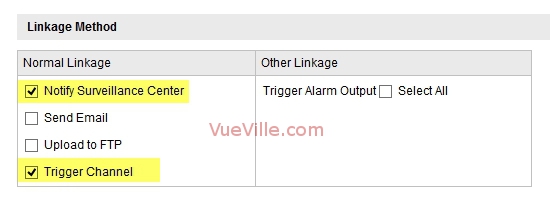
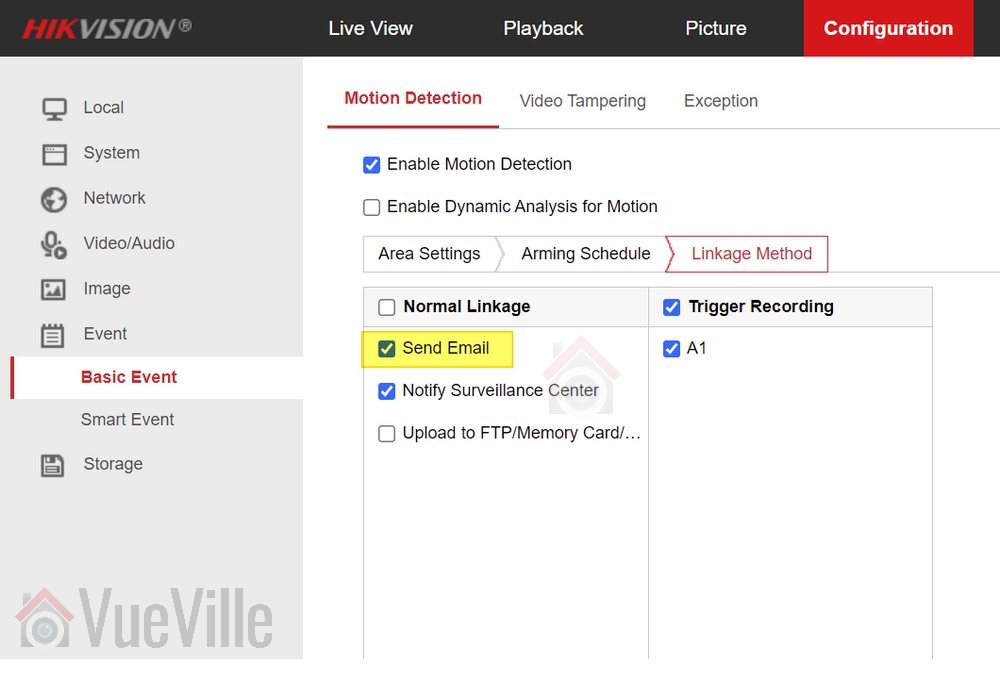
    2. In each of your cameras’ motion alert settings pages, make sure ‘Notify Surveillance Centre’ is checked.
      For example, Basic Event > Motion Detection
      Set up alarm push notifications for your Hikvision IP camera - Image 1 - VueVille.com
    3. Network > uPNP should also be enabled.
      Set up alarm push notifications for your Hikvision IP camera - Image 2 - VueVille.com
    4. Also go to Network > NAT and make sure: ‘Enable Port mapping’ is checked.
      Set up alarm push notifications for your Hikvision IP camera - Image 3 - VueVille.com
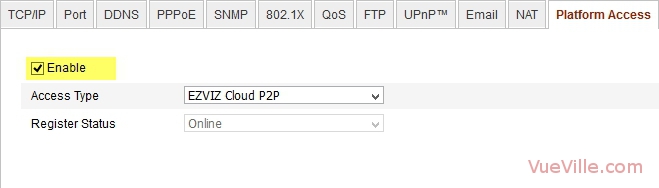
    5. Network > Platform access should be checked.
      Set up alarm push notifications for your Hikvision IP camera - Image 4 - VueVille.com

      NOTE: You do not need DDNS enabled.

    3. On your smartphone:

    1. Download and install the iVMS-4500 HD app from the Android Google Play Store or iOS App Store.
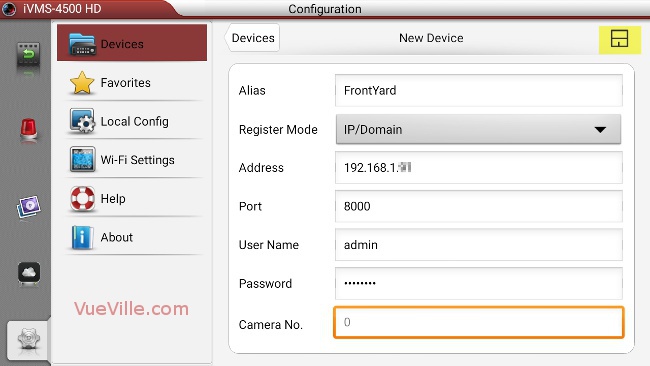
    2. Adding your cameras to the app.Click on the settings tab and select ‘Devices’.
      Set up alarm push notifications for your Hikvision IP camera - Image 5 - VueVille.com
      Click the + button at the top right to start adding your camera.Fill in all the fields. Use the IP address and server ports that you have configured for your camera. The default server port is 8000, so unless you have changed it yourself, you should use 8000. Save your setting by touching the save button at the top right.
      Set up alarm push notifications for your Hikvision IP camera - Image 6 - VueVille.com
      When you have added the first camera, the screen should look like this:
      Set up alarm push notifications for your Hikvision IP camera - Image 7 - VueVille.com

      Add all your cameras one by one.


      Set up alarm push notifications for your Hikvision IP camera - Image 8 - VueVille.com

    3. Go to the Push Notifications tab. You will see the cameras that you have added here with a toggle next to each one.
      Set up alarm push notifications for your Hikvision IP camera - Image 9 - VueVille.com
      Move each toggle to the right to activate alarm push notifications for each camera.
      Set up alarm push notifications for your Hikvision IP camera - Image 10 - VueVille.com

    4. Test by setting off the motion detection.

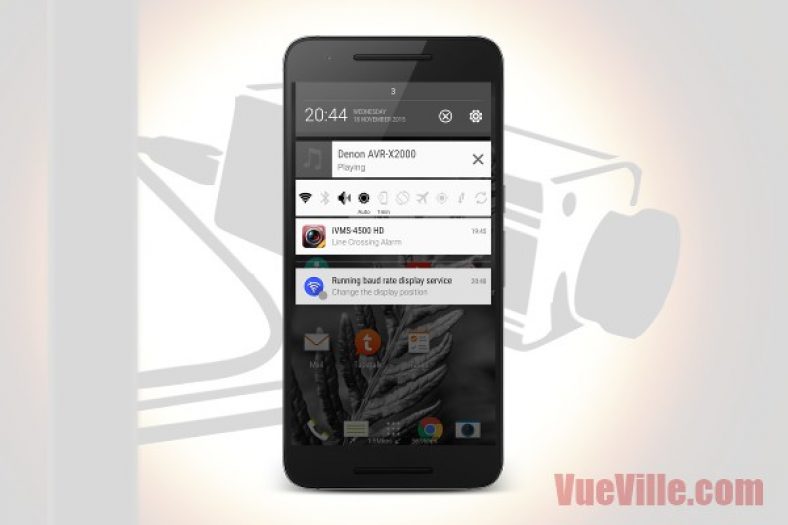
    5. You should see a notification like this within 1-5 seconds.

    Set up alarm push notifications for your Hikvision IP camera - Image 11 - VueVille.com
    Set up alarm push notifications for your Hikvision IP camera - Image 12 - VueVille.com


    Congratulations, you have now set up alarm push notifications on your smartphone. Also, if you have set up the port forwarding rules correctly on your router, you should receive push notifications outside your local network as well, i.e on the Wide Area Network (WAN).

    Troubleshooting

    If you do not get push notifications when the motion alarm is set off, try the following:

    • Make sure the account you are using to set up the camera in iVMS-4500 HD is an administrator account.
    • Uninstall the iVMS-4500 HD app, re-install the app and then try the setup steps above.

    If you face any problems or difficulties, please tell us through the comment field below. We love hearing from you!

    [text-blocks id=”earnings-disclaimer-incl-hivision-dahua”]

  • Buyer’s Guide 2018 – Network Video Recorders (NVR)

    Buyer’s Guide 2018 – Network Video Recorders (NVR)

    A Digital Video Recorder (DVR) has always been an essential component of a good CCTV security solution. With the advent of network cameras (IP Cameras) however, the humble DVR has given way to the Network Video Recorder (NVR). Whether you are upgrading from a DVR or dipping your toes into home CCTV, we will guide you all the way.

    2018 NVR Comparison - VueVille.com

    [wpsm_toplist]

    DVR vs. NVR – What’s the difference?

    How do you distinguish between a DVR and an NVR? A DVR is usually specified by the lines of resolution and the number of cameras that can be connected to it. This is because it is not a network based device and has analog video inputs for each camera it records. An NVR is a network device specified by the bandwidth it can handle and thus the number of video channels it can record. NVRs can do so much more than a DVR that it can be difficult to identify and research the model that best meets your needs. The problem with all the other home security related websites is that they offer no quick and easy way to find an NVR that meets your needs.

    This is why we decided to build the ultimate comparison table for NVRs. The table below lets you compare the features of the most popular NVRs from manufacturers such as Hikvision, Dahua, Samsung etc. You can filter using the feature dropdown boxes, search for a specific feature such as 4K, or sort these NVRs by any column. So you can quickly narrow the list to NVRs that have the features you are looking for. We have also explained the comparison criteria in detail just below the table.

    We think the most important features that you should look for in an NVR are in the comparison table. Let us know if we can improve this tool in any way. We will soon be adding NVR models from other manufacturers also.

    NVR vs. NVR kit

    Based on my DIY Smart Home framework, you can go EasyDIY and get a single kit that includes an NVR (read my recommendations), IP cameras and everything else you need to set it up. But if you want to go ProDIY and choose an NVR and the cameras yourself, the table below should be helpful.

    NVR Comparison table/matrix

    Start by filtering the table by using the dropdown boxes or the search box. Simply click on the required column header to sort by that criteria. To reset the table, just reload this page by clicking your browser’s refresh button or pressing F5 on your keyboard.

    I have included NVRs from Hikvision, Dahua, Amcrest, Reolink and LaView below.

    [table id=11 datatables_columnfilterwidgets=true responsive=scroll /]
    [text-blocks id=”4426″]

    NVRs – Explanation of technical terms:

    Category: We have grouped the NVRs into categories so that you can easily drilldown to the exact type of NVR you are after.

    Model: This is the exact model number of the NVR as described by the manufacturer.

    Price: To provide you with up-to-date prices, we have linked the NVRs to Amazon. Please note that this is an affiliate link which will provide us a commission if you decide to buy from Amazon.

    Number of channels: This is the maximum number of separate channels the NVR supports.

    Camera Megapixels: This is the maximum number of megapixels of the camera that the NVR supports.

    4K HDMI: Some of the newer NVR models have 4K support so that you can enjoy your NVR output in 4K resolution if your TV supports it.

    POE ports: Some NVRs have Power-over-Ethernet (POE) network ports.

    Hikvision NVR Model Naming Convention

    Hikvision has 6 different series of NVRs aimed at different sectors of the market and different types of users – the 9600, 8600, 7600, 9500, 7700, and the 7100 series. The 7600 series is the most affordable one and also the one that is most interesting to DIY home security enthusiasts like us.

    The full Hikvision NVR naming convention is:
    ‘DS-XXXX-NI’ – ‘(I OR E)X’ / ‘X’P where X denotes the numbers 0-9.

    Let’s break this down with an example, shall we? Let’s take the DS-7608NI-E2/8P:

    • A fixed prefix:
      • ‘DS-’, then
    • 4 digits:
      • The first 2 digits are the first 2 digits of the series number, eg. 76 for the 7600 series.
      • The next 2 digits indicate the number of channels supported by the NVR, eg. 08 for 8 channels.
    • A fixed suffix:
      • ‘-NI-’, where the N stands for NVR and I for International markets
    • The next alphabet of I or E is just an auxilliary letter.
    • The next digit indicates the number of SATA interfaces supported:
      • This shows you how many hard drives can be installed in the NVR. In our example, the 2 in E2 shows that 2 hard drives are supported.
    • If the NVR is PoE enabled, then we have another suffix, starting with a slash ‘/’
    • The next digit indicates:
      • The number of PoE ports. In or example, the 8 in 8P shows that this model has 8 PoE ports.
    • The next alphabet of P, H or N indicate the presence or absence of certain features:
      • P indicates PoE support.
      • H indicates Extended HDMI.
      • N indicates that PoE is not supported, i.e. just a switch interface is present.

    Dahua NVR Model Naming Convention

    The full Dahua NVR naming convention is:
    ‘DH-NVR’ – ‘XXYYH’ – ‘P or W or R’ where X denotes numbers 0-9 and YY is the no. of camera channels.

    • DH – The first two alphabets are always DH for Dahua
    • NVR – The next three will say NVR for NVRs.
    • X – The next digit describes the type of chipset solution used in the system:
      • 1=His3520D
      • 2=His3520A
      • 3=ST7108
      • 4=His3535/ST312
      • 5=Ti8167
      • 6=X86 i3/i5
      • 7=ST416
    • X – The next digit is the maximum number of hard drives that can be installed.
      • 1=1HDD
      • 2=2HDD
      • 4=4HDD
      • 8=8HDD
      • 0=16HDD
    • YY – The number of channels supported
      • 04=4ch
      • 08=8ch
      • 16=16ch
      • 32=32ch
      • 64=64ch
      • 00=128ch
    • H if present always means the case is of the type Mini 1U
    • The last alphabet defines the function:
      • P=PoE
      • W=WiFi
      • R=RAID

    Let’s break this down with an example, shall we? Let’s take the DH-NVR1108H-P:

    • DH = Dahua
    • NVR = Network Video Recorder
    • 1 = This NVR is based on the His3520D chipset solution
    • 1 = It supports 1 hard disk drive (HDD)
    • 08 = It supports 8 camera channels
    • H = It has a Mini 1U type case
    • P = This NVR has POE support
  • 25 Great Gift Ideas for Men this Christmas

    25 Great Gift Ideas for Men this Christmas

    25 Great Gift Ideas for Men - Vueville.com

    25 Awesome Gifts for Men this Christmas

    What do you gift a guy? It’s a question that bugs women everywhere, every holiday season, or special occasion. Many of us ladies will readily agree that it is so easy to pick a gift for a female friend but it can become a chore if it is for a guy. More so if you have already gifted them ties, shirts, sweaters, watches, cuff-links and the lot. If you find yourself in a similar situation this Christmas, here’s some good news for you. We have done the heavy lifting and searched out the most wished-for products on the Internet this Christmas to bring you this exhaustive list of great gift ideas. We are confident that this list of awesome gifts available from everybody’s favourite online retailer, Amazon, will help you check off your Christmas shopping quicker than you thought possible!

    P.S: This list of gift ideas has been approved by my gadget loving husband, so you really can’t go wrong with any of these!

    [wpsm_toplist]

    [wpsm_stickypanel][contents h2][/wpsm_stickypanel]

    A quick note: This article contains affiliate links from Amazon. If you click on one of these links and then purchase something from Amazon, we will receive affiliate income for referring you to Amazon. This goes towards the costs of hosting and running this website and does not affect you in any way.

    Without further ado, in no particular order, here we go:

    Amazon Echo – a great gadget gift

    [easyazon_image align=”center” height=”300″ identifier=”B00X4WHP5E” locale=”US” src=”https://www.vueville.com/wp-content/uploads/2015/11/Amazon-Echo-Vueville.com-300p.jpg” tag=”vueville.com-eaz-20″ width=”300″]

    Is there anything this smart voice-controlled device can’t do? Wireless speaker, Internet streaming including Spotify, a very intelligent virtual assistant, home automation hub, this is one of the most interesting devices we have seen in a long time. Want to give it a voice command while it’s streaming your favourite music? No problem! Aiming to become the centrepoint of the connected home, Amazon has set a very high bar with the Echo.

    [easyazon_link identifier=”B00X4WHP5E” locale=”US” tag=”vueville.com-eaz-20″]View on Amazon[/easyazon_link]

    Synology DS214 Play Network Attached Storage

    [easyazon_image align=”center” height=”300″ identifier=”B00FWUQNDQ” locale=”US” src=”https://www.vueville.com/wp-content/uploads/2015/11/Synology-DS214Play-Vueville.com-300p.jpg” tag=”vueville.com-eaz-20″ width=”300″]

    A media storage centre that does much more than its humble price tag suggests, it runs Synology’s acclaimed DiskStation software. Apart from reliably backing up data from all the devices in your home such as laptops, Macbooks, iPhones and Android based phones, it can stream media, download files, keep an eye on your security cameras, run a web server, the list goes on and on. This is one gift that will keep on giving for years to come!

    [easyazon_link identifier=”B00FWUQNDQ” locale=”US” tag=”vueville.com-eaz-20″]View on Amazon[/easyazon_link]

    iRobot Roomba 980 Vacuum Cleaning Robot

    [easyazon_image align=”center” height=”300″ identifier=”B013E9L4ZS” locale=”US” src=”https://www.vueville.com/wp-content/uploads/2015/11/iRobot-Roomba-Vueville.com-300p.jpg” tag=”vueville.com-eaz-20″ width=”300″]

    Still one of the best gifts a lazy guy can get, a robot that vacuums itself. What could be better, set up a schedule and the Roomba wakes up from its dock at the appointed time, diligently vacuums and returns to its base to recharge like a faithful house pet. Wait, pets still need looking after, the Roomba doesn’t. It even keeps an eye on its battery charge level while it is vacuuming, pause performing its duties, recharge itself and then pick up where it left off! The perfect tech gift for the bachelor who says he’s got no time.

    [easyazon_link identifier=”B013E9L4ZS” locale=”US” tag=”vueville.com-eaz-20″]View on Amazon[/easyazon_link]

    Smart Netatmo Weather Station

    [easyazon_image align=”center” height=”300″ identifier=”B0095HVAKS” locale=”US” src=”https://www.vueville.com/wp-content/uploads/2015/11/Netatmo-NWS01-US-Vueville.com-300p.jpg” tag=”vueville.com-eaz-20″ width=”300″]

    A smartphone controlled weather station and indoor air quality monitor, the Netatmo is a fascinating take on a traditional gadget. Stylish and well-designed, it can send text alerts when it detects abnormal or dangerous conditions such as high CO2 levels. It can even invite friends to view the vitals of your home environment.

    [easyazon_link identifier=”B0095HVAKS” locale=”US” tag=”vueville.com-eaz-20″]View on Amazon[/easyazon_link]

    Sphero Smartphone controlled BB-8 Droid Robot

    [easyazon_image align=”center” height=”300″ identifier=”B0107H5FJ6″ locale=”US” src=”https://www.vueville.com/wp-content/uploads/2015/11/StarWars-Sphero-BB8-Vueville.com-300p.jpg” tag=”vueville.com-eaz-20″ width=”300″]

    Rapidly becoming the must have gadget this Christmas, the Sphero BB-8 Star Wars Droid is a dream come true for every Star Wars fan. Check out the video above to see what this little droid can do. Without controversy, the force is strong with this one!

    [easyazon_link identifier=”B0107H5FJ6″ locale=”US” tag=”vueville.com-eaz-20″]View on Amazon[/easyazon_link]

    Canon EOS Rebel T5 Kit with 18-55mm lens / Canon 1200D

    [easyazon_image align=”center” height=”300″ identifier=”B00IB1BTWI” locale=”US” src=”https://www.vueville.com/wp-content/uploads/2015/11/Canon-EOS-Rebel-T5-Vueville.com-300p.jpg” tag=”vueville.com-eaz-20″ width=”300″]

    Perfect for all those photo-worthy moments that will take place when the whole family gathers together, this DSLR can produce those ‘oh-so-professional’ looking photos where the background is beautifully blurred. A must have for every guy these days, this is one gift that will give you brownie points like no other!

    [easyazon_link identifier=”B00IB1BTWI” locale=”US” tag=”vueville.com-eaz-20″]View on Amazon[/easyazon_link]

    Record those long drives and save on your car insurance

    [easyazon_image align=”center” height=”300″ identifier=”B00TRC3YF0″ locale=”US” src=”https://www.vueville.com/wp-content/uploads/2015/11/Rexing-F9-Dashcam-Vueville.com-300p.jpg” tag=”vueville.com-eaz-20″ width=”300″]

    A dashcam is not just another car gadget, not only can it record journeys in Full HD and provide valuable evidence in the case of a disputed accident, simply using it in your car gives you an extra discount with some car insurance companies. Don’t forget to also get a 32GB Micro SD card like [easyazon_link identifier=”B00M55C0NS” locale=”US” tag=”vueville.com-eaz-20″]this one[/easyazon_link].

    [easyazon_link identifier=”B00TRC3YF0″ locale=”US” tag=”vueville.com-eaz-20″]View on Amazon[/easyazon_link]

    Smartphone controlled Christmas Lights

    [easyazon_image align=”center” height=”300″ identifier=”B016EAOENS” locale=”US” src=”https://www.vueville.com/wp-content/uploads/2015/11/Vickerman-WeMo-Christmas-Lights-Vueville.com-300p.jpg” tag=”vueville.com-eaz-20″ width=”300″]

    Wireless Christmas lights – brilliant! Using the popular Wemo plug-in power controller, your smartphone can now turn on and off anything plugged into the WeMo. With a ton of accessories such as light switches that work seamlessly with home automation hub products such as the Amazon Echo, the WeMo can make the whole home intelligent.

    [easyazon_link identifier=”B016EAOENS” locale=”US” tag=”vueville.com-eaz-20″]View on Amazon[/easyazon_link]

    Showerhead with Wireless Speaker

    [easyazon_image align=”center” height=”300″ identifier=”B00A46X48A” locale=”US” src=”https://www.vueville.com/wp-content/uploads/2015/11/Kohler-Moxie-Showerhead-Vueville.com-300p.jpg” tag=”vueville.com-eaz-20″ width=”300″]

    This is one unique showerhead – it houses a water-proof rechargeable Bluetooth speaker. Pure genius, this ought to have been invented long ago – at least now there’s an excuse for those ridiculously long hot showers! When done showering, it can simply be unplugged from the showerhead and used as a regular wireless speaker.

    [easyazon_link identifier=”B00A46X48A” locale=”US” tag=”vueville.com-eaz-20″]View on Amazon[/easyazon_link]

    Philips Hue Go LED Lamp

    [easyazon_image align=”center” height=”300″ identifier=”B014H2P53I” locale=”US” src=”https://www.vueville.com/wp-content/uploads/2015/11/Philips-Vue-800292-Vueville.com-300p.jpg” tag=”vueville.com-eaz-20″ width=”300″]

    The Hue GO is a portable version of Philips popular Hue LED lamps. It can be used as accent lighting, or as a feature on its own. Boasting smartphone connectivity, you can set it to over 2 million different colour combinations from your smartphone. Note that this is not compatible with the Amazon Echo at present.

    [easyazon_link identifier=”B014H2P53I” locale=”US” tag=”vueville.com-eaz-20″]View on Amazon[/easyazon_link]

    Handheld Police/Emergency services scanner

    [easyazon_image align=”center” height=”300″ identifier=”B00A1VSO9M” locale=”US” src=”https://www.vueville.com/wp-content/uploads/2015/11/Uniden-Handheld-Scanner-Vueville.com-100p.jpg” tag=”vueville.com-eaz-20″ width=”100″]

    A modern take on the classic gadget that every teenage boy has wanted – a compact, mobile, handheld police scanner. Extremely useful during emergencies and also great fun as a hobby.

    [easyazon_link identifier=”B00A1VSO9M” locale=”US” tag=”vueville.com-eaz-20″]View on Amazon[/easyazon_link]

    Linksys WiFi range extender

    [easyazon_image align=”center” height=”300″ identifier=”B00UVN20YA” locale=”US” src=”https://www.vueville.com/wp-content/uploads/2015/11/Linksys-WiFi-RE6700-Extender-Vueville.com-300p.jpg” tag=”vueville.com-eaz-20″ height=”300″]

    You can never have enough WiFi coverage. Spotty, weak WiFi is a common household issue and the solution is surprisingly accessible – this WiFi extender should take care of those voids in your home’s WiFI coverage.

    [easyazon_link identifier=”B00UVN20YA” locale=”US” tag=”vueville.com-eaz-20″]View on Amazon[/easyazon_link]

    Quadcopter Drone

    [easyazon_image align=”center” height=”300″ identifier=”B013U0F6EQ” locale=”US” src=”https://www.vueville.com/wp-content/uploads/2015/11/DJI-Phantom-3-Vueville.com-300p.jpg” tag=”vueville.com-eaz-20″ width=”300″]
    This drone easily gives the most immersive flying experience that you can get for the money. It has a built-in high definition camera and GPS to maintain precise control and manoeuvrability. A 2 kilometre range ensures that the drone is always within reach and responsive. Also, the 25 minutes of flying time is industry-leading. It even has an auto take-off and auto-landing feature. This has to be one of the best gifts ever for a guy!

    [easyazon_link identifier=”B013U0F6EQ” locale=”US” tag=”vueville.com-eaz-20″]View on Amazon[/easyazon_link]

    Hikvision DS-2CD2032F-IW bullet-style IP security camera

    [easyazon_image align=”center” height=”300″ identifier=”B00ZZQS1ZU” locale=”US” src=”https://www.vueville.com/wp-content/uploads/2015/11/Hikvision-DS-2CD2032-I-300p.jpg” tag=”vueville.com-eaz-20″ width=”300″]

    A security camera with a stunning range of features such as 3 Megapixel resolution, built in SD card and WiFi, this is the perfect gift for those who are security-conscious. From a brand that supplies industrial grade products to businesses all over the world, you can’t go wrong with Hikvision. It also has a feature we love, sending email alerts whenever it detects motion. To learn more about Hikvision, read our Hikvision product guide.

    [easyazon_link identifier=”B00ZZQS1ZU” locale=”US” tag=”vueville.com-eaz-20″]View on Amazon[/easyazon_link]

    Motion activated wireless alert system

    [easyazon_image align=”center” height=”300″ identifier=”B002ISVJL6″ locale=”US” src=”https://www.vueville.com/wp-content/uploads/2015/11/Chamberlain-CWA200-Wireless-Motion-Detector-Vueville.com-300p.jpg” tag=”vueville.com-eaz-20″ width=”300″]

    Sometimes you need to know when there is motion in a particular area around your house. It could be the driveway, the yard or a shed. This is where wireless motion detection systems come in. Simple to set up and being wireless a breeze to install, this device adds an extra layer of security.

    [easyazon_link identifier=”B002ISVJL6″ locale=”US” tag=”vueville.com-eaz-20″]View on Amazon[/easyazon_link]

    Thermal Imager for iPhone 5/5s

    [easyazon_image align=”center” height=”300″ identifier=”B00K0PXFB6″ locale=”US” src=”https://www.vueville.com/wp-content/uploads/2015/11/FLIR-One-Thermal-Imager-Vueville.com-300p.jpg” tag=”vueville.com-eaz-20″ width=”300″]

    Here’s a cool gadget that can turn anyone with an iPhone into the next James Bond. Thermal imaging is now affordable for the average DIY-er. What can you do with this device? Identify heat loss from your boiler system, inspect heating pipes, or just observe the wildlife in your garden – the possibilities are endless.

    [easyazon_link identifier=”B00K0PXFB6″ locale=”US” tag=”vueville.com-eaz-20″]View on Amazon[/easyazon_link]

    Smart Wifi-Enabled WeMo Large Heater

    [easyazon_image align=”center” height=”300″ identifier=”B00KL770Q4″ locale=”US” src=”https://www.vueville.com/wp-content/uploads/2015/11/Holmes-Smart-WiFi-Large-Heater-Vueville.com-300p.jpg” tag=”vueville.com-eaz-20″ width=”300″]

    Can’t remember whether you switched off the heater before leaving the house? The humble heater gets an upgrade to join the smart home revolution with the help of [amazon asin[us]=B00BB2MMNE&asin[uk]=B00H51XYLY&text=Wemo] technology. Turn on/off, set schedules, adjust the thermostat – all possible now from your smartphone.

    [easyazon_link identifier=”B00KL770Q4″ locale=”US” tag=”vueville.com-eaz-20″]View on Amazon[/easyazon_link]

    Nest Cam Security Camera

    [easyazon_image align=”center” height=”300″ identifier=”B00WBJGUA2″ locale=”US” src=”https://www.vueville.com/wp-content/uploads/2015/11/NESTCam-Vueville.com-300p.jpg” tag=”vueville.com-eaz-20″ width=”300″]

    For those who just want to plug-and-play without faffing around, the Nest Cam is a great choice. We still recommend getting a more robust outdoor security camera such as those on our Top Security Camera Recommendations for 2016 list. However the Nest cam is peerless in simplicity and ease of setting up. So it is also suited for those who are not great at technology. Also see our recommendations for the best security camera.

    [easyazon_link identifier=”B00WBJGUA2″ locale=”US” tag=”vueville.com-eaz-20″]View on Amazon[/easyazon_link]

    Smart Wifi-Enabled WeMo Air Purifier

    [easyazon_image align=”center” height=”300″ identifier=”B00KL770ZK” locale=”US” src=”https://www.vueville.com/wp-content/uploads/2015/11/Holmes-Smart-WiFi-HEPA-Air-Purifier-Vueville.com-300p.jpg” tag=”vueville.com-eaz-20″ width=”300″]

    Another device that aims to make your living environment better, it functions just like the smart heater above. The standout feature is the TrueHEPA air filters that capture 99.97% of airborne particles such as pollen, mold and dust.

    [easyazon_link identifier=”B00KL770ZK” locale=”US” tag=”vueville.com-eaz-20″]View on Amazon[/easyazon_link]

    Canary All-in-One Home Security Device

    [easyazon_image align=”center” height=”300″ identifier=”B00NW31YSE” locale=”US” src=”https://www.vueville.com/wp-content/uploads/2015/11/Canary-Home-Security-Vueville.com_.jpg” tag=”vueville.com-eaz-20″ width=”300″]

    The Canary all-in-one successfully attempts to centralise all the different things you would want your smart home to do – monitor the air quality, monitor the ambient temperature and humidity, and let you keep an eye on things remotely. All of this accessible via a smartphone app. Simples.

    [easyazon_link identifier=”B00NW31YSE” locale=”US” tag=”vueville.com-eaz-20″]View on Amazon[/easyazon_link]

    Philips Hue and Ambience Smartphone controlled LED bulbs

    [easyazon_image align=”center” height=”300″ identifier=”B014H2P4KW” locale=”US” src=”https://www.vueville.com/wp-content/uploads/2015/11/Philips-Hue-456210-Vueville.com-300p.jpg” tag=”vueville.com-eaz-20″ width=”300″]

    The Philips Hue and Ambience system is simply put a wireless lighting solution that you can control from your smartphone. As with the Hue system above, you can define the precise colour of light that you want and the brightness, letting you create stunning lightscapes in your home. What’s more, you can voice control all of this through Siri on the iPhone or the [amazon asin=B00X4WHP5E&text=Amazon Echo].

    [easyazon_link identifier=”B014H2P4KW” locale=”US” tag=”vueville.com-eaz-20″]View on Amazon[/easyazon_link]

    Smart Lock – Keyless Home Entry with Your Smartphone

    [easyazon_image align=”center” height=”300″ identifier=”B00OHY14CS” locale=”US” src=”https://www.vueville.com/wp-content/uploads/2015/11/August-Smart-Lock-Vueville.com-300p.jpg” tag=”vueville.com-eaz-20″ width=”300″]

    Modern cars have keyless entry systems, why not get one for the home? The August Smart Lock resembles a regular door lock but auto-unlocks when you approach the door with your phone – your phone becomes the key. It can also lock the door automatically if you forget to lock it on your way out. It runs on batteries that can last for upto a year and can even set your [amazon asin=B0131RG6VK&text=Nest Thermostat] to ‘Away’ mode when you leave the house. As always there is an app to remotely lock or unlock if you have unexpected visitors that you want to let in (or out!).

    [easyazon_link identifier=”B00OHY14CS” locale=”US” tag=”vueville.com-eaz-20″]View on Amazon[/easyazon_link]

    Wireless Home Security Alarm System Kit with Auto Dial + Outdoor Siren

    [easyazon_image align=”center” height=”300″ identifier=”B00A1D90Q6″ locale=”US” src=”https://www.vueville.com/wp-content/uploads/2015/11/Fortress-Security-S02B-Vueville.com-300p.jpg” tag=”vueville.com-eaz-20″ width=”300″]

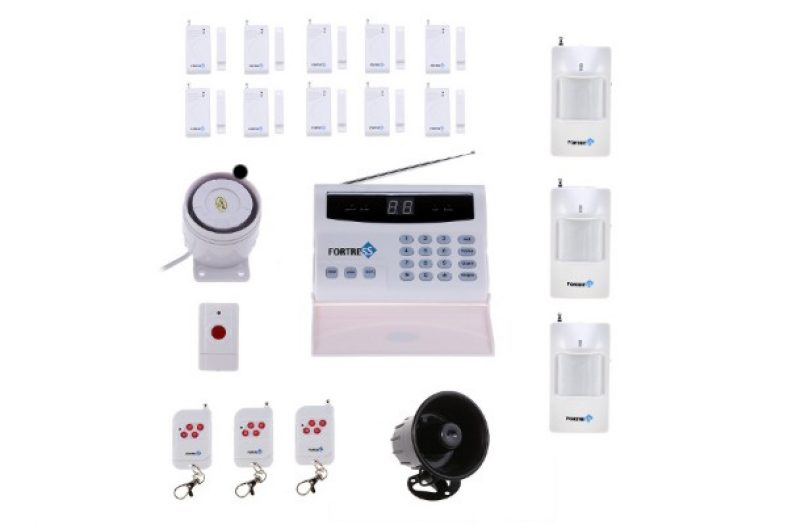
    Every home needs a burglar alarm system, but the traditional wired system is passé. Going wireless is the trend; it is as reliable as a wired system and is so much easier to install, especially for renters. This system also has plenty of accessories such as gas leak detectors, water leak detectors, and glass break detectors.

    [easyazon_link identifier=”B00A1D90Q6″ locale=”US” tag=”vueville.com-eaz-20″]View on Amazon[/easyazon_link]

    Dahua SD22204T-GN Mini PTZ(Pan/Tilt/Zoom) dome-style IP security camera

    [easyazon_image align=”center” height=”300″ identifier=”B00A1D90Q6″ locale=”US” src=”https://www.vueville.com/wp-content/uploads/2015/11/Dahua-Mini-PTZ-SD22204T-GN-Vueville.com-300p.jpg” tag=”vueville.com-eaz-20″ width=”300″]

    This Dahua Mini PTZ(Pan/Tilt/Zoom) IP camera is a small wonder – you can remotely monitor your home and point it wherever you want. This gives much more flexibility in installation and monitoring moving objects. It has 4x zoom which is good for a mini-PTZ camera.

    [easyazon_link identifier=”B00A1D90Q6″ locale=”US” tag=”vueville.com-eaz-20″]View on Amazon[/easyazon_link]

    Samsung EXON Fingerprint Digital Door Lock SHS-5230

    [easyazon_image align=”center” height=”300″ identifier=”B00BCRNRCS” locale=”US” src=”https://www.vueville.com/wp-content/uploads/2015/11/Samsung-Exon-Fingerprint-Door-Lock-Vueville.com-300p.jpg” tag=”vueville.com-eaz-20″ width=”300″]

    The ultimate in intelligent biometric door locks, this Samsung EXON lock uses fingerprints or a keycode of your choice to identify and grant access. There is no doubt how impressed your friends will be when the fingerprint protector flips up to reveal the pad. Apart from the obvious wow factor, it is a solid, reliable, functional yet stylish product from a brand that you can trust.

    [easyazon_link identifier=”B00BCRNRCS” locale=”US” tag=”vueville.com-eaz-20″]View on Amazon[/easyazon_link]

    So husband, boyfriend, father, son, brother, or nephew – they are the best and they deserve the best. Let us know which gift ideas you liked and which ones you finally choose – leave a comment below!

  • Best IP Camera 2016 Recommendations

    Best IP Camera 2016 Recommendations

    [wpsm_box type=”yellow” float=”none” text_align=”left”]

    The latest version of this guide is now available separately for outdoor and indoor IP cameras!
    [/wpsm_box]

    Yes I admit it, I am crazy about DIY home security. When I started researching home security and IP cameras, my goal was to find the best solutions to keep my family and home safe and secure. What started out as market research has turned into my passion and this blog!

    From my experience of trying to make sense of it all, choosing the right security camera can seem very difficult. But it is something that we just can’t afford to get wrong, is it? So I strongly recommend taking the time to research and understand the various options you have before spending your hard earned money. I have taken all my notes and condensed it into this single buying guide which I hope you will find helpful.

    My top 3 recommendations for outdoor security cameras are:

    • View [easyazon_link identifier=”B01BN1FEQE” locale=”US” tag=”vueville.com-eaz-afold-bipc16-20″]Amcrest IP2M-842EB[/easyazon_link] on Amazon
    • View [easyazon_link identifier=”B00PBXZVBE” locale=”US” tag=”vueville.com-ref-20″]Hikvision DS-2CD2132F-IWS[/easyazon_link] on Amazon, and
    • View [easyazon_link identifier=”B00RL2FZF0″ locale=”US” tag=”vueville.com-ref-20″]Hikvision DS-2CD2332-I[/easyazon_link] on Amazon.

    View my top recommendation for an indoor security camera on Amazon: [easyazon_link identifier=”B0145OQTPG” locale=”US” tag=”vueville.com-eaz-afold-bipc16-20″]Amcrest IP2M-841B[/easyazon_link].

    [wpsm_titlebox title=”Contents” style=”3″][contents h2][/wpsm_titlebox]

    Best Outdoor IP Camera 2016 Recommendations: Summary

    [table id=33 responsive=scroll/]

    As part of a well-planned security system, outdoor security cameras are an effective deterrent against would-be intruders and, if God forbid the worst happens, immensely helpful in assisting the police tracking down troublemakers. Surveillance cameras are not just for companies and large organisations anymore. You can get yourself a good High Definition IP camera (also called a network camera) for not much money. Indeed, its never been better for those who are interested in home security without paying a monthly fee.

    Many of these IP cameras work perfectly fine on their own without an NVR (Network Video Recorder) as they have built-in recording capabilities. They can also be easily integrated into either dedicated NVRs or PCs running surveillance software such as BlueIris.

    How this list is structured

    There are so many ways of categorising IP cameras – we have chosen form factor as we believe this is one of the first decisions to make while choosing an IP camera. Bullet style, dome style or mini-dome, this will depend primarily on the location of installation and how visible you want the camera to be.

    Bullet style camera

    The typical CCTV camera look which is not discreet and serves as a visible deterrent. Very flexible as it can be aimed after installation. However, it is not resistant to vandalism.

    Best value: Amcrest IP2M-842E

    [wpsm_column size=”one-half”]
    [easyazon_image align=”center” height=”300″ identifier=”B01BN1FEQE” locale=”US” src=”https://www.vueville.com/wp-content/uploads/2016/12/41eRFhB2BCyL.jpg” tag=”vueville.com-eaz-bipc16-20″ width=”300″]
    [/wpsm_column]

    [wpsm_column size=”one-half” position=”last”]
    [wpsm_titlebox title=”Features” style=”3″]

    • 2MP (1080p) CMOS image sensor
    • 72° Viewing Angle
    • 30m (98 feet) IR range
    • Ethernet port with Power over Ethernet (PoE)
    • ONVIF and RTSP protocols supported
    • IP67 weatherproof rating

    [/wpsm_titlebox]

    [/wpsm_column]

    [wpsm_column size=”one-half”][wpsm_pros title=”PROS:”]

    • Very good video quality with 1080p Full HD resolution
    • SD card slot, PoE, WiFi optional
    • Simply superb value

    [/wpsm_pros][/wpsm_column][wpsm_column size=”one-half” position=”last”][wpsm_cons title=”CONS:”]

    • No audio/alarm connections

    [/wpsm_cons][/wpsm_column]

    [easyazon_link identifier=”B01BN1FEQE” locale=”US” tag=”vueville.com-eaz-bipc16-20″]View on Amazon[/easyazon_link]

    This excellent little IP camera from Amcrest is hands-down the best value IP camera we could find. Don’t waste your time, money, and sanity buying cheap knock-offs for a few dollars less than this camera. On the hardware front, this Amcrest camera seems to be a rebranded Dahua which is great because Dahua is one of the top security camera manufacturers in the world. It supports PoE and this is our recommended way of powering the camera and data communication (use a PoE switch like this one). Amcrest software is very professional, and simply works. The other strong reason to go with Amcrest is their extensive US and European support networks. Check out our Amcrest Camera Guide to learn more about who Amcrest are and why we love their cameras.

    If you prefer having the Wifi option as well, the Amcrest IP2M-842B is also available.

    Great value: Hikvision DS-2CD2032F-IW (Also re-branded as Swann)

    [wpsm_column size=”one-half”][easyazon_image align=”center” height=”300″ identifier=”B017C53TI0″ tag=”vueville.com-ref-20″ locale=”US” src=”https://www.vueville.com/wp-content/uploads/2015/11/Hikvision-DS-2CD2032-I-300p.jpg” width=”300″][/wpsm_column]

    [wpsm_column size=”one-half” position=”last”]
    [wpsm_titlebox title=”Features” style=”3″]

    • 3MP CMOS image sensor
    • Up to 79° Viewing Angle
    • 30m (98 feet) IR range
    • Ethernet port with Power over Ethernet (PoE), Wi-Fi
    • On-board storage (SD card)
    • ONVIF and RTSP protocols supported
    • IP66 weatherproof rating

    [/wpsm_titlebox]

    [/wpsm_column]

    [wpsm_column size=”one-half”][wpsm_pros title=”PROS:”]

    • 3MP, excellent image quality
    • SD card slot & WiFi
    • Superb value

    [/wpsm_pros][/wpsm_column][wpsm_column size=”one-half” position=”last”][wpsm_cons title=”CONS:”]

    • No audio/alarm connections

    [/wpsm_cons][/wpsm_column]

    [easyazon_link identifier=”B017C53TI0″ locale=”US” tag=”vueville.com-ref-20″]View on Amazon[/easyazon_link]

    Hikvision is a manufacturer that many of us venturing into home security may not have heard of. However, rest assured this company has produced some brilliant cameras and this little bullet camera has been one of their best-selling ever. Have a look at our Hikvision product guide to learn more about their product range.

    As our first IP camera purchase, we were surprised at how much camera you get for the money with the DS-2CD2032F-IW. With a 3MP Sony sensor, it has very good image quality, both during the day and at night. The full metal body is of solid construction and comes with a choice of lens sizes. The Sony image sensor contributes to stellar low light performance. Adding just a network storage location lets you use the built-in NVR feature if you are aiming at a single-camera setup initially. While it has POE and an SD card slot, it does not have audio or alarm features. Also available is the DS-2CD2032-I which is slightly cheaper at as it doesn’t have an SD card slot or WiFi. If you need higher resolution, there is a 4MP model available. See how you can set up motion detection alerts for any Hikvision camera.

    Great value: Dahua IPC-HFW4300S (Also re-branded as Lorex)

    [wpsm_column size=”one-half”][easyazon_image align=”center” height=”300″ identifier=”B00MUMRJMI” locale=”US” tag=”vueville.com-ref-20″ src=”https://www.vueville.com/wp-content/uploads/2015/11/Dahua-IPC-HFW4300S-300p.jpg” width=”300″][/wpsm_column]

    [wpsm_column size=”one-half” position=”last”]
    [wpsm_titlebox title=”Features” style=”3″]

    • 3MP CMOS image sensor
    • Up to 97.6° Viewing Angle
    • 30m (98 feet) IR range
    • Ethernet port with Power over Ethernet (PoE)
    • ONVIF and RTSP protocols supported
    • IP66 weatherproof rating

    [/wpsm_titlebox]

    [/wpsm_column]

    [wpsm_column size=”one-half”][wpsm_pros title=”PROS:”]

    • 3MP, good image quality
    • Good value

    [/wpsm_pros][/wpsm_column][wpsm_column size=”one-half” position=”last”][wpsm_cons title=”CONS:”]

    • No audio/alarm connections
    • No SD card slot

    [/wpsm_cons][/wpsm_column]

    [easyazon_link identifier=”B00MUMRJMI” locale=”US” tag=”vueville.com-ref-20″]View on Amazon[/easyazon_link]

    Dahua is another respected manufacturer of high quality surveillance equipment. The 3MP Dahua IPC-HFW4300S is similar to the Hikvision DS-2CD2032-I above in technical specifications with POE and no audio or alarm connections, but is considerably longer in size. Even though it uses a different ‘Aptina’ sensor, image quality is very close too, with the Hikvision said to have the edge. The Dahua however has been reported to have slightly better low light performance. The eco-sensor lets the camera operate with just 5.5W of power vs. 7.5W of the Hikvision bullet. Both cameras have been reviewed highly favourably by users on the popular internet forums, so the buying decision can really be boiled down to the rest of your CCTV landscape and price. Also consider the IPC-HFW5300C which adds a 2.7-12mm varifocal lens, audio/alarm connections and an SD card slot.

    Full-featured: Hikvision DS-2CD2632F-IS

    [wpsm_column][easyazon_image align=”center” height=”300″ identifier=”B00GFFPFEU” locale=”US” src=”https://www.vueville.com/wp-content/uploads/2015/11/Hikvision-DS-2CD2632F-IS-300p.jpg” width=”300″ tag=”vueville.com-ref-20″][/wpsm_column]

    [wpsm_column size=”one-half” position=”last”]
    [wpsm_titlebox title=”Features” style=”3″]

    • 3MP CMOS image sensor
    • 2.8-12mm varifocal zoom lens
    • 105.2°-31.9° Viewing Angle
    • 30m (98 feet) IR range
    • Ethernet port with Power over Ethernet (PoE)
    • On-board storage (SD card)
    • ONVIF and RTSP protocols supported
    • IP66 weatherproof rating

    [/wpsm_titlebox]

    [/wpsm_column]

    [wpsm_column size=”one-half”][wpsm_pros title=”PROS:”]

    • 3MP, excellent image quality
    • Varifocal lens
    • Audio and alarm connections
    • SD card slot

    [/wpsm_pros][/wpsm_column][wpsm_column size=”one-half” position=”last”][wpsm_cons title=”CONS:”]

    • None

    [/wpsm_cons][/wpsm_column]

    [easyazon_link identifier=”B00GFFPFEU” locale=”US” tag=”vueville.com-ref-20″]View on Amazon[/easyazon_link]

    This 3MP Hikvision model has a unique feature – it has variable focal lengths from 2.8mm to 12mm. While this gives you immense flexibility in camera placement and testing, it does however push the price up but the camera remains great value at current prices. POE, audio and alarm inputs and onboard storage are standard.

    High-end: Vivotek IB8168

    [wpsm_column][easyazon_image align=”center” height=”300″ identifier=”B00LC7OLIW” locale=”US” src=”https://www.vueville.com/wp-content/uploads/2015/11/Vivotek-IB8168-300p.jpg” width=”300″ tag=”vueville.com-eaz-bipc16-20″][/wpsm_column]

    [wpsm_column size=”one-half” position=”last”]
    [wpsm_titlebox title=”Features” style=”3″]

    • 2MP CMOS image sensor
    • 97° Viewing Angle
    • Ethernet port with Power over Ethernet (PoE)
    • On-board storage (SD card)
    • ONVIF and RTSP protocols supported
    • IP66 weatherproof rating

    [/wpsm_titlebox]

    [/wpsm_column]

    [wpsm_column size=”one-half”][wpsm_pros title=”PROS:”]

    • Superior image quality
    • SD card slot

    [/wpsm_pros][/wpsm_column][wpsm_column size=”one-half” position=”last”][wpsm_cons title=”CONS:”]

    • No audio or alarm connections
    • No InfraRed night vision

    [/wpsm_cons][/wpsm_column]

    [easyazon_link identifier=”B00LC7OLIW” locale=”US” tag=”vueville.com-eaz-bipc16-20″]View on Amazon[/easyazon_link]

    Vivotek is a Taiwanese brand and as such their cameras are priced higher than the Chinese manufacturers such as Hikvision or Dahua. There is a large range of cameras available from this high quality manufacturer. The Vivotek IB8168 is a 2MP model with POE and a built-in SD card slot. A 3MP version is also available, the Vivotek IP8371E model which boasts 30fps at 3MP resolution which is uncommon.

    Also consider: Amcrest Qcam 3MP Bullet

    [easyazon_image align=”center” height=”300″ identifier=”B014E995K8″ locale=”US” src=”https://www.vueville.com/wp-content/uploads/2015/11/Amcrest-Qcam-3MP-Bullet-300p.jpg” width=”300″ tag=”vueville.com-eaz-bipc16-20″]

    [wpsm_column size=”one-half”][wpsm_pros title=”PROS:”]

    • Good reviews from users
    • Amcrest is on the Blueiris compatibility list

    [/wpsm_pros][/wpsm_column][wpsm_column size=”one-half” position=”last”][wpsm_cons title=”CONS:”]

    • No audio or alarm connections
    • No SD card slot

    [/wpsm_cons][/wpsm_column]

    [easyazon_link identifier=”B014E995K8″ locale=”US” tag=”vueville.com-eaz-bipc16-20″]View on Amazon[/easyazon_link]

    Amcrest is an American company from the same team that founded the popular Foscam brand. So these guys are not exactly new to the CCTV game and are already creating a name for themselves with excellent customer service and support. The Amcrest Qcam 3MP bullet has very positive reviews on Amazon.

    Dome style cameras

    These cameras are designed to be vandal-proof and are also a good deterrent.

    Best value: Hikvision DS-2CD2132F-I(W)(S)

    [easyazon_image align=”center” height=”300″ identifier=”B00QTMBIHM” locale=”US” src=”https://www.vueville.com/wp-content/uploads/2015/11/Hikvision-DS-2CD2132F-IS-300p.jpg” width=”300″ tag=”vueville.com-ref-20″]
    [wpsm_column size=”one-half”][wpsm_pros title=”PROS:”]

    • 3MP, good image quality
    • Audio & alarm connections
    • Onboard storage

    [/wpsm_pros][/wpsm_column][wpsm_column size=”one-half” position=”last”][wpsm_cons title=”CONS:”]

    • Image quality not as good as the Hikvision bullet
    • IR bleed experienced by some users

    [/wpsm_cons][/wpsm_column]

    [easyazon_link identifier=”B00QTMBIHM” locale=”US” tag=”vueville.com-ref-20″]View on Amazon[/easyazon_link]

    A dome camera is ideal for areas that may be vulnerable to vandals/damage. The DS-2CD2132F-IS dome comes in two flavours, with and without WiFi. However, we do not recommend using the optional WiFi as it is less reliable than a wired ethernet connection and prone to dropped frames. This camera has POE, onboard SD storage, audio and alarm inputs/outputs. Image quality is nearly as good as the Hikvision DS-2CD2032-I bullet above, but there is a noticeable difference. Some users had reported IR bleed in this model’s predecessor but our extensive testing reveals that this is no longer an issue. See how you can set up motion detection alerts for any Hikvision.

    Great value: Dahua IPC-HDBW4300E

    [easyazon_image align=”center” identifier=”B00KMDIEXK” locale=”US” src=”https://www.vueville.com/wp-content/uploads/2015/11/Dahua-IPC-HDBW4300E-300p.jpg” tag=”vueville.com-ref-20″]
    [wpsm_column size=”one-half”][wpsm_pros title=”PROS:”]

    • 3MP, good image quality
    • Audio & alarm connections
    • Onboard storage
    • Energy-efficient

    [/wpsm_pros][/wpsm_column][wpsm_column size=”one-half” position=”last”][wpsm_cons title=”CONS:”]

    • Image quality reportedly not as good as the Hikvision dome

    [/wpsm_cons][/wpsm_column]

    [easyazon_link identifier=”B00KMDIEXK” locale=”US” tag=”vueville.com-ref-20″]View on Amazon[/easyazon_link]

    This 3MP Dahua has good image quality and supports POE and audio/alarm connections. It also has a local storage option in the form of an SD card slot. It is also very efficient and consumes just 4W in operation vs. the 7.5W of the Hikvision dome. Also consider the Dahua IPC-HDBW5300 which has a 2.7-12mm varifocal lens.

    Full-featured: Vivotek FD8167 SNV

    [easyazon_image align=”center” height=”300″ identifier=”B00QR6RQGM” locale=”US” src=”https://www.vueville.com/wp-content/uploads/2015/11/Vivotek-FD8167-300p.jpg” width=”300″ tag=”vueville.com-eaz-bipc16-20″]

    [wpsm_column size=”one-half”][wpsm_pros title=”PROS:”]

    • Superior image quality
    • PIR motion sensor
    • Varifocal lens
    • Audio & alarm connections
    • 30m IR range
    • Onboard storage

    [/wpsm_pros][/wpsm_column][wpsm_column size=”one-half” position=”last”][wpsm_cons title=”CONS:”]

    • None

    [/wpsm_cons][/wpsm_column]

    [easyazon_link identifier=”B00QR6RQGM” locale=”US” tag=”vueville.com-eaz-bipc16-20″]View on Amazon[/easyazon_link]

    The 2MP Vivotek FD8167 has two very interesting features – firstly, it is an outdoor camera that has a built-in PIR sensor. This means you can avoid one of the biggest hassles with automatic motion detection – false positives. Using the PIR sensor should greatly reduce false notifications and thus make it likelier that you will pay attention to motion detection alerts. Of course you can modify any camera with an alarm input to achieve the same result but its just easier if it has this function out of the box. Secondly, it is varifocal (2.8mm – 12mm), greatly increasing the flexibility of installation location and it supports POE and audio/alarm connections as standard. The SNV models such as this one, have increased IR range of up to 30 metres.

    High-end: Axis M3005-V

    [easyazon_image align=”center” height=”300″ identifier=”B00BFCSDKG” locale=”US” src=”https://www.vueville.com/wp-content/uploads/2015/11/Axis-M3005-V-300p.jpg” width=”300″ tag=”vueville.com-eaz-bipc16-20″]

    [wpsm_column size=”one-half”][wpsm_pros title=”PROS:”]

    • Superior image quality
    • Audio alarm connections
    • Onboard storage, supports edge recording

    [/wpsm_pros][/wpsm_column][wpsm_column size=”one-half” position=”last”][wpsm_cons title=”CONS:”]

    • None

    [/wpsm_cons][/wpsm_column]

    [easyazon_link identifier=”B00BFCSDKG” locale=”US” tag=”vueville.com-eaz-bipc16-20″]View on Amazon[/easyazon_link]

    Axis is the Swedish company that invented the network camera in 1996. As it is a European company, you can expect prices to be higher but what sets Axis apart from the Asian manufacturers is the quality of their products and their global support network. The Axis M3005-V is a 2MP camera with a tiny footprint, POE and a built-in SD card for storage.

    Turret/Mini-dome style cameras

    The best of both worlds – easy to aim and set up, and somewhat resistant to vandalism.

    Best value: Hikvision DS-2CD2332-I

    [easyazon_image align=”center” height=”300″ identifier=”B00RL2FZF0″ locale=”US” src=”https://www.vueville.com/wp-content/uploads/2015/11/Hikvision-DS-2CD2332-I-300p.jpg” width=”300″ tag=”vueville.com-ref-20″]

    [wpsm_column size=”one-half”][wpsm_pros title=”PROS:”]

    • Great image quality
    • Bright EXIR LEDs

    [/wpsm_pros][/wpsm_column][wpsm_column size=”one-half” position=”last”][wpsm_cons title=”CONS:”]

    • No audio/alarm features
    • No onboard storage

    [/wpsm_cons][/wpsm_column]

    [easyazon_link identifier=”B00RL2FZF0″ locale=”US” tag=”vueville.com-ref-20″]View on Amazon[/easyazon_link]

    Turret or mini-dome style cameras have the advantage of being able to use EXIR LEDs instead of the classic ring style LEDs. EXIR LEDs last longer and are brighter thus contributing to the higher IR ranges on these models. This 3MP turret is a big favourite for its great value and small size. It supports POE but does not have audio, alarm connections or any on-board storage.

    Great value: Dahua IPC-HDW4300C

    [easyazon_image align=”center” height=”300″ identifier=”B00HG10XHQ” locale=”US” src=”https://www.vueville.com/wp-content/uploads/2015/11/Dahua-IPC-HDW4300C-300p.jpg” width=”300″ tag=”vueville.com-ref-20″]

    [wpsm_column size=”one-half”][wpsm_pros title=”PROS:”]

    • Good image quality
    • Bright EXIR LEDs
    • Built-in microphone
    • Low power consumption

    [/wpsm_pros][/wpsm_column][wpsm_column size=”one-half” position=”last”][wpsm_cons title=”CONS:”]

    • No alarm features
    • No onboard storage
    • Max. bitrate only 8Mbps

    [/wpsm_cons][/wpsm_column]

    [easyazon_link identifier=”B00HG10XHQ” locale=”US” tag=”vueville.com-ref-20″]View on Amazon[/easyazon_link]

    This 3MP Dahua is similar to the Hikvision DS-2CD2332-I turret above but has a built-in mic as well which is great if you need the audio feature. It also claims to use just 4.5W of power vs. the Hikvision’s 7.5W. However, it supports only a rather average maximum bitrate of 8Mbps vs. the 16Mbps of the Hikvision.

    Full-featured: Hikvision DS-2CD2532F-I(W)(S)

    [easyazon_image align=”center” height=”300″ identifier=”B00XBJBRKE” locale=”US” src=”https://www.vueville.com/wp-content/uploads/2015/11/Hikvision-DS-2CD2532F-IS-300p.jpg” width=”300″ tag=”vueville.com-ref-20″]

    [wpsm_column size=”one-half”][wpsm_pros title=”PROS:”]

    • Extremely compact and discreet
    • Very good low-light performance
    • SD card slot

    [/wpsm_pros][/wpsm_column][wpsm_column size=”one-half” position=”last”][wpsm_cons title=”CONS:”]

    • Weak IR LED illumination

    [/wpsm_cons][/wpsm_column]

    [easyazon_link identifier=”B00XBJBRKE” locale=”US” tag=”vueville.com-ref-20″]View on Amazon[/easyazon_link]

    This 3MP camera has a very discreet look and very good low light performance. It is perfect for those locations where you don’t want your camera to stick out like a sore thumb. It supports POE and also has an SD card slot for internal storage.

    High-end: Vivotek FD8166

    [easyazon_image align=”center” height=”300″ identifier=”B00E1SWMKS” locale=”US” src=”https://www.vueville.com/wp-content/uploads/2015/11/Vivotek-FD8166-300p.jpg” width=”300″ tag=”vueville.com-eaz-bipc16-20″]

    [wpsm_column size=”one-half”][wpsm_pros title=”PROS:”]

    • Extremely small footprint
    • Very good low-light performance
    • Built-in microphone
    • SD card slot

    [/wpsm_pros][/wpsm_column][wpsm_column size=”one-half” position=”last”][wpsm_cons title=”CONS:”]

    • No alarm features
    • No on-board IR LEDs

    [/wpsm_cons][/wpsm_column]

    [easyazon_link identifier=”B00E1SWMKS” locale=”US” tag=”vueville.com-eaz-bipc16-20″]View on Amazon[/easyazon_link]

    This Vivotek camera comes with a 2MP sensor and is highly rated for its low light performance. It is also difficult to spot due to its tiny footprint of just 90 millimetres. It supports POE, has an SD card slot for internal storage and even manages a built-in microphone!

    Indoor security camera

    These are designed to be used in indoor locations and may not be waterproof or weather-resistant. They also tend to have 2 way audio and PIR based motion detection.

    Best Value: Amcrest ProHD 1080p Pan-Tilt Indoor Security Camera

    [easyazon_image align=”center” height=”300″ identifier=”B0145OQTPG” locale=”US” src=”https://www.vueville.com/wp-content/uploads/2015/12/Amcrest-ProHD-IP2M-841-Wireless-Indoor-Pan-Tilt-IP-Security-Camera.jpg” width=”600″ tag=”vueville.com-eaz-bipc16-20″]

    [wpsm_column size=”one-half”]
    [wpsm_pros title=”PROS:”]

    • Good image quality and 1080p resolution
    • Very clear and loud two-way audio with mic and speaker built-in
    • WiFi and RJ-45 Ethernet port
    • IR Leds provide night vision capability
    • 360 degree Pan-Tilt feature
    • Support for SD card, NAS, NVR, FTP and Cloud storage locations
    • Very good value for money

    [/wpsm_pros][/wpsm_column]

    [wpsm_column size=”one-half” position=”last”]
    [wpsm_cons title=”CONS:”]

    • Doesn’t have Power over Ethernet feature
    • Smartphone apps could be better – free Amcrest apps lack basic features such as push notifications

    [/wpsm_cons][/wpsm_column]

    [easyazon_link identifier=”B0145OQTPG” locale=”US” tag=”vueville.com-eaz-bipc16-20″]Check Price on Amazon[/easyazon_link]

    The Amcrest IP2M-841B did very well in our hands-on review and I like it so much that it is now serving as our full-time baby monitor. It has a network port, WiFi, built-in InfraRed LEDs for very good night vision, loud and clear 2-way audio with mic and speaker, built-in SD card local storage, and very good low-light performance. A non-WiFi PoE-enabled IP2M-841EB version is also available.

    Read our full review of this wonderful IP camera below:
    [wpsm_top postid=1461]

    Great Value: Hikvision DS-2CD2432F-I(W)

    [easyazon_image align=”center” height=”300″ identifier=”B00JWCV9CU” locale=”US” src=”https://www.vueville.com/wp-content/uploads/2015/11/Hikvision-DS-2CD2432F-IW-300p.jpg” width=”300″ tag=”vueville.com-ref-20″]

    [wpsm_column size=”one-half”][wpsm_pros title=”PROS:”]

    • Great image quality
    • Good low-light performance
    • Bright EXIR LED
    • Built-in microphone and speaker
    • SD card slot
    • PIR sensor
    • Alarm In/Out connections
    • True 2-way audio (full-duplex)

    [/wpsm_pros][/wpsm_column][wpsm_column size=”one-half” position=”last”][wpsm_cons title=”CONS:”]

    • No Pan-Tilt-Zoom

    [/wpsm_cons][/wpsm_column]

    [easyazon_link identifier=”B00JWCV9CU” locale=”US” tag=”vueville.com-ref-20″]View on Amazon[/easyazon_link]

    This 3MP Hikvision cube is the best balance of image quality, features and price for an indoor IP camera. It has POE, WiFi, built-in EXIR LEDs for IR illumination, true 2-way audio with speaker, built-in SD storage, a PIR sensor for accurate motion detection, good low-light performance and looks good too. A non-WiFi enabled DS-2CD2432F-I version is also available in the US, but is only marginally cheaper.

    Full-featured: Hikvision DS-2CD2432F-I(W)

    The Hikvision DS-2CD2432F-I(W) above has all the features you will ever need for an indoor camera and so gets this title as well.

    Also consider: Samsung SmartCam HD Pro / SNH-P6410BN

    [easyazon_image align=”center” height=”300″ identifier=”B00J38NVHE” locale=”US” src=”https://www.vueville.com/wp-content/uploads/2015/11/Samsung-SNH-P6410BN-300p.jpg” width=”300″ tag=”vueville.com-eaz-bipc16-20″]

    [wpsm_column size=”one-half”][wpsm_pros title=”PROS:”]

    • Good image quality
    • Built-in microphone and speaker
    • SD card slot
    • 128 degree wide-angle lens
    • Push notifications on mobile app

    [/wpsm_pros][/wpsm_column][wpsm_column size=”one-half” position=”last”][wpsm_cons title=”CONS:”]

    • Default remote monitoring cloud based
    • No PIR sensor
    • Not POE enabled
    • No alarm connections
    • Audio is only one-way at a time (half-duplex)
    • 11W power consumption is high

    [/wpsm_cons][/wpsm_column]

    [easyazon_link identifier=”B00J38NVHE” locale=”US” tag=”vueville.com-eaz-bipc16-20″]View on Amazon[/easyazon_link]

    This 2MP Samsung camera is the consumer electronics giant’s first foray into home security and in our opinion is one of the better mainstream options. It should have good daytime image quality based on the Sony 2MP sensor, and supports 2-way audio with a built-in mic and speaker just like the Hikvision. It has an SD card slot for local storage and built-in IR illumination, so night visibility should not be compromised. POE would have been a nice to have but is not critical considering it is an indoor camera. There is also no PIR sensor which the Hikvision has. It should be noted that the default remote monitoring website is set up on Samsung’s servers so is not great from a security and privacy standpoint. However, integration with 3rd party NVRs is possible and this camera is listed on BlueIris Software’s compatibility list.

    High-end: Axis M1025

    [easyazon_image align=”center” height=”300″ identifier=”B00K8UIHW0″ locale=”US” src=”https://www.vueville.com/wp-content/uploads/2015/11/Axis-M1025-300p.jpg” width=”300″ tag=”vueville.com-eaz-bipc16-20″]

    [wpsm_column size=”one-half”][wpsm_pros title=”PROS:”]

    • Excellent image quality
    • Great low-light performance
    • Built-in HDMI port
    • SD card slot
    • True 2-way audio (full-duplex)

    [/wpsm_pros][/wpsm_column][wpsm_column size=”one-half” position=”last”][wpsm_cons title=”CONS:”]

    • No PIR sensor
    • No alarm connections
    • No on-board IR LEDs

    [/wpsm_cons][/wpsm_column]

    [easyazon_link identifier=”B00K8UIHW0″ locale=”US” tag=”vueville.com-eaz-bipc16-20″]View on Amazon[/easyazon_link]

    The Axis M1025 cube camera sports a 2MP sensor giving upto 1080p Full HD resolution and has an SD card slot as well. An interesting feature is the on-board mini HDMI port that lets you hook up the camera directly to your HDTV.

    What about Dropcam/Nest etc.?

    Dropcam, Arlo (a Netgear brand), Nest, Oco etc. are not our first choice because they are mostly designed to tie you into their monthly cloud recording/home monitoring plans. So while they may seem cheaper initially, the operating costs add up quickly. These devices may be simpler to set up and maintain as most of them run off the cloud, so may be the best solution for those who want a plug and play option. But if you are prepared for a slightly more hands-on experience, we think more robust, standalone, local-recording solutions that are in your full control and ensure total privacy are the way to go (anything you put on the cloud is open to hacking and potential misuse – remember the iCloud hack or the ransomware attacks?)

    If you must however go for one of these mainstream solutions, make sure you go for one that offers the local storage option instead of a pure cloud storage approach. We echo the advice in the articles above.

    Here is a quick overview of the most popular cloud based security cameras:

    [wpsm_box type=”dashed_border” float=”none” text_align=”left”]
    [wpsm_column size=”two-third”]
    Dropcam (now acquired by Nest):

    Local storage: No, cloud storage only (Paid subscription required for video archives of any length)

    Highest resolution: 1080p

    Subscription: Paid subscription required per camera for video archives

    [/wpsm_column]
    [wpsm_column size=”one-third” position=”last”]
    [easyazon_image align=”center” height=”150″ identifier=”B00WBJGUA2″ locale=”US” src=”https://www.vueville.com/wp-content/uploads/2015/11/DropCam-PRO-150p.jpg” width=”150″ tag=”vueville.com-eaz-bipc16-20″]View on Amazon[/wpsm_column]
    [/wpsm_box]

    [wpsm_box type=”dashed_border” float=”none” text_align=”left”]
    [wpsm_column size=”two-third”]
    Oco:

    Local storage: No, cloud storage only (Paid subscription required for video archives of any length)

    Highest resolution: 720p

    Subscription: Paid subscription required for video archives.

    [/wpsm_column]
    [wpsm_column size=”one-third” position=”last”]
    [easyazon_image align=”center” height=”150″ identifier=”B0108N1Y2Q” locale=”US” src=”https://www.vueville.com/wp-content/uploads/2015/11/Oco-Camera-150p.jpg” width=”150″ tag=”vueville.com-eaz-bipc16-20″]
    View on Amazon
    [/wpsm_column]

    [/wpsm_box]

    [wpsm_box type=”dashed_border” float=”none” text_align=”left”]
    [wpsm_column size=”two-third”]
    Arlo (battery powered cameras from Netgear):

    Local storage: No, cloud storage only (Paid subscription required for video archives)

    Highest resolution: 720p

    Subscription: Paid subscription required per camera for video archives.

    [/wpsm_column]
    [wpsm_column size=”one-third” position=”last”]
    [easyazon_image align=”center” height=”150″ identifier=”B00QH0Q8IA” locale=”US” src=”https://www.vueville.com/wp-content/uploads/2015/11/Arlo-camera-150p.jpg” width=”150″ tag=”vueville.com-eaz-bipc16-20″]
    View on Amazon
    [/wpsm_column]

    [/wpsm_box]

    [wpsm_box type=”dashed_border” float=”none” text_align=”left”]
    [wpsm_column size=”two-third”]
    Belkin Netcam:

    Local storage: No, cloud storage only (Paid subscription required for video archives)

    Highest resolution: 720p

    Subscription:Paid subscription required per camera for video archives.

    [/wpsm_column]
    [wpsm_column size=”one-third” position=”last”]
    [easyazon_image align=”center” height=”150″ identifier=”B009AR2MQO” locale=”US” src=”https://www.vueville.com/wp-content/uploads/2015/11/Belkin-Netcam-150p.jpg” width=”150″ tag=”vueville.com-eaz-bipc16-20″]
    View on Amazon
    [/wpsm_column]

    [/wpsm_box]

    Choosing the best IP camera for your needs

    The myriad of IP camera brands, models and jargon can trip up even the most determined shopper, but we are here to help. Your choice of a camera depends on the area you want to observe, the location of installation, and specific features required such as onboard storage, motion detection method, audio etc.

    In any case the camera should produce video footage that is good enough to positively identify a suspect – the threshold for a positive identification required by the police and courts is much higher than what you might assume it to be.

    There are a few minimum requirements for an IP camera if you want a good quality system that can easily identify a suspect:

    Why these particular IP Cameras?

    Best IP Camera 2016 Recommendations - VueVille.com

    We have deliberately avoided the hundreds of dodgy brands that make up the ‘most popular’ lists of Amazon and the like, for one simple reason – when you are spending your hard earned money on something to protect your family and your home, you want it to be rock solid when it comes to reliability and performance.

    What you do not want is having to spend countless hours setting it up, or troubleshooting to get it up and running only to then experience unreliable performance. An IP camera should mostly be a set and forget item in your network. It needs to give you the confidence that it’s running in the background and will pay for itself, if God forbid, you need to provide video evidence to the police.

    If you are currently using a generic IP camera, you have probably not yet experienced the incredible power and advanced features that quality IP cameras bring. Many of us have gone down that route, trying something cheap and cheerful only to find that for some things in life you get what you pay for.

    So we recommend only reliable manufacturers with a track record of quality products. We have used some of these IP cameras, and our recommendations are backed up by the real life experience of thousands of users on the popular Internet forums.

    Technical terms or IP Camera Jargon

    Here’s a quick overview of the technical terms you will find in this article:

    IP camera: Internet Protocol or network camera as opposed to an analog camera.

    Megapixels (MP) : A measure of resolution, we recommend going for at least 2MP (1080p), and 3MP is quickly becoming very popular as prices are steadily falling. Even 4MP cameras are now available at affordable prices but we suggest 3MP as the optimum balance of detail and storage requirements.

    Frames Per Second (FPS): The higher the FPS, smoother the motion will be. Most cameras offer 20fps at 3MP and 30fps at 2MP resolution. We recommend you set your cameras to record at a minimum of 10 fps to capture adequate detail.

    POE-enabled: Power over Ethernet, the recommended way to provide power and data connection to the camera over a regular ethernet cable. The easiest way to achieve this is by using a POE enabled switch such as the highly recommended TP-Link TL-SG1008P 8-port gigabit switch we reviewed this year. This saves you having to run a separate power cable and thus improves reliability and troubleshooting.

    Lens focal length (mm): The focal length of the lens which is expressed in millimetres (mm) affects the angle of the coverage area. For example the standard lens is 4mm, 2.8mm is great for wide-angle and 6mm onwards is great for a zoomed-in view. Of course some cameras have variable focal lengths (varifocal) and hence give the greatest flexibility but at added cost.

    PIR sensor: Passive Infrared sensor (PIR) – a method of detecting changes in heat in a scene and thus detecting motion. The advantage is that it is far more accurate than image based motion detection, and thus cuts down the number of false alerts.

    Network Video Recorder: A device that records IP camera streams usually to its build-in hard drive(s). The main advantage of using an NVR is that it enables you to record your cameras as well as bring all your cameras together in a single multi-channel live-view screen that you can access locally within your network or remotely.

    Is there an alternative to cloud connected cameras that can still be accessed over the Internet?

    Definitely and that’s precisely what we have at our home. We have a few Hikvision IP cameras hooked up to a TP-Link TL-SG1008P 8-port gigabit POE switch. These cameras are individually set up to send email alerts on motion detection. We also have a QNAP TS-231+ Network Attached Storage system running Surveillance Station that records these IP cameras 24/7 365 days a year.

    For enhanced security, we remotely access our home network only over a VPN connection – the QNAP NAS acts as a VPN server. You can also set up a VPN server on your router (such as the Asus RT-AC68U) if it supports this function. When we are away from home, our Android phones, tablets and Windows laptops can connect to the QNAP over VPN and so access the entire home network including the Hikvisions. This lets me access a multi-channel live view of all our cameras (either via the QNAP’s Android app or any other Android IP camera app such as our personal choice tinyCamMonitor Pro). This system is secure and reliable. We can optionally back up the recordings to the cloud.

    The NAS and VPN are optional, you could simply port forward your IP cameras to your router and achieve the same multi-channel view on your phone or computer. However anybody on the Internet could easily attempt a brute force hack attempt on your IP cameras. Our own IP cameras were attacked in this manner and that’s why we got the QNAP NAS with a view to securely remote access our home network and IP cameras. Read more about our DIY home security setup here.

    We hope this IP camera roundup has helped you to choose the best IP security camera for your needs. If you have any questions at all, please leave a comment below. We would love to hear from you!

    A quick note: Notice the lack of ads on our blog? This article contains links to Amazon instead. Reason is I don’t like ads and I’m sure you don’t either but we still have to pay the bills. Moreover linking to Amazon ensures a distraction-free experience for you, my dear reader. So if you click on one of these links and then purchase something from Amazon, I will receive a fee for referring you to Amazon. This goes towards the costs of hosting and running this website and does not affect you in any way, promise! Thanks for your understanding and I hope I have been of some help to you today!
  • Set up motion detection email alerts on your Hikvision camera

    Set up motion detection email alerts on your Hikvision camera

    June 2022 Update: The Gmail method for sending email notifications has stopped working, so I have fully updated & revised this article to use the free Outlook.com web mail service instead.

    This tutorial will show you how to set up motion detection email alerts for your Hikvision cameras. You can use these settings even if you use the camera with a Hikvision NVR.

    [wpsm_titlebox title=”Contents” style=”main”][contents h2][/wpsm_titlebox]

    [text-blocks id=”earning-disclaimer”]

    Ensure your camera’s internet connection is setup correctly

    Your camera needs some information so that it can connect to the internet and send the email alert out. If your camera is already set up on your network as per the Hikvision user manual, and you are able to live-view it from the mobile app, you can skip this section.

    If you have DHCP ticked (see screenshot below), the camera will have already figured out all the required details. If so leave everything at the default values.

    If you do not know your network’s IPv4 details, click here to learn how to obtain these details. I have highlighted the important bits in the screenshot below.

    Hikvision Motion Detection Email Alerts Gmail - Network TCPIP Settings - VueVille
    Click to enlarge

    Ensure motion detection is turned on

    With your favourite web browser (I recommend Chrome as it works well with Hikvision without installing any plug-ins), login to your camera using its IP address as the URL. Follow this how-to guide to set up your desired motion detection pages in your camera’s web interface.

    Turn on email alerts

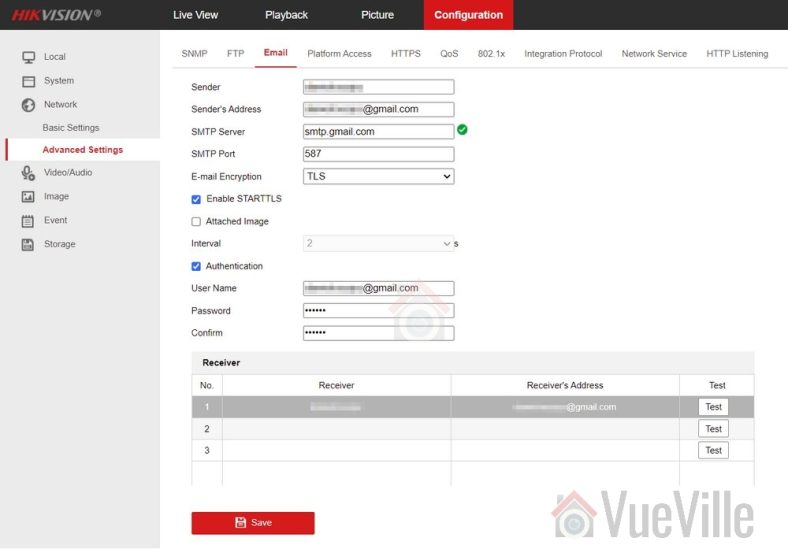
    Step 1: Make sure email alerts are turned on in each of your motion detection settings pages (Motion Detection, Video Tampering, Face Detection, Line Crossing Detection or Intrusion Detection) as shown below:

    Hikvision Motion Detection Email Alerts Gmail - Basic Event Linkage - VueVille
    Click to enlarge

    Configure your email account from which the camera will send email notifications

    We will use Microsoft’s free and unlimited Outlook.com as our mail server for the camera to use while sending email notifications.

    After signing up for a new free account, follow the steps below to obtain the email server settings that we will need for the next section.

    Step 2: Log in to your outlook account and click on the Settings icon (gear wheel) at the top right of the screen

    Step 3: In the pane that slides out from the right, click on “View all Outlook settings”

    Click to enlarge

    Step 4: Then navigate to Mail >Sync Email and note the SMTP settings highlighted in the screenshot below

    Click to enlarge

    Configure your email settings in the camera

    Next we need to configure the camera as the email ‘sender’- it will use the email account you configured above to send the email alert to a ‘receiver’ account. So the ‘sender’ is the camera and the receiver is the email address(es) that you want to receive the alerts on. Follow the steps below to configure your camera:

    Step 5: Click on the configuration tab on the top menu bar.

    Step 6: Then navigate to Network and click on ‘Advanced Settings‘ (older cameras have a slightly different menu structure but should have the same settings)

    Step 7: Choose the email tab

    Step 8: Refer to the screenshot above to fill out this section. Enter the login details of your Outlook account – this is the sender account. Enter the ‘receiver’ account details – this is where the email alerts will be received. I am using my personal Yahoo email address in the screenshot above. Tick ‘Attached Image’ if you would like snapshots of the motion detected as well.

    Test your settings

    Step 9: Click the Test button. You should see the “Testing Succeeded” message and receive a test email at the ‘receiver’ address(es).

    If not, you need to ensure that all settings such as TCP/IP and email settings are entered correctly as in the screenshots above.

    Save your settings

    Step 10: Finally save your settings by clicking the Save button.

    Now test your email alerts by intentionally setting off the motion detection of your camera. You should get an email alert within 60 seconds.

    Troubleshooting

    You may occasionally find that you no longer receive alerts. This could be because of two reasons:

    • Most email providers like Gmail/Yahoo may automatically mark the alerts as spam and move these emails to the Junk folder – it will treat the sender address as a suspicious sender due to repeated motion detection email alerts being sent day in and day out. Simply choose the option to treat the ‘sender’ address as a trusted email address and this behaviour should stop.
    • A misconfiguration in your motion detection settings could trigger a large burst of notification emails in a very short span of time. While I have not experienced it personally, free email service providers may not like a barrage or incessant stream of notifications, and may temporarily stop accepting email relay requests from your camera. A premium service like Sendinblue that will not throttle or limit email delivery in this manner.
  • TP-Link TL-SG1008P 8-Port Gigabit PoE Switch Review

    TP-Link TL-SG1008P 8-Port Gigabit PoE Switch Review

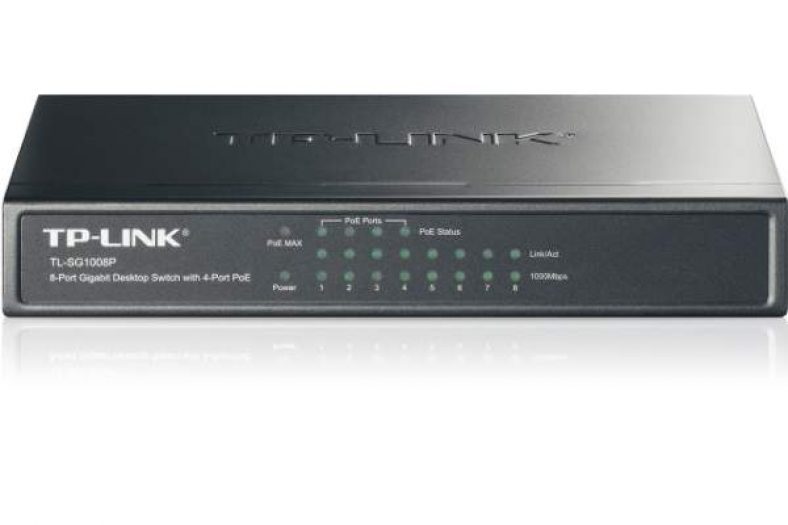
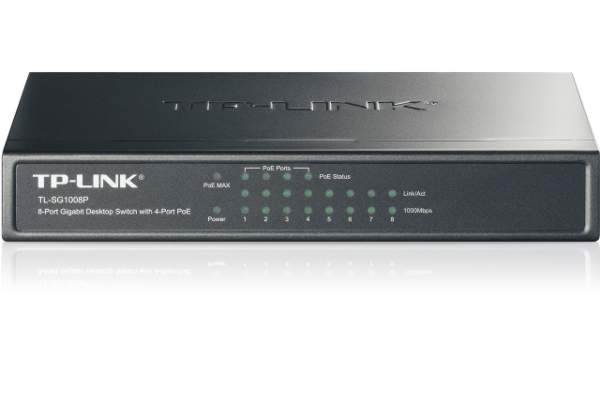
    TP-LINK-TL-SG1008P-Front-VueVille.com
    The SG1008P has faithfully served me for over 5 years now

    One of the most common applications for Power over Ethernet (PoE) is to connect and power IP devices such as IP phones and IP cameras over a single network cable. The main advantages are:

    • you can avoid running both a power cable and Ethernet cable over long distances, instead using the spare capacity of the humble ethernet cable to also carry the power.
    • the single power supply of the switch provides power for all PoE devices

    [wpsm_toplist]

    [text-blocks id=”5527″]

    Gigabit PoE Switches for Home Security

    If you have more than one device to power over PoE, it makes sense to consider using a PoE switch instead of injecting power and data using a PoE injector. You could connect the switch to your existing router and then plug your devices into the switch.

    TL-SG1008P – Features

    [easyazon_image align=”center” height=”500″ identifier=”B00BP0SSAS” locale=”US” src=”https://m.media-amazon.com/images/I/316oSWRkMkL._SL500_.jpg” tag=”vueville.com-eaz-20″ width=”500″]

    Networking features:

    The networking features of the TL-SG1008P PoE switch are:

    • 8 10/100/1000 Mbps RJ45 ports, 4 of these are PoE
    • 16 Gbps internal switching capacity
    • Supports IEEE 802.3x flow control for Full-duplex Mode and back-pressure for Half-duplex Mode
    • 8K entry MAC address table of the TL-SG1008P with auto-learning and auto-aging
    • LED indicators for monitoring power, link, activity and speed
    • External power adapter supply

    PoE features:

    The main feature that you should look for in a PoE switch is 802.3af compatibility. This is the standard which lets connected 802.3af compatible devices auto-negotiate the voltage they need from the switch. This is why you can plug in any compatible device without worrying about the specific voltage requirement. Up to 48V is available, so for example a 12V IP camera will negotiate with the switch to ensure it is given only 12V.

    • Supports PoE IEEE 802.3af compliant PDs
    • Supports PoE power up to 15.4W for each PoE port
    • Supports PoE power up to 53W for all PoE ports
    • Port power priority function that ensures prioritised devices continue to get power even in the case of an overload

    A gigabit switch is advantageous over a 10/100 Mbps switch because you do not want the switch to become the data bottleneck when you are powering 4 PoE IP cameras in addition to other devices on the switch.

    What’s in the box

    The TL-SG1008P PoE switch comes in a compact box and we found the following in it:

    • Gigabit PoE switch
    • External 48V 1.25A power power brick and power cable / kettle lead
    • User Guide

    Look and Feel

    The metallic body of the TL-SG1008P PoE switch gives it a solid appearance and a re-assuring sense of high quality. Even though you are probably going to hide the switch away in the attic or cupboard, its good to know that this is a switch that’s made to last.

    Installation

    Since this is an unmanaged switch, no configuration is required – simply plug in the power adaptor and your devices using ethernet cables. Power it on and you are ready to go. It couldn’t get any easier than this. Most home users need a plug and play switch and do not need advanced features or configuration options. This switch truly delivers exceptional simplicity.

    Performance

    A modern gigabit ethernet switch should have no issue with performance and the TL-SG1008P does not disappoint. We observed the gigabit ethenet ports being maxed out while copying files to and from a Asus 551CA laptop and a QNAP TS-231+ NAS.

    IP Camera Test

    I tested the TL-SG1008P with several IP cameras I’ve reviewed such as the RLC-511 and the RLC-824A which are PoE devices. These cameras are rated at 5W each with a maximum power consumption of 7W with the IR LEDs on. I plugged in both cameras and tested them over many months of 24/7 operation, and are happy to report that the TL-SG1008P switch was more than capable of powering the cameras. Each port is rated up to 15.4W so this should come as no surprise.

    Verdict

    Where to buy

    [easyazon_link identifier=”B00BP0SSAS” locale=”US” tag=”vueville.com-eaz-20″]Check price on your local Amazon Website[/easyazon_link]

    Also consider

    The Netgear GS308P has similar features and is also worth a look.

    We hope you enjoyed this review, let us know what you think!

  • DIY Wireless Home Security System Review – Fortress S02-B

    DIY Wireless Home Security System Review – Fortress S02-B

    Fortress S02-B Wireless Security System VueVille

    Fortress S02-B Home Security System

    Wireless burglar alarm systems are a great option when you cannot installed a conventional fixed wired system. Maybe you are a renter and are not allowed to make alterations to the walls, or maybe you simply don’t want the hassle of installing a wired system. When I recently moved into a rented house without a pre-installed burglar alarm system, I had only one option – go wireless!
    There are many options available, ranging from the established names in the industry such as Yale to lesser known brands that you may have never heard of. However as I researched the various options available, I realised that with the more established brands configuring a system that can cover a mid-sized home or moderately large business property can quickly become very expensive.

    When it comes to value for money, you get so much more with the lesser known brands but knowing which ones are worth your hard earned cash is not easy at all.

    Today, we are reviewing the Fortress S02-B Home Security System which is a self-monitored system. This means that your alarm system is not monitored by a company remotely. However the auto-dial feature means that the system can notify you via a phone call or SMS/text in case of an alarm.
    [text-blocks id=”4426″ slug=”earnings-disclaimer-incl-hivision-dahua”]

    Who is Fortress Security?

    Fortress Security is a company started in 2005, and is based in Washington, USA. They have built their business model on a system approach to wireless home security. What do I mean by this? Imagine a single wireless solution that combines entry/access points monitoring (such as doors, windows, gates), motion, glass breakage, vibration, smoke, gas leak, water/flood detection and even a wireless door-bell plus auto dial and SMS text options. That’s the integrated approach to security that makes it easy to secure your property with minimum hassle – one single point of control to arm and disarm a variety of sensors.

    Standout features

    • Fully wireless with a very good range.
    • Top-class quick support via email, and phone.
    • Supports up to 99 sensors and accessories.
    • Auto-dial up to 6 numbers, VOIP available.
    • Home and away modes that secure your home whether you are inside or away.
    • Pet-compatible motion sensors.
    • Play a recorded message or sound through the main panel when the alarm is set off.
    • Call in to the system from anywhere to arm/disarm alarm, and listen to what’s happening in your house.

    Product range

    Fortress Security offers both the option of building your own security system or choosing from one of the kits they have put together.

      1. Build your kit option: There are a large number of components (required for the system to function) and accessories (optional) that you can choose from, and they will configure it to work together before shipping it out to you:
        • Main alarm unit with landline autodial option and/or GSM option (Either unit required)
        • Door / window contact based detectors (Min. 2 units included)
        • Motion PIR detector (Min. 1 unit included)
        • Internal siren
        • Outdoor siren
        • Key fobs (Min. 2 units included)
        • Panic button fob
        • RFID tags
        • Wireless keypad with RFID
        • Large outdoor siren unit with flashing strobe lights
        • Small outdoor siren unit with flashing strobe lights
        • Sphere siren with flashing strobe lights
        • Small indoor plug-in siren
        • Glass break sound detector
        • Vibration sensor
        • Smoke detector
        • Gas leak detector
        • Water sensor / detector
        • Wireless signal repeater
        • Wireless doorbell
      2. Pre-built kits – The pre-selected kits cover a wide range of components and accessories that should suit most homes and businesses. There are essentially two types – non-GSM and GSM:
        1. the S02 landline autodial systems
          • S02-A
          • S02-B
          • S02-C
          • S02-D
          • S02-E
          • S02-F
        2. the GSM systems
          • GSM-A
          • GSM-B
          • GSM-C
          • GSM-D
          • GSM-E
          • GSM-F

    This review is for the Fortress S02-B system.

    Installation

    The Fortress S02-B kit is pre-configured so all you need to do is unpack the box, and install the various components. The system I reviewed was the S02-B kit.


    Manual

    The included manual is detailed and covers all aspects of the system, from installation to troubleshooting (not that I needed it!). The recommended way of getting to know the system and how to install it is by watching the useful videos that can be found on the company’s website. The manual is also available online.

    Main Panel & Indoor siren


    The main alarm panel of the Fortress S02-B can be installed anywhere in the house, but a central location is ideal. It needs a power supply (included) but has a battery back-up built-in. So in case intruders cut the power or if there is a power failure, the system will continue to function. A very loud indoor siren connects to the main panel and does not require additional power. There is an extendable antenna as well.
    Remember the system can support up to 99 wireless sensors and accessories, so expansion is very easy.

    Door and window sensors

    The door and window sensors and magnetic contacts come with very strong double side adhesive tapes.

    PIR sensors

    The PIR sensors are also easy to install with a good degree of rotation possible to cover the widest area possible.

    External Siren (black)

    This is louder than the internal siren and has its own power supply (included) so that you can position it at another location, say in an outdoor garage.

    Key fobs

    The key fobs are very convenient and can arm, disarm and set off the panic alarm. They are keychain size and have a very slick sliding cover so that it is not obvious that it is an alarm key.

    Panic button

    A single press of the button will immediately set off the alarm. This is a great feature for those times when you may hear an unexpected sound and need to respond quickly.

    Other accessories

    We did not test the other accessories but have no reason to doubt they will perform to satisfaction.

    Performance

    So how does the Fortress Security S02 system fare on the most important performance characteristics of a wireless burglar alarm system?

    Range

    The range of the system is rated at 250 feet for the sensors and the sirens at 80 feet. We tested these and found the ratings to be accurate. Not once did we face a signal drop-out. The system operates at the 433 Mhz frequency range which can be crowded as many other wireless systems use the same range. However, there was absolutely no interference and the Fortress system uses a clever anti-jamming system which secures it from hacking attempts.

    Reliability

    The system was rock solid and never failed to detect an intrusion when a door or window was opened. The sensors are very sensitive and there is no circumventing it. The PIR motion sensors are also extremely sensitive and have a very good range of 20 feet and 110 degrees. The system was tested for over two months and it never stopped operating even once.

    Where to buy

    You can read other user-reviews and purchase the Fortress S02-B Alarm System here:

    Note: This is not a paid advertisement, I have not received any payment or benefit for writing this article. This article does contain affiliate links which support the development and hosting costs of this website.

  • Hikvision Network Cameras Guide 2018

    Hikvision Network Cameras Guide 2018

    Network or IP security cameras

    A network camera (often called an IP camera) is basically a CCTV or security camera that has a computer built-in. Most network cameras can independently monitor, detect and send (push) notifications to computers in a home network, or on the Internet, mobile phones, smart phones or any email address. Some can also record footage locally to SD cards or to Network Attached Storage (NAS) drives, upload snapshots to FTP and much more. In a sense they perform the function of a camera and Digital Video Recorder (DVR) or Network Video Recorder (NVR) combination.

    [wpsm_toplist]

    [text-blocks id=”4426″ slug=”earnings-disclaimer-incl-hivision-dahua”]

    Hikvision – who are they?

    [easyazon_image align=”center” height=”400″ identifier=”B017C53TI0″ tag=”vueville.com-eaz-20″ locale=”US” src=”https://www.vueville.com/wp-content/uploads/2015/02/HikvisionPressRelease30092013.jpg” width=”600″]

    Hangzhou Hikvision Digital Technology Co. Ltd. popularly known as simply Hikvision, is a Chinese surveillance product company started in 2001. It is listed on the Shenzhen Stock Exchange. It claims to be the world’s largest supplier of video surveillance products and solutions including security cameras. Indeed, many of the popular security camera brands (such as Swann and older Lorex) are rebranded Hikvision products. Hikvision is a name that is quickly becoming popular in the home security and surveillance market owing mainly to their inexpensive but reliable and high performance network (or IP) security cameras and Network Video Recorders (NVR). In a crowded market with names such as Dahua and Foscam, Hikvision stands out as a great first choice for a network camera.

    Network camera range

    Hikvision divides their network cameras into three product lines, rather interestingly called 2-Line, 4-Line and 6-Line. Please note that these terms have nothing to do with the analog resolution term ‘lines’ (TVL). Pan-Tilt-Zoom (PTZ) camera models are not included in the scope of this guide, as they are more expensive and probably not of interest to the average homeowner.

    What can these cameras do? As a standalone device, they do not need a computer to function. So if you are looking for an inexpensive, simple, energy bill friendly CCTV solution that you can monitor through email, FTP, or from your smartphone, without having to run a computer 24/7 the Hikvision cameras are perfect.

    Model naming convention

    The full Hikvision IP camera naming convention is:
    ‘DS-2CD’ ‘1234’ F/H/WD – I (A) (H) (P) (S) (W) (Z)

    • A fixed prefix:
      • ‘DS-’, then
      • ‘2CD’, then
    • 4 digits:
      • product line number 2,4,or 6
      • a digit from 0 to 5 representing the type of IP camera.
      • a digit representing the number of megapixels.
      • a digit representing – currently unknown.
    • The next set of alphabets of F, H or WD indicate the presence of certain features:
      • F indicates Flash memory. This means that the model has the on-board flash storage option. Remember you will have to add a suitable SD-Card.
      • H indicates a built-in heater.
      • WD indicates Wide Dynamic Range (WDR).
    • The suffices are:
      • I indicates a true IR cut filter with auto day/night switch.
      • A indicates Auto back focus.
      • H indicates HD resolution (1080p).
      • P indicates P-iris.
      • S indicates Sound or what Hikvision calls Smart Audio Detection – 2 way audio using either inputs or a mic and a built-in speaker as in some indoor models.
      • W indicates WiFi.
      • Z indicates a Motorized VF lens.
      • The last digit indicates the range of the camera infrared LEDs. Model specific details can be found below.

    For the Hikvision NVR model naming convention, check our detailed NVR Buying Guide.

    Product lines

    We have grouped Hikvision’s network camera range so that you can easily find the model you are looking for.

    2-Line

    Fixed focus / Standard IR LED

    [table id=2 responsive=scroll /]

    Fixed focus / EXIR LED

    [table id=3 responsive=scroll /]

    As one of our readers pointed out, the last digit in the DS-2CD2T32-I3 / DS-2CD2T32-I5 / DS-2CD2T32-I8 models represents the claimed range of the infrared LEDs:
    I3 = 30 metres
    I5 = 50 metres
    I8 = 80 metres

    Variable focus / Standard IR LED

    [table id=4 responsive=scroll /]

    4-Line

    Box camera

    [table id=5 responsive=scroll /]

    Bullet camera

    [table id=7 responsive=scroll /]

    Indoor Dome / Standard IR LED

    [table id=6 responsive=scroll /]

    Outdoor Dome / Standard IR LED

    [table id=8 responsive=scroll /]

    6-Line

    Ultra lowlight

    [table id=9 responsive=scroll /]

    Where can I buy them?

    Hikvision network cameras have good reviews on the Internet and we you can check out our reviews of the Hikvision 2CD-2132F-IS and the Hikvision 2CD-2542FWD-IS. The cameras are officially allowed to be sold via designated distributors only, however it is often cheaper to source them directly from China via AliExpress or via Amazon.

    Amazon

    [easyazon_link keywords=”hikvision” locale=”US” tag=”vueville.com-eaz-20″]Check price on your local Amazon site[/easyazon_link]

    As always on an online marketplace, please ensure you are buying from a genuine seller.

    More resources

    Full product catalogue (PDF)
    Hikvision Web catalogue