Blog

  • Weekend Reading: Experts Answer Home Security Questions with Redfin

    Weekend Reading: Experts Answer Home Security Questions with Redfin

    Weekend Reading - VueVilleI have always been an avid reader. From Noddy & Big Ears, to the Famous Five, the Secret Seven & the Hardy Boys and then on to Poirot and Sherlock Holmes in my teenage years, my parents instilled in me a love for reading. As I enter my thirties, I am happy to report I still read a lot, albeit more on a digital screen than on paper.

    So I often come across great blog posts and articles through the week, and would like to share my reading list on a regular basis here. Most have to do with home security, smart homes, technology in general, but may also relate to my other passions of blogging, investing and personal finance.

    So without further ado, here we go!

    Not so long ago, I was approached by Redfin to contribute to a feature on expert answers to the most urgent home security questions that homeowners face. Redfin has done a superb job on interviewing the top experts in the industry such as Frontpoint Security and Ring, and I am honoured to have been included!

    Some of my favourite questions answered in the article are:

    • How often & when should you change your locks?

    Its alarming how many new homeowners overlook this simple tip!

    • What factors should I consider when shopping for a smart lock?
    • How do I prevent Lock Bumping?
    • What are the best places to place indoor cameras throughout your home?

    Yes, this last one was answered by yours truly, so head on over to the Redfin blog post to see my answer!

    What do you think about the article? Leave a comment below! Have a great weekend everyone!

    News

    Nest cameras without 2 Factor Authentication hacked to announce false North Korean missile attack – CBS

    Strangers Might Be Watching Your Ring Videos – Yahoo

    3 ways to protect yourself from home security camera hackers – Digital Trends

    A new tactic for smart-home security: shaming Walmart – Yahoo

    Amazon’s Home Security Company Is Turning Everyone Into Cops – Vice Motherboard

    Do home security cameras actually help stop and arrest package thieves? – KTUL News

    Video shows deputy cover home’s security camera with mud to block view – Fox 5

    Products & Services

    Hubitat Elevation Home Automation Hub – A Z-Wave Hub that has local processing and is not cloud-reliant – Amazon

    Ring adds color night vision to wired security devices and HDR to wireless ones – Digital Trends

    This home security drone will help you tell possums from prowlers – CNET

    ADT’s DIY Play for LifeShield: Why Analysts Are Bullish on the Deal – SecuritySales

    Comment and opinion (from real bloggers)

    Ever thought of getting 20 Megapixel IP cameras? – VueVille

    Follow AutomatedHome.co.uk on their self-build project called Automated Home 2.0 – #05 Choosing Our Architect – Automated Home

    Konnected review – A modern upgrade for your wired alarm system – 24-7-home-security.com

    Gate Smart Lock Review – The Smart Cave

    Sonos Speakers Guide – For the Smart Home

    Home Automation with openHAB – Smart Home Blog

    Are Smart Speakers Invading My Privacy? – Automate Your Crib

    Where is my doorbell transformer? – One Hour Smart Home

    24 Essential Smart Home Projects for Beginners – Smart Home Solver

    Smart Homes For Grandma [Podcast] – One Hour Smart Home

    Weekend deals

    31% off LaView PoE Home Security Camera System on Amazon

    15% off Q-See PoE Home Security Camera System on Amazon

    $70 off Sony WH1000XM3 wireless Bluetooth headphones on Amazon (I have the XM2 and I love it!)

    20% off Beats Solo 3 on Amazon

    20% off Google Wi-Fi on Amazon

    15% off Reolink Argus 2 + Solar Panel on Amazon

    Save 50.0% on select products from Genius with promo code 50VTLYRY, through 2/20 while supplies last – Amazon

    [text-blocks id=”5527″ slug=”earning-disclaimer”]

  • Best 20 Megapixel CCTV Cameras

    Best 20 Megapixel CCTV Cameras

    Looking for the best 20 Megapixel CCTV cameras on the market? We have rounded up the best IP cameras on the market that offer both incredible daytime detail and outstanding night time performance with no compromises.

    The Best 20 Megapixel CCTV Cameras

    [toc]

    What to look for

    Here are the most important features to look for in a high-pixel count CCTV camera:

    • Indoor or Outdoor – Outdoor cameras should have at least an IP66 rating for weather protection
    • Wired connections – At 20 Megapixel resolution, you have to use a wired connection. PoE is fine but an SFP fibre-optic slot is even better due to its ability to cover long distances that fibre can cover.
    • Local storage or Cloud Storage – Local storage is more reliable vs. using only cloud storage in case of an Internet fault.
    • Smart home compatibility – Make sure the camera has ONVIF support for inter-operability

    Sony SNC-VM772R – The Outdoor Champion with Optical Zoom

    [easyazon_image align=”center” height=”500″ identifier=”B01350CKNQ” locale=”US” src=”https://m.media-amazon.com/images/I/31ScrSxxPkL.jpg” tag=”vueville.com-eaz-20″ width=”500″]

    httpv://www.youtube.com/watch?v=tuXuZ5K_b8Y
    [wpsm_divider top=”20px” bottom=”20px” style=”clear”]
    Sony’s IP cameras are legendary for their low light performance and the SNC-VM772R is no exception. This IP camera sports a large, highly sensitive 1.0-type back-illuminated Exmor R CMOS image sensor with 20 Megapixels and a minimum illumination level of 0.06 lux in full-colour. Although Sony bills it as a 4K camera that can do 3,840 x 2,160, you can go up to 5472 x 3648 resolution.

    Want a 20 Megapixel camera but with optical zoom? The SNC-VM772R has a motorized optical zoom lens with focal length from 8.8 mm to 25.7 mm. This is an effective 2.9x zoom. The f-stop varies from F1.8 at the wide end to F2.8 at the tele end. The viewing angle ranges from 70.7° to 27.5°.

    One feature frequently missing from high MP cameras is an on-board IR illuminator. Fear not, this Sony has 30x 850nm IR LEDs giving it a night vision range of 50m.

    I always prefer cameras with advanced motion detection ability. This Sony supports intrusion, passing, existing, disappearance, capacity, abandoned object, and removed object detection. So its on par with Dahua, Axis and Vivotek. Another interesting feature is a PTZ-like virtual tracking feature of up to 4 moving targets.

    Local storage of images and motion detection clips is supported with an SD card slot that takes up to 128GB cards. For cameras with such high pixel counts, the SD card is more suited as a failover video recording destination in case of network outage.

    What about connectivity? IEEE 802.3af PoE is present, as is microphone and line input. 2x alarm inputs and 2x alarm outputs are generous by IP camera standards. An HDMI port is a very unusual inclusion, but very welcome.

    [wpsm_divider top=”20px” bottom=”20px” style=”clear”][wpsm_column size=”one-half”]Features:

    • 20MP Exmor R CMOS image sensor
    • Optical zoom, 8.8 mm to 25.7 mm
    • Automatic IR cut filter
    • PoE support, 12V DC, or 24V AC
    • 2x alarm in/out ports
    • microSD card for Edge recording
    • IP66 and IK10 impact resistant housing
    • Works from -40 °C to +50 °C (-40 °F to +122 °F)
    • Dimensions – φ190 x 146.7 mm

    [/wpsm_column][wpsm_column size=”one-half” position=”last”]Verdict:

    • Local storage available: Yes
    • Cloud reliant: No
    • Battery backup: No
    • Smart home compatibility: ONVIF Profile S

    [/wpsm_column]

    [easyazon_link identifier=”B01350CKNQ” locale=”US” tag=”vueville.com-eaz-20″]View on Amazon[/easyazon_link]

    AXIS Q1659 – The Indoor Choice with DSLR features

    The Axis Q1659 is the perfect marriage of DSLR-level image quality from the Canon APS-C sensor and the surveillance prowess that Axis is famous for. The 22.4 x 15.0 mm CMOS sensor allows for a maximum resolution of 5472×3648 and a shutter speed down to 1/8000 seconds.

    Since the camera uses a Canon mount, you can use any Canon EF/EF-S lens with this camera.

    AXIS Q1659 - Best 20MP CCTV IP Cameras - VueVille

    Axis sells the camera with the following lenses:

    • AXIS Q1659 24 mm, f/2.8
    • AXIS Q1659 35 mm, f/2a
    • AXIS Q1659 50 mm, f/1.4a
    • AXIS Q1659 85 mm, f/1.2La
    • AXIS Q1659 100 mm, f/2.8L
    • AXIS Q1659 10–22 mm, f/3.5-4.5
    • AXIS Q1659 70–200 mm, f/2.8L
    • AXIS Q1659 55–250 mm f/4-5.6

    A major highlight is the Lightfinder technology which capture full-colour video in very low level light. Check out the video below to learn more:
    httpv://www.youtube.com/watch?v=77cN3LHdBQQ
    [wpsm_divider top=”20px” bottom=”20px” style=”clear”]

    The camera can be powered over conventional PoE. But on a high-end camera like this, it’s no surprise to find an SFP slot which allows you to connect the camera using a fibre optic cable. The main advantage is low latency and the ability to carry data over long distances. This gives you immense flexibility in camera installation. Axis also has a technilogy called ZipStream which lowers the bandwidth needed by up to 50%.

    The camera is not light on audio features – it support 2-way audio and has an external microphone input and audio line out. It can operate in freezing temperatures.

    [wpsm_divider top=”20px” bottom=”20px” style=”clear”][wpsm_column size=”one-half”]Features:

    • 20MP APS-C CMOS image sensor
    • Canon mount and EF/EF-S lenses
    • Automatic IR cut filter
    • PoE and SFP fibre-optic port
    • microSD/microSDHC/microSDXC card and NAS support
    • Works from 0 °C to 45 °C (32 °F to 122 °F)
    • Two-way talk with mic-input and line-out
    • Dimensions – Camera body: 176 x 102 x 75 mm (7 x 4 x 3 in)

    [/wpsm_column][wpsm_column size=”one-half” position=”last”]Verdict:

    • Local storage available: Yes
    • Cloud reliant: No
    • Battery backup: No
    • Smart home compatibility: Open API including VAPIX® and AXIS Camera Application Platform, AXIS Video Hosting System (AVHS), ONVIF Profile S and G

    [/wpsm_column]
    B073RC8R2B

    Arecont Vision AV20175DN-28 – The Surround Video star with WDR

    [easyazon_image align=”center” height=”500″ identifier=”B00ODB5FS4″ locale=”US” src=”https://m.media-amazon.com/images/I/41bUYJXw6lL.jpg” tag=”vueville.com-eaz-20″ width=”500″]

    Arecont Vision is a California-based company that specialises in video surveillance and machine vision tech. The AV20175DN-28 is a very unique multi-sensor camera that provides ‘surround’ video. The 4 independently controllable 5MP sensors have M12 lens mounts. Each mount can take a lens of 2.1mm, 2.8mm, 4mm, 6mm, 8mm, 12mm or 16mm focal length. The AV20175DN-28 model comes with 2.8mm lens and the AV20175DN-08 comes with 8 mm lens.

    The 360° track together with these 4 sensors means you get superb flexibility in defining the camera’s scene coverage, with up to 270° field of view. In case you are wondering the resolution this camera pushes out is an incredible 10240×1920 at 3.5 fps. At 5120×960, you can get 11 fps.

    The very high 20 Megapixel count allows for an intriguing feature – you can zoom into a recorded video and still maintain Full HD 1080p resolution. This virtually eliminates the need for PTZ cameras which anyway have the downside of missing out on details outside the zoomed in view.

    There is no audio support but there is alarm in/out support. The camera can be powered over PoE, via 12–48V DC or 24V AC. It is also IP66 outdoor rated with an IK-10 impact resistant housing. Did we say the camera is made in the USA?
    [wpsm_divider top=”20px” bottom=”20px” style=”clear”][wpsm_column size=”one-half”]Features:

    • 20MP total, 4x5MP CMOS image sensor
    • Multiple lens options from 2.1mm up to 16mm
    • Enhanced 100dB WDR
    • Automatic IR cut filter
    • PoE support, or 12–48V DC/24V AC
    • Alarm in/out ports
    • IP66 and IK-10 impact resistant housing
    • Works from -40°C (-40°F) to +50°C (122°F)
    • Dimensions – Ø 7.7″ (196mm) x 3.1″ H (78.5mm)

    [/wpsm_column][wpsm_column size=”one-half” position=”last”]Verdict:

    • Local storage available: No
    • Cloud reliant: No
    • Battery backup: No
    • Smart home compatibility: ONVIF Profile S

    [/wpsm_column]

    [easyazon_link identifier=”B00ODB5FS4″ locale=”US” tag=”vueville.com-eaz-20″]View on Amazon[/easyazon_link]

    Conclusion

    IP cameras with super high resolutions are great when you have a large area to cover, but need to be able to zoom in and make a positive ID. Be it day or night. With 20 Megapixels, you can have full 4K resolution even when zoomed in. So these cameras a great choice for DIY enthusiasts who want the best in CCTV technology.

    [text-blocks id=”5527″ slug=”earning-disclaimer”]

  • Best Budget IP Cameras – 2019 Recommendations

    Best Budget IP Cameras – 2019 Recommendations

    Best Budget IP Cameras - VueVille

    Looking for an affordable budget IP camera that won’t fall apart after a few months, doesn’t spy on your family and doesn’t cost a bomb in ‘subscription’ fees every month? Yes I have been there too.

    The market is awash with cheap generic Chinese IP cameras that are super cheap but are probably more trouble than they are worth.

    If you have just started researching and already feel like giving up, don’t worry we have got you covered. Your time is valuable, so we have separated the wheat from the chaff for you. Here’s our hand-picked list of the best budget IP cameras for 2019.

    Best Budget IP Cameras – 2019 Recommendations

    [wpsm_toplist]

    Best Budget Outdoor Bullet IP Camera: Reolink RLC-410 (PoE) & 410W (Wi-Fi)

    [wpsm_column size=”one-half”][easyazon_image align=”center” height=”500″ identifier=”B010LH48F4″ locale=”US” src=”https://images-na.ssl-images-amazon.com/images/I/416viZoNy7L.jpg” tag=”vueville.com-eaz-20″ width=”500″]
    [/wpsm_column]
    [wpsm_column size=”one-half” position=”last”][wpsm_titlebox title=”Features” style=”3″]

    • 4MP or 5MP models available, CMOS image sensor
    • 80° Viewing Angle
    • Infrared LEDs for night vision with 30m range
    • Power over Ethernet (PoE) on RLC-410
    • Dual band WiFi with 2T2R MIMO antenna (802.11ac 2.4 and 5.0 GHz) on RLC-410W
    • ONVIF and RTSP protocols supported
    • IP66 weatherproof rating

    [/wpsm_titlebox][/wpsm_column]
    Reolink is a solid mainstream brand that makes both budget and advanced IP cameras. The RLC-410 is a tried and tested model that is now in its third year. The RLC-410 and 410W variant are entry-level outdoor IP camera models. Unlike most cheap IP cameras which are made of plastic, these cameras have a full metal body. Both have on-board microphones and local storage by way of the on-board SD card slot. The only difference between them is that 410 is PoE-only and 410W is WiFi-only.

    The camera can be easily ceiling mounted and comes with elbow joints. There is a true IR cut removable filter (ICR) to ensure excellent night time videos and faithful colour reproduction during the day. Noise reduction and back-light compensation are also available. Wide Dynamic Range (WDR) which is a premium feature is predictably absent on these cameras.

    One of the features that budget IP cameras miss out on is our beloved built-in NVR feature. I am happy to report that both the RLC-410 and RLC-410W have the built-in NVR feature. This feature is great if you are just starting out and have a single camera or do not have a dedicated NVR. So you can set up the camera to do basic motion detection, and it will overwrite older videos automatically. But do note that Reolink cameras do not support advanced motion detection methods.

    However the camera doesn’t support continuous recording to the on-board SD card, which is fine because its not something I recommend anyway. You will just end up wearing out the SD card sooner. SD cards are best suited to intermittent motion detection clips being written, rather than continuous data recording. The cameras can instead record to a Reolink NVR or any 3rd party NVR or software that supports the ONVIF standard and RTSP protocol.

    [wpsm_column size=”one-half”][wpsm_pros title=”PROS:”]

    • 4MP or 5MP, very good image quality
    • On-board storage and built-in NVR features
    • Email notifications and push alerts
    • Great value for money
    • Works with any 3rd party ONVIF-compliant device such as Synology and QNAP NAS

    [/wpsm_pros]
    [/wpsm_column][wpsm_column size=”one-half” position=”last”][wpsm_cons title=”CONS:”]

    • No audio/alarm connections
    • Viewing angle of 80° is low
    • Ethernet connection needed for initial setup
    • No WDR
    • Lacks advanced motion detection methods
    • Can’t have both PoE and Wi-Fi

    [/wpsm_cons][/wpsm_column]

    Smart Home Checklist

    • Local storage available: Yes
    • Cloud reliant: No
    • Battery backup: No
    • Smart home compatibility: ONVIF, RTSP
    • Subscription fees: None

    [easyazon_link identifier=”B010LH48F4″ locale=”US” tag=”vueville.com-eaz-20″]Check price on Amazon[/easyazon_link]

    Best Budget Outdoor Dome IP Camera: Reolink RLC-422 (PoE) & 422W (Wi-Fi)

    [wpsm_column size=”one-half”][easyazon_image align=”center” height=”500″ identifier=”B076HLT53N” locale=”US” src=”https://images-na.ssl-images-amazon.com/images/I/41aJLUKg9rL.jpg” tag=”vueville.com-eaz-20″ width=”500″]
    [/wpsm_column]

    [wpsm_column size=”one-half” position=”last”][wpsm_titlebox title=”Features” style=”3″]

    • 5MP CMOS sensor
    • 33-98° Viewing Angle with 2.7-12mm Motorized Zoom
    • 30m IR night vision
    • SD card slot, Power over Ethernet (PoE)
    • Wi-Fi model available: RLC-422W
    • IP66 weatherproof rating

    [/wpsm_titlebox]
    [/wpsm_column]
    The RLC-422 has been continuously improved by Reolink and took the crown of best value dome IP camera in our annual IP camera rankings.

    Belying its budget-friendly pricing, the RLC-422 sports a 4x motorized vari-focal lens, which is really a premium feature. The camera also has a built-in NVR feature and together with the SD card slot, you can forego an NVR if you wish.

    The motion detection feature is a bit lacking as it supports only simple MD, but it does support zones and you can adjust the sensitivity in each zone. However advanced motion detection methods that would help cut down false alerts are not available. The Reolink mobile app is stable and lets you live view all your Reolink cameras simultaneously and access the built-in NVR feature of the timeline. The mobile app is a high quality affair and I use it daily as one of our baby monitor apps.

    The camera has a metal body and is IP66 weatherproof and IK10 vandal proof. In case you cannot conveniently wire the camera up at your installation location, you can get the Wi-Fi version – the RLC-422W which supports both 2.4 and 5 GHz bands. Unfortunately, Reolink does not make a model with both PoE and Wi-Fi features.
    [wpsm_column size=”one-half”][wpsm_pros title=”PROS:”]

    • 5MP sensor, good image quality
    • Easy to use with clear setup process
    • Great value

    [/wpsm_pros][/wpsm_column][wpsm_column size=”one-half” position=”last”][wpsm_cons title=”CONS:”]

    • No audio support at all
    • No WDR
    • Lacks advanced motion detection methods

    [/wpsm_cons][/wpsm_column]
    Smart Home Checklist

    • Local storage available: Yes
    • Cloud reliant: No
    • Battery backup: No
    • Smart home compatibility: ONVIF, RTSP
    • Subscription fees: None

    [easyazon_link identifier=”B076HLT53N” locale=”US” tag=”vueville.com-eaz-20″]Check price on Amazon[/easyazon_link]

    Best Budget Outdoor Turret IP Camera: Dahua IPC-HDW4431 (PoE)

    [wpsm_column size=”one-half”][easyazon_image align=”center” height=”500″ identifier=”B07BNP9T8M” locale=”US” src=”https://images-na.ssl-images-amazon.com/images/I/31X2YJIe-bL.jpg” tag=”vueville.com-ref-20″ width=”500″]
    [/wpsm_column]
    [wpsm_column size=”one-half” position=”last”][wpsm_titlebox title=”Features” style=”3″]

    • 4MP CMOS sensor with WDR
    • 104° Viewing Angle
    • 30m IR Range
    • True hardware WDR
    • Power over Ethernet (PoE)
    • IP67 weatherproof, IK10 vandal-proof rating
    • SD card slot on-board
    • Audio & alarm in/out on mini-dome model

    [/wpsm_titlebox]
    [/wpsm_column]
    The Dahua IPC-HDW4431 family comes is many different variants but all of them have the same core specifications of 4MP sensor, 104° field of view, PoE, SD card slot, great weatherproofing, H.265 encoding, and advanced motion detection. How do they differ? Only in their size and shape, IR range, and audio features:

    • Dahua IPC-HDBW4431E-AS: Mini-dome with audio and alarm in/out and 30 metres IR range
    • Dahua IPC-HDW4431EM-AS: Turret with onboard mic but no audio or alarm in/out and 30 metres IR range
    • Dahua IPC-HDBW4431F-AS: A smaller mini-dome with onboard mic but no audio or alarm in/out and 20 metres IR range
    • Dahua IPC-HDB4431C-AS: An even smaller mini-dome with onboard mic but no audio or alarm in/out and 20 metres IR range

    So depending on whether you need the audio and alarm in/out connections or prefer an on-board mic, and the available space you have, choose one of the models above. If you don’t want audio features at all, check out the IPC-HDW4431M model.
    [wpsm_column size=”one-half”][wpsm_pros title=”PROS:”]

    • Very good image quality
    • Good value for money
    • Advanced motion detection
    • Its quite rare to find a turret with local storage and a mic onboard

    [/wpsm_pros][/wpsm_column][wpsm_column size=”one-half” position=”last”][wpsm_cons title=”CONS:”]

    • No audio/alarm connections on the turrets
    • No full duplex 2-way audio support

    [/wpsm_cons][/wpsm_column]
    Smart Home Checklist

    • Local storage available: Yes
    • Cloud reliant: No
    • Battery backup: No
    • Smart home compatibility: ONVIF, RTSP
    • Subscription fees: None

    [easyazon_link identifier=”B01F9CP490″ locale=”US” tag=”vueville.com-ref-20″]Check price on Amazon[/easyazon_link]

    Best Budget Outdoor PTZ IP Camera: Reolink RLC-423 (PoE)

    [wpsm_column size=”one-half”][easyazon_image align=”center” height=”500″ identifier=”B016UCNP08″ locale=”US” src=”https://images-na.ssl-images-amazon.com/images/I/41pEQx9SW4L.jpg” tag=”vueville.com-eaz-20″ width=”500″]
    [/wpsm_column]

    [wpsm_column size=”one-half” position=”last”][wpsm_titlebox title=”Features” style=”3″]

    • 5MP CMOS sensor
    • 2.8-12mm motorized vari-focal lens
    • 33°-98° Viewing Angle
    • 60m IR Range
    • Power over Ethernet (PoE 802.3at)
    • IP66 weatherproof rating

    [/wpsm_titlebox]
    [/wpsm_column]

    The 4MP Reolink RLC-423 of 2017 has been upgraded to 5MP for 2019. When we first reviewed it, we were very impressed with the quality and features that Reolink managed to cram into this PTZ at a very affordable price.

    But this is a budget PTZ camera – it doesn’t have auto tracking or advanced motion detection, on-board storage/SD card, alarm connections or WiFi. But for the asking price, these are not deal-breakers at all.

    Check out our review of the 4MP RLC-423 PTZ here:

    [wpsm_top postid=4255]

    [wpsm_column size=”one-half”][wpsm_pros title=”PROS:”]

    • Very good image quality
    • Fast panning/slewing speed of up to 180°/second
    • Great value for money
    • 30 fps is available at 4MP resolution
    • There is an audio in socket

    [/wpsm_pros][/wpsm_column][wpsm_column size=”one-half” position=”last”][wpsm_cons title=”CONS:”]

    • No alarm connections
    • No SD card slot for local storage
    • No Wi-Fi option
    • Slow focus speed relative to PTZ speed
    • No advanced motion detection methods

    [/wpsm_cons][/wpsm_column]
    Smart Home Checklist

    • Local storage available: No
    • Cloud reliant: No
    • Battery backup: No
    • Smart home compatibility: ONVIF, RTSP
    • Subscription fees: None

    [easyazon_link identifier=”B016UCNP08″ locale=”US” tag=”vueville.com-eaz-20″]Check price on Amazon[/easyazon_link]

    Best Budget Indoor IP Camera: Amcrest ProHD IP3M-941B (Wi-Fi)

    [wpsm_column size=”one-half”]
    [easyazon_image align=”center” height=”500″ identifier=”B01M15WH9C” locale=”US” src=”https://images-na.ssl-images-amazon.com/images/I/71u%2B1vRRQBL._SL500_.jpg” tag=”vueville.com-eaz-20″ width=”500″]
    [/wpsm_column]
    [wpsm_column size=”one-half” position=”last”]
    [wpsm_titlebox title=”Features” style=”3″]

    • 3MP CMOS image sensor
    • 90° Viewing Angle, Pan-Tilt
    • 10m IR range
    • Built-in mic and speaker, half-duplex
    • Ethernet port, Wi-Fi
    • Audio and alarm in/out
    • SD card slot

    [/wpsm_titlebox]

    [easyazon_link identifier=”B01M15WH9C” locale=”US” tag=”vueville.com-eaz-20″]Read Amazon user reviews[/easyazon_link]

    [/wpsm_column]
    While Amcrest’s outdoor IP cameras are decent yet uninspiring, their indoor IP cameras such as the Amcrest ProHD 1080p Pan-Tilt WiFi Camera (IP2M-841B) are very reasonably-priced and well-made. Amcrest has this unique blend of high-quality hardware, reliable software, and great after-sales support.

    The IP2M-841B that I still use as one of our baby monitors has now been succeeded by the IP3M-941B. It has an Ethernet port, WiFi, built-in InfraRed LEDs for very good night vision, clear 2-way audio with mic and speaker, built-in SD card local storage, and on top of all this, very good low-light performance. One downside is that the pan-tilt motion is not super quiet.

    Amcrest has smartphone apps for both iOS and Android. 4 hours of free cloud storage comes free with every Amcrest camera, with more storage available on the purchase of a subscription. The camera does not need an Internet connection to be set up or for functioning normally.
    [wpsm_column size=”one-half”]
    [wpsm_pros title=”PROS:”]

    • Great image quality and 3MP resolution
    • 90 degree viewing angle, with Pan-Tilt
    • Very clear and loud two-way audio with mic and speaker built-in
    • WiFi and RJ-45 Ethernet port, so can use a PoE injector
    • IR LEDs provide night vision capability
    • Built-in NVR feature, support for SD card, NAS, NVR, FTP and Cloud storage locations
    • Home Automation compatible with ONVIF and RTSP support, works with any NVR also
    • Audio and alarm in/out connections
    • Very good value for money

    [/wpsm_pros][/wpsm_column]
    [wpsm_column size=”one-half” position=”last”]
    [wpsm_cons title=”CONS:”]

    • Audio is half-duplex only, you cannot hear and speak simultaneously
    • Smartphone apps could be better – free Amcrest apps lack basic features such as push notifications
    • Still no model with both PoE and Wi-Fi, unlike Hikvision

    [/wpsm_cons][/wpsm_column]
    Smart Home Checklist

    • Local storage available: No
    • Cloud reliant: No
    • Battery backup: No
    • Smart home compatibility: ONVIF, RTSP
    • Subscription fees: None

    [easyazon_link identifier=”B01M15WH9C” locale=”US” tag=”vueville.com-eaz-20″]Check Price on Amazon[/easyazon_link]

    Best Budget Indoor PTZ IP Camera: Amcrest IP2M-846E (PoE) & Amcrest IP2M-846 (Wi-Fi)

    [wpsm_column size=”one-half”]
    [easyazon_image align=”center” height=”500″ identifier=”B01MU0CU17″ locale=”US” src=”https://images-na.ssl-images-amazon.com/images/I/816VvKJcPIL._SL500_.jpg” tag=”vueville.com-eaz-20″ width=”500″]
    [/wpsm_column]
    [wpsm_column size=”one-half” position=”last”]
    [wpsm_titlebox title=”Features” style=”3″]

    • 2MP 1080p CMOS image sensor
    • 34.5°-116.5° Viewing Angle, Pan-Tilt-Zoom
    • 30m IR range
    • Ethernet port, PoE or Wi-Fi models
    • SD card slot
    • ONVIF and RTSP protocols supported

    [/wpsm_titlebox]
    [/wpsm_column]
    You can use outdoor PTZs indoors, but they have one major drawback: size. Indoor cameras should be discreet and unobtrusive, outdoor PTZs are anything but this. That’s why the Amcrest IP2M-846 is so brilliant – its a small indoor PTZ camera that you can tuck away in a corner of any room.

    Armed with a 2MP sensor, it has a motorized varifocal lens with 34.5°-116.5° viewing angle. Night vision is provided by EXIR LEDs that have a 30m range. It also has an SD card slot that works will with the built-in NVR feature.

    The Amcrest IP2M-846E is a PoE-only model and the Amcrest IP2M-846 is only Wi-Fi enabled.
    [wpsm_column size=”one-half”]
    [wpsm_pros title=”PROS:”]

    • Very good image and audio quality, PTZ
    • PoE or Wi-Fi available
    • Built-in NVR feature
    • Support for ONVIF & RTSP
    • On-board microSD storage, pre-record and post-record feature

    [/wpsm_pros][/wpsm_column]

    [wpsm_column size=”one-half” position=”last”]
    [wpsm_cons title=”CONS:”]

    • No audio or alarm connections
    • No PIR sensor
    • No model with both PoE and Wi-Fi

    [/wpsm_cons][/wpsm_column]

    Smart Home Checklist

    • Local storage available: No
    • Cloud reliant: No
    • Battery backup: No
    • Smart home compatibility: ONVIF, RTSP
    • Subscription fees: None

    [easyazon_link identifier=”B01MU0CU17″ locale=”US” tag=”vueville.com-eaz-20″]Check Price on Amazon[/easyazon_link]

    What to look for in a budget IP camera

    • Power source – Ethernet port preferable with PoE (Power over Ethernet) support, internal battery good for power backup purposes
    • Wireless – Most cheap IP cameras have only Wi-Fi support. The better IP cameras have an Ethernet port as well. Unless your Wi-Fi camera is very close to your router, you are bound to suffer from drop-outs and poor video/audio. In a bind, you can use Wi-Fi but for security critical purposes, do not use Wi-Fi. PoE make Ethernet an even better choice as you can run just one cable to the camera.
    • Continuous Video Recording instead of just automatic event triggered or manual recording. This requires a storage medium though, like an NVR which adds to the cost.
    • Software features – Built-in NVR feature, advanced motion detection methods to reduce false alerts, push notifications to smartphone apps
    • Local storage – A microSD card slot is great for recording motion detection clips in addition to continuous recording to an NVR or DIY NAS NVR.
    • Audio – Microphone built-in would be a nice to have, full-duplex capability is superb but hard to find in a budget IP camera
    • Advanced features:
      • API available for interfacing with home automation controllers such as the Vera Plus or Fibaro Home Centre
      • Full duplex 2-way audio support, built-in mic or audio and alarm connections
      • PIR sensor to reduce false alerts

    [text-blocks id=”4426″ slug=”earnings-disclaimer-incl-hivision-dahua”]

  • Hands-on Review: Neo Coolcam Z-Wave Motion Sensor

    Hands-on Review: Neo Coolcam Z-Wave Motion Sensor

    Z-Wave motion sensors are not exactly cheap, are they? While the sensors from Fibaro and Aeotec are great products which are very reliable, the costs do add up when you need more than a few of them. That’s where the Neo Coolcam Z-Wave Motion Sensor comes in.

    Neo Coolcam has recently started competing aggressively with the established players and their main selling point is the super-attractive price. But have corners been cut? Are they reliable? Is the battery life any good? Let’s find out in this hands-on review.

    [wpsm_titlebox title=”Contents” style=”main”][contents h2][/wpsm_titlebox]

    What gear do you need to use this motion sensor?

    This motion sensor is based on Z-Wave technology and intended to work with a Z-Wave based smart home hub.

    So you need a Z-Wave hub/controller such as a Vera Plus or HomeSeer HomeTroller Sel that acts as the smart hub to use this sensor. This is the right way of building a smart home that you can upgrade and enhance as you wish, instead of getting stuck with things that work only with the manufacturer’s other devices or an internet-reliant smart speaker like Alexa.

    Unboxing

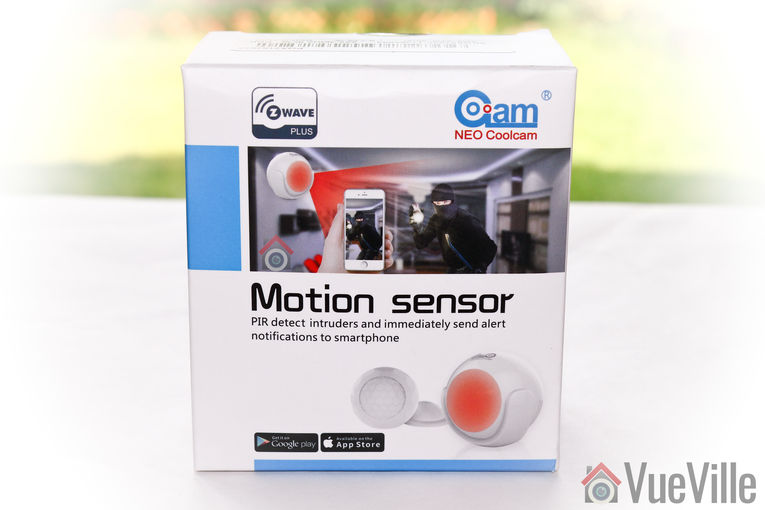
    Just like the Neo Coolcam Door/Window sensor we reviewed recently, the Neo Coolcam Motion Sensor also comes in a smart package with a modern design. The Z-Wave Plus logo is once again prominently featured at the top left.

    Neo Coolcam Motion Sensor - Box front - VueVille

    The back of the box lists the main specifications of the motion sensor.

    Neo Coolcam Motion Sensor - Box rear - VueVille

    Neo Coolcam Motion Sensor - Box contents - VueVille

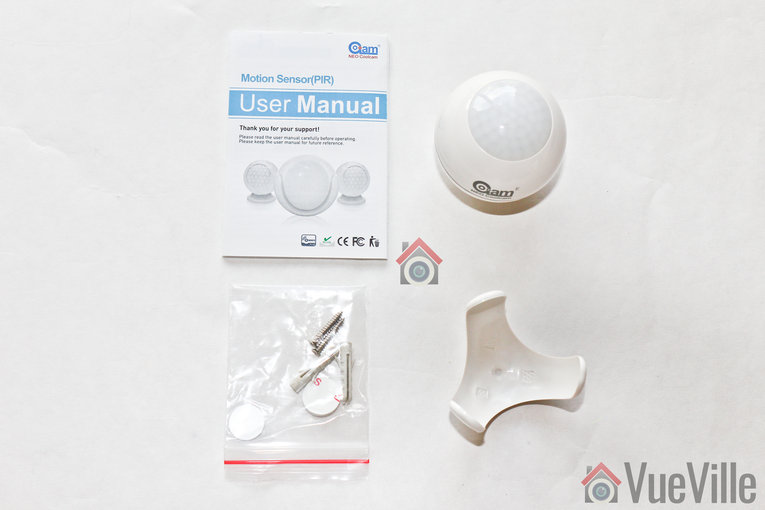
    Opening the box, we find the following:

    • Motion sensor with 1xCR2-3V battery pre-installed
    • Motion sensor holder
    • User manual
    • Screws and rawl plugs
    • 3M stickers

    Neo Coolcam Motion Sensor Manual

    The included user manual is high-quality and unusually for Chinese products, has good quality English. Here’s a link in case you want to check it out before buying.

    Specifications

    [table id=53 responsive=”scroll” /]

    Design & Features

    Neo Coolcam Motion Sensor - Sensor - VueVille
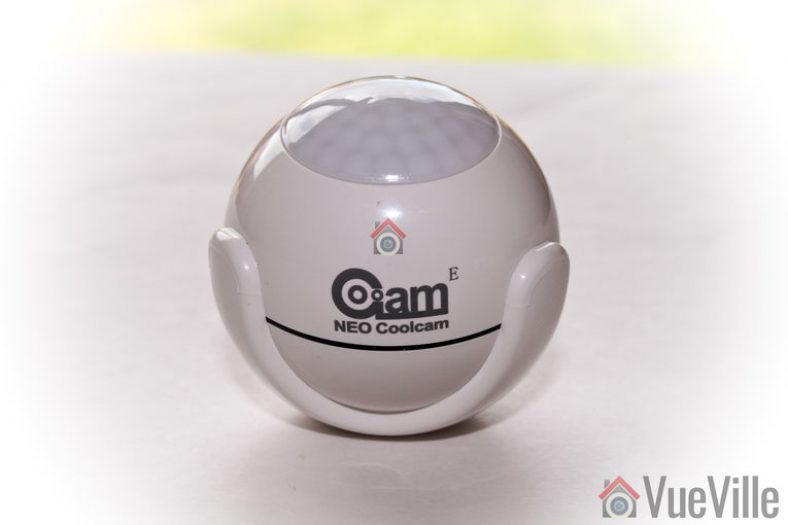
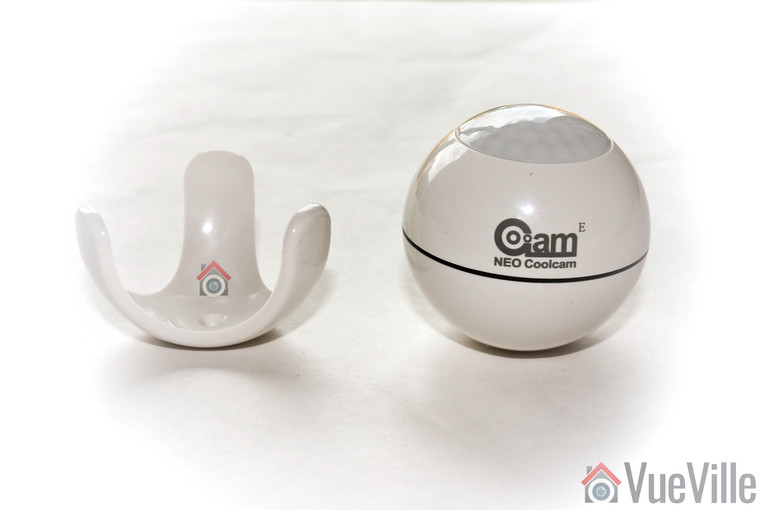
    The Neo Coolcam Motion sensor reminds me of the Fibaro motion sensor we reviewed recently. The design is very similar with a spherical main body and a holder that cradles the sensor smugly. It’s a very good design and one that lets you orient the sensor in any direction you want.

    Neo Coolcam Motion Sensor - Sensor 2 - VueVille

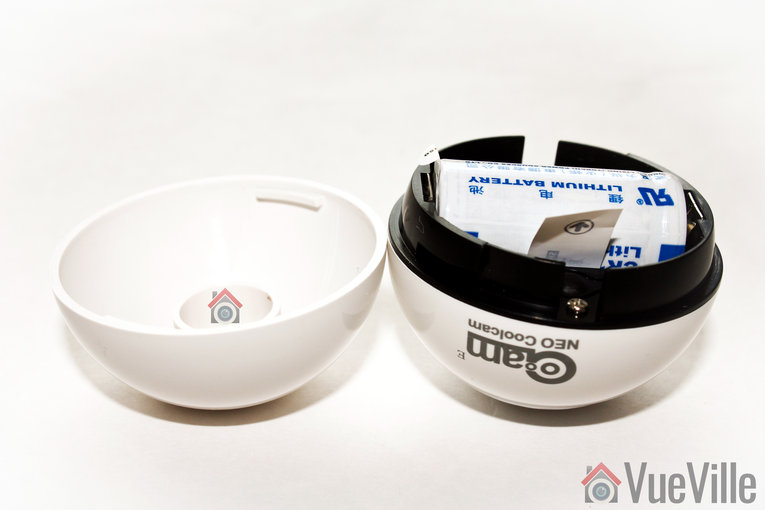
    Grip the bottom half of the sensor and turn it to open the sensor. A CR123A battery is pre-installed and pulling the plastic tab activates the sensor.

    Neo Coolcam Motion Sensor - Sensor 3 - VueVille

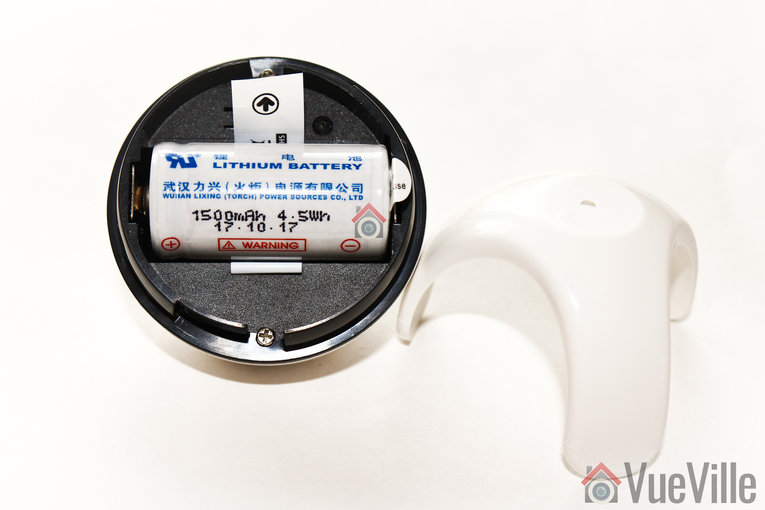
    The battery provided is an unbranded one, but has a good energy capacity of 1500mAh.

    Neo Coolcam Motion Sensor - Sensor 4 - VueVille

    The black ‘code’ button is also found here. This button has a few different functions: waking up the sensor so that you can configure it, putting the sensor in inclusion/exclusion mode and for restoring factory defaults.

    Installation

    As with the Neo Coolcam Door Sensor, I found the whole Z-Wave inclusion or pairing process easy and pretty straight-forward.

    Its always best to perform a factory default on a new Z-Wave device before including it in your Z-Wave network. I have found that this one step usually solves any problem I am having with including a new Z-Wave device.

    So these are the steps I took to set up the sensor with my HomeSeer Z-Wave hub:

    1. I removed the back cover of the sensor’s main body.
    2. I pulled the paper tab to turn on the device as the battery comes pre-installed.
    3. I put HomeSeer into inclusion mode.
    4. I pressed the code button on the Coolcam sensor thrice very quickly (it needs three presses within 1.5 seconds).
    5. The red LED flashed 5 times.
    6. After a few seconds, HomeSeer reported that the sensor had been successfully included and the child devices had been created.

    Performance

    There are 4 main criteria that define how good a motion sensor is:

    • Sensitivity of motion detection
    • Response time
    • Reliability
    • Z-Wave wireless range
    • Battery life

    I tested the Coolcam motion sensor extensively for over 3 months and these are my findings.

    Sensitivity of motion detection: Very good

    Response time: Excellent

    Reliability: Excellent

    Z-Wave wireless range: Very good

    Battery life: Excellent so far, testing underway

    Verdict

    The Neo Coolcam Z-Wave Plus Motion sensor is a budget-friendly sensor that is actually reliable. Once again, we were impressed by the performance and reliability of the Coolcam family of Z-Wave products.
    [review]

    Where to buy

    [easyazon_link identifier=”B079JTSR3V” locale=”US” tag=”vueville.com-eaz-20″]Check Price on your local Amazon site[/easyazon_link]

  • QNAP QVR Pro vs QNAP Surveillance Station – NAS NVR Software Comparison

    QNAP QVR Pro vs QNAP Surveillance Station – NAS NVR Software Comparison

    QNAP recently released QVR Pro, a new surveillance app for their beefier NAS models. So if your NAS makes the cut, you now have a choice between the default Surveillance Station app and the new QVR Pro app.

    But is it worth switching? Let’s find out in this head-to-head between the time-tested and functional Surveillance Station vs. the polished all grown-up QVR Pro.

    [wpsm_titlebox title=”Contents” style=”main”][contents h2][/wpsm_titlebox]

    QNAP QVR Pro vs Surveillance Station - VueVille

    QNAP QVR Pro vs. QNAP Surveillance Station – Comparison Table

    [table id=51 responsive=scroll /]

    QNAP QVR Pro vs QNAP Surveillance Station – Features

    What will probably draw most people into trying QVR Pro is the generous 8 IP camera licences that come with the software. Yes, you get 8 channels irrespective of how many Surveillance Station IP camera licences your NAS originally came with.

    QNAP has beefed up the motion detection feature in QVR Pro. With Surveillance Station, the NAS depended on the IP cameras to send a motion detection trigger. It did not have any motion detection ability of its own. But with QVR Pro, the NAS can perform motion detection on up to 2 channels and at a max resolution of 1080p. This is great if you have older IP cameras with poor motion detection features.

    The other major reason to try QVR Pro is the improved mobile app, QVR Pro Client. The Surveillance Station mobile app Vmobile is quite functional but nothing to write home about.

    I always felt that the maximum playback speed in Surveillance Station could be faster. My wish has come true – QVR Pro can playback videos in synchronized mode up to 10 times faster than Surveillance Station.

    There are some other interesting features such as fail-over recording, the ability to record events and continuous recording to different disks, and NAS pooling. If you have more than one NAS device capable of running QVR Pro, NAS pooling may be of interest. You can essentially run up to 8 IP cameras on each NAS and then view all these cameras in one single app, the QVR Pro Client on desktop, or mobile.

    QNAP QVR Pro vs QNAP Surveillance Station – Performance

    QNAP has designed QVR Pro to use the on-board GPU of Intel processors to perform hardware video decoding. QNAP claims that this will result in 10x faster playback and 5x faster video exporting.

    Can all QNAP NAS models run QVR Pro?

    All QNAP NAS models with at least 4GB of RAM will be able to run QVR Pro. Both Intel x86 and ARM-based processors are supported.

    Is QVR Pro free to use?

    Yes but with the limitation of 8 IP camera channels, and a maximum of 14 days video backup.

    What is QVR Pro Gold?

    If you want to use more than 8 IP camera channels, QVR Gold is the premium paid version of QVR Pro. You also get the following features:

    • unlimited recording playback via QVR Pro Client
    • camera channel scalability
    • enhanced QVR Center central management over QVR Pro servers
    • domain privilege management for Windows Active Directory and LDAP

    QVR Pro Gold also adds 8 extra camera channels, and the ability to activate additional QVR Pro Camera Channel Extension Licenses (1/4/8 channels).

    Can my existing Surveillance Station IP camera licences be used in QVR Pro?

    No. QVR Pro has its own IP camera licences which are different from the Surveillance Station ones that come bundled with QNAP NAS servers.

    What are the downsides of QVR Pro?

    QVR Pro is free to use but lets you play back only the last 14 days of recorded video.

    How do I install QNAP QVR Pro?

    Navigate to the QTS App Center on your QNAP NAS and you will find QVR Pro among the list of apps available for download.

    Which QNAP NAS models are best for QVR Pro?

    Any QNAP NAS model with more than 4GB RAM from our recommended NAS models will run QVR Pro like a champ.

  • 15 Best-Selling Wireless Outdoor Home Security Cameras

    15 Best-Selling Wireless Outdoor Home Security Cameras

    Best Wireless Outdoor Home Security Cameras - VueVille

    Are you looking for the best bang for the buck wireless outdoor home security camera?

    This is one area where you should definitely not follow the herd. Some of the top-selling cameras have serious drawbacks you should be aware of before buying.

    In this article, we will list the best-selling wireless outdoor home security cameras and identify the ones to avoid and the ones to buy.

    Wireless Outdoor Home Security Cameras

    In this blog post, we are going to briefly review the best-selling security cameras around. There’s a huge variety of features and security capabilities, so we will point out any red-flags as we go.

    Home Security Cameras can be grouped into various categories thus:

    • Indoor or Outdoor – Outdoor cameras should have at least an IP66 rating for weather protection
    • Wired or Wireless – Wired cameras are recommended for reliability, but wireless cameras are fine for difficult to reach spots, and when used alongside wired cameras
    • Local storage or Cloud Storage – Local storage is more reliable vs. using only cloud storage in case of an Internet fault.
    • Smart home compatibility – Some cameras can be controlled directly by smart speakers such as Alexa, or work with smart hubs such as Samsung SmartThings
    • One-time purchase or Subscription model – Some cameras require a monthly subscription too unlock the advanced features such as 24/7 recording or person detection

    The Best-Selling Wireless Outdoor Home Security Cameras

    [wpsm_toplist]
    [text-blocks id=”5527″ slug=”earning-disclaimer”]

    Ring Floodlight Camera Motion-Activated HD Security Cam

    [easyazon_image align=”center” height=”500″ identifier=”B0727XJQLD” locale=”US” src=”https://images-na.ssl-images-amazon.com/images/I/61hFMCfS2LL.jpg” tag=”vueville.com-eaz-20″ width=”500″]

    [wpsm_divider top=”20px” bottom=”20px” style=”clear”]

    The Ring family is a mainstay of the security camera market and the Floodlight Cam is the latest addition to the brood. It certainly fills a void in the mainstream market for those who want a hardwired floodlight camera.

    However the camera is Wi-Fi only, and worryingly cloud reliant. It doesn’t even have an SD card slot, is useless during a power cut and so is not recommended by us.
    [wpsm_divider top=”20px” bottom=”20px” style=”clear”][wpsm_column size=”one-half”]Features:

    • 2MP 1080p CMOS image sensor
    • 140° Viewing Angle
    • 2 LEDs floodlight, 1800 lumens
    • WiFi (802.11 b/g/n, 2.4GHz)
    • Weather resistant, -22°F to 120°F (-30°C to 48.5°C)
    • Two-way talk with noise cancellation
    • Remote-activated siren alarm
    • Power – Hardwired to weatherproof electrical boxes (110-240 VAC)
    • Dimensions – 11 in x 8.25 in x 7 in (28 cm x 21 cm x 17.8 cm)
    • Mounting base – Integrated mounting base with adjustable light and cameras angles. Mounts on 4 inch round weatherproof electrical box (not included)

    [/wpsm_column][wpsm_column size=”one-half” position=”last”]Verdict:

    • Local storage available: No
    • Cloud reliant: Yes
    • Battery backup: No
    • Smart home compatibility: Alexa, IFTTT

    [/wpsm_column]

    [easyazon_link identifier=”B0727XJQLD” locale=”US” tag=”vueville.com-eaz-20″]View on Amazon[/easyazon_link]

    Nest Cam Outdoor Security Camera

    [easyazon_image align=”center” height=”500″ identifier=”B01M66NWOQ” locale=”US” src=”https://images-na.ssl-images-amazon.com/images/I/51UFWyUQouL.jpg” tag=”vueville.com-eaz-20″ width=”500″]

    [wpsm_divider top=”20px” bottom=”20px” style=”clear”]

    Another very popular camera making it to no.2 on the list is the Nest Cam Outdoor Security Camera. The positives are 1080p, and 2 way-audio. However 24/7 recording is available only with a paid Nest Aware subscription. Person alerts are a cool feature but again is a premium option.

    However the camera is Wi-Fi only, and once again worryingly cloud reliant and will not work if your Wi-Fi is not working or if your Internet connection is down. It doesn’t have an SD card slot for local storage. Not recommended.
    [wpsm_divider top=”20px” bottom=”20px” style=”clear”][wpsm_column size=”one-half”]Features:

    • 3MP 1/3″ CMOS image sensor, 1080p H.264 encoding
    • 130° Diagonal Viewing Angle
    • Wi-Fi 802.11a/b/g/n, 2.4GHz or 5GHz (WEP, WPA, WPA2 encryption supported)
      Bluetooth Low Energy (BLE)
    • 8 IR LEDs (850nm) with IR cut filter
    • IP65 weather protection, –4 to 104°F (–20 to 40°C)
    • Two-way talk with speaker, microphone
    • Remote-activated siren alarm
    • AC power adaptor or 5V DC, 1.0A camera power input
    • Dimensions – 2.8 in x 2.8 in x 3.5 in

    [/wpsm_column][wpsm_column size=”one-half” position=”last”]Verdict:

    • Local storage available: No
    • Cloud reliant: Yes
    • Battery backup: No
    • Smart home compatibility: Alexa, IFTTT

    [/wpsm_column]

    [easyazon_link identifier=”B01M66NWOQ” locale=”US” tag=”vueville.com-eaz-20″]View on Amazon[/easyazon_link]

    Arlo Pro Wire-Free Security Camera System with Siren (VMS4230)

    [wpsm_column size=”one-half”]
    [easyazon_image align=”left” height=”375″ identifier=”B01LR8PG6Q” locale=”US” src=”https://images-na.ssl-images-amazon.com/images/I/31S8cYvi-uL.jpg” tag=”vueville.com-eaz-20″ width=”500″]
    [/wpsm_column][wpsm_column size=”one-half” position=”last”]
    [easyazon_image align=”right” height=”500″ identifier=”B01LR8PG6Q” locale=”US” src=”https://images-na.ssl-images-amazon.com/images/I/41vcksI2b%2BL.jpg” tag=”vueville.com-eaz-20″ width=”500″]
    [/wpsm_column]
    [wpsm_divider top=”20px” bottom=”20px” style=”clear”]

    The first battery powered security camera on our best-sellers list is the Netgear Arlo Pro system consisting of 2 Arlo Pro cameras and the base station. These cameras were the first real battery powered security cameras to go mainstream.

    The batteries are rechargeable, the video is HD resolution, you get 2-way audio, night vision IR LEDs, and a smart siren. Pay for the monthly subscription and get the latest person alert feature to reduce false motion detection alerts.

    The downsides are that the system is Wi-Fi only and is totally cloud-reliant even though it has an SD card slot for local storage. Netgear has confirmed that access to the cloud is required and that the local storage is not an alternative to cloud storage, its just a dual recording solution in case the Wi-Fi fails or the Internet connection is disrupted. Not recommended.
    [wpsm_divider top=”20px” bottom=”20px” style=”clear”][wpsm_column size=”one-half”]Features:

    • 720p HD video with H.264 encoding
    • 130° Diagonal Viewing Angle
    • Wi-Fi 802.11n, 2.4GHz
    • IR LEDs (850nm) with IR cut filter, 25 feet range
    • IP65 weather protection, -4 to 113°F (-20 to 45°C)
    • Two-way talk with speaker, microphone
    • Remote-activated siren alarm
    • 2440 mAh rechargeable battery
    • Dimensions – 3.1 in x 1.9 in x 2.8 in

    [/wpsm_column][wpsm_column size=”one-half” position=”last”]Verdict:

    • Local storage available: Yes
    • Cloud reliant: Yes
    • Battery backup: Yes
    • Smart home compatibility: Alexa, IFTTT

    [/wpsm_column]

    [easyazon_link identifier=”B01LR8PG6Q” locale=”US” tag=”vueville.com-eaz-20″]View on Amazon[/easyazon_link]

    Yi Wireless Outdoor Security Camera

    [easyazon_image align=”center” height=”500″ identifier=”B01CW49AGG” locale=”US” src=”https://images-na.ssl-images-amazon.com/images/I/418WDE3ImKL.jpg” tag=”vueville.com-eaz-20″ width=”500″]
    [wpsm_divider top=”20px” bottom=”20px” style=”clear”]

    This is the first non-brand camera on our list. Yi is perfect example of the new crop of Chinese manufacturers who have stormed the home security camera market with cut-price products that are not cloud-reliant. You typically get a lot more features than a branded alternative such as a Nest Cam. For example, this Yi camera has an SD card slot for local storage and they don’t force you to pay a monthly subscription for 24/7 recording. You can pay up if you want cloud backup though.

    The main issue we have with the camera is that it is Wi-Fi only (the wired connection is for power only). There is no Ethernet connection available. Also note that this camera is not smart home compatible as it does not support RTSP, nor does it have native support for Alexa. The other worry is about privacy as there are some signs that the camera may be ‘dialing home’. This should be a concern for all Chinese-made cameras in our opinion. So we suggest you look at the Reolink brand for solid, reliable, yet affordable cameras that do not invade your privacy.

    [wpsm_divider top=”20px” bottom=”20px” style=”clear”][wpsm_column size=”one-half”]Features:

      • 1080p HD video with H.264 encoding, 1/2.7″ CMOS sensor
      • 3.9mm lens, 110° Viewing Angle
      • Wi-Fi 802.11 b/g/n, 2.4GHz
      • 12 IR LEDs (850nm) with IR cut filter, 50 feet range
      • IP65 weather protection
      • Built-in deterrent alarm
      • Two-way talk (half-duplex) with speaker, microphone

    [/wpsm_column][wpsm_column size=”one-half” position=”last”]Verdict:

    • Local storage available: Yes
    • Cloud reliant: No
    • Battery backup: No
    • Smart home compatibility: None

    [/wpsm_column]

    [easyazon_link identifier=”B01CW49AGG” locale=”US” tag=”vueville.com-eaz-20″]View on Amazon[/easyazon_link]

    SV3C Outdoor Wireless Bullet Security Camera

    [easyazon_image align=”center” height=”500″ identifier=”B07789DM4R” locale=”US” src=”https://images-na.ssl-images-amazon.com/images/I/41UX0zTnzVL.jpg” tag=”vueville.com-eaz-20″ width=”500″]
    [wpsm_divider top=”20px” bottom=”20px” style=”clear”]

    This SV3C is a bullet style IP camera. I say IP camera because it supports ONVIF and RTSP. It has a 2 Megapixel sensor that lets it record video at 1080p resolution.

    This is a Wi-Fi only camera (the wired connection is for power only). It does have SD card support so you can record motion detection clips locally. While its not a locked down cloud-reliant camera, it still uses P2P by default to allow remote access form outside your home or office. Again I would recommend disabling P2P access to protect your privacy and keep your home network secure. Also note there is no cloud storage option, should you require it.

    [wpsm_divider top=”20px” bottom=”20px” style=”clear”][wpsm_column size=”one-half”]Features:

      • 1080p HD video with H.264 encoding, 1/3″ CMOS sensor
      • 3.6 mm lens, 70° Viewing Angle
      • Wi-Fi 802.11 b/g/n, 2.4GHz
      • Ring-type 36 IR LEDs with IR cut filter, 67 feet night vision range
      • IP66 weather protection, all metal body

    [/wpsm_column][wpsm_column size=”one-half” position=”last”]Verdict:

    • Local storage available: Yes
    • Cloud reliant: No
    • Battery backup: No
    • Smart home compatibility: Yes

    [/wpsm_column]

    [easyazon_link identifier=”B07789DM4R” locale=”US” tag=”vueville.com-eaz-20″]View on Amazon[/easyazon_link]

    Reolink PoE Dome-style Outdoor Security Camera RLC-422W

    [easyazon_image align=”center” height=”500″ identifier=”B076HLT53N” locale=”US” src=”https://images-na.ssl-images-amazon.com/images/I/41aJLUKg9rL.jpg” tag=”vueville.com-eaz-20″ width=”500″]
    [wpsm_divider top=”20px” bottom=”20px” style=”clear”]

    Now we’re talking. This IP camera is from one of my favourite brands – Reolink. This camera gives you room to grow since you can buy an NVR later on if you want 24/7 local recording without any monthly fee. Adding an NVR will also let you add more such cameras from Reolink to your home and be able to watch them on a single screen. This is the most cost-effective way to get into DIY security cameras.

    The resolution is an impressive 5 Megapixels which is frankly overkill when you think about it, that’s a resolution of 3072×1728. Can your monitor even display that high a resolution? So its good you can fall back on standard 1080p resolution should you need to. This RLC-420 also has a built-in mic for audio recording.

    This camera is not cloud reliant, but Reolink does offer it an option. You get a slick yet effective mobile app through which you can check in remotely using P2P or port forwarding. An SD card slot is available, and a 64 GB SD card is provided too. Since it supports ONVIF and RTSP, you can easily integrate them into you smart home automation system. You can also use 3rd party IP camera viewers such as tinyCAM Monitor Pro.

    Check out our hands-on review of the PoE version of this excellent IP camera.

    [wpsm_divider top=”20px” bottom=”20px” style=”clear”][wpsm_column size=”one-half”]Features:

      • 5MP resolution with H.264 encoding, 1/2.9″ CMOS sensor
      • 2.7 – 12 mm lens, 98-33° Viewing Angle
      • Mainstream: 3072×1728, 2592×1944, 2560×1440, 2048×1536, 2304×1296; Substream: 640×360
      • 24 PCS 850nm IR LEDs with IR cut filter, 30 m / 100 feet night vision range
      • Supported protocols: UPNP, RTSP, SMTP, DDNS, FTP, ONVIF, P2P
      • DC12V power supply
      • IEEE 802.11a/b/g/n 2.4/5.0 GHz Wi-Fi
      • IP66 weather protection, all metal body
      • Operating temperature: -10℃ to +55℃ (14°F~131°F), 10% – 90% relative humidity

    [/wpsm_column][wpsm_column size=”one-half” position=”last”]Verdict:

    • Local storage available: Yes
    • Cloud reliant: No
    • Battery backup: No
    • Smart home compatibility: Yes

    [/wpsm_column]

    [wpsm_column size=”one-half”]

    [easyazon_link identifier=”B076HLT53N” locale=”US” tag=”vueville.com-eaz-bnvr17-20″]Check Price on Amazon[/easyazon_link]

    [/wpsm_column]

    [wpsm_column size=”one-half” position=”last”]

    Check Price on Reolink.com

    [/wpsm_column]

    Reolink Argus 2 Rechargeable Battery/Solar-Powered Outdoor Wireless Security Camera

    [easyazon_image align=”center” height=”500″ identifier=”B0786XGM8M” locale=”US” src=”https://images-na.ssl-images-amazon.com/images/I/51iPkUEcRNL.jpg” tag=”vueville.com-eaz-20″ width=”500″]
    [wpsm_divider top=”20px” bottom=”20px” style=”clear”]

    For quite some time, the Netgear Arlo was the only choice of a totally wire-free security camera. It had several issues, namely that it is a Internet & cloud-reliant camera. That didn’t sit well with us here at Vueville.

    So we rejoiced when Reolink launched the super high-quality Argus which was not cloud-reliant and not Internet-reliant. Now Reolink has released the successor Argus 2 which improves upon its predecessor by adding a rechargeable battery and a solar panel accessory.

    There is one clear downside though – there is no way to directly connect this camera to a home automation system because it doesn’t have an API, doesn’t support RTSP, and doesn’t interface natively with any other system. Even IFTTT is not available, not that I recommend it because it is slow and unreliable.

    [wpsm_divider top=”20px” bottom=”20px” style=”clear”][wpsm_column size=”one-half”]Features:

    • 1080p (2 MP) resolution with H.264 encoding, Starlight CMOS sensor
    • Fixed lens, 130° Viewing Angle
    • IR LEDs with IR cut filter, 10 m (33 ft) night vision range
    • High-quality speaker and microphone
    • PIR sensor, adjustable sensitivity up to 9 m (30 ft)
    • 5200 mAh rechargeable battery, 5V 2A DC adaptor, solar panel also
    • IEEE 802.11b/g/n 2.4 GHz Wi-Fi, WEP/WPA-PSK/WPA2-PSK security
    • Recordable audio alerts, email alerts and push notifications
    • Weatherproof
    • Operating temperature: -10° to 55° C (14° to 131° F)
    • 96 x 58 x 59 mm (3.8 x 2.3 x 2.3 in)
    • 2 year limited warranty

    [/wpsm_column][wpsm_column size=”one-half” position=”last”]Verdict:

    • Local storage available: Yes
    • Cloud reliant: No
    • Battery backup: Yes
    • Smart home compatibility: No

    [/wpsm_column]

    [wpsm_column size=”one-half”]

    [easyazon_link identifier=”B0786XGM8M” locale=”US” tag=”vueville.com-eaz-bnvr17-20″]Check Price on Amazon[/easyazon_link]

    [/wpsm_column]

    [wpsm_column size=”one-half” position=”last”]

    Check Price on Reolink.com

    [/wpsm_column]

    Reolink Bullet-style Outdoor Wireless Security Camera RLC-410W

    [easyazon_image align=”center” height=”500″ identifier=”B07DC2GM5K” locale=”US” src=”https://images-na.ssl-images-amazon.com/images/I/61DAQ69S9vL.jpg” tag=”vueville.com-eaz-20″ width=”500″]
    [wpsm_divider top=”20px” bottom=”20px” style=”clear”]

    The Reolink RLC-410W is a more traditional offering compared to the Argus above, but is also wireless. Available in either 4 MP or 5 MP guise, this camera unusually supports the 5GHz Wi-Fi band. We think its because of the high resolutions involved which necessitates higher bandwidth availability which the 5GHz band can provide. But wireless range will suffer as a result. Lower frequency electromagnetic waves (2.4 GHz) penetrate solid walls better than higher frequency waves.

    [wpsm_divider top=”20px” bottom=”20px” style=”clear”][wpsm_column size=”one-half”]Features:

      • 4 MP / 5 MP resolution with H.264 encoding, 1/2.7″ CMOS sensor
      • 4 mm lens, 80° Viewing Angle
      • Main Stream: 2560 x 1920 (5 MP), 2560×1440 (4 MP); Sub Stream: 640 x 480
      • 18x 850nm IR LEDs with IR cut filter, 30 m (100 feet) night vision range
      • 3D Digital Noise Reduction (DNR), Backlight compensation
      • Auto day/night switch-over
      • Built-in microphone
      • On-board storage: SD card
      • Supported protocols: UPNP, RTSP, SMTP, DDNS, FTP, ONVIF, P2P
      • DC 12V power input
      • 10M/100Mbps RJ45 connectivity
      • IP66 weather protection, all metal body
      • Operating temperature: -10℃ to +55℃ (14°F to 131°F), 10% – 90% relative humidity

    [/wpsm_column][wpsm_column size=”one-half” position=”last”]Verdict:

    • Local storage available: Yes
    • Cloud reliant: No
    • Battery backup: No
    • Smart home compatibility: Yes

    [/wpsm_column]

    [wpsm_column size=”one-half”]

    [easyazon_link identifier=”B07DC2GM5K” locale=”US” tag=”vueville.com-eaz-bnvr17-20″]Check Price on Amazon[/easyazon_link]

    [/wpsm_column]

    [wpsm_column size=”one-half” position=”last”]

    Check Price on Reolink.com

    [/wpsm_column]

    Ubiquiti Networks UniFi Video Camera G3 (UVC-G3-AF)

    [easyazon_image align=”center” height=”500″ identifier=”B077QCR56S” locale=”US” src=”https://images-na.ssl-images-amazon.com/images/I/41h8oovQT7L.jpg” tag=”vueville.com-eaz-20″ width=”500″]
    [wpsm_divider top=”20px” bottom=”20px” style=”clear”]

    The UniFi range of security cameras are usually preferred by those who are already aware of Ubiquiti’s stellar reputation in the wireless network arena. These cameras are equally amazing and are really under-rated.

    These cameras used to come only with Ubiquiti’s proprietary Passive 24V PoE, but now Ubiquiti is making the shift to also supporting 802.3af standards compliant PoE. We welcome this move. So when you buy the G3, make sure you get the model with -AF at the end. Suppliers may still have old stock of the non -AF model.

    The UVC-G3-PRO variant adds a powered 3x zoom lens.

    [wpsm_divider top=”20px” bottom=”20px” style=”clear”][wpsm_column size=”one-half”]Features:

    • 4 MP resolution with H.264 encoding, 1/3″ HDR Sensor
    • 3.6 mm lens, f/1.8 lens, 85° Viewing Angle
    • Main Stream: 1920 x 1080
    • IR LEDs with Mechanical IR Cut Filter
    • 802.3af PoE or 24V Passive PoE
    • Built-in microphone
    • Operating Temperature -20 to 50° C (-4 to 122° F), 20% – 90% relative humidity
    • Maximum power consumption 4W

    [/wpsm_column][wpsm_column size=”one-half” position=”last”]Verdict:

    • Local storage available: No
    • Cloud reliant: No
    • Battery backup: No
    • Smart home compatibility: Yes

    [/wpsm_column]

    [easyazon_link identifier=”B077QCR56S” locale=”US” tag=”vueville.com-eaz-20″]View on Amazon[/easyazon_link]

    Zmodo 1080p Outdoor Wireless Home Security Camera (SD-H2921-H)

    [easyazon_image align=”center” height=”500″ identifier=”B07GVB7PDB” locale=”US” src=”https://images-na.ssl-images-amazon.com/images/I/51HqOAhbljL.jpg” tag=”vueville.com-eaz-20″ width=”500″]
    [wpsm_divider top=”20px” bottom=”20px” style=”clear”]

    This Zmodo camera is a bit of a strange one – cloud storage is optional but it has no local storage. It doesn’t support ONVIF or RTSP either. So you are basically forced to buy their optional cloud service. It doesn’t have any way of connecting to home automation systems either.

    We don’t recommend this camera. Not least for the fact that these have extremely poor security and are easily hacked.

    [wpsm_divider top=”20px” bottom=”20px” style=”clear”][wpsm_column size=”one-half”]Features:

    • 1080p resolution
    • 3.6 mm lens, 96° Viewing Angle
    • IR LEDs with IR cut filter, 65 feet night vision range
    • DC 5V 2A power source needed
    • 2.4GHz WPA/WPA2 WiFi
    • Weatherproof, operating temperature: 14°F to 122°F
    • Size: 2.2″ x 2.1″ x 3.4″

    [/wpsm_column][wpsm_column size=”one-half” position=”last”]Verdict:

    • Local storage available: No
    • Cloud reliant: No
    • Battery backup: No
    • Smart home compatibility: No

    [/wpsm_column]

    [easyazon_link identifier=”B07GVB7PDB” locale=”US” tag=”vueville.com-eaz-20″]View on Amazon[/easyazon_link]

    Amcrest Outdoor Wireless Home Security Camera (IP3M-943B)

    [easyazon_image align=”center” height=”500″ identifier=”B01I01QLTE” locale=”US” src=”https://images-na.ssl-images-amazon.com/images/I/41OAjECh6sL.jpg” tag=”vueville.com-eaz-20″ width=”472″]
    [wpsm_divider top=”20px” bottom=”20px” style=”clear”]

    The 3 Megapixel Amcrest IP3M-943B is a worthy alternative to Reolink’s higher resolution RLC-410W. This Amcrest camera has an Ethernet port in addition to Wi-Fi. So you always have a reliable way of connecting your camera in case Wi-Fi is temporarily unavailable. The lens is wide-angle, there’s onboard SD card storage, the camera supports ONVIF, RTSP and has an API.

    [wpsm_divider top=”20px” bottom=”20px” style=”clear”][wpsm_column size=”one-half”]Features:

      • 3MP resolution with H.264/MJPEG dual-stream encoding, 1/3″ CMOS sensor
      • 4 mm lens, 80° Viewing Angle
      • Main Stream: 2304 × 1296 / 1920 × 1080 / 1280 x 720; Sub Stream: 640 x 480
      • IR LEDs with IR cut filter, 98 feet night vision range
      • Supported protocols: UPNP, RTSP, SMTP, DDNS, FTP, ONVIF, P2P
      • DC12V
      • 10M/100Mbps RJ45 connectivity
      • IP67 weather protection, all metal body
      • Operating temperature: -30℃ to +50℃, <95% relative humidity

    [/wpsm_column][wpsm_column size=”one-half” position=”last”]Verdict:

    • Local storage available: Yes
    • Cloud reliant: No
    • Battery backup: No
    • Smart home compatibility: Yes

    [/wpsm_column]

    [easyazon_link identifier=”B01I01QLTE” locale=”US” tag=”vueville.com-eaz-20″]View on Amazon[/easyazon_link]

    Wansview 1080p Wireless Home Security Camera

    [easyazon_image align=”center” height=”500″ identifier=”B01J0V6C2Y” locale=”US” src=”https://images-na.ssl-images-amazon.com/images/I/41Bd5gfx1ZL.jpg” tag=”vueville.com-eaz-20″ width=”500″]

    We have a confession to make – it was the 720p version that we found on the top-selers list. But 720p is just too low a resolution for a modern security camera, and we recommend at least 1080p resolution (2 Megapixel). Considering how affordable 1080p cameras are, we were really surprised to see this model on the top-sellers list. If you have to buy a Wansview, please do yourself a giant favour and get the 1080p version.

    The camera supports ONVIF and RTSP but has no local storage, so you will have to rely on an NVR, computer or mobile app for recording motion detection clips.

    [wpsm_divider top=”20px” bottom=”20px” style=”clear”][wpsm_column size=”one-half”]Features:

    • 1080p resolution
    • 6 mm lens, 65° Viewing Angle
    • 36 PCS IR LEDs with IR cut filter, 60 feet night vision range
    • Main AC power source needed
    • 2.4GHz WPA/WPA2 WiFi
    • IP 66 weatherproof, operating temperature: 14°F to 122°F
    • ONVIF & RTSP support

    [/wpsm_column][wpsm_column size=”one-half” position=”last”]Verdict:

    • Local storage available: No
    • Cloud reliant: No
    • Battery backup: No
    • Smart home compatibility: Yes

    [/wpsm_column]

    [easyazon_link identifier=”B01J0V6C2Y” locale=”US” tag=”vueville.com-eaz-20″]View on Amazon[/easyazon_link]

    HiKam A7 WiFi Wireless Outdoor Security Camera

    [easyazon_image align=”center” height=”500″ identifier=”B075NYPCN3″ locale=”US” src=”https://images-na.ssl-images-amazon.com/images/I/41pgnUucNjL.jpg” tag=”vueville.com-eaz-20″ width=”474″]
    [wpsm_divider top=”20px” bottom=”20px” style=”clear”]

    We have not come across this brand before, not a huge surprise because we stick to the tried and trusted brands. The Hikam A7 is a feature-rich camera – it supports Alexa natively and has ‘AI-powered’ person detection. Adding AI to the features list is the latest trend, and we are generally skeptical of ‘AI-powered’ claims.

    [wpsm_divider top=”20px” bottom=”20px” style=”clear”][wpsm_column size=”one-half”]Features:

    • 2MP resolution with H.264 encoding, 1/3″ CMOS sensor
    • 3.6 mm lens, 80° Viewing Angle
    • IR LEDs with IR cut filter, 50 feet night vision range
    • Supported protocols: UPNP, RTSP, SMTP, DDNS, FTP, ONVIF, P2P
    • Motion Zone + Person/Human Detection + Motion Detection
    • 10M/100Mbps RJ45 connectivity
    • IP66 weather protection, all metal body
    • Built-in microphone
    • Built-in SD card slot
    • 12V 1A power input, UL listed adapter, 10 ft power cable
    • Operating temperature: -10℃ to +55℃ (14°F~131°F), 10% – 90% relative humidity

    [/wpsm_column][wpsm_column size=”one-half” position=”last”]Verdict:

    • Local storage available: Yes
    • Cloud reliant: No
    • Battery backup: No
    • Smart home compatibility: Yes

    [/wpsm_column]

    [easyazon_link identifier=”B075NYPCN3″ locale=”US” tag=”vueville.com-eaz-20″]View on Amazon[/easyazon_link]

    Netvue Vigil 1080p Bullet Camera

    [easyazon_image align=”center” height=”500″ identifier=”B07B9WNBBT” locale=”US” src=”https://images-na.ssl-images-amazon.com/images/I/51ys5OKYcqL.jpg” tag=”vueville.com-eaz-20″ width=”500″]
    [wpsm_divider top=”20px” bottom=”20px” style=”clear”]

    The latest trend among security cameras seems to be “Works with Alexa”. One can see the attraction – control your security camera with your voice. But that’s just the thing, security cameras are not devices you want to actively control. They should be set up once and then do their job 24/7 whether that be motion detection recording or 24/7 continuous recording to an NVR or DIY NAS NVR.

    However this camera does not currently support ONVIF and RTSP – so its not going to work with any NVR or non-Alexa smart home system.

    [wpsm_divider top=”20px” bottom=”20px” style=”clear”][wpsm_column size=”one-half”]Features:

    • 2MP resolution with H.264 encoding
    • 3.6 mm lens, 110° Viewing Angle
    • IR LEDs with IR cut filter, 60 feet night vision range
    • 10M/100Mbps RJ45 connectivity
    • Built-in microphone and speakrer
    • Built-in SD card slot
    • 12V 1A power input
    • IP66 weather protection
    • Operating temperature: -4°F to 122°F (-20°C to 50°C)

    [/wpsm_column][wpsm_column size=”one-half” position=”last”]Verdict:

    • Local storage available: Yes
    • Cloud reliant: No
    • Battery backup: No
    • Smart home compatibility: Yes

    [/wpsm_column]

    [easyazon_link identifier=”B07B9WNBBT” locale=”US” tag=”vueville.com-eaz-20″]View on Amazon[/easyazon_link]

    Foscam 1080p Outdoor Wi-Fi Security Camera (FI9900P)

    [easyazon_image align=”center” height=”500″ identifier=”B011US2ADK” locale=”US” src=”https://images-na.ssl-images-amazon.com/images/I/41HFoQsi3QL.jpg” tag=”vueville.com-eaz-20″ width=”500″]
    [wpsm_divider top=”20px” bottom=”20px” style=”clear”]

    Once upon a time, the go-to brand for DIY home security cameras was Foscam. But their hegemony was challenged when one of their distributors spun off to create the challenger named Amcrest. They managed to outclass Foscam in every way and dominated the market for some time. Then Reolink came along and undercut Amcrest in price. So there’s a happy balance but with Foscam nearly pushed out of the market.

    They are still around though and seem to have upped their game. The FI9900P has been well-received and is a brisk seller. It has a maximum 1080p resolution, an SD card slot, and supports ONVIF and RTSP.

    [wpsm_divider top=”20px” bottom=”20px” style=”clear”][wpsm_column size=”one-half”]Features:

    • 2MP resolution with H.264 encoding, 1/2.7″ CMOS sensor
    • 2.8 mm lens, 90° Viewing Angle
    • 30 PCS IR LEDs with IR cut filter, 20 metres night vision range
    • Supported protocols: UPNP, RTSP, SMTP, DDNS, FTP, ONVIF, P2P
    • DC 12 V, 1 Amp power source
    • 10M/100Mbps RJ45 connectivity
    • IP66 weather protection, all metal body
    • Operating temperature: -20°C~ 60°C (4°F ~ 140°F), 0-90% relative humidity

    [/wpsm_column][wpsm_column size=”one-half” position=”last”]Verdict:

    • Local storage available: Yes
    • Cloud reliant: No
    • Battery backup: No
    • Smart home compatibility: Yes

    [/wpsm_column]

    [easyazon_link identifier=”B011US2ADK” locale=”US” tag=”vueville.com-eaz-20″]View on Amazon[/easyazon_link]

    Conclusion

    Top-sellers are not always the best, some of them are heavily crippled without a costly monthly subscription. That’s unfortunately the new business model that some companies have adopted. However with some research and the information on this website, you can make an informed decision. Remember local processing and local data storage are the key to a reliable security camera and protecting your family’s privacy.

    Check out the following posts to see our recommendations for the best security cameras that do not require a monthly subscription:


  • How to view all your security cameras in one place

    How to view all your security cameras in one place

    Imagine having to open different apps to live-view your many different cameras from different brands. What a pain, right? Thankfully there is a better way!

    We started our home security journey with a single outdoor security camera. Soon, we were hooked and started buying more IP cameras to cover all 4 sides of our home.

    Before long, we had 4 IP cameras from Hikvision, Reolink and Amcrest. Opening and logging into each camera’s app to live-view each camera got old, fast.

    Want to watch 2 cameras on one screen? Or more? Thankfully, it’s not difficult to view all your security cameras in one screen. And there are several ways of doing it, so let’s dig in!

    [wpsm_titlebox title=”Contents” style=”main”][contents h2][/wpsm_titlebox]

    A quick note: As an Amazon Associate I earn from qualifying purchases. This post contains affiliate link(s). An affiliate link means I may earn advertising or referral fees if you make a purchase through my link, at no extra cost to you.

    Important Prerequisite – Remote access

    Please note that you will need remote access to your home network – I recommend setting up your own secure VPN tunnel using WireGuard. There are issues with the other 2 options: the port forwarding method is dangerous and there are privacy concerns with using a 3rd party P2P feature that comes built-in with most cameras and NVRs. I have written a blog article that can help you understand the various options you have to set up remote access. The rest of this article assumes you have set up remote access using one of these remote access methods.

    How to view all your security cameras in one place

    There are several different ways of accomplishing this:

    1. Use a 3rd party mobile app or desktop app
    2. Get a Network Video Recorder (NVR)
    3. Get a NAS to use as an NVR
    4. Use Frigate and Home Assistant

    Which of the 3 methods you should choose depends on your needs, your budget and how involved you want to get with your home security camera hobby.

    Use a 3rd party mobile app or desktop app

    This is the easiest method and something you can even do for free. There are 3rd party apps such as tinyCAM Monitor (Free & paid versions) for smartphones and Milestone XProtect Essential (Free version) that will let you add all your IP cameras and view them in one single screen.

    On smartphones and tablets

    For Android, we recommend the excellent tinyCAM Monitor app. This app has a wealth of features, including motion detection recording, thus turning your mobile device into a full-blown DVR.

    Here are the main features of the tinyCAM Monitor Pro version:

    • 2-way audio (selective models)
    • Motion detection (both in-app and on-camera), face detection
    • Video recording (local storage, time-lapse, FTP/FTPS, Amazon Drive, Dropbox, Google Drive, Microsoft OneDrive, ownCloud)
    • Background/DVR mode (background recording and background motion detection)
    • Internal web server for remote recordings playback and live view
    • Android Wear app
    • Google Cast (Chromecast)
    • TV support (Android TV, Amazon Fire TV)
    • Widgets
    • Floating windows
    • Tasker automation plugin

    Here’s what tinyCAM Monitor Pro looks like on my Samsung Galaxy A5:

    How to access your DIY security cameras remotely using a NAS VPN server - tinyCAM Monitor Pro - VueVille

    If you have Apple mobile devices, you could try the well-reviewed IP Cam Viewer Pro app.

    On desktop

    There is a good choice of free IP camera management and DVR software that will let you live-view a limited number of IP cameras, do basic motion detection, and recording. The most popular free versions are:

    If you are willing to pay for premium features such as a higher number of IP camera channels or advanced motion detection to reduce false alerts, these are the best options:

    Get a Network Video Recorder (NVR)

    If you haven’t bought a single IP camera yet or need additional IP cameras, then the EasyDIY approach is to get a complete security camera system that comes with everything you need in one package (see our picks).

    But if you have more than 1 IP camera, i.e. you are already heavily invested and do not want to buy a whole kit, just buy an NVR.

    NVR that works with most ONVIF-compliant cameras:

    Reolink: You can use their own cameras or 3-rd party cameras. You can also use Home Assistant with a Reolink NVR to fully integrate it into

    ProDIY – Get a NAS to use as an NVR

    If you want to interface your home security camera system with your home automation system like we have, increase data reliability by using disk mirroring, go for the DIY NAS NVR option.

    NAS servers from Synology & QNAP also have Surveillance Station mobile apps so that you can view the same simultaneous live-view and recordings on your mobile device.

    Here’s a screenshot from my QNAP TS-253A running Surveillance Station:

    Monitor - How to set up your own DIY NAS NVR using QNAP Surveillance Station - VueVille
    Our DIY Home Security System – QNAP QVR Client for Surveillance Station

    So what are the pros and cons of this method?

    We have written an extensive review of the best DIY NAS NVRs – this is a great place to start your research.

    Use Frigate NVR and Home Assistant – My Favourite Setup

    While this is probably more difficult to set up than the other options, its also the most rewarding. I personally went this route and now have AI person & object detection running 100% locally on my Home Assistant server.

    I use a very cheap power-sipping Coral AI USB dongle from Google to handle the AI motion detection part. And I mean it when I say power-sipping, it consumes just 2-3 Watts! This also means your Home Assistant server doesn’t need to have a powerful CPU or GPU to perform AI motion detection.

    Learn more how we built our own DIY security camera system around Frigate NVR.

    Conclusion

    As you can see, there are quite a few ways to get all your security cameras together in one place – each has its pros and cons but what’s life without some variety? Let us know which method you have chosen and why in the comments below!

  • Arlo vs. Arlo Pro 2 – What’s the difference?

    Arlo vs. Arlo Pro 2 – What’s the difference?

    Is the Arlo Pro 2 worth getting over the plain vanilla Arlo? Let’s find out as we compare them in our detailed head-to-head.

    Arlo HD vs Arlo Pro 2 - VueVille

    [wpsm_titlebox title=”Contents” style=”main”][contents h2][/wpsm_titlebox]

    Arlo vs. Arlo Pro 2 – Comparison Table

    [table id=50 responsive=scroll /]

    Video Quality

    This is perhaps the single biggest difference between the entry-level Arlo and the range-topping Arlo Pro 2. The baby Arlo has only a 720p max video resolution, but the Arlo Pro 2 does Full HD.

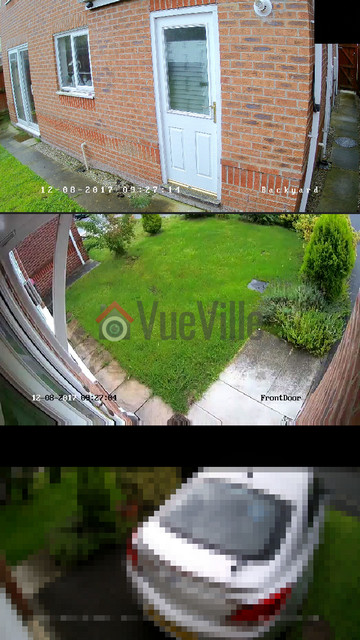
    Arlo Pro vs. Arlo HD - Arlo Wire-Free - VueVille

    Full HD or 1080p is the minimum resolution you should go for. This is because 720p just doesn’t give you enough detail, especially at night time. So the Arlo Pro 2 has the edge here.

    Audio Quality

    The Arlo doesn’t have audio support at all. But the Arlo Pro 2 has both a mic and speaker, so it has 2-way audio capability.

    But note that the 2-way audio on offer here is only half-duplex, not full-duplex. So you cannot have a natural conversation. Rather you are limited to a walkie-talkie style of taking turns talking and listening.

    If you are wondering which cameras do support full-duplex audio, even most wired cameras do not have this feature. But there is one wire-free camera that does have full duplex audio – the Reolink Argus.

    Motion Detection

    There are a few different ways cameras do motion detection:

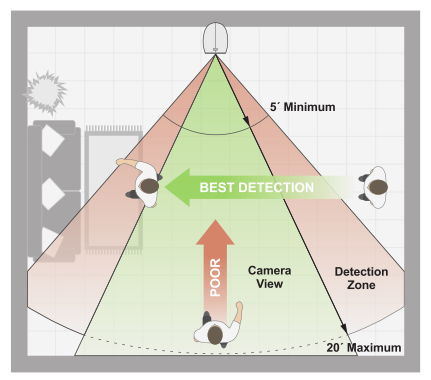
    • PIR based: Passive Infrared is the most reliable method of motion detection and the only one that the baby Arlo model supports. Its also easier on the camera’s processor.Arlo Pro vs. Arlo HD - PIR detection range - VueVillePIR motion detection works by detecting the warmer parts of a scene such as a moving person or animal. So clouds, shadows or moving vehicles will not trigger the motion detection.
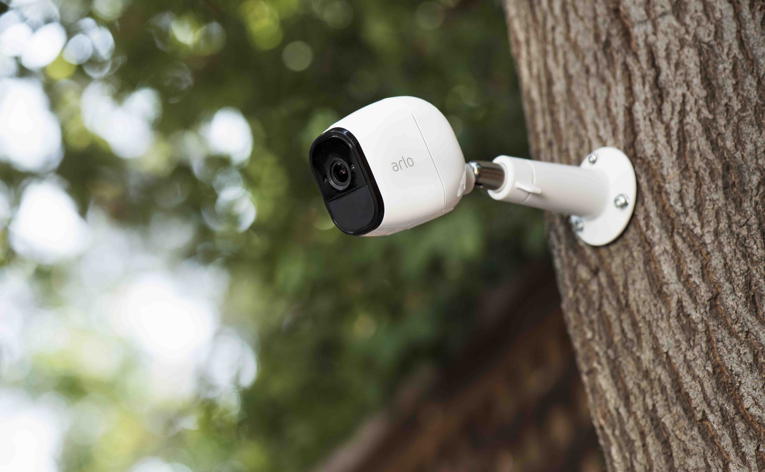
      While this is typically a more accurate motion detection method, you cannot define zones to restrict motion detection to. So any motion in the whole scene will trigger an alert.

      Both the Arlo and the Arlo Pro 2 support PIR motion detection.

    • Software based motion detection: While this can lead to false alerts if not properly configured, you do gain the ability to specify motion detection zones. Only the Arlo Pro 2 supports this method.In fact, the Arlo Pro 2 has a smart system. On battery power it uses only PIR based motion detection. But if plugged into AC power, it will use zone-based motion detection.

    httpv://www.youtube.com/watch?v=h-7mkPxQ8EQ

    Alert Notifications

    Since the Arlo Pro 2 has audio capabilities, you can get not just motion but sound triggered alerts also. These alerts can be in the form of emails or push notifications to the mobile app.

    The Arlo can do only motion detection alerts.

    Weatherproofing

    Both the Arlo Pro 2 and the Arlo Pro have an IP65 rating for weatherproofing. So you can use these cameras outdoors with confidence.

    Arlo Pro vs. Arlo HD - Arlo Pro - VueVille

    Battery life

    This is another major difference between the Arlo Pro 2 and the Arlo. The Arlo Pro 2 has a rechargeable battery whereas the Arlo Pro runs on four non-rechargeable CR123A batteries.

    Rechargeable batteries are more convenient but do they last longer than the CR123s of the Arlo?

    Let’s compare the energy capacities of the two cameras. The Arlo Pro 2’s rechargeable battery has 2440 mAh capacity whereas the Arlo’s four CR123A batteries will give it 6000 mAh (1500 mAh per battery). That is a huge difference in total energy capacity, so definitely something to keep in mind.

    Smart Home Compatibility

    Arlo Pro vs. Arlo HD - Arlo Wire-Free Inside - VueVille

    The Arlos range of cameras are cloud reliant and have little in the way of local processing capabilities. Amazon Alexa, IFTTT and Stringify are supported, but these are all Internet-reliant platforms.

    If you want battery powered cameras with local data processing, well we can but hope. At least we have battery powered cameras with local data storage like the Reolink Argus.

    Arlo vs. Arlo Pro 2 – The VueVille Verdict

    If you need 24/7 recording and are able to keep the camera plugged in, go for the Arlo Pro 2.
    Another reason to get the Arlo Pro 2 is for its audio support.

    If you don’t need the above features, the Arlo HD will do the job.