How do you access your security cameras remotely when you are away from home? In all likelihood, you are accessing each device using the manufacturer’s mobile app because they simply work without having to mess with port forwarding or VPNs. In other words you are relying on the manufacturer’s P2P servers, whether you realise it or not.
I think there are two main issues with this approach:
Inconvenience If you have a Hikvision camera, an Amcrest camera and a Reolink camera, you may be using the Hikvision iVMS app to access the Hikvision camera, the Amcrest app to access the Amcrest camera and finally the Reolink app to access the Reolink camera, one by one. Not the most convenient way to access all your cameras is it?
Security Although its straightforward and simple to use your camera manufacturer’s native app, you should understand what exactly is happening here. You are allowing the camera to make an outgoing connection from your network to the manufacturer’s servers. So essentially you are trusting the manufacturer’s security practices. If you are using their cloud service for data storage instead of using local storage, you are trusting your private data to a 3rd party.If you think this is without risks, just google the iCloud hack. If it can happen to Apple, it can happen to you.
So, what’s the alternative?
If you are a power user like me, why not do what I do and use a single app like tinyCAM Monitor Pro to view the live streams of all your cameras?
tinyCAM Monitor Pro
And why not access your DIY NAS NVR and review all your camera’s recorded clips in one place, with simultaneous synchronised playback?
QNAP NAS – QVRClient
And why not do all of this securely without relying on any 3rd party to protect your data?
As I alluded to earlier, there are 3 ways to access your home network remotely, but not all are secure:
the manufacturer’s own app which uses the manufacturer’s servers, uPnP and P2P protocols to reach your camera,
port forwarding each of your devices to your router,
set up a VPN server on your home network – I recommend this method!
The first and second methods are not secure as you are either relying on the security of your device manufacturers or opening up multiple ports on your network to the Internet (port forwarding). The recommended way of remotely accessing your home network and security cameras is by creating a VPN connection from your remote device straight to your home network.
If you are wondering how your VPN server can be reached from the Internet, you have been paying attention! You cannot eliminate port forwarding totally. Your VPN server needs to listen for incoming connections and so you have to port forward your VPN server’s port to the router. But this is far safer than port forwarding every single camera and exposing these devices which often have poor security to the dangerous digital expanse we call the Internet.
Unless you have a static IP for your home broadband, you also have to deal with the fact that your home IP address will change occasionally and so you may not be able to reach your VPN server when you need to! Fear not, there is a way around it – Dynamic DNS services.
Here’s a 4-step summary of how to set up the VPN method of remotely accessing your home network and your security cameras:
Set up a device in your home network to act as a VPN server, eg. WiFi router, NAS, a PC or a Raspberry Pi
Forward the OpenVPN port from your NAS to your broadband router
Set up the same VPN server or any other device in your home network to periodically report your home IP address to a Dynamic DNS service, so that you can always reach your VPN server using an address like yournetworkname.noip.com
Set up a VPN client on the device you will use to remotely access your home network, eg. your mobile phone, tablet or laptop
Now simply use the VPN client to connect to your VPN server and voila, you are in your home network, as if you never left home. You can then access your security camera or any device on your home network, without relying on third-party P2P services, without port forwarding each IP camera, without a static ip address, and with maximum security.
Let’s take these steps one by one and break them down. I will be using my QNAP TS-253A NAS for this how-to.
Some house-keeping
Make sure you disable all existing port forwarding rules and uPnP in your router settings. Then systematically disable P2P in each of your cameras (and NVR if you use one). This locks down the cameras and other devices so that they are isolated from the Internet and cannot ‘dial home’ without your knowledge.
If you still want to use the camera manufacturer’s app, you should not disable uPnP and P2P. But then don’t be surprised if your cameras and network get hacked!
Step 1 – Set up the QNAP NAS as a VPN server
Login to your QNAP NAS using an admin account and search for vpn. Click on QVPN.
This will take you to the QVPN page in the QNAP App service. Click the Install button.
Now go to the desktop and you will find a new QVPN Service shortcut. Click on it.
The QVPN app will open. You have three different VPN technologies to choose from at this point – PPTP, OpenVPN and L2TP/IPSec. Since PPTP and L2RP/IPSec are not the most secure protocols, turn on OpenVPN.
Choose OpenVPN from the menu on the left and tick the checkbox of the first three options as shown below. Click Apply.
Now click “Download Certificate” and save the resulting zip file to your hard drive.
Choose Privilege Settings from the menu on the left, and enable OpenVPN for the accounts you would like to use to login to your home network.
If you would like to have all VPN connections logged, turn this on in the Connection Logs section.
Step 2 – Port Forwarding from your NAS to your router
Follow your broadband router or gateway’s instructions to forward the 1194 UDP port from the NAS to an external port. 1194 is the default port used by OpenVPN.
If your router supports port forwarding with port translation, one tip I have is to choose an external port that is not 1194. This adds an extra layer of security from hackers who may be scanning for an open 1194 port on your network. So for example, I would map UDP port 1194 of my NAS to the router’s external port 35376, where 35376 is just a random port I chose.
So port 35376 on router -> port 1194 on NAS. The screenshot below shows how this port forwarding rule is set up in my ISP-provided broadband router.
Step 3 – Set up Dynamic DNS on your QNAP NAS
First sign up for a dynamic dns account at noip.com (or any service supported by QNAP), note that the free account forces you to verify your account every 30 days.
Login to your QNAP NAS using an admin account and navigate to Control Panel>Network & File Services>Network Access and click on the DDNS Service.
Enable the DDNS Service, and enter the noip username, password and host name you created at noip.com and click ‘Apply All’.
Step 4 – Set up the OpenVPN client on your device
Before you can set up the OpenVPN client on any device, you need to edit the client configuration file (openvpn.ovpn):
Unzip the certificate zip file you downloaded from your NAS earlier, you will now have 3 files ca.crt, openvpn.ovpn and readme.txt
Edit the openvpn.ovpn file and replace the IP address with the noip hostname you created in the steps above.
Save the file.
Android devices – Set up the OpenVPN for Android client
Transfer the three files, ca.crt, the edited openvpn.ovpn and readme.txt to your mobile device.
Install the OpenVPN for Android app from the Google Play Store.When you first open the app, it will look like this:
Tap the + symbol at the top right of the app which will give you the screen below.
At the ‘Add Profile’ screen, select Import.
Now choose the openvpn.ovpn file you copied to your mobile device.
At the Convert Congif File screen, select the certificate file you downloaded.
Now select the tick mark at the top right.
Now you will find a new profile called openvpn in the app Profiles tab, tap this.
In the Allow Connection screen, click OK.
When it asks for the username and password, press Cancel.
Click on the edit icon of the openvpn profile.
Go to the Server List tab and change the Server Port to the port number you forwarded the UDP 1194 port to. If you followed my recommendation of using an external port such as 35376 which is different from 1194, use that. Back out to the main app screen.
Make sure you are on an external network such as 3G or 4G, and tap the openvpn profile to connect.
Enter the username and password of one of your QNAP NAS accounts which you allowed VPN access to the NAS. Click Ok.
That’s it you are now connected to your QNAP VPN server!
Conclusion
I hope this how-to has helped you set up your own VPN server at home which lets you securely access your security cameras and the home network remotely.
Even if you are not ready to implement a full blown VPN server, it’s a great idea to disable uPnP on your router and to avoid port forwarding your devices to the Internet.
Looking at the most ubiquitous IoT device, there are 204 million smart phones in use in the United States. Apple is highly credited with releasing the first modern smart phone in 2007. Over the next 10 years dozens of companies invested significant R&D into the security of their customers mobile data. Despite the billions spent, there have been dozens of hacking cases involving these relatively secure devices. Along with the consumer data collection that the companies who produce these phones take part in, these devices with their audio, video, and GPS sensors allow for data to be collected on someone in real-time.
It is estimated that there will be fifty billion objects on the IoT in just three years. We must realize, that an IoT device doesn’t need all the functionality of a cell phone to be a serious privacy challenge. James Lyne the global head of security research at Sophos claims that:
IoT devices are coming in with security flaws which were out-of-date ten years ago you wouldn’t dream of seeing on a modern PC
While an IoT large-scale data breach has not yet occurred, we have already seen these devices be hijacked on a large scale. The DDoS attack which overwhelmed the DNS for most of the Eastern United States was done with a botnet consisting of IoT devices, primarily digital cameras, DVRs, and routers.
Unfortunately if history is any indicator, it seems to be a question of when and not if there will be a large IoT data breach. To date, reputable tech companies such as Yahoo, Tumblr, eBay and Daily Motion have lost the personal information of billions of users in hacks. These are companies, which deal solely in creating technology platforms. With such a high data loss to date, will the public be able to trust manufacturers of smart fridges, smoke detectors, cars, watches, etc., to protect their personal data from malicious actors?
Of course protecting peoples privacy not only relies on stopping the bad guys, it also requires informed consumers. There is a $125 billion market involving collecting and analyzing consumer’s personal data. If a consumer buys a smart fridge that tracks all of their purchasing and knows their most intimate dietary habits, the company which manufactures this fridge could have the option to sell this information to a third-party. A study by MeasuringU predicts at a maximum, 8% of users actually read a software EULA. There needs to be a more transparent option to identify company’s data policies, few people will have the initiative to read and comprehend hundred page documents for every IoT product bought.
As it stands, if you read every user agreement and only bought products that didn’t track data, and were able to guarantee you were never hacked – government agencies would still potentially have access to your personal information. Many countries such as the United States and Sweden, have laws which allow government agencies to monitor all internet traffic coming through their country. Today, anytime you use Skype, Facebook, or a service based in the US, the NSA has access to the data you’ve transmitted.
Let’s pretend a US company started selling millions of smart espresso makers all around the world. The espresso makers contain a camera, microphone, and remember all of your past coffee habits. Under PRISM, all your data use on that espresso maker could be recorded and viewed by the US government if it were transmitted through a US server. This means if you live in Norway and use your espresso maker to video chat your friend in Iran, because your call could be routed through a US based server, that call could be monitored. Later if the United States (or any other country) created or altered a secret law such as the Patriot Act, one can only imagine the potential to collect information about an individual just because they purchased a specific product.
While there are many potential privacy pitfalls with the coming IoT, there is evidence that regulatory agencies are looking at ways to tackle them. The United States Federal Trade Commission has made recommendations to protect consumer choice and ownership of data. A resolution passed by the US senate states the need to create a national policy on IoT data security and management, and the National Highway Traffic Safety Administration is preparing cyber security recommendations to make soon to arrive autonomous cars more secure.
In addition to governmental regulation, we can only hope companies are sufficiently motivated to adopt sufficient cyber security and ethical standards. Yahoo is estimated to have lost 1 billion dollars of its market cap after their massive data hack in 2016, and data breaches are costing consumer service companies on average $174 per record stolen as of 2016. Once again, the consumer has the potential to play a huge role. Currently data breaches have little effect on company stock prices. It will take consumers caring about their data, and fiscally punishing institutions who violate their trust to alter the current IoT landscape.
If you have outdoor security cameras with night vision, you must have come across this pesky problem. Lovely, beautiful (yeah, right) spider webs right in front of your cameras lens obscuring the whole view! Add in a little breeze and you have the perfect storm – spider webs setting off false motion detection alerts and filling your inbox with email alerts.
[toc]
Incy Wincy Spider has been up to no good at the VueVille residence
What attracts spiders to security cameras?
Its the flying insects. Get rid of the insects and you get rid of the spiders. Let me explain.
Contrary to popular opinion, most web-spinning spiders are actually blind.((http://www.spiders.us/faq/how-many-eyes-do-spiders-have/)) They cannot sense the Infrared LEDs.
I have been running CCTV cameras at my home since 2014 and my constant challenge has been to keep the blasted spiders and their webs away. The main reason these critters are attracted to the cameras are because of the abundance of food. Yup food, tasty flying food. So its not the spiders that are attracted to the camera’s IR lamps, but the flying insects they feed on.
It is thought that some flying insects are sensitive to infrared light and get attracted to the camera’s IR LEDs. Now these spiders are not dumb. So even though they don’t even know that there is InfraRed on the camera, they do know that they can get lots of food easily. So that’s where the web gets built.
So what’s the solution?
Now that we know why it happens, we can look at how to solve the problem of spider webs. We either need to keep the flying insects away or prevent the spiders from building their webs regardless of the flying insects.
The permanent solution – Disable the on-board IR LEDs and use external IR lamps
This method has worked very well for me. By moving the source of IR light away from the camera, the flying insects and hence the spiders move base from the camera lens to the external IR lamp.
Most IP cameras will let you disable the on-board IR. If your cameras don’t, its time to consider new security cameras.
Pro tip: Put the external IR lamp inside your house shining its beam of light through a window and you get the ultimate revenge – they can see it but they can’t get to it!
There are different types of IR LED lamps. Expanding upon my comments on a related /r/HomeDefense post, there are two types of Infrared lamps – the more common type where the IR LEDs are arranged in a ring, and the less common but brighter longer-lasting EXIR LEDs. Just like you can find cameras with either type of LEDs, you can find IR lamps with either type of LED:
Standard IR LED lamp – These are the ones I use because they are cheap and surprisingly durable. The downside is the narrow beam angle of 60 deg or so. I don’t think they are weather-proof but I use them inside through a window. I have not had any noticeable fading or dimming after 1 year of use, which is the most common complaint about these LEDs.
EXIR IR LED lamp – Now I haven’t tried these but they have a wider beam angle of 90 degrees and are IP65 weather-rated.[easyazon_image align=”center” height=”500″ identifier=”B075F7NV56″ locale=”US” src=”https://m.media-amazon.com/images/I/51lXOLzMI5L._SL500_.jpg” tag=”vueville.com-eaz-20″ width=”500″]
The “do it once in two weeks” solution – Use bug sprays or insect repellents
I tried many different bug sprays from many different brands before finally finding something that would keep the nosy spiders and their webs at bay:
This is a method I came across on Reddit and seems to have helped some folks. Basically you are making the camera housing and the area surrounding the camera slippery so that the spider can’t even spin its web.
If false motion detection alerts are the problem, you can try and use Intrusion detection or dwell detection instead of simple motion detection. This way an alert is set off only when something of a certain size and larger is in the scene for a certain period (say, 1 second). See how you can do this with Hikvision cameras.
This is a useful thing to do in any case and could be combined with the methods described above.
So what have you found to be the most effective way to deal with spider webs in front of your camera lens?
A quick note: This article contains affiliate links from Amazon. I don’t like ads and I’m sure you don’t either. So this is how we pay the bills and ensure a distraction-free experience for you, my dear reader. If you click on one of these links and then purchase something from Amazon, I will receive affiliate income for referring you to Amazon. This goes towards the costs of hosting and running this website and does not affect you in any way. Thanks for your understanding!
[text-blocks id=”8897″]
Have you ever wondered what happens when you leave the pets alone at home? Or whether your nanny is taking good care of your baby? Or whether your office is secure when you are not around? Is someone vandalising your property? If so, you should be interested in wireless spy cameras.
Wireless spy cameras come in two forms:
A single integrated unit that combines the camera lens and the wireless transmitter into one package. Often disguised as an everyday household object such as a clock, light bulb, speakers etc.
Separate lens and wireless transmitter parts connected by a wire. Meant for installation in tight spaces and where the observed parties may suspect that a hidden camera is present in the room.
The Relohas covert camera is a small wonder. It is an IP camera that packs 1080p FullHD resolution, WiFi, and a microSD card slot. The camera sensor is separated from the rest of the camera which allows you to easily position the sensor unit in the desired position. Thanks to Wi-Fi, you can access the video stream or recorded clips without physically accessing it.
There are four different recording modes:
Full-Time Recording Mode: Just insert the microSD card, and the mini cam will go into 24-hour loop recording, Wi-Fi is not needed for this mode
Timed Recording Mode: The camera records for a specified time period.
Motion detection Mode: The camera records clips only when it detects motion
Phone Recording: On-demand recording using the smartphone app
The spy camera also sports InfraRed lamps so that you get crystal clear night vision. An 800mAh built-in rechargeable battery powers the camera through even when there’s no power.
Full specs:
– 1080P HD video, H.264
– Free Apps for iOS and Android, view and hear remotely from anywhere
– Quick setup within minutes, no complicated settings needed
– MicroSD DVR supports cards up to 128GB (SD Card not included)
– Motion record/alerts via Push Notifications/Email/FTP
– Fully compatible connectivity, works over Wi-Fi
[easyazon_link identifier=”B07VDL1H3F” locale=”US” tag=”vueville.com-eaz-20″]View on Amazon[/easyazon_link]
This IP spy camera is one of the smallest we have seen. Yet, it has all the features of a good wireless spy camera. The camera base has a strong magnet which you can use to attach to any metallic surface. PLug in the USB cable for power and twist the camera into position. That’s it you are set!
The 1080p sensor, 2.4 GHz Wi-Fi, IR night vision range of 6 metres, built-in battery, 128GB microSD card support and push notifications alerts make this spy camera a solid performer.
Main specs:
– Flexible base for aiming camera
– Android/iOS apps available
– 1080p 30FPS with audio recording
– 150° wide-angle lens, 16 feet IR night vision range
– Motion detection, loop recording
– Record while charging
– Built-in 350mAh battery
– Power supply:Input 100-240V, Output DC 5V 1A
– Up to 128GB micro SD Card (class 10 above suggested for smoother video)
[easyazon_link identifier=”B07Y361KQR” locale=”US” tag=”vueville.com-eaz-20″]View on Amazon[/easyazon_link]
Wireless Nanny Cam Clock With Superb IR Night Vision
Want to keep an eye on your nanny as she keeps an eye on your kid? This clock is a well disguised nanny camera that you can connect to over Wi-Fi and check in on. View live streaming video on the smartphone app. You won’t miss anything when you are not looking because the spy camera can take a microSD card to capture motion detection clips. 24/7 recording is possible with AC power. But even a power failure won’t stop this thing, it has a 5 hour battery built-in. And yes insert an AA battery for the clock to work!
Main specs:
– Video resolution: 1080p FullHD
– WiFi details: 2.4 GHz 802.11n WiFi
– Supports up to 32GB SD card (Memory card not included)
– 10 powerful IR LEDs
– iOS & Android supported
– Charging voltage:DC-5V
– Battery life:2-5 hours
– Mini 5Pin USB
[easyazon_link identifier=”B07XHNMRCD” locale=”US” tag=”vueville.com-eaz-20″]View on Amazon[/easyazon_link]
1080p FullHD Wireless Hidden Nanny Charger Spy Camera
This USB charger looks normal enough, but underneath lurks a monster of a spy camera. It is essentially an IP camera that packs 1080p FullHD resolution, WiFi, and a microSD card slot. Yes you can charge two USB devices while the spy camera is recording motion detection based video. The wide-angle lens can capture everything in a 90° field of view. When the SD card gets full, it will overwrite the oldest footage and keep going.
Main specs:
– Image Sensor Dimensions Φ 0.74 x 1 in
– Main Unit Dimensions(W x D x H mm) 3.7 x 2.87 x 0.94 in
– High-Resolution 1080p HD video streaming, H.264, MPEG4, MJPEG configurable stream.
– 3-D Digital Noise Reduction (3-D DNR), Get exceptional image quality and video with less noise.
– Loop recording, motion detection recording, continuous recording
– Push notifications
– Works over Wi-Fi b/g/n.
– MicroSD card slot up to 128GB, playback via our app or software.
– Free app for iOS & Android smartphones/tablets.
[easyazon_link identifier=”B07MXGPH7Z” locale=”US” tag=”vueville.com-eaz-20″]View on Amazon[/easyazon_link]
This tiny cube packs a powerful punch for something that’s the same size as an Apple Watch! Measuring just 1.65 inches across, you can use this as a wearable spy cam, a drone camera or pretty much anywhere you can think of. The 380mAh built-in rechargeable battery makes this possible. Add a 64GB SD card and you have a 24/7 continuous recording wireless spy camera.
Main specs:
– Real-time Video Recording Video Resolution 1080P/720P/640P/480P
– Size: 1.65×1.65×0.45 inch
– Video coding :H.264+
– Night resolution: 720P
– Infrared night vision: 18ft night vision infrared light
– Battery type: Built-in 380mAh rechargeable lithium battery
– Storage card: support up to 64GB Micro SD card TF card
– Motion detection or continuous recording
– Net weight: 18g
– Interface Micro USB: 5V 1A
– Free app for iOS & Android smartphones/tablets.
[easyazon_link identifier=”B07SQYCQL4″ locale=”US” tag=”vueville.com-eaz-20″]View on Amazon[/easyazon_link]
This innocuous looking 5-port USB charging tower conceals a powerful 1080p camera that you can wirelessly access from a smartphone. A standout feature is the ability to define activity zones for motion detection just like more expensive IP cameras like a [easyazon_link identifier=”B07C5JWK4K” locale=”US” tag=”vueville.com-eaz-20″]Reolink RLC-410[/easyazon_link].
Main specs:
– Real-time Video Recording Video Resolution 1080P/720P/640P/480P
– Discrete Hidden Spy Camera with 1080P HD Clarity
– Adaptive 5-Port USB Charging Hub
– Motion Detection with push-alert message
– Overcharge and Over-Surge Protection
– Wireless 2.4 GHz Support
– Wide-Angle Viewing and Recording Lens
– Free app for iOS & Android smartphones/tablets
[easyazon_link identifier=”B07ZLZK9JM” locale=”US” tag=”vueville.com-eaz-20″]View on Amazon[/easyazon_link]
FUVISION Motion Activated Smoke Detector Nanny Spy Camera
A dummy smoke detector that houses a 1080p Full HD camera and can run on battery power for 180 days? Sounds great, right? A concealed 125 degree fish-eye camera lens gives a full view of the room and the no-glow IR LEDs give superior night vision. The 6000mAh battery takes only 5 hours to charge up.
Main specs:
– Real-time Video Recording Video Resolution 1080P/720P/640P/480P
– Built-in Wi-Fi allows you to control, view, and stream video from smartphone anywhere in the world
– It has a concealed 125 degree bottom viewing angle camera lens
– PIR Motion captured video records when you need it most
– Battery operates for up to 180 days(Standby time)
– Instant alerts to iOS and Android devices
– Built-in “No Glow” night vision LEDs inside for seeing up to 30 feet in darkness
– 1080P HD live view mode with push alarm notification
– Data and Time Stamping
– Free app for iOS & Android smartphones/tablets.
[easyazon_link identifier=”B07W1XZ8NV” locale=”US” tag=”vueville.com-eaz-20″]View on Amazon[/easyazon_link]
The Toughsty portable WiFi camera also supports both connecting to a WiFi network or directly to a mobile device using a P2P WiFi connection. IT however supports only a maximum 32 GB SD card.
Main specifications:
– Video Resolution: 640×480 @ 25/30fps, Video Format: AVI
– Real-time Audio & Video Recording, Microphone Built-in
– IR Night Vision
– Supports Wifi Wireless Network Connection
– Supports iPhone, iPad or Android Tablet/Smartphone, P2P Live View
– Supports Tablet/Smartphone Remote Recording
– Min. illumination:2 Lux
– Max. 32GB SD Card supported
– Rechargeable Battery Built-in, Supports recording and charging at the same time, works off external power supply also
– Operating Back-up Battery Life Time: 45 minutes
– Charging Time for Back-up Battery: 1.5 hours
– Back-up Battery Capacity: 2600mAh, Outlet Power Supply: DC 5V 500mA
– Power Consumption:<10W, Working Temperature:0°C to 40°C
[easyazon_link identifier=”B074GWL8KC” locale=”US” tag=”vueville.com-eaz-20″]View on Amazon[/easyazon_link]
This wall clock is a perfect cover for keeping an eye on the nanny or for general security purposes in your home or office.
Main specifications:
– Discreet appearance
– Made of high quality, durable materials
– 720p Video Resolution, AVI & JPG format support
– Audio recording supported, WAV format
– Wireless Distance: <50m
– Interface Type: Mini USB
– External micro-SD/TF card supported
– Power Source: DC 5V / 300~500mA
– Android, iOS smartphones supported
– Dimensions: ( 4.5 x 30)cm / ( 1.77 x 11.81 )” (H x Dia)
[easyazon_link identifier=”B0058O6160″ locale=”US” tag=”vueville.com-eaz-20″]View on Amazon[/easyazon_link]
This device is another ingenious way of concealing a spy camera. The lens is separated from the main body of the camera, making the lens incredibly small. The bulk of the camera is in the connected body which houses the built-in 600mAh battery, the microSD card, the USB port, the reset button and action LEDs.
Main specifications:
– Records video with audio and can take snapshots.
– Supports WiFi for wireless connectivity.
– Wi-Fi effective radius: 30M
– Record on motion detection supported, range 6 metres.
– Ultra clear hidden lens OV9712.
– H.264 encoding feature that allows more storage space.
– All day recording possible.
– Supports remotely video playback with an internal Battery Capacity of 2400mAh.
– Max. 32GB SD Card supported.
– Image Sensor:5.0 mega pixels CMOS.
– 720p resolution, video format: ASF/AVI, compression codec H.264.
– Wide-angle 90° coverage.
– Mobile phone operation systems supported: Android/iOS.
– Video coding: H.264 resolution: 1920*1080P/1080*720/640*480
– Video frame Rate: 15-30fps
– Storage: Micro SD card, up to 128g(not included)
– Operating system: Windows/Mac OS X/Android/iOS
– Recording time: 140 minutes
– Battery charging time: 2.5 hours (with a 2A plug)
[easyazon_link identifier=”B07PQFJ9L5″ locale=”US” tag=”vueville.com-eaz-20″]View on Amazon[/easyazon_link]
EsiCam Cute Panda 1080p HD Pan-Tilt Wireless Remote Hidden Surveillance IP Camera
The EsiCam Panda Camera is perfect for using in the nursery thanks to its cute appearance. Whether you want to use it as a baby monitor, or a spy camera, the 1080p resolution and the built-in IR LEDs make it the perfect fit. The presence of a real IR cut filter sets it apart from other cheap IP spy cameras. This means you get a true colour image during daytime and a high quality night vision video in the dark.
Main specifications:
– Cute Panda design, easy to hide in the home, office or other places.
– Easy Install anywhere with bracket, table mount, ceiling mount, wall mount
– 2.0 Megapixel 1080p HD clear image; Standard H.264 video compression. Supports WPS function.
– Micro SD card recording enabled – support max. 32GB SD card.
– 112° viewing angle (horizontal); 4x Digital zoom.
– Supports WiFi (IEEE 802.11 b/g/n) and QR code login.
– Two-Way audio; Built-in Microphone and speaker.
– Motion detection supported.
– Remote live video streaming with pan (345°), tilt (65º)
– P2P technology, plug and play, no configuration required.
– App push notifications.
– Remote firmware upgrade.
– 6 pcs infrared LEDs, night vision distance: 10 meters, 24 hours day and night monitoring, IR-CUT switch.
– Supports IE, Chrome, Firefox, Safari, Opera, etc.
– Support Android /iOS system mobile devices; remote real-time monitoring (25 fps, 720P HD images)
[easyazon_link identifier=”B0775R5P7S” locale=”US” tag=”vueville.com-eaz-20″]View on Amazon[/easyazon_link]
This alarm clock spy camera has several unique features – the 1080p sensor producing excellent quality video and images, the immense 150 degree wide-angle lens, and the ability to send email alerts on motion detection.
Main Specifications:
– New and improved hardware – 1080p HD video, smoother video quality, excellent low-light view
– 150° wide-angle lens, IR Night Vision, Wifi wireless connectivity
– Supports iPhone, Android phones
– Motion detection with email alerts
– 2200mAh Rechargeable Battery Built-in, supports recording and charging at the same time
– Video compression format: H.264
[easyazon_link identifier=”B07WSGS2RV” locale=”US” tag=”vueville.com-eaz-20″]View on Amazon[/easyazon_link]
Wireless Spy Camera in PIR Motion Detector (WF-450)
The mini HD wireless spy camera is a 2MP 1080p spy camera camouflaged inside a rather innocuous looking home PIR sensor. The type of device that most people wouldn’t give a second thought to. It supports WiFi, and an effective wireless radius of 49ft. What is really interesting though is that it supports both ONVIF and RTSP protocols along with an Ethernet port. This lets you use it with a standard NVR or BlueIris software. It has a 3.7mm pinhole lens, and the features are all reflective of a much more expensive device.
Main specifications:
– Image sensor: IMX323 Sony Chip
– Lens: HD professional 3.7mm pinhole lens
– Video compression: H.264 High profile, JPEG capture
– Bit rate: 32Kbps~8Mbps
– Image resolution: 1080p
– Frame rate : 25fps, 30fps
– 940nm InfraRed LEDs night vision
[easyazon_link identifier=”B0057HBPSW” locale=”US” tag=”vueville.com-eaz-20″]View on Amazon[/easyazon_link]
This well-reviewed IP camera is hidden inside a bulb, yes a real bulb that will light up albeit only from the mobile app. It is an IP camera and supports WiFi. The 360 degree fish eye lens gives you a surround view of the room.
It has built-in IR LEDs for night vision and supports motion detection alerts. It also has a remote that you can use to activate recording manually. It also supports a maximum 64GB SD card which provides a local recording option. You can connect to the bulb and watch realtime video or make it record motion detection clips onto the SD card. It can also send push notifications to the smartphone app.
Main specifications:
– E27 bulb base
– Supports both Access Point(AP) mode and WiFi mode.
– Remote access by SmartPhones(Android)/ iPhone/ iPad/ Notepads/ Notebooks/ PC/ Mac.
– Uses industrial grade processor, TI-DM365.
– 2 megapixel image sensor, H.264 compression, HD960P resolution, 3.6mm Len installed, 90 degree viewing angle.
– Fast WiFi, IEEE 802.11b/g/n.
– 36pcs IR LEDs (940nm wavelength), night vision distance 10 meters, Motion Dection (distance 5 meters).
– Supports both email alerts and mobile push alerts.
– Micro-SD card of up to 64GB supported, a 32GB card can store 12 days worth of video files.
[easyazon_link identifier=”B07DFM4N2B” locale=”US” tag=”vueville.com-eaz-20″]View on Amazon[/easyazon_link]
Wireless Spy Camera with WiFi in Computer Speakers
This IP spy camera comes in the form of standard PC speakers. The 1.3 MP, 720P camera supports fast wireless-N speeds. The IR cut filter enables proper night vision.
[easyazon_link identifier=”B0058IC0N4″ locale=”US” tag=”vueville.com-eaz-20″]View on Amazon[/easyazon_link]
Spy camera Applications
Home Security
Is someone in the home stealing things? It’s difficult to accuse family members without proof.
Do you suspect someone of vandalising your car or property? Maybe there are some unruly kids in the neighbourhood but their parents just won’t take your word for it.
In the case of a robbery or break-in, video footage can be instrumental in the police catching the bad guys.
Child Safety
Keep an eye on the babysitter or nanny.
Use your camera as a baby monitor.
Pet Safety
Are you worried about leaving your pets alone at home?
Do you suspect your pets are hurting themselves while you are away?
Office Security
Have things gone missing from your desk?
Are employees helping themselves to things they shouldn’t?
Remember that you should not use hidden cameras for any illegal purpose. Generally the law permits their use within your home or your office if you are an employer. But you should not point them at neighbours’ properties or use it in areas where there is a reasonable expectation of privacy such as changing areas or bathrooms. In the UK, the Data protection Act and the Human Rights Act may govern the usage of such devices. For more information refer to the UK Government’s guide to using domestic CCTV.
What to look for in a Hidden Camera
Which hidden camera should you purchase? This depends on where you intend to place the hidden camera. There are certain features you should look for in a wireless spy camera based on the application:
Hidden cameras for the home: Home video surveillance is very popular these days with advanced cameras being so affordable. Analyse the room you want to place the camera in and make sure you get a good view. Cameras with wide-angle lens are preferable so that you can cover as wide an area as possible. You should go for the cameras that are disguised as everyday objects – the Panda cam for a nursery, a Wall Clock camera, a Desk Clock camera or Computer Speakers Camera for the home office. Motion detection email alerts are essential so that the camera records only when required. Battery powered cameras will suffice for motion detection but it is best to get one that can work of a wall power outlet. This will give you the option of 24/7 recording as well.
Nanny cams: These cameras need to be either everyday objects or have separate lens units that you can hide along with other objects,say, on a shelf. Extended recording capability and battery capacity are desirable. Motion detection is less important here.
Night vision cameras: If you know the surveillance area will have low light, you need to look for night vision capability. Infrared (IR) LEDs that produce light waves that the eye cannot see are used for this purpose. Standard ring LEDs are okay but EXIR LEDs are better as they produce more light than standard SMD LEDs. Night vision cameras that have a real IR filter are desirable as this will produce truer colours during daytime.
Micro cameras: These are also called pinhole cameras. They are extremely small and hence will not have very high resolutions or fancy features. You will probably find that these have separate lens and wireless transmitter units. The transmitter units will be much larger than the camera part due to the built-in batteries and the transmitter components.
We have not mentioned the prices of the cameras in this article. This is because the selling price varies day-to-day and also depends on the deals available. You can click on the ‘View on Amazon’ link to see the current offer price and check out detailed user reviews.
Conclusion
These were the best-selling wireless spy cameras based on sales data from Amazon USA. We found a wide range of spy cameras in the top-sellers list, from micro cameras to those disguised as everyday items. If you found this list useful, please let us know by leaving a comment below.
A few years ago, my wife and I decided to get a CCTV security system. We didn’t know much about home security or security cameras at that point. But we wanted to be check in on our home while we were away.
But we felt deep unease about these brands storing our video footage on the cloud, especially indoor videos. Cloud-reliant security cameras were getting hacked left, right and center. Some companies even offered up video clips to cops without warrants! Moreover, many useful features of these cameras such as advanced motion detection were locked behind monthly paid subscription plans. Even basic things like being able to review recorded clips, which you would expect is a given.
So while the upfront costs looked low, ongoing costs would quickly balloon. This is the downside of the subscription-based model of business that most security camera companies are turning to these days. Don’t get me wrong, cloud backup is fine and serves as off-site backup. But having it shoved down our throats and having to pay for it is simply unacceptable.
But being the DIY and tech-crazy people we are, we decided to do it ourself – the ProDIY way, learning by doing, using excellent stand-alone IP cameras (like the Reolink E1 Pro), and high-quality yet affordable prosumer networking gear (like Ubiquiti’s Unifi range).
We often get questions about our DIY CCTV setup, such as how we are able to view our home security cameras securely from anywhere in the world. So we thought we would share our journey with you, our readers.
We will list our complete security camera setup and how we are able to safely and securely connect to our home from just about anywhere. Also we will go into not just a list of the different devices that form the system, but also how they all come together to help us achieve our specific security goals.
A quick note: As an Amazon Associate I earn from qualifying purchases. This post contains affiliate link(s). An affiliate link means I may earn advertising or referral fees if you make a purchase through my link, at no extra cost to you.
High enough resolution to get a clear picture at day or night.
Our privacy is paramount. All camera footage needs to be stored locally. No cloud-reliant stuff for us! We do not want to port forward cameras leaving the entire network vulnerable to hackers and botnets.
Push notifications – a nice to have if it doesn’t compromise network security.
The system should be flexible enough to grow and change according to our evolving needs.
The End Result: Here is a screenshot of how we live-view our IP cameras from our laptops, tablets and on the TV:
Our DIY Home Security System – Frigate Lovelace Cards in a Home Assistant Dashboard
We can also access the cameras from our smartphones using the Home Assistant mobile app which loads the same dashboard, or the tinyCAM Monitor Pro app.
Home Assistant Mobile App
So how does it work? My primary NVR software is Frigate NVR running on an Intel NUC mini-PC. Frigate pulls the RTSP streams of all the IP cameras and performs AI motion detection on it.
Whenever it detects any of the configured objects of my choice (person/car/van/cat/dog), it informs our Home Assistant home automation system which can then send a push notification, turn on external lights through Shelly relays, turn on the Reolink Duo’s floodlights or siren alarm, send mobile notifications, pop up a video clip on a tablet, anything I can think of really.
In the past I used HomeSeer HS3 and so I connected QNAP’s now phased-out Surveillance Station directly to my Homeseer HS3 system. But I have since then switched entirely from Homeseer to Home Assistant.
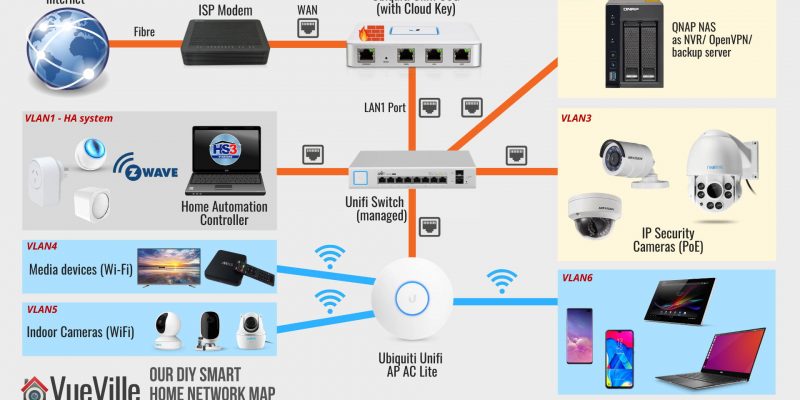
A topology is a representation of how a system is connected together. Network topologies may be either physical or logical. A physical network topology shows the actual physical layout and the connections between different elements. A logical network topology shows how they are functionally linked to each other.
Here’s a physical map of our entire smart home network. For a reliable and scalable surveillance system, you got to have the right network set up to support it. So let’s begin there.
Our DIY Smart Home Network Map in 2025
The first thing you will notice is that there are a lot of different network components, and that devices are nicely siloed off into neat compartments (LAN, VLAN2, VLAN3…etc.).
Most people just connect a Wi-Fi router to the ISP modem and call it a day. If you are just using a couple of wireless cameras, that will probably do.
But for our Pro-DIY system that is security and privacy-focused, we need to go further. We need to be able to defend our network from hackers and botnets. For this we need a strong and powerful hardware firewall.
We need to be able to isolate security cameras so that they cannot ‘dial home’ or leak data outside our network. Any device in our network we do not trust (like most Chinese security cameras) shouldn’t be able to access sensitive personal devices like laptops and mobile phones of its own volition. For this we need the ability to create Virtual LAN (VLAN) networks.
Every consumer Wi-Fi router has a built-in firewall that offers basic protection. But they are often not very customizable. For example, in most cases you can’t create your own firewall rules. And most of them cannot create VLANs. So after dabbling with overpriced ‘prosumer’ ASUS router for some time and failing to get what I need, I switched to enterprise standard networking gear. I went with Ubiquiti’s Unifi range.
We have a large home and getting reliable Wi-Fi throughout has been an issue. I had realized we needed multiple Wi-Fi access points. But the house is already wired for gigabit Ethernet. So this was another reason to skip the consumer-grade mesh networks and just go with a reliable established enterprise brand.
Also when your network gets large and you have multiple devices (router, switches, Access points), it becomes difficult and time-consuming to configure and manage multiple devices.
Here are the advantages of the Ubiquiti Unifi line of enterprise class networking gear:
Enterprise-grade hardware with higher reliability
Central management dashboard
Seamless Wi-Fi mesh network with Ethernet back-haul
Affordably priced
Ability to create VLANs
The easiest way to understand Unifi’s product line is this: a typical Wi-Fi router like Asus or Netgear is an all-in-one device.
There’s a router, a firewall, and Wi-Fi access point all rolled into one device for convenience. However this means that your Wi-Fi coverage is limited to the area where the router resides. Also if you want advanced features such as VLANs, you are usually out of luck.
Also if one function (like the wireless radio) fails, the entire network fails and you have to junk the whole device. Not great for redundancy or your wallet. I speak from experience – over the years I have amassed a cupboard full of various consumer-level Wi-Fi routers with busted Wi-Fi that are otherwise perfectly fine.
Full equipment description
Our DIY Smart Home Network Map in 2025
The Network Hardware
Starting from the top left of the network map, we have a symmetric 1 Gbps up/down fibre broadband connection. So the first device is the ISP fibre-optic modem which we cannot avoid. However, everything after that point is of our own choice and design.
After the ISP modem, comes the Unifi Security Gateway (or USG). This is our hardware firewall which serves as the DHCP router for the whole network and also manages all the VLANs. The USG has a Dual-Core 500 MHz processor with 512MB RAM. It can handle up to 1,000,000 packets per second. It can handle our 1 Gbps fibre broadband connection at full speed, but only without extra security features turned on like Deep Packet Inspection (DPI), Intrusion Detection System (IDS) or Intrusion Prevention System (IPS). If I turn these on, the throughput drops to a measly 85 Mbps. The USG is more than 5 years old now and as you can guess, obsolete. The WAN failover has been forever broken, and it has not received newer features like WIreguard VPN or WAN load balancing which the UDM now has.
That’s why I don’t recommend the Unifi USG any more (they are also getting increasingly difficult to buy!). Unifi has released something else that I recommend now – the UDM product range comprising of three models:
Unifi Dream Machine (UDM)
Unifi Dream Machine Pro (UDM-Pro)
Unifi Dream Machine Special Edition (UDM-SE)
The UDM range combines the USG, a managed network switch and the Unifi OS network management software into a single device. The UDM is the baby of the trio and is a direct replacement of an existing Wi-Fi router because it also includes a Wi-Fi Access Point.
The UDM-Pro and SE models are more powerful, are rack-mountable and so may be a better fit if you plan to use a server rack or cabinet. But note these don’t have built-in Wi-Fi.
But hey what about the Unifi Dream Router (UDR)? I’d say give it a miss, because its a cut-down version of the UDM – less powerful CPU that makes it more like the USG than the UDM.
Product prices and availability are accurate as of the date/time indicated and are subject to change. Any price and availability information displayed on https://www.amazon.com/ at the time of purchase will apply to the purchase of this product.
(* = affiliate link / image source: Amazon Associates Program)
The UDM SE/Pro can perform Intrusion Detection and Prevention at up to 3.5 Gbps line speed, which is far superior to that of the USG’s 85 Mbps or even the UDM’s 850 Mbps. But for most home users, the UDM will be enough.
One key difference between the UDM SE and UDM Pro models is that the SE has PoE support. This removes the need to get a separate PoE switch.
Back to the layout: The ISP modem plugs into the USG’s WAN1 port (WAN port in the UDM SE/Pro). The USG has only two physical LAN ports – LAN1 and LAN2 (the UDM SE/Pro have 8). Each port can be used to create a unique sub-net, but I use only the USG’s LAN1 port for my network – I will refer to this as LAN. The Unifi system uses a central management portal for all device configuration and logging. The UDM SE/Pro have this built-in, but the USG doesn’t. So you will have to run it off a computer but only when you need to configure devices.
So you can see why its better to go with the UDM SE. If you still want to use the USG (it is cheaper), you can get a [easyazon_link identifier=”B017T2QB22″ locale=”US” tag=”vueville.com-eaz-20″]Cloud Key[/easyazon_link], a small PoE device that hosts the controller software and logs network statistics locally 24/7. I don’t want a computer running all the time, but I like to log all the data I can. So I went for the Cloud Key.
As mentioned in our goals earlier, we didn’t want to forward ports from the cameras to the Internet. The alternative to forwarding ports from the camera to the router and exposing them to the Internet, is to create a VPN connection to your home network so that you can dial in securely. For this you need an Internet-facing device in your home network that can act as a VPN server.
The Unifi UDM Pro and SE support OpenVPN & Wireguard. So that’s the way forward.
But I am still stuck on the old USG which doesn’t support either of these protocols. QNAP has built into their NAS a VPN server app that supports all the major VPN protocols. In the beginning, I used our QNAP TS-253A NAS as the VPN server for the entire home network. But again I quickly learnt that exposing a NAS server to the Internet is risky.
So I have the excellent open-source free PiVPN running on an [easyazon_link identifier=”B0B973214J” locale=”US” tag=”vueville.com-eaz-20″]Orange Pi Zero[/easyazon_link] that also runs PiHole on my network. I chose the Wireguard protocol as it requires less resources than the OpenVPN protocol.
The Pi Zero’s Wireguard port is forwarded to the Unifi USG. No other ports are forwarded. The USG is configured with Dynamic DNS (DDNS) and so is always accessible from the internet using a friendly name, instead of the public dynamic IP address which ISPs change every so often. I use the excellent and free Afraid.org service.
We use the official Wireguard VPN client on our Android phones or laptops to connect to our home network, the Orange Pi Zero acting as the Wireguard server for the entire home network. This lets us access all our network resources as if we never left home, live-viewing and reviewing recorded footage is so easy.
Moving to the center of the network map, we reach the network switch.
If you just want to create VLANs for Wi-Fi devices you don’t need a managed Ethernet switch – the Unifi wireless access points (WAP) can do that. But to create Ethernet-based VLANs, you need a managed switch. The UDMs have a built-in managed switch but I needed to get a separate one.
I created separate VLANs for Home Automation gear (Raspberry Pi4 running Home Assistant), and IP cameras using the excellent Unifi firewall rules feature. See the links below to learn how to do this. Yes you can have both wired and wireless devices in the same VLAN!
Of course you can also follow the guides above to assign wired and wireless devices to the same VLAN as I have.
Note: If you get the Unifi USG or the UDM Pro, you will need a separate PoE switch. This is because the USG and UDM Pro don’t have PoE support.
With the UDM SE/Pro you get 8 managed ports, so one of them can be connected to a PoE switch. If you want to further managed each port of the PoE switch you will need to go for a managed option like the Unifi US-8-60W I got (image below). This is an 8-Port fully managed 802.3af PoE Gigabit switch. It has a fan-less design and thus is silent in operation.
The switching capacity is up to 8 Gbps total, and it can provide up to 15W output per PoE port. I use one of the PoE ports to power the Unifi Cloud Key.
If you do not mind all the ports of your PoE switch being unmanaged and ending up in a single VLAN, you just need an unmanaged PoE switch like the TP-Link SG1008 I have detailed below.
The Unifi Wi-Fi Access Points (WAP) are widely acclaimed for solid wireless performance. I use the Unifi 6 Lite and U6 Pro in my home. The U6 Lite is an 802.11ax AX1500 Dual-band WAP, it can do up to 300 Mbps in the 2.4GHz band and up to 1.2 Gbps in the 5GHz band simultaneously. The U6 Pro is an AX5400 WAP ups those figures to 573.5Mbps in the 2.4 GHz band and 4.8 Gbps in the 5GHz band.
Product prices and availability are accurate as of the date/time indicated and are subject to change. Any price and availability information displayed on https://www.amazon.com/ at the time of purchase will apply to the purchase of this product.
(* = affiliate link / image source: Amazon Associates Program)
You can power these WAPs via standard 802.3af PoE (the UDM-SE has 8 such ports) or Ubiuiti’s proprietary 24V PoE (if you are already invested in their older equipment).
I am able to create separate Wi-Fi VLANs for my personal devices (VLAN6), media devices (VLAN3) and also add the security cameras into the same VLAN as the wired cameras (VLAN5). This is possible because the Unifi WAPs support VLANs. I am very happy with these WAPs, my 200 sq. m home is fully covered with just 2 of these.
I no longer experience dropped frames on my Wi-Fi cameras and overall responsiveness while browsing on our WiFi6 devices (such as the Samsung Galaxy S20) has improved noticeably.
The DIY Security Camera System
Outdoor IP Cameras
We use mostly Reolink cameras and a few Hikvision cameras, all recording on motion detection to a Network Attached Storage (NAS) system from QNAP. They are connected to the TP-Link PoE switch which in turn is connected to the Unifi Managed Switch.
I created a VLAN (numbered as VLAN5) to group both wired and wireless cameras together. The Unifi WAPs and the Unifi managed switch work seamlessly to make this possible using the Unifi controller web interface. The Unifi USG firewall then allows me to then set up strict firewall rules on what these cameras can and cannot do in my network.
For example, the Hikvisions cannot phone home to their Chinese manufacturer, they cannot access the Internet, they cannot even initiate any connection outside of the VLAN they are in. They can only respond to ONVIF and RTSP connection requests (using port number access controls on the Unifi USG). That’s what an advanced enterprise-grade firewall like the Unifi USG can do.
Please note that Hikvision and Dahua along with their associated brands are now banned from the USA. Brands like Lorex which are white-labelled Dahuas are also banned. So I do not recommend buying these brands.
For a long time, I had only Hikivison outdoor cameras. But recently we added 2 more cameras:
A Battery-powered camera – the Reolink TrackMix which is a 4MP PTZ camera powered by a solar panel
If you need just a standard IP camera (without floodlights), check out my current recommendations for the best outdoor IP cameras without a paid subscription or ongoing fees, here’s a preview of my top picks:
We have quite a few indoor security cameras, the latest being the Reolink E1 Pro. This is a Wi-Fi camera that also has an Ethernet port, and we use it as our baby monitor camera.
Check out my current recommendations for the best indoor IP cameras without a paid subscription or ongoing fees, here’s a preview of my top picks:
Product prices and availability are accurate as of the date/time indicated and are subject to change. Any price and availability information displayed on https://www.amazon.com/ at the time of purchase will apply to the purchase of this product.
TP-Link TL-SG1008P – 8 Port Gigabit Unmanaged PoE Switch
(* = affiliate link / image source: Amazon Associates Program)
The TP-Link TL-SG1008P Gigabit PoE switch powers the PoE cameras, and is connected to the Unifi Managed Switch. Note that this is an unmanaged switch. Read our review of this capable little switch.
Product prices and availability are accurate as of the date/time indicated and are subject to change. Any price and availability information displayed on https://www.amazon.com/ at the time of purchase will apply to the purchase of this product.
(* = affiliate link / image source: Amazon Associates Program)
You can never have enough Ethernet ports! The Netgear GS-308 8-port gigabit switch is an unmanaged switch. This means there are no settings to configure, it is truly plug and play. It has a sturdy metal chassis, auto-sensing 10/100/1000 Mbps port support and excellent real-world performance.
It also has LED activity, link speed and status LEDs per port. I have been using it for over 6 months now and it has been super reliable. Highly recommended plug and play switch for setting up your home surveillance network!
DIY Network Attached Storage (NAS) NVR
QNAP NAS TS-253A with 2x 8TB WD Red hard drives
Now let’s move on to the NVR where the camera footage is recorded. You could take one of 3 Pro-DIY routes for recording video streams from your cameras:
use a PC as your NVR using NVR software like BlueIris
The main reason we went for the NAS is because it allows us to integrate the security cameras with our Home Assistant-based home automation system without needing a powerful energy-guzzling computer to run BlueIris software 24/7.
NAS devices today are much more than just network storage, they are more like mini-servers. Generally they run their own Linux-based operating system that is accessed through a web browser.
Common uses for a NAS are centralized network storage, as a backup target, as a VPN client/server, and as a DLNA server for streaming your media across the house to multiple devices.
Synology and QNAP make NAS models that have powerful software running on them which makes them more like computers than dumb hard drives. But since they use Linux and specialized software, they can do a lot of things far more efficiently. So we use the NAS as the NVR, a VPN server, backing up our laptops, phones, and as a DLNA server. All for a few watts of energy usage.
The QNAP TS-253A we chose is an affordable yet powerful NAS that is the hub of our surveillance system and an integral part of our home automation system.
We settled on the QNAP because it had more powerful hardware, more features such as HDMI out ports, and 2 extra camera licenses over the nearest comparable Synology model. Both Synology and QNAP are great brands though.
Product prices and availability are accurate as of the date/time indicated and are subject to change. Any price and availability information displayed on https://www.amazon.com/ at the time of purchase will apply to the purchase of this product.
(* = affiliate link / image source: Amazon Associates Program)
The QNAP NAS has a built-in NVR software called Surveillance Station. So the QNAP records full resolution video streams from my IP cameras to its internal hard drives. You could get a dedicated NVR but as I said, we had other uses for the NAS.
QNAP now also have an alternative free NAS NVR app called QNAP QVR Pro which grants you 8 IP camera channels regardless of how many channels your NAS originally came with. Here’s a rundown of QVR Pro and how it compares to QNAP’s standard Surveillance Station software. This is incredible value and I highly recommend trying it out.
I have set up my NAS hard drives with RAID-1 drive mirroring. This gives me peace of mind in case a hard drive fails. If 1 of the hard drives fail, the system will carry on working as usual, and I just need to replace the failed drive with a new one. Zero interruptions because my NAS supports hot-swapping of disks.
For the hard drives, I currently use 8TB WD NAS drives (model [easyazon_link identifier=”B07D3MWMNZ” locale=”US” tag=”vueville.com-eaz-20″]WD80EFAX[/easyazon_link]). When I got my drives 2 years ago, life was simple, there were only two choices in the WD NAS range – WD Red and Red Pro. Both were CMR based drives so I went for the cheaper Red drives.
After the SMR-CMR scandal, WD made the Red line SMR-only, spun off the CMR Red drives into a new product line called Red Plus, and Red Pro remained a CMR-only line.
Strangely in doing this, WD renamed my 8TB drives from Red to Red Plus, but without changing the model number WD80EFAX. So the next time I replace my drives, I will be extra careful to buy CMR drives only.
(* = affiliate link / image source: Amazon Associates Program)
Accessing the security camera system while at home
The QNAP NAS Surveillance Station can be accessed either via the web interface or the Windows QNAP QVR client software that you saw above in the screenshot.
The tinyCAM Monitor Pro app on our smartphones are all configured using the local IP address of the QNAP NAS and Hikvision cameras. At home, we just open the app and it simply works. No fuss. No hassles.
Accessing the security camera system from outside the home
Outside our home network, I simply need to connect to the VPN server (running on the the Orange Pi Zero as mentioned earlier), and all the apps and the QVR client on the laptop simply continue to work. This is the detailed process: So I use the Wireguard client on my laptop or phone to connect to the Wireguard server on the Pi Zero. Once connected, my PC is virtually part of our home network.
So none of our IP cameras are exposed to the Internet. The Pi Zero running Wireguard server is though, but this is a far better option because the Wireguard server is built for this purpose and has attack defeat measures such as IP exclusion, automatic IP bans based on rules etc. which the IP cameras simply don’t have.
Also the VPN server allows me to access the data on my QNAP NAS without hassle – my laptop or smartphone will think that they are in the local network. So all network drives automatically re-connect and the experience is seamless in terms of recently used files etc.
Product prices and availability are accurate as of the date/time indicated and are subject to change. Any price and availability information displayed on https://www.amazon.com/ at the time of purchase will apply to the purchase of this product.
Two basic IR illuminators for the backyard and 12V power adaptors that have lasted nearly a year now and are still going strong. These are of the 60 degree coverage variety, and you can also get wide-angle illuminators.
Product prices and availability are accurate as of the date/time indicated and are subject to change. Any price and availability information displayed on https://www.amazon.com/ at the time of purchase will apply to the purchase of this product.
For Ethernet cables that run outside the home, I recommend using cables that are designed specially for this purpose – outdoor heavy-duty burial-grade CAT-5e or CAT-6 Ethernet cables.
This will ensure that you do not face issues with the cables such as breakage, little animals chewing the cables etc. Ensure that the cables are 100% pure copper and not the cheaper and inferior Copper Clad Aluminium(CCA) variety.
Product prices and availability are accurate as of the date/time indicated and are subject to change. Any price and availability information displayed on https://www.amazon.com/ at the time of purchase will apply to the purchase of this product.
A CyberPower BRICs BR650ELCD (Line-interactive UPS – 390W/650 VA) to protect and power the entire system (13% load for all the above kit + a couple of other devices). I got a cheap yet reliable UPS which is officially compatible with the QNAP NAS.
If the power fails or supply voltage is outside the tolerance, it informs the NAS which is programmed to shut down gracefully. I also have a schedule to turn it on automatically every morning, which ensures the NAS will turn itself on the next morning if the power fails and it shuts down.
I believe the UPS has paid for itself. On several occasions, the NAS has informed me that it had shut down as instructed by the UPS.
Product prices and availability are accurate as of the date/time indicated and are subject to change. Any price and availability information displayed on https://www.amazon.com/ at the time of purchase will apply to the purchase of this product.
64GB SD cards for all the cameras. 128 GB SD cards should also work but some cameras are a bit picky about which 128GB cards they will accept.
Make sure you use at least a Class 10 speed card so that you don’t suffer from dropped frames in the recordings. I use the SD cards to record motion detection alert clips. This is then yet another location where the clips are backed up.
Software
The QNAP NAS comes with the free QVR Pro app. It supports all the features a good NVR has and it works very well.
We use tinyCam Monitor PRO app on Samsung Galaxy S9, Samsung Galaxy A5, Samsung Galaxy M10S and a Nexus 7 tablet. The tablet is our dedicated IP camera monitoring screen running the Imperihome Android app.
Storage capacity needed for QNAP Surveillance Station
Initially I recorded all my 3 external IP cameras 24/7 at 6Mbps bitrate and 10fps. This meant that the 1.5TB that I had set aside was good for 8-10 days of CCTV footage for all 3 cameras put together.
But I have since realized I don’t really need 24/7 recording and that replacing hard drives every year or so is no fun. Modern surveillance hard drives are rated for no more than 1 year of continuous operation. So now I just use alarm recording which places markers on the QVR Pro timeline so that I can jump directly to motion events.
The amount of storage you need depends on the quality and frame per second settings. After 3 years of experimenting with various quality settings, I have settled at 2Mbps and 6fps as we couldn’t see any improvement with higher settings.
I have also set the QVR Pro app on the QNAP to use only 1.5 TB (out of the 3TB available). So it automatically overwrites older recordings to maintain the 1.5TB quota. You can also specify number of days instead.
Conclusion
We hope this article gives you an insight into how you can set up your own DIY home security camera system. If you have any questions at all, please do not hesitate to get in touch through the comments field below.
Are you waiting for Black Friday deals? Did you know that most of the online retailers have already started their Black Friday deals? Every year Black Friday deals break earlier and earlier as retailers try to cash in early on the busiest shopping period of the year running up to Christmas.
To save you the trouble and the time, we have rounded up the best home security deals and bargains available from the biggest online retailer Amazon. We will keep updating this page daily with breaking deals.
A quick note: This article contains affiliate links from Amazon. If you click on one of these links and then purchase something from Amazon, we will receive affiliate income for referring you to Amazon. This goes towards the costs of hosting and running this website and does not affect you in any way.
IP Cameras / Security Cameras
More than 70% discount:
[amazon asin=B012IE4GNC&text=Hikvision DS-2CD2042WD-I Outdoor IR Bullet Camera, 4MP (AMAZON)]
[amazon asin=B004P8K24W&text=D-Link Wireless Day/Night IP Camera(DCS-932L), VGA (AMAZON)]
[amazon asin=B006ZP8UOW&text=Foscam FI8910W Pan and Tilt IP Camera with Two-Way Audio and Night Vision, VGA (AMAZON)]
[amazon asin=B0081S6TQW&text=GE Wireless Digital Home Monitoring Camera and LCD Monitor Kit 45255, VGA (AMAZON)]
[amazon asin=B00H2VSTG2&text=Dahua IPC-HFW4300S 3MP Eco-Savvy Weatherproof Hi Def IP Security Camera, 3MP (AMAZON)]
[amazon asin=B009AR2MQO&text=Belkin NetCam Wireless IP Camera , VGA (AMAZON)]
[amazon asin=B00YJ2QICO&text=Hikvision DS-2CD2032F-I Outdoor IR Bullet Camera, 3MP (AMAZON)]
[amazon asin=B00RL2FZF0&text=Hikvision DS-2CD2332-I Outdoor IR Mini-dome/turret Camera, 3MP (AMAZON)]
[amazon asin=B00LMZY5BW&text=Hikvision DS-2CD2732F-IS Outdoor IR Dome Camera, 3MP (AMAZON)]
[amazon asin=B00JWCV9CU&text=Hikvision DS-2CD2432F-IW Indoor IR Wifi Cube Camera, 3MP (AMAZON)]
[amazon asin=B00ESK3LKY&text=Hikvision DS-2CD2132-I 3MP IR Fixed Focal Dome Camera, 3MP (AMAZON)]
[amazon asin=B0154NU8BI&text=Hikvision H.265 DS-2CD3135-I 1/3″ CMOS 3MP 4mm IR Fixed Focal Lens Dome Camera, 3MP (AMAZON)]
[amazon asin=B00W0ZDIVQ&text=Hikvision Full HD 1080P H.264 IR Night Vision Home Security IP Camera, DS-2CD3132-I, 3MP (AMAZON)]
[amazon asin=B00U5U1AJA&text=Hikvision DS-2CD2332-I Original 1/3″ CMOS 3MP 2.8mm Lens POE Network CCTV Dome IP Camera, 3MP (AMAZON)]
[amazon asin=B00C97AF16&text=Belkin NetCam HD Wireless IP Camera (F7D7602), 720p (AMAZON)]
More than 25% discount & at least 4 star reviews on Amazon:
[amazon asin=B00XIZGMVU&text=Hikvision DS-2CD2132F-IS Outdoor IR Dome Camera, 3MP (AMAZON)]
[amazon asin=B00GFFPFEU&text=Hikvision DS-2CD2632F-I Outdoor IR Bullet Camera, 3MP (AMAZON)]
[amazon asin=B00O7Y96IM&text=Oco Wireless HD Video Monitoring Smart Camera With One Free Year of 1 Day Cloud Recording Service – COUPON AVAILABLE (AMAZON)]
Network Video Recorder (NVR) Surveillance Systems
The following surveillance systems also have at least 25% discount and at least 4/5 star ratings on Amazon:
[amazon asin=B010VYO70I&text=Lorex LNR4163 16-Channel Full HD NVR with 3TB Hard drive (AMAZON)]
[amazon asin=B0122YSFC6&text=Lorex 8 Channel NVR Security System with 2TB Hard drive and 8 1080p Cameras (AMAZON)]
[amazon asin=B00QLA2V28&text=Lorex 8 Channel NVR Security System with 6 1080P POE Cameras (AMAZON)]
[amazon asin=B00VCNJIZ2&text=Lorex 16 Channel NVR Security System with 3TB Hard drive and 12 1080P Cameras – 6 Bullet & 6 Domes (AMAZON)]
[amazon asin=B00VAILCYY&text=Q-See QT8616-8Z7-3 32 Channel 3 MP/1080p HD NVR System with 8 3 MP/1080p Cameras, and 3 TB Hard Drive (AMAZON)]
[amazon asin=B00VAIM3II&text=Q-See QT8716-16AA-4 32 Channel 3 MP/1080p HD NVR System with 12 3 MP/1080p Cameras, 4 HD Varifocal Cameras and 4 TB Hard Drive (AMAZON)]
[amazon asin=B011CS13KO&text=Amcrest 1080P 4CH DVR Security Camera System with 2 x 2.1MP Bullet Cameras, 2 x 2.1MP Dome Cameras and 2TB Hard Drive (AMAZON)]
Home Automation
[amazon asin=B010NZV14U&text=Samsung SmartThings Home Monitoring Kit (AMAZON)]
What do you gift a guy? It’s a question that bugs women everywhere, every holiday season, or special occasion. Many of us ladies will readily agree that it is so easy to pick a gift for a female friend but it can become a chore if it is for a guy. More so if you have already gifted them ties, shirts, sweaters, watches, cuff-links and the lot. If you find yourself in a similar situation this Christmas, here’s some good news for you. We have done the heavy lifting and searched out the most wished-for products on the Internet this Christmas to bring you this exhaustive list of great gift ideas. We are confident that this list of awesome gifts available from everybody’s favourite online retailer, Amazon, will help you check off your Christmas shopping quicker than you thought possible!
P.S: This list of gift ideas has been approved by my gadget loving husband, so you really can’t go wrong with any of these!
A quick note: This article contains affiliate links from Amazon. If you click on one of these links and then purchase something from Amazon, we will receive affiliate income for referring you to Amazon. This goes towards the costs of hosting and running this website and does not affect you in any way.
Without further ado, in no particular order, here we go:
Is there anything this smart voice-controlled device can’t do? Wireless speaker, Internet streaming including Spotify, a very intelligent virtual assistant, home automation hub, this is one of the most interesting devices we have seen in a long time. Want to give it a voice command while it’s streaming your favourite music? No problem! Aiming to become the centrepoint of the connected home, Amazon has set a very high bar with the Echo.
[easyazon_link identifier=”B00X4WHP5E” locale=”US” tag=”vueville.com-eaz-20″]View on Amazon[/easyazon_link]
A media storage centre that does much more than its humble price tag suggests, it runs Synology’s acclaimed DiskStation software. Apart from reliably backing up data from all the devices in your home such as laptops, Macbooks, iPhones and Android based phones, it can stream media, download files, keep an eye on your security cameras, run a web server, the list goes on and on. This is one gift that will keep on giving for years to come!
[easyazon_link identifier=”B00FWUQNDQ” locale=”US” tag=”vueville.com-eaz-20″]View on Amazon[/easyazon_link]
Still one of the best gifts a lazy guy can get, a robot that vacuums itself. What could be better, set up a schedule and the Roomba wakes up from its dock at the appointed time, diligently vacuums and returns to its base to recharge like a faithful house pet. Wait, pets still need looking after, the Roomba doesn’t. It even keeps an eye on its battery charge level while it is vacuuming, pause performing its duties, recharge itself and then pick up where it left off! The perfect tech gift for the bachelor who says he’s got no time.
[easyazon_link identifier=”B013E9L4ZS” locale=”US” tag=”vueville.com-eaz-20″]View on Amazon[/easyazon_link]
A smartphone controlled weather station and indoor air quality monitor, the Netatmo is a fascinating take on a traditional gadget. Stylish and well-designed, it can send text alerts when it detects abnormal or dangerous conditions such as high CO2 levels. It can even invite friends to view the vitals of your home environment.
[easyazon_link identifier=”B0095HVAKS” locale=”US” tag=”vueville.com-eaz-20″]View on Amazon[/easyazon_link]
Rapidly becoming the must have gadget this Christmas, the Sphero BB-8 Star Wars Droid is a dream come true for every Star Wars fan. Check out the video above to see what this little droid can do. Without controversy, the force is strong with this one!
[easyazon_link identifier=”B0107H5FJ6″ locale=”US” tag=”vueville.com-eaz-20″]View on Amazon[/easyazon_link]
Canon EOS Rebel T5 Kit with 18-55mm lens / Canon 1200D
Perfect for all those photo-worthy moments that will take place when the whole family gathers together, this DSLR can produce those ‘oh-so-professional’ looking photos where the background is beautifully blurred. A must have for every guy these days, this is one gift that will give you brownie points like no other!
[easyazon_link identifier=”B00IB1BTWI” locale=”US” tag=”vueville.com-eaz-20″]View on Amazon[/easyazon_link]
Record those long drives and save on your car insurance
A dashcam is not just another car gadget, not only can it record journeys in Full HD and provide valuable evidence in the case of a disputed accident, simply using it in your car gives you an extra discount with some car insurance companies. Don’t forget to also get a 32GB Micro SD card like [easyazon_link identifier=”B00M55C0NS” locale=”US” tag=”vueville.com-eaz-20″]this one[/easyazon_link].
[easyazon_link identifier=”B00TRC3YF0″ locale=”US” tag=”vueville.com-eaz-20″]View on Amazon[/easyazon_link]
Wireless Christmas lights – brilliant! Using the popular Wemo plug-in power controller, your smartphone can now turn on and off anything plugged into the WeMo. With a ton of accessories such as light switches that work seamlessly with home automation hub products such as the Amazon Echo, the WeMo can make the whole home intelligent.
[easyazon_link identifier=”B016EAOENS” locale=”US” tag=”vueville.com-eaz-20″]View on Amazon[/easyazon_link]
This is one unique showerhead – it houses a water-proof rechargeable Bluetooth speaker. Pure genius, this ought to have been invented long ago – at least now there’s an excuse for those ridiculously long hot showers! When done showering, it can simply be unplugged from the showerhead and used as a regular wireless speaker.
[easyazon_link identifier=”B00A46X48A” locale=”US” tag=”vueville.com-eaz-20″]View on Amazon[/easyazon_link]
The Hue GO is a portable version of Philips popular Hue LED lamps. It can be used as accent lighting, or as a feature on its own. Boasting smartphone connectivity, you can set it to over 2 million different colour combinations from your smartphone. Note that this is not compatible with the Amazon Echo at present.
[easyazon_link identifier=”B014H2P53I” locale=”US” tag=”vueville.com-eaz-20″]View on Amazon[/easyazon_link]
A modern take on the classic gadget that every teenage boy has wanted – a compact, mobile, handheld police scanner. Extremely useful during emergencies and also great fun as a hobby.
[easyazon_link identifier=”B00A1VSO9M” locale=”US” tag=”vueville.com-eaz-20″]View on Amazon[/easyazon_link]
You can never have enough WiFi coverage. Spotty, weak WiFi is a common household issue and the solution is surprisingly accessible – this WiFi extender should take care of those voids in your home’s WiFI coverage.
[easyazon_link identifier=”B00UVN20YA” locale=”US” tag=”vueville.com-eaz-20″]View on Amazon[/easyazon_link]
Quadcopter Drone
[easyazon_image align=”center” height=”300″ identifier=”B013U0F6EQ” locale=”US” src=”https://www.vueville.com/wp-content/uploads/2015/11/DJI-Phantom-3-Vueville.com-300p.jpg” tag=”vueville.com-eaz-20″ width=”300″]
This drone easily gives the most immersive flying experience that you can get for the money. It has a built-in high definition camera and GPS to maintain precise control and manoeuvrability. A 2 kilometre range ensures that the drone is always within reach and responsive. Also, the 25 minutes of flying time is industry-leading. It even has an auto take-off and auto-landing feature. This has to be one of the best gifts ever for a guy!
[easyazon_link identifier=”B013U0F6EQ” locale=”US” tag=”vueville.com-eaz-20″]View on Amazon[/easyazon_link]
Hikvision DS-2CD2032F-IW bullet-style IP security camera
A security camera with a stunning range of features such as 3 Megapixel resolution, built in SD card and WiFi, this is the perfect gift for those who are security-conscious. From a brand that supplies industrial grade products to businesses all over the world, you can’t go wrong with Hikvision. It also has a feature we love, sending email alerts whenever it detects motion. To learn more about Hikvision, read our Hikvision product guide.
[easyazon_link identifier=”B00ZZQS1ZU” locale=”US” tag=”vueville.com-eaz-20″]View on Amazon[/easyazon_link]
Sometimes you need to know when there is motion in a particular area around your house. It could be the driveway, the yard or a shed. This is where wireless motion detection systems come in. Simple to set up and being wireless a breeze to install, this device adds an extra layer of security.
[easyazon_link identifier=”B002ISVJL6″ locale=”US” tag=”vueville.com-eaz-20″]View on Amazon[/easyazon_link]
Here’s a cool gadget that can turn anyone with an iPhone into the next James Bond. Thermal imaging is now affordable for the average DIY-er. What can you do with this device? Identify heat loss from your boiler system, inspect heating pipes, or just observe the wildlife in your garden – the possibilities are endless.
[easyazon_link identifier=”B00K0PXFB6″ locale=”US” tag=”vueville.com-eaz-20″]View on Amazon[/easyazon_link]
Can’t remember whether you switched off the heater before leaving the house? The humble heater gets an upgrade to join the smart home revolution with the help of [amazon asin[us]=B00BB2MMNE&asin[uk]=B00H51XYLY&text=Wemo] technology. Turn on/off, set schedules, adjust the thermostat – all possible now from your smartphone.
[easyazon_link identifier=”B00KL770Q4″ locale=”US” tag=”vueville.com-eaz-20″]View on Amazon[/easyazon_link]
For those who just want to plug-and-play without faffing around, the Nest Cam is a great choice. We still recommend getting a more robust outdoor security camera such as those on our Top Security Camera Recommendations for 2016 list. However the Nest cam is peerless in simplicity and ease of setting up. So it is also suited for those who are not great at technology. Also see our recommendations for the best security camera.
[easyazon_link identifier=”B00WBJGUA2″ locale=”US” tag=”vueville.com-eaz-20″]View on Amazon[/easyazon_link]
Another device that aims to make your living environment better, it functions just like the smart heater above. The standout feature is the TrueHEPA air filters that capture 99.97% of airborne particles such as pollen, mold and dust.
[easyazon_link identifier=”B00KL770ZK” locale=”US” tag=”vueville.com-eaz-20″]View on Amazon[/easyazon_link]
The Canary all-in-one successfully attempts to centralise all the different things you would want your smart home to do – monitor the air quality, monitor the ambient temperature and humidity, and let you keep an eye on things remotely. All of this accessible via a smartphone app. Simples.
[easyazon_link identifier=”B00NW31YSE” locale=”US” tag=”vueville.com-eaz-20″]View on Amazon[/easyazon_link]
Philips Hue and Ambience Smartphone controlled LED bulbs
The Philips Hue and Ambience system is simply put a wireless lighting solution that you can control from your smartphone. As with the Hue system above, you can define the precise colour of light that you want and the brightness, letting you create stunning lightscapes in your home. What’s more, you can voice control all of this through Siri on the iPhone or the [amazon asin=B00X4WHP5E&text=Amazon Echo].
[easyazon_link identifier=”B014H2P4KW” locale=”US” tag=”vueville.com-eaz-20″]View on Amazon[/easyazon_link]
Smart Lock – Keyless Home Entry with Your Smartphone
Modern cars have keyless entry systems, why not get one for the home? The August Smart Lock resembles a regular door lock but auto-unlocks when you approach the door with your phone – your phone becomes the key. It can also lock the door automatically if you forget to lock it on your way out. It runs on batteries that can last for upto a year and can even set your [amazon asin=B0131RG6VK&text=Nest Thermostat] to ‘Away’ mode when you leave the house. As always there is an app to remotely lock or unlock if you have unexpected visitors that you want to let in (or out!).
[easyazon_link identifier=”B00OHY14CS” locale=”US” tag=”vueville.com-eaz-20″]View on Amazon[/easyazon_link]
Wireless Home Security Alarm System Kit with Auto Dial + Outdoor Siren
Every home needs a burglar alarm system, but the traditional wired system is passé. Going wireless is the trend; it is as reliable as a wired system and is so much easier to install, especially for renters. This system also has plenty of accessories such as gas leak detectors, water leak detectors, and glass break detectors.
[easyazon_link identifier=”B00A1D90Q6″ locale=”US” tag=”vueville.com-eaz-20″]View on Amazon[/easyazon_link]
Dahua SD22204T-GN Mini PTZ(Pan/Tilt/Zoom) dome-style IP security camera
This Dahua Mini PTZ(Pan/Tilt/Zoom) IP camera is a small wonder – you can remotely monitor your home and point it wherever you want. This gives much more flexibility in installation and monitoring moving objects. It has 4x zoom which is good for a mini-PTZ camera.
[easyazon_link identifier=”B00A1D90Q6″ locale=”US” tag=”vueville.com-eaz-20″]View on Amazon[/easyazon_link]
Samsung EXON Fingerprint Digital Door Lock SHS-5230
The ultimate in intelligent biometric door locks, this Samsung EXON lock uses fingerprints or a keycode of your choice to identify and grant access. There is no doubt how impressed your friends will be when the fingerprint protector flips up to reveal the pad. Apart from the obvious wow factor, it is a solid, reliable, functional yet stylish product from a brand that you can trust.
[easyazon_link identifier=”B00BCRNRCS” locale=”US” tag=”vueville.com-eaz-20″]View on Amazon[/easyazon_link]
So husband, boyfriend, father, son, brother, or nephew – they are the best and they deserve the best. Let us know which gift ideas you liked and which ones you finally choose – leave a comment below!