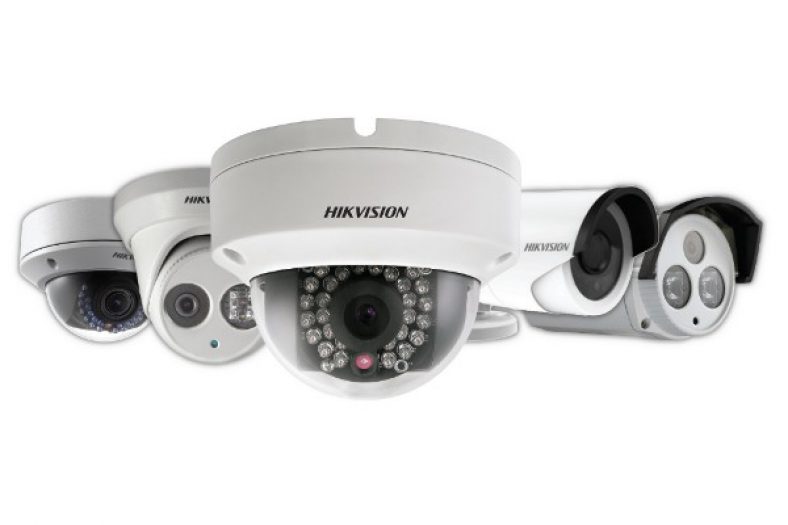
Hikvision Network Cameras Guide 2018

Hikvision Network Cameras - 2015 Guide

Written by

in

Network or IP security cameras

A network camera (often called an IP camera) is basically a CCTV or security camera that has a computer built-in. Most network cameras can independently monitor, detect and send (push) notifications to computers in a home network, or on the Internet, mobile phones, smart phones or any email address. Some can also record footage locally to SD cards or to Network Attached Storage (NAS) drives, upload snapshots to FTP and much more. In a sense they perform the function of a camera and Digital Video Recorder (DVR) or Network Video Recorder (NVR) combination.

[wpsm_toplist]

[text-blocks id=”4426″ slug=”earnings-disclaimer-incl-hivision-dahua”]

Hikvision – who are they?

[easyazon_image align=”center” height=”400″ identifier=”B017C53TI0″ tag=”vueville.com-eaz-20″ locale=”US” src=”https://www.vueville.com/wp-content/uploads/2015/02/HikvisionPressRelease30092013.jpg” width=”600″]

Hangzhou Hikvision Digital Technology Co. Ltd. popularly known as simply Hikvision, is a Chinese surveillance product company started in 2001. It is listed on the Shenzhen Stock Exchange. It claims to be the world’s largest supplier of video surveillance products and solutions including security cameras. Indeed, many of the popular security camera brands (such as Swann and older Lorex) are rebranded Hikvision products. Hikvision is a name that is quickly becoming popular in the home security and surveillance market owing mainly to their inexpensive but reliable and high performance network (or IP) security cameras and Network Video Recorders (NVR). In a crowded market with names such as Dahua and Foscam, Hikvision stands out as a great first choice for a network camera.

Network camera range

Hikvision divides their network cameras into three product lines, rather interestingly called 2-Line, 4-Line and 6-Line. Please note that these terms have nothing to do with the analog resolution term ‘lines’ (TVL). Pan-Tilt-Zoom (PTZ) camera models are not included in the scope of this guide, as they are more expensive and probably not of interest to the average homeowner.

What can these cameras do? As a standalone device, they do not need a computer to function. So if you are looking for an inexpensive, simple, energy bill friendly CCTV solution that you can monitor through email, FTP, or from your smartphone, without having to run a computer 24/7 the Hikvision cameras are perfect.

Model naming convention

The full Hikvision IP camera naming convention is:
‘DS-2CD’ ‘1234’ F/H/WD – I (A) (H) (P) (S) (W) (Z)

  • A fixed prefix:
    • ‘DS-’, then
    • ‘2CD’, then
  • 4 digits:
    • product line number 2,4,or 6
    • a digit from 0 to 5 representing the type of IP camera.
    • a digit representing the number of megapixels.
    • a digit representing – currently unknown.
  • The next set of alphabets of F, H or WD indicate the presence of certain features:
    • F indicates Flash memory. This means that the model has the on-board flash storage option. Remember you will have to add a suitable SD-Card.
    • H indicates a built-in heater.
    • WD indicates Wide Dynamic Range (WDR).
  • The suffices are:
    • I indicates a true IR cut filter with auto day/night switch.
    • A indicates Auto back focus.
    • H indicates HD resolution (1080p).
    • P indicates P-iris.
    • S indicates Sound or what Hikvision calls Smart Audio Detection – 2 way audio using either inputs or a mic and a built-in speaker as in some indoor models.
    • W indicates WiFi.
    • Z indicates a Motorized VF lens.
    • The last digit indicates the range of the camera infrared LEDs. Model specific details can be found below.

For the Hikvision NVR model naming convention, check our detailed NVR Buying Guide.

Product lines

We have grouped Hikvision’s network camera range so that you can easily find the model you are looking for.

2-Line

Fixed focus / Standard IR LED

[table id=2 responsive=scroll /]

Fixed focus / EXIR LED

[table id=3 responsive=scroll /]

As one of our readers pointed out, the last digit in the DS-2CD2T32-I3 / DS-2CD2T32-I5 / DS-2CD2T32-I8 models represents the claimed range of the infrared LEDs:
I3 = 30 metres
I5 = 50 metres
I8 = 80 metres

Variable focus / Standard IR LED

[table id=4 responsive=scroll /]

4-Line

Box camera

[table id=5 responsive=scroll /]

Bullet camera

[table id=7 responsive=scroll /]

Indoor Dome / Standard IR LED

[table id=6 responsive=scroll /]

Outdoor Dome / Standard IR LED

[table id=8 responsive=scroll /]

6-Line

Ultra lowlight

[table id=9 responsive=scroll /]

Where can I buy them?

Hikvision network cameras have good reviews on the Internet and we you can check out our reviews of the Hikvision 2CD-2132F-IS and the Hikvision 2CD-2542FWD-IS. The cameras are officially allowed to be sold via designated distributors only, however it is often cheaper to source them directly from China via AliExpress or via Amazon.

Amazon

[easyazon_link keywords=”hikvision” locale=”US” tag=”vueville.com-eaz-20″]Check price on your local Amazon site[/easyazon_link]

As always on an online marketplace, please ensure you are buying from a genuine seller.

More resources

Full product catalogue (PDF)
Hikvision Web catalogue

Comments

37 responses to “Hikvision Network Cameras Guide 2018”

  1. Rob Avatar
    Rob

    Hey guys,

    Really good article. Was looking to purchase some POE cameras. I was a bit confused on the – S two way audio smart audio parameter on the camera. Does it mean that the camera has a built in microphone and speaker or do we have to buy our own microphone and speaker to connect. What would you go for if this is the case in the 2 line cameras or the 4 line cameras in terms of Fixed DOME vs BULLET for outdoor. I was looking at 2142 FWD IWS and the 2742 DOME 2642 BULLET from the 2 range as long as they could support TWO WAY AUDIO whether it was built in or I had to provide my own speaker and mic. Or Maybe something from the 4 LINE cameras. This is for home install. Can you guys help out.

    1. Daniel Avatar

      Hi Rob,

      Hikvision puts a -S in the camera model name if it either has two way sound inputs or it actually has an onboard microphone. Confusing, I know. The only way to know for sure is to look at the datasheet. None of the outdoor models have a built-in speaker, that’s for sure. For example, the 2142FWD-IWS and DS-2CD2742FWD-IS domes have audio in and out connectors, you have to add the actual mic and speaker. But the DS-2CD2532F-IWS has a built-in mic! Note all 3 examples have the -S. What I have noticed is that among outdoor cameras, the mini-domes tend to have on-board mics. Use the network camera comparison table here to find ones with the features you want.

      Daniel

  2. Andy Avatar
    Andy

    Hi VueVille,

    Thanks for your great article/guide. I am a Chinese living in Canada. I plan to purchase HikVision IP cameras directly from on-line store in China, and do not worry about Chinese interface/menu. I know HikVision has the Chinese model and overseas model. Can I use those Chinese model here in Canada, and update the firmware safely?

    HikVision IP cameras sold in Aliexpress/Ebay always have warning not to update firmware. Is it simply because after updating the firmware, the interface will become Chinese? I read somewhere saying some camera will even become brick by entering rebooting cycle. Are those HikVision cameras sold in AliExpress/Ebay Chinese model with hacked firmware to have multi-language interface/menu?

    1. VueVille.com Avatar

      Hi Andy,

      Thanks for your kind comment. You are right, there are two official versions of Hikvision cameras – the Chinese versions and the International verions. The cameras sold on AliExpress/EBay with the warning not to upgrade the firmware are the Chinese versions hacked to enable the “Multi-language” options. When you upgrade these cameras’ firmware, the language will return to Chinese. This is the main reason that the sellers do not advise upgrading the FW.

      There is also a chance that the cameras may get bricked if the wrong/incorrect FW is flashed onto them. This is why we recommend buying the international versions from Amazon or other reputed local distributors.

      VueVille

      1. Andy Avatar
        Andy

        Hi VueVille,

        Thanks for your prompt reply. So I can purchase a “original” Chinese version HikVision IP camera (no hacked firmware: all menu are in Chinese) and use it in Canada, correct?

        Andy

        1. Daniel Avatar

          As far as we know, yes. We haven’t tried this but hey it’s an IP camera, it should work anywhere in the world.

  3. Daniel Avatar
    Daniel

    Hi,
    I’m thinking of purchasing 4 DS-2CD4332FWD-PTZ(S) cameras and a DS-7716NI-E4/16p NVR from China to use in Australia as they are considerably cheaper to buy than from an official store.

    The seller claims that they have been upgraded to a mult-language version and the firmware will be V5.2.5 or V5.3.0. He also claims that the fimeware cannot be further upgraded.

    Is it worth the risk to purchase this setup despite not being able to upgrade the firmware?

    1. VueVille Avatar
      VueVille

      Hi Daniel,
      It all depends on whether the cameras are exposed to the internet and if so, how secure your network is. I say this because the main reason you would want to upgrade the firmware of your camera or NVR is if major bugs or security issues are found in the current firmware, which can be fixed through a newer firmware. If your cameras/NVR will not be connected to the Internet, but will be used purely for recording on to an NVR which itself will not be connected to the internet, you will not normally need to upgrade the firmware. Of course I also make the assumption that you will be happy with the features provided by the firmware versions that come with the camera.

      Now one of our cameras ordered from China is on the V5.2.5 multi-language version and we are perfectly happy with it. We are not too concerned about upgrading the firmware because even though our cameras are connected to the Internet, the entire network is behind a VPN server and this provides a level of security we are happy with. Have a look at our network setup here. So for us, the savings of ordering from China far exceeded the disadvantage of not being able to upgrade the firmware.

      Another point to consider is how long you will be using the cameras/NVR. Any device’s firmware will become dangerous to use beyond a certain age (2-3 years?), simply because technology moves so fast these days.

  4. Larry Avatar
    Larry

    I have installed a Hikvision DS-7716NI-SP/16 with 10 Hikvision bullet and dome cameras. The firmware for NVR is 3.34 and cameras are 5.3 and I keep getting no resource showing up on some of the cameras on the split screen instead of the picture but I can see them if I go to full screen. When I search for recording most of them come up with no resource and I can’t find any recorded video except on a couple of them but the cameras show the motion recording icon on the screen when movement is happening, any suggestions.

    1. VueVille Avatar
      VueVille

      Hi Larry,
      I can’t say why this is happening, but removing and adding the cameras may help.

Leave a Reply

Your email address will not be published. Required fields are marked *