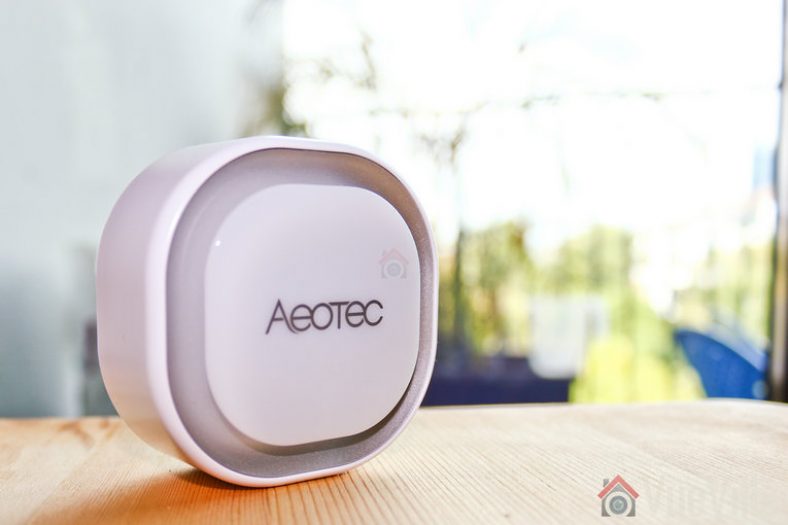
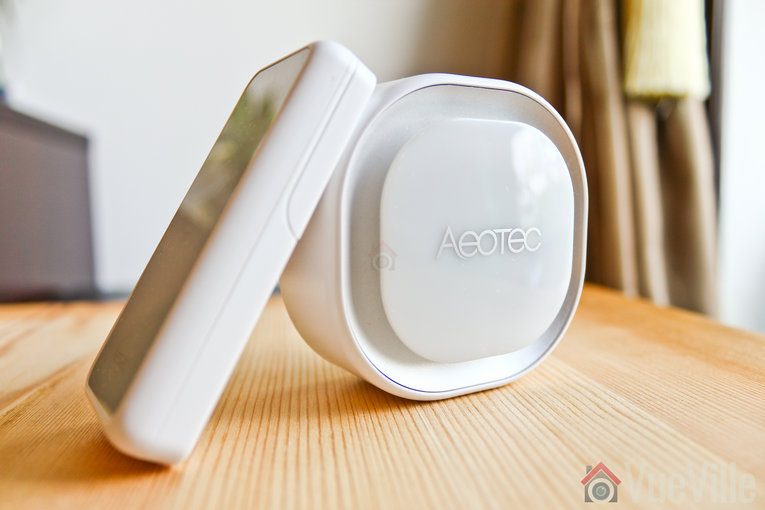
What if you are not interested in a wireless video doorbell, but still want a smart doorbell? The [easyazon_link identifier=”B07DC569FL” locale=”US” tag=”vueville.com-eaz-20″]Aeotec Doorbell 6[/easyazon_link] is one such wireless smart doorbell based on the Z-Wave standard.
This doorbell can be added to your Z-Wave network to send you push notifications whenever the bell is pressed. You can also trigger other actions such as turning on porch lights, or recording a camera that covers your porch.
Aeotec used to belong to Aeon Labs, the company founded in 2006 and based out of Silicon Valley. But that’s no longer the case. Aeotec also have another brand that’s popular in the smart home market – Popp.
Over The Air (OTA) Updates: Yes, requires Z-Stick USB
Distance between Chime and Z-Wave Gateway: 30m (Indoor) /150m (Outdoor)
Button Control distance between Chime and Button: 120m (Barrier-free sight line distance)
Input Voltage Chime:
Battery, 3.7V; Power Adapter, DC 5V/2A
Button: Battery, 3V
Chime’s Battery:
Model: PT502035
Capacity: 400mAh
Detachable: No
Chargeable: Yes. Charging via Chime Power Adapter.
Endurance: 4 hours
Button’s Battery:
Model: CR2450
Capacity: 630mAh
Detachable: Yes
Chargeable: No
Endurance: 2 years
Power Consumption Chime: IWORK < 80mA, I STANDBY < 70mA
Button: IWORK < 20mA, I STANDBY < 0.1uA
Splash, Water, and Dust Resistant
Chime: Not Waterproof
Button: Rated IP55 under IEC standard 60529
Sensors: Vibration Sensor
Supported Paired Buttons Max: 3
Tones Storage Size 16MB
Supported Tones Max: 30; (No interface to replace the built-in tones. If want to change these built-in tones, you need to contact us to customize).
Volume Max: 105dB from 10cm away; 7 adjustable volume levels
Design and Hardware Features
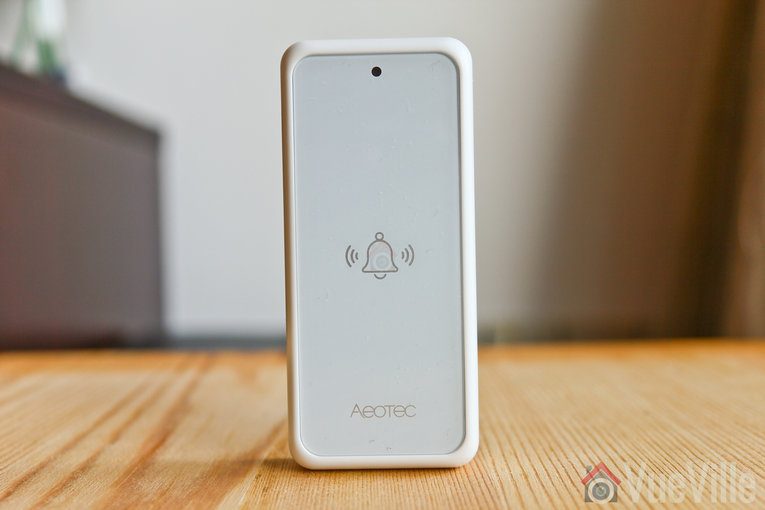
The Aeotec Doorbell 6 has two halves – the chime unit and the ring button.
The chime unit unit has a premium look and feel about it. There is a white LED embedded in the front face and lights up when the chime rings. The LED in the chime unit is actually a very powerful 1000 lumens strobe light as well.
Why does a doorbell have such a powerful LED? Because the chime unit is also engineered to be a standalone siren, in fact it is the exact same thing sold as the Aeotec Siren 6.
The chime has a 105dB speaker. You can also add up to 3 additional buttons to the same chime unit. Aeotec sells these as [easyazon_link identifier=”B07PB3NPPJ” locale=”US” tag=”vueville.com-eaz-20″]accessory buttons[/easyazon_link]. The signal between the chime unit and the bell button is a 433MHz ultra low-power signal. This also maximises the range between the two.
The chime has a built-in rechargeable battery, but surprisingly it only has a capacity of 400mAh. Not much for a doorbell chime if you ask me. However, it is designed to be powered with the included power adaptor. So for powering the doorbell through a brief power cut, the battery seems to be fine.
What about tamper-resistance? The chime has a sensitive vibration sensor. So once you include the doorbell in your Z-Wave network, the siren will go off if you move the chime. The Z-Wave tamper device will also be triggered at your Z-Wave controller.
The chime unit is not water-proof by the way, it is intended for indoor use only.
The bell button has a tiny LED at the top that blinks twice when you push the bell. An included CR2450 3V button cell powers the button. It has a capacity of 630mAh and is rated for 2 years use.
The bell button is water-proof with an IP55 ingress rating.
Software Features
The chime unit uses Z-Wave to communicate with your HA controller/hub. The chime unit has 16MB storage and comes with 30 tones pre-installed. You cannot add more unless you delete a few existing ones.
The 30 tones range from the standard ding-dong tone, a Christmas tree tone, and various alarm tones such as smoke, CO and even a tornado siren!
The doorbell has a surprising number of unusual features such as a Z-Wave signal quality tester.
You can also change the chime LED light effect. This is achieved by changing certain parameters described in the engineering document. I find the vibration sensor alarm unnecessary, and thankfully you can mute it or reduce the alarm volume by modifying parameter 0x11(17). Just like other Aeotec products, the doorbell is extremely customisable. You just need to check whether your Z-Wave controller can send parameter configuration commands.
Installation and Setup
The bell button can be easily installed beside your door with the included 3M double-sided tape or the small screws.
I plugged in the chime unit using the provided power adaptor.
My smart home automation system is built on Z-Wave using the excellent HomeSeer HS3 software. I use an Aeotec Z-Stick USB device as the Z-Wave radio, plugged into a Dell Inspiron laptop running HS3.
Pairing the Aeotec Doorbell 6 with my Z-Wave controller
As per the quick start guide, I plugged in the Doorbell 6 chime unit. The front white LED started blinking in heartbeat style.
I then had to set HomeSeer HS3 into ‘Inclusion mode’. For this I navigated to Plugins > Z-Wave > Controller Management. Under Actions, I selected ‘Add/Include a Node’ and clicked the Start button.
I pressed the action button on the rear of the doorbell once. If your hub requires S2 security, you can enter the first 5 digits of the DSK printed on the back of the doorbell.
The inclusion process finished successfully in HS3. According to the manual, doorbell’s white LED should then turn solid white for 30 seconds to indicate successful inclusion, but it didn’t. Nevertheless the doorbell was included successfully.
I could then see all the different devices the doorbell created in my HS3 devices list.
Performance
Loudness
The chime can get very loud indeed. If you place it at a central location in your home, you should hear it from pretty much any room.
Wireless Range
The first thing I tested is the range between the bell and the chime. Remember this does not use Z-Wave, just a standard signal like an ordinary wireless doorbell. Aeotec claims the range between the chime and the button is up to 90 metres. I had no trouble with the chime ringing throughout my home, so the stated range sounds right.
Next up was the range between the chime and my Z-Wave controller. My home is of solid concrete construction and where I have placed the chime means that the Z-Wave signal has to penetrate at least 2 solid concrete walls. This the chime unit did with ease.
The mesh network design of Z-Wave networks allows the doorbell chime unit to act as a repeater . So the chime unit actually extended the reach of my Z-Wave network.
Responsiveness and Reliability
Whenever I pressed the button, the chime instantaneously rang. There was mo delay in the device status updating in HS3 either.
Compatibility
The Aeotec Doorbell 6 is officially compatible with Samsung SmartThings, Fibaro HomeCenter and Popp Hub. But as you can see from my review, it works with HomeSeer HS3 also.
Zack at Self-hosted Home has got it to work with HomeAssistant event though its not officially supported.
You can see the full compatibility list on the Aeotec website.
Verdict
I have been using the Aeotec Doorbell 6 for over 4 months now. A smart doorbell means that I can now trigger actions such as turning on porch lights and sending notifications to mobile devices.
[review]
Where to Buy
Buy the Aeotec Doorbell 6 from [easyazon_link identifier=”B07PB2HN6D” locale=”US” tag=”vueville.com-eaz-20″]your local Amazon store[/easyazon_link].
One of the hottest developments to hit the smart home market has been smart video doorbells. Not only are they handy to stop parcel thieves, they also add that cool factor to your smart home.
Until that is, you find that many wireless doorbells are useless without a paid cloud subscription. Can you believe it – some doorbells that are sold as ‘smart doorbells’ are anything but smart unless you pay a monthly fee forever. No thank you! So here are my picks for the best wireless smart video doorbells without a monthly fee.
A quick note: As an Amazon Associate I earn from qualifying purchases. This post contains affiliate link(s). An affiliate link means I may earn advertising or referral fees if you make a purchase through my link, at no extra cost to you.
The inherent advantage a doorbell has in becoming a smart video enabled device is the excellent vantage point. The doorbell is typically at the right height to get a clear face shot of anybody who shows up at your door. They are also then in good proximity for 2-way audio.
So you could answer your door as if you were at home, but without being at home! This is what a good smart video doorbell should be able to do. The experience should be so seamless that it should never occur to your visitors that you may actually not be in the house. What better way to scare of potential intruders casing your home and checking whether someone is at home.
All the doorbell cameras featured below support RTSP video streams, so you can add them to Blue Iris or other surveillance software to integrate with your own DIY CCTV or Home Automation System.
Wireless Smart Video Doorbells – What to look for
The features to look for in a wireless smart video doorbell are:
Video Resolution – You should aim for a minimum of 1080p resolution. Also called Full HD / 2MP resolution, the higher level of details captured increases the chance of law enforcement making a positive identification of faces. 4MP and 5MP is on offer these days, and higher is better! Though you should consider a wired PoE Smart doorbell if you go for those higher resolutions.
Night vision – An absolute must in a security camera, it should have InfraRed LEDs for true night vision. A true IR cut filter is good to have because this will ensure good night vision and true daytime colours (you don’t want that cheap looking purple hue!)
Field of view – Measured horizontally, it should be at least 90 degrees. This depends on the focal length of the camera lens. Increasingly vertical field of view is also important to catch parcel thieves.
Weather proofing – Good doorbells will have an IP rating which indicates its resistance to water ingress. Worth getting one with a rating as then you know your smart doorbell won’t fail in a particularly bad storm and become a very dumb and very dead doorbell.
Audio – A smart doorbell should have a microphone and speaker built-in
Local storage – in the form of a microSD card slot, or internal flash storage is very desirable because it means you don’t need to necessarily pay for a cloud storage subscription.
Software features – Live streaming capability is pretty much standard these days but the continuous recording feature is not. Email alerts on motion detection are essential, push notifications to smartphone app is ideal so that you know as soon as somebody is at your door regardless of whether they actually push the button.
Cloud reliance – ideally not reliant on the cloud for operation, mainly because it introduces lag into your conversation.
Motion detection method – PIR motion sensor preferable to cut down on false alerts
Power source – Ethernet port preferable with PoE (Power over Ethernet) support, internal battery is good for power backup purposes
Wireless – Support for WiFi, Bluetooth
Advanced features:
Preferably ONVIF or API available for interfacing with NVR / home automation controllers.
Preferably RTSP stream capable so that you can use 3rd party applications such as tinyCam Monitor Pro. ONVIF support is ideal as it means it can interface with home automation controllers such as my Vera Plus, and my existing DIY home NVR security system.
Best Wireless Smart Video Doorbells with No Monthly Fee – 2024 Recommendations
Best Budget Wireless Smart Doorbell – XTU Smart Video Doorbell Camera (J5)
Existing mechanical doorbell power supply needed (12-24V AC, 12V DC)
VueVille Smart Home Verdict:
Local storage available: Yes
Advanced motion detection: PIR, Blue Iris
Cloud reliant: Only initial setup
Battery backup: No
Self-monitoring works without Internet? Yes
Smart home compatibility: ONVIF & RTSP supported
XTU is a relatively new market entrant and differentiates its J5 doorbell camera by supporting both ONVIF and RTSP officially. This is 1 of the handful of smart doorbells I could find on the market that officially supports ONVIF.
The J5 has a 3 MegaPixel (MP) sensor which is an acceptable resolution for security purposes. Video quality is excellent and the company’s Cloudedge mobile app is better than most. Physical installation and the app-based setup is easy and the J5 scores points here because this can be a challenge with other doorbells.
On the smart home front, the J5 officially supports ONVIF & RTSP, so you can add this camera directly to any 3rd party NVR that supports ONVIF & RTSP.
So you can view doorbell’s video easily on your existing mobile apps if you prefer. The RTSP stream addresses are:
The J5 thus works with QNAP QVR Pro, Synology Surveillance centre, and you can also use Blue Iris or Home Assistant add-ons to perform advanced motion detection.
Main stream rtsp://::8554/Streaming/Channels/101
Sub-stream rtsp://::8554/Streaming/Channels/102
If you don’t have an ONVIF compliant system, just wire a [easyazon_link identifier=”B004Z0W1LM” locale=”US” tag=”vueville.com-eaz-20″]relay[/easyazon_link] in parallel. When the doorbell is pressed, the voltage drop will trigger the relay. Use a Z-Wave sensor to detect this and fire off an event to your HA controller. You can even accomplish this wirelessly – this particular bell push actually sends a 433MHz signal that you can pick up using a Sonoff bridge flashed with Tasmota.
2 years in, there are plenty of reviews on Amazon also that confirm this is a quality video doorbell at a great price.
Please note that not all XTU doorbells support RTSP and ONVIF, the J5 does support these protocols, but most other products in the XTU doorbell family do not!
[easyazon_link identifier=”B091H47Q4J” locale=”US” tag=”vueville.com-eaz-20″]View price on Amazon[/easyazon_link]
Best Wireless Smart Doorbell – Amcrest SmartHome Video Doorbell Camera (AD410)
[wpsm_titlebox title=”VueVille Smart Home Verdict” style=””]
Local storage available: Yes
Advanced motion detection: PIR, RTSP enables 3rd party analysis
Cloud reliant: Only initial setup
Battery backup: No
Self-monitoring works without Internet? Yes
Smart home compatibility: Home Assistant, Alexa, Google Assistant, Amcrest SmartHome
[/wpsm_titlebox]
Over the years, Amcrest have built up a solid reputation for their high quality IP cameras. Last year Amcrest ventured into the smart home space with a new product line simply called ‘Amcrest Smart Home’ with a new companion mobile app. This relatively new product line was a bit sparse at launch with just the 1080p AD110 model launched last year along with some battery powered cameras. But now they have added more stuff and a premium wireless doorbell to the family – the AD410 in review here.
The reason I like this wireless video doorbell is that it doesn’t force you to pay a monthly fee for storing and viewing video clips or motion detection events (unlike Ring, Zmodo, Simplisafe, Eufy and the Remobell). Cloud storage is fully optional, and for some may be a decent off-site backup solution. I still don’t like storing footage from my home on the cloud, so the local storage option is a must-have in my book.
Last year we noted the unmistakable similarities between this Amcrest doorbell and the [easyazon_link identifier=”B083KNPG7L” locale=”US” tag=”vueville.com-eaz-20″]Dahua DHI-DB11[/easyazon_link]. But this new AD410 model seems to be an entirely in-house model.
For the AD110 launched last year, Amcrest added the older but very useful PIR sensor method that detects heat signatures for reliable motion detection. Not the software based method that is set off by clouds, shadows, trees another inanimate objects.
Still the PIR sensor cannot distinguish between people and animals. So the AD410 has dispensed with the PIR sensor in favour of the much more convenient software-based person detection.
On the smart home front, you can pull an RTSP video stream from the camera. While the cheaper AD110 doesn’t officially support ONVIF, the AD410 does support it. The AD410 also officially supports Blue Iris and allows 2-way audio through that interface too. So you can use Blue Iris to perform advanced motion detection.
You can also access the doorbell from Alexa, Google Home and Google Assistant. But do note the only available action is to utter a phrase to view the stream on-demand.
[wpsm_column size=”one-half” position=”last”]
[wpsm_titlebox title=”VueVille Smart Home Verdict” style=””]
Local storage available: Yes
Advanced motion detection: PIR, Blue Iris
Cloud reliant: Only initial setup
Battery backup: No
Self-monitoring works without Internet? Yes
Smart home compatibility: Alexa, Amcrest SmartHome
[/wpsm_titlebox]
[/wpsm_column]
It was only a matter of time before Amcrest ventured outside of security cameras. They have built up a solid reputation for their IP cameras, and look set to repeat this with their smart home product line. This new product line is a bit sparse at the moment, with just some battery powered cameras and this Wi-Fi doorbell available at the moment.
The reason I like this wireless video doorbell is that it doesn’t force you to pay a monthly fee for storing and viewing video clips or motion detection events (unlike Ring, Zmodo, Simplisafe, Eufy and the Remobell). Cloud storage is fully optional, and for some may be a decent off-site backup solution. I still don’t like storing footage from my home on the cloud, so the local storage option is a must-have in my book.
Amcrest generally re-brands Dahua cameras, and they seem to have stuck to the winning formula again. The similarities between this Amcrest doorbell and the [easyazon_link identifier=”B083KNPG7L” locale=”US” tag=”vueville.com-eaz-20″]Dahua DHI-DB11[/easyazon_link] are unmistakable. Both doorbells are 1080p, have a viewing angle of 140°, have an SD card for local storage, and are IP55 weather-rated. They also share 2.4 GHz Wi-Fi support.
For 2021, Amcrest has the much vaunted PIR sensor that detects heat signatures for true motion detection. Not the software based method that is set off by clouds, shadows, trees another inanimate objects.
On the smart home front, you can pull an RTSP video stream from the camera. But sadly, ONVIF is not enabled (just like the Dahua it is based on) and even the Amcrest API is not supported. Happily though, this Amcrest doorbell officially supports Blue Iris and allows 2-way audio through that interface too. So you can use Blue Iris to perform advanced motion detection. Here’s hoping Amcrest adds ONVIF support so that you can detect the bell push also.
There are no alarm out ports for home automation integration. But there’s a far simpler way to integrate any doorbell with your HA system – just wire a [easyazon_link identifier=”B004Z0W1LM” locale=”US” tag=”vueville.com-eaz-20″]relay[/easyazon_link] in parallel. When the doorbell is pressed, the voltage drop will trigger the relay. Use a Z-Wave sensor to detect this and fire off an event to your HA controller.
If there’s one reason to go for the Amcrest and not the Dahua it is based on, it’s because Dahua doesn’t support retail customers like Amcrest does. Dahua’s customers are primarily integrators and installers, not people like you and me. But if you are willing to brave it, you can buy the Dahua doorbell from B&H Photo who are official retailers of the device.
[wpsm_column size=”one-half” position=”last”]
[wpsm_titlebox title=”VueVille Smart Home Verdict” style=””]
Local storage available: Yes
Advanced motion detection: PIR, Blue Iris
Cloud reliant: Only initial setup
Battery backup: No
Self-monitoring works without Internet? Yes
Smart home compatibility: Yes, RTSP, Blue Iris, IFTTT, Alexa, Google Home
[/wpsm_titlebox]
[/wpsm_column]
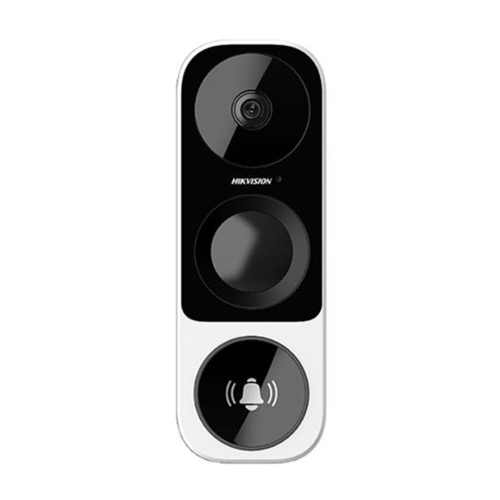
While doorbells with RTSP, ONVIF and API support have been around for some time (think [easyazon_link identifier=”B012Z5X0FE” locale=”US” tag=”vueville.com-eaz-20″]Doorbird[/easyazon_link]), Hikvision took their time to launch a wireless video doorbell. But DIY enthusiasts all over the world were rewarded by their patience with the Hikvision DS-HD1.
The retail version of the DS-HD1 is the EZVIZ DB1 – EZVIZ being the retail brand of Hikvision and the one that they want people like you and me to buy. It has a very high pixel count for a video doorbell, 3 MP at a resolution of 2048×1536. The lens used is 2.2 mm @ f2.4. As more people fall prey to parcel theft, its important to get a full 180 degree view. Manufacturers have realised this and so the EZVIZ DB1 has a vertical viewing angle of 180°, and a decent horizontal viewing angle of 105°.
Importantly, it has a PIR sensor to reduce false motion alerts and recordings. The night vision range of 16 feet is pretty good and you can define custom motion detection zones.
How about local streaming of video? The DB1 supports RTSP and so you can pull the video feeds using the standard Hikvision URL format in Blue Iris or any other software that can accept an RTSP stream. You also get onboard microSD card storage as well.
Sadly there is no ONVIF support but you can get it by flashing the LaView firmware. This also lets you use the PIR motion sensor of the DB1 as a recording trigger in Blue Iris or other supported software. You can also grab JPEGs the same way you would with any other Hikvision camera.
Google Home and Echo Show support has also been added. Interestingly using Monocle the Echo Show can directly pull the camera video stream without routing it through the cloud. Of course I have no interest in letting an Echo device into my home, so I won’t be testing that.
The Hikvision DS-HD1 has also been re-branded as the [easyazon_link identifier=”B07GN355R6″ locale=”US” tag=”vueville.com-eaz-20″]RCA HSDB2A[/easyazon_link], [easyazon_link identifier=”B07XZMQZXW” locale=”US” tag=”vueville.com-eaz-20″]Nelly’s Security NSC-DB2[/easyazon_link], [easyazon_link identifier=”B07LFP9C9C” locale=”US” tag=”vueville.com-eaz-20″]LaView One Halo[/easyazon_link], [easyazon_link identifier=”B07TS91DV7″ locale=”US” tag=”vueville.com-eaz-20″]Winic NDB313-W[/easyazon_link], and LTS LTH-7132-WIFI (now discontinued).
All of them are virtually the same Hikvision OEM camera and even the firmware are interchangeable. They all support RTSP and flashing the LaView One firmware adds ONVIF. But I would strongly recommend going with the EZVIZ brand if you can, simply because it is the official Hikvision retail brand.
The Hikvision DS-HD1 is the model that the EZVIZ DB1 above is based on, so it has the same features. You won’t get retail support from Hikvision unless you buy it from an authorised dealer such as BH Photo. Even then, the US government is getting touch on Chinese state-sponsored security camera companies like Hikvision and Dahua. So if you do opt for these brands, make sure you isolate the doorbell properly so that it cannot access the Internet or even the rest of your network.
[easyazon_link identifier=”B0837BTDT2″ locale=”US” tag=”vueville.com-eaz-20″]View price on Amazon[/easyazon_link]
Doorbird WiFi Video Doorbell – A feature-packed PoE but cloud-reliant doorbell
The Doorbird is a very interesting doorbell that is developed, engineered and manufactured in Germany. It differentiates itself from the rest by having an insane amount of features. It has an RTSP stream, and can work with any app that can receive an RTSP stream (like tinyCam Monitor Pro). The RTSP stream can be accessed at rtsp://<device-ip>:<device-rtsp-port>/mpeg/media.amp
It also has an Ethernet port which supports Power over Ethernet (PoE 802.3af Mode-A) so is the perfect choice if you want to add a video doorbell to your existing standards compliant CCTV system (Synology or QNAP NAS/Hikvision NVR, Blue Iris etc.).
The camera is only 720p which is only average, however it has a hemispheric lens which provides a brilliant 180 degree field of view just like the Skybell video doorbell. The vertical field of view is also a very good 90 degrees. 12 InfraRed LEDs provide very good night vision with a true IR cut filter.
Two-way audio is standard along with noise cancellation and echo reduction features.
On the communications front, it has WiFi, Bluetooth (optional) and uniquely an RFID system using a 433 MHz transceiver. This adds compatibility with Volkswagen, digitalStrom, Control4, RTI, Elan, URC, Nuki, and Zipato. It also has its own API which should be of interest to home automation fans.
Cloud features
Just as most of these smart video doorbells, the Doorbird is reliant on the cloud for advanced operations:
“Our products are cloud-based solutions (see also NEST, Dropbox, etc.). For reasons of reliability and security no port forwarding is conducted through the internet (using NAT or DynDNS). Our products establish an encrypted VPN tunnel connection to our cloud server (located in a highly secured data centre in Germany). Our products rely on the same secure communications technology used by financial institutions for online banking (SSL). The remote access via our cloud-server is free of charge. It is not technically possible to use our products autonomously without internet access or without access to our cloud servers, as otherwise key functionality like, for example, push notifications (special server security certificates required by Apple and Google), remote access, periodic free software updates etc. would not be available.”
Reliant on the cloud for operation/motion detection
No internal battery
[/wpsm_cons][/wpsm_column]
Ring Video Doorbell Pro – A popular yet flawed 1080p cloud doorbell
The Ring Video Doorbell Pro is the latest model in the Ring family of doorbells and was launched in March 2016. It is dependent on a power supply. It differs from the standard Ring WiFi doorbell in that it doesn’t have a battery but has an upgraded 1080p sensor. It can also send you motion detection alerts to your email or smartphone if it detects motion in front of it. However it cannot record video continuously.
No API for interfacing with home automation controllers
[/wpsm_cons][/wpsm_column]
Check out my review below for more information: [wpsm_top postid=1994]
I do not recommend the original Ring WiFi doorbell either because it works only on an internal battery and is limited to a 720p resolution.
One point to note is that Ring doesn’t claim any weatherproof rating for its doorbells, which is one of my biggest bugbears with their video doorbells. The company seems to have been overwhelmed by the incredible popularity of its products, with customer service being less than stellar of late.
Skybell Wi-Fi Video Doorbell – Another Full HD 1080p cloud doorbell
The Skybell is one of those rare products that is designed and manufactured in the USA. California to be exact. For many, that itself is a great advantage when buying a tech gadget.
The Skybell HD is a very small unit at 2.8 inches across and just 0.9 inches deep. It is a straight replacement for your existing wired doorbell if it uses a transformer. It comes with a mounting plate, so it is quiet easy to install to any surface.
The camera of the doorbell can do up to 1080p Full HD video, which is very good. It also has a class-leading 180 degree field of view. It has the standard features you would expect such 2-way audio using a microphone and a speaker. It has a unique multi-colour bell push button that can do 16 million colours, a nice personalisation touch to make your doorbell truly yours. Additionally it has a real PIR sensor which should aid massively with motion detection.
Alas the doorbell doesn’t have true night vision because it doesn’t have Infrared LEDs. Instead it has a standard white LED light to light up the person in front of the doorbell. This is fine if its a person standing right in front of the doorbell, but limited by the 15 feet range of the PIR sensor for triggering an alert at night. It doesn’t have a local storage option such as an SD card so all video is routed through their cloud servers. This means you need a decent internet connection with an upload speed of at least 1.5 Mbps.
The Skybell HD has an IPX4 weather proof rating, which means it is not rated for solid ingress but is protected against splash water from any direction. It is claimed to work between -40 and 140 degrees F.
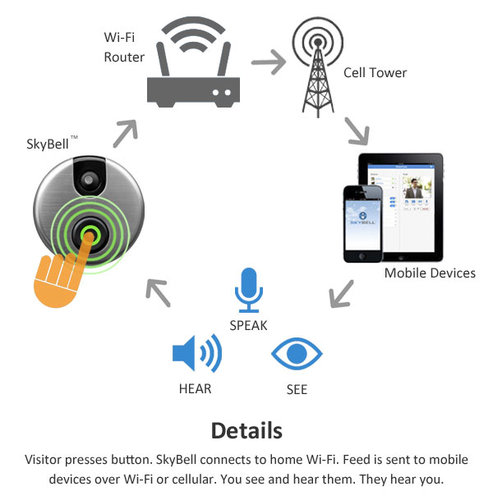
So how does it work? There are 3 ways you can use the Skybell HD video doorbell:
A visitor presses the bell button and you get a call on your smartphone.
A visitor doesn’t press the button, but the PIR motion sensor detects motion and alerts you.
Live view – you can check in any time to see what’s going on at your front door.
This image below should explain the details:
How about compatibility with home automation? It supports IFTTT, Alexa, Nest and many other home automation protocols and controllers.
Reliant on the cloud for operation/motion detection
No ethernet port/No PoE
No internal battery
No ONVIF support, not RTSP stream capable
No API for interfacing with home automation controllers
[/wpsm_cons][/wpsm_column]
Vuebell WiFi Video Doorbell (Hardwired) – A cheap 720p doorbell that is cloud-reliant
Vuebell is a brand owned by the Chinese manufacturer, Netview Technologies (Shenzhen) Co. Ltd. They have been in business since June 2010 and their camera are sole on Amazon and HomeDepot.
The Vuebell consists of an outdoor unit and an optional indoor chime unit. At just over 3.1 inches x 3.1 inches, the Vuebell’s outdoor unit has a very attractive design and looks very much a premium device. It is smaller than the standard video doorbell. Even so, it sports Infrared LED lights, a microphone, a speaker, and a Passive InfraRed (PIR) detector.
The video sensor has a max resolution of 720p which is about par for video doorbells but has an outstanding 185 degrees field of view. You can get a live view on your smartphone whenever somebody presses the doorbell, when the PIR detects motion within its range of 3 metres or you can simply check in any time to watch. It can send you motion detection alerts and save clips on either a micro SD card or on the free cloud storage account.
The outdoor unit of the Vuebell is very easy to install as it is a straight replacement for your existing hardwired doorbell. It just uses your existing hardwired doorbell transformer.
The indoor unit is a great touch and has a range of chimes. The chime volume can be adjusted and can be very loud if you need it to be.
The August Wi-Fi Video doorbell was one of the first smart video doorbells to hit the market. So its features now look a bit dated compared to the latest gen models such as the Ring and Skybell doorbells. It is designed to work with the optional Smart Lock so that you can answer the door and then unlock it if desired. With its smart industrial design and sleek looks, it won over many looking for a stylish and smart video doorbell.
The August Wi-Fi Video doorbell was selected by Fortune magazine as the Best Doorbell. However I find that very strange because it doesn’t have Infrared LEDs, it relies on a standard white LED for lighting the scene at night. This is fine for lighting up somebody right in front of the camera but in the absence of a PIR motion sensor, makes the camera very poor at detecting motion in the night.
Reliant on the cloud for operation/motion detection
No PIR motion sensor
No ethernet port/No PoE (Power over Ethernet)
No internal battery
No ONVIF support, not RTSP stream capable
No API for interfacing with home automation controllers
[/wpsm_cons][/wpsm_column]
Conclusion
I researched dozens of wireless smart video doorbells and rejected most of them before arriving at the list above. Sadly, the trend of not letting customers watch recorded clips without a cloud subscription is increasing.
Another rising trend is locking away smart features behind a monthly subscription. This is simply unacceptable as more and more homes are getting smarter with a multitude of smart devices that all need to communicate with each other. That’s why I always check whether a product can work locally without cloud reliance and supports industry standards such as RTSP or ONVIF.
So the smart doorbell market still has some way to go before it catches up with proper security cameras when it comes to integrating with a smart home. But now is as great a time as any to get your toes wet. So please let me know which smart doorbell you are going for, I would love to hear from you!
Video doorbells are a great addition to your home security arsenal. I am just about to embark on my home automation project and the doorbell is one area that I am particularly interested in making smart.
Having already installed a wireless video doorbell for my mom, I would advise looking for the following features as a minimum in a video doorbell:
1080p HD resolution
Night vision capability using IR LEDs, ideally a true IR cut filter so that daytime pictures don’t suffer from false colours
Good field of view, the best in class have up to 180 degrees horizontally
Weatherproof/waterproof rating, ideally at least IP 65
Built-in speaker and microphone
WiFi supported
Live View feature
Video recording feature
The following features are nice-to-have:
Continuous recording feature, preferably without a subscription
Should not be reliant on the cloud for basic functions
Local video storage option in the form of an SD card slot
A PIR motion sensor to cut down on false alerts
Preferably should not rely purely on batteries as saying your smart doorbell isn’t working because you forgot to charge the batteries is pretty dumb
ONVIF support so that you can use the doorbell with any NAS, NVR, or software like ZoneMinder, BlueIris
RTSP stream capable so that even if ONVIF support is not present, you can still pull the video stream and use it
Should integrate with popular HA (Home Automation) hubs and controllers such as the MiCasaVerde Vera Plus – this means that the manufacturer should have a published API in the very least.
Siren for scaring off intruders
Ring – Who are they?
Ring was founded by Jamie Siminoff who is also its CEO. But the Ring Video Doorbell is not their first product. That was the DoorBot, launched in 2014 by Jamie’s earlier venture, Bot Home Automation. It was mostly a success and was then rebranded as the Ring Video Doorbell.
Essentially, the Ring Video Doorbell and the Ring Video Doorbell Pro work on the same concept – a doorbell that is connected via WiFi to your home network. When someone rings the bell at your door, an alert is sent through your home network over the Internet to Ring’s servers and then to your phone wherever it is in the world. Use the app on your phone to then check who is at the door (live video), and if you so desire, you can have a 2-way conversation with them right away using the built-in speaker of the doorbell. The optional Chime wall plug unit will produce a chime as well when the doorbell is pressed. So you can see them but they can’t see you. Also, you can be anywhere – in the house itself, in another city for work, or on holiday in France; but your caller will never know!
If you are not able to answer, you can play a recorded greeting and allow them to leave a message. The event will be captured so that you can check on missed calls later on.
It also has motion detection so that it can sound a chime or send alerts to your smartphone, whenever someone is at the door, even if they don’t press the doorbell. This is why it is billed as a smart home security device – you can know if somebody is snooping around.
The original Ring model was launched in 2014 and was received positively albeit having a few flaws, such as flaky reliability and motion detection, apart from being reliant on a battery that needed charging.
The Pro model under review here is the second product in the Ring family and was launched in March 2016. The main improvements over the Ring model are 1080p HD over 720p HD, 5GHz wifi support and push notifications, custom motion zones, and it is hardwired into your existing doorbell thus obviating the need for batteries.
Since the Ring is dependent on the Internet for smart features such as live view, smartphone notifications, video conversations, a 2 Mbps upload speed is recommended by Ring for best performance. We would say this is the bare minimum and you really need a faster connection.
Ring Video Doorbell Pro – What is it suitable for?
If you want to improve the security of your home by keeping tabs on who’s calling even when you are not at home, the Ring doorbells are perfect for you. If you are renting and cannot rip out your existing dumb doorbell, go for the Ring Video Doorbell which uses batteries. If you are a homeowner and can replace the existing dumb doorbell fully, go with the Ring Video Doorbell Pro.
With its new Ring+ feature, you can integrate it into your home automation system. So you could have WeMo lights going on automatically when someone rings the bell. Or if you have one of the supported hubs, you can create your own custom action trigger.
Main specifications
If you are trying to make up your mind between the Ring WiFi Video Doorbell vs. Ring Video Doorbell Pro, the main differences are the video resolution and the installation method.
ring doorbell pro vs. ring Doorbell compared:
[table id=19 responsive=scroll /]
What’s in the box
The Ring Video Doorbell Pro comes with everything you need to set it up:
Ring Video Doorbell Pro
Four interchangeable face-plates
Drill bit
Mounting screws and anchors
Security screw
Security screwdriver
Pro Power Kit
Wire Clips
Wire Harness
Install instruction guide
Installation
Installation is straight-forward and Ring has provided comprehensive manuals online. The Ring Doorbell Pro requires access to a wired doorbell but is compatible with most mechanical or digital (electronic) doorbell kits that use transformers between 16 and 24 volts AC.
DC transformers or AC transformers below 16 volts AC are not supported at this time. However they are working on connecting it directly to a transformer.
Here is a brief overview of the installation process:
Install the Pro Power Kit – this unit connects to your existing doorbell itself and provides the right power level for the Ring Video Doorbell Pro. Your current doorbell transformer should be of the 16/24 Volts variety, otherwise the Ring just won’t get enough power.
Install your Ring Video Doorbell Pro – You will need to hardwire it into your existing doorbell switch.
Complete the in-app setup and you are ready to go.
One of the main issues with the original Ring was the rather pedestrian 720p HD resolution. The Pro comes with 1080p HD which is a welcome improvement. Higher the resolution, higher the amount of detail you can get to identify shady characters you have caught on video!
Night vision
The Ring Video Doorbell Pro has true night vision using its InfraRed LEDs. So you will be able see clearly what’s going on even in pitch dark conditions, although it will be in black and white.
Field of View
The Ring Pro has a very wide-angle lens with a 160° field of view which is on the higher side. This should make it very difficult for anyone to escape getting caught by the Ring if they are up to no good.
Design
The Ring Pro is very stylish and definitely looks the part. The body is not compact though at 12.65cm x 6.17cm x 2.21cm, and so is not very discreet. The body is not IP rated for water proofing, but Ring says it is resistant to rain water and will even work in freezing temperatures. The recommended operating temperatures range is -20.56 ºC to 48.89 ºC.
Audio features
The Ring Pro has a built-in speaker and microphone for two-way audio conversations.
Wireless
The Ring Pro supports the 5GHz WiFi band in addition to 2.4GHz. However the 5GHz band has shorter range than 2.4 GHz, so unless your router is near the Ring’s intended installation location, use the 2.4 GHz band.
There is no RJ45 ethernet port, hence no Power over Ethernet feature either. It has to be hardwired to your doorbell, so that’s where it gets power from.
Motion Detection
Another weakness with the original Ring was the fixed motion detection zones which has also been improved.
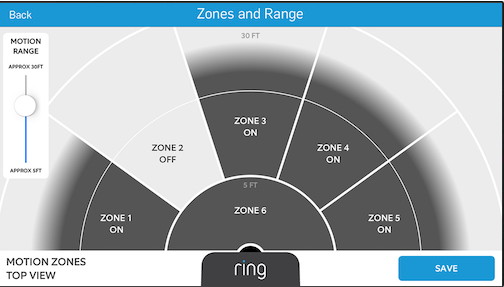
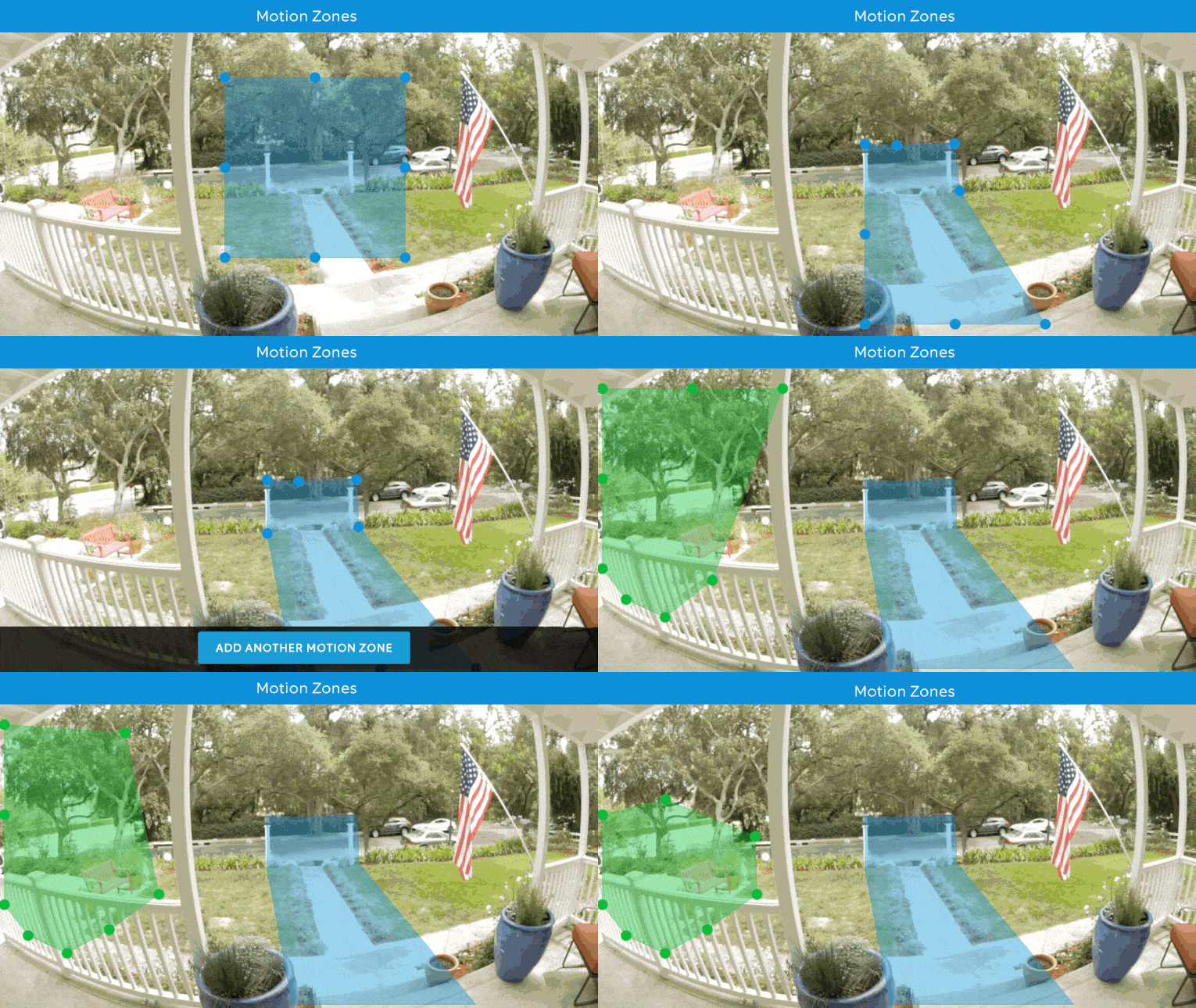
You can now draw custom motion detection zones with the Ring Pro. The sensitivity can also be adjusted.
Live View and Recording
The Ring Pro supports live view without a cloud subscription. However, if you want to record event or motion-triggered clips, you will need to pay the monthly or annual cloud subscription.
Cloud Services
Every Ring doorbell comes with a free trial of the Ring.com cloud recording service. After the 30 day trial, it costs $3 a month (£2.5) or $30 annually (£24.99), per device. Sadly, there is no discount for additional devices on your cloud account.
So what can you do with the camera if you don’t want to pay for the cloud subscription?
1080p Full HD Live View – you can check into the Ring Video Doorbell Pro to see what’s going on
Motion detection zones and push alerts to your smartphone
Two-way audio: Talk and listen through the built-in microphone and speaker
Since there is no local storage option – you have to pay for the cloud subscription if you want the following features:
to record event clips and to store that recorded video for up to 6 months.
permanently save a video by downloading it to your device
timeline feature which helps you find recorded event clips quickly
create and share recorded video clips with friends, family, or law enforcement
Ring recommends a minimum broadband upload speed of 2Mbps for using the live streaming and cloud storage features. [wpsm_video]https://www.youtube.com/watch?v=5QLVliiob8s[/wpsm_video]
Mobile App
The Ring Pro app is available for Android, Apple devices, and Windows 10.
Verdict
The Ring Video Doorbell Pro is a good product that has been well-received by users and this wireless doorbell is the #1 best-seller on Amazon USA. However I am not happy about its reliance on Ring.com servers and the security, privacy and latency issues this introduces into the mix. It is easier to set up due to this reliance on the cloud though.
As a power user, I would have preferred a fully local option where it is not reliant on the Internet to work.
[review]
Where can I buy it?
[easyazon_link identifier=”B01DM6BDA4″ locale=”US” tag=”vueville.com-eaz-20″]View on your local Amazon Website[/easyazon_link]