Category: IP Cameras

IP or Network Cameras

  • Buyer’s Guide: Network Camera Comparison Chart

    Buyer’s Guide: Network Camera Comparison Chart

    Are you wondering how you should go about choosing the right network camera for your home? Network cameras (or IP cameras) are the most important components of a CCTV security system, and you need to make sure you select cameras that are suited to the areas you want to monitor in and around your home.

    There are so many network cameras out there, all with a dizzying array of features, not to mention applications. This is why we decided to build the ultimate comparison table for IP cameras. The table below lets you compare the features of the most popular IP cameras from manufacturers such as Hikvision, Dahua, etc. You can filter using the feature dropdown boxes, search for a specific feature such as built-in IR, or sort these cameras by any column. So you can quickly narrow the list down to the IP cameras that have the features you are looking for. We have also explained the comparison criteria in detail just below the table.

    We think the most important features that you should look for in an IP cameras are in the comparison table below. Just below the table, you will also find detailed explanations of each of the columns of this table. Let us know if we can improve this tool in any way!

    IP Camera Comparison table/matrix:

    Start by filtering the table by using the dropdown boxes or the search box. Simply click on the required column header to sort by that criteria. To reset the table, just reload this page by clicking your browser’s refresh button or pressing F5 on your keyboard.

    [table id=14 responsive=scroll /]

    IP Cameras – Explanation of technical terms:

    Category: We have grouped the IP Cameras into categories so that you can easily drilldown to the exact type of camera you are after.

    Price: To provide you with up-to-date prices, we have linked the cameras to Amazon. Please note that this is an affiliate link which will provide us a commission if you decide to buy from Amazon.

    Company:This is the camera manufacturer – we have listed cameras from Hikvision, Dahua and Reolink at the moment.

    Product line:Manufacturers often use distinctive titles for their product families – this can be a useful way to filter out cameras that do not appeal to you.

    Status:Tells you whether the camera is a current model or has been phased out.

    Model:Each manufacturer has their own system of nomenclature. Here is a guide to the naming system used by Hikvision.

    MP:The number of megapixels the camera’s sensor has.

    IR:IR stands for infrared, most of the cheaper cameras use ring style LEDs but the EXIR LEDs are brighter and have a higher range.

    Focus:This column refers to the amount of flight the camera lens has, this maybe either a fixed iris, a manual iris which can be changed, an auto iris which is motorized and responds to the light levels in the scene, or the most desirable P-iris(precise-iris) which uses a motorized lens with additional software to improve the video quality.

    PTZ:Indicates whether the camera has a Pan Tilt Zoom feature.

    PoE:Indicates whether the camera supports Power-over-Ethernet.

    Snapshots:Indicates whether the camera supports taking image snapshots.

    IR-cut filter:Good quality cameras have an automatic IR cut filter, which lets the camera produce true colour video during the daytime and high quality night time videos. A camera without this filter can only ever have one of the two, not both.

    WDR:Stands for Wide Dynamic Range. WDR is desirable as it enhances the darker parts of the scene without blowing out the brighter parts of the scene.

    Hikvision IP Camera Model Naming Convention

    Please refer to the Hikvision product guide to understand the model naming convention.

    [text-blocks id=”earnings-disclaimer-incl-hivision-dahua”]

  • Hands-on Review: Amcrest ProHD 1080p Wireless Indoor IP PTZ Camera (IP2M-841)

    Hands-on Review: Amcrest ProHD 1080p Wireless Indoor IP PTZ Camera (IP2M-841)

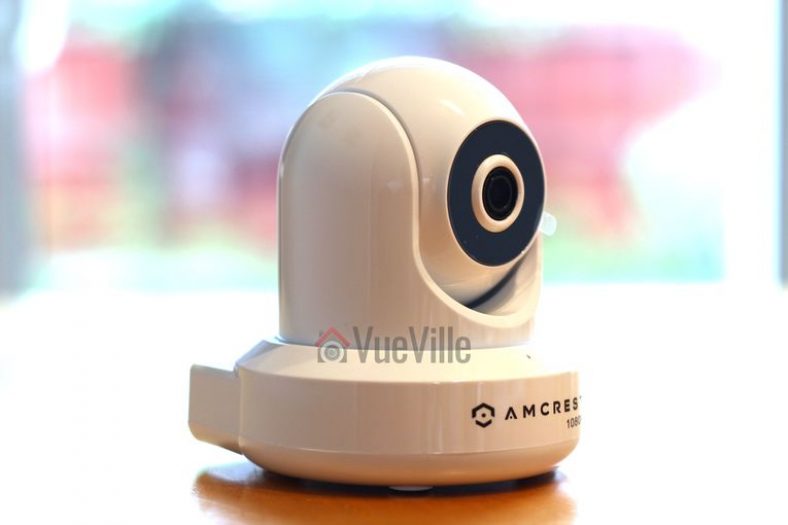
    Are you looking for a reliable wireless security camera that can act as a baby monitor, a nanny camera, or just to talk to your dog while you are away? The Amcrest ProHD IP2M-841 Wireless Indoor IP Security Camera is what you need: a feature-rich network camera which has great video quality, excellent night vision and crystal clear two-way audio capability. I have been using it for over a year now and here is a hands-on review based on my experience of using it day in and day out.

    [wpsm_column size=”two-third”]
    This indoor IP camera has all the features I recommend in an indoor security camera like live streaming, 24/7 recording, and playback features that you can access either locally or remotely via the camera’s web interface or the Amcrest smartphone apps. The stand-out feature is of course Pan-Tilt which lets you look around for a 360 degree view. It can record video, sound and images to an SD card in the camera, to a Network Attached Storage (NAS) or to the cloud. FTP support for alert snapshot images is also present.
    [/wpsm_column]

    [wpsm_column size=”one-third” position=”last”]
    Amcrest ProHD IP2M-841B Wireless Indoor Pan-Tilt IP Security Camera - Front View - VueVille.com

    [easyazon_link identifier=”B0145OQTPG” locale=”US” tag=”vueville.com-eaz-20″]Check Price on Amazon[/easyazon_link]

    [/wpsm_column]

    [wpsm_toplist]
    [text-blocks id=”5527″ slug=”earning-disclaimer”]

    Making sense of the Amcrest naming convention

    If like me, you have been struggling to figure out which Amcrest camera you really need or what the letters and digits in the model number mean, simply refer to our easy-to-use guide to Amcrest cameras. It has a comprehensive list of all the Amcrest security cameras, neatly categorized by indoor/outdoor use and features such as WiFi, PoE.

    Briefly this camera has two models based on the colour. Check out the [easyazon_link identifier=”B0145OQTPG” locale=”US” tag=”vueville.com-eaz-20″]IP2M-841B[/easyazon_link] on Amazon for the black colour model and [easyazon_link identifier=”B0145OQXCK” locale=”US” tag=”vueville.com-eaz-20″]IP2M-841W[/easyazon_link] on Amazon for the white colour model.

    What is the Amcrest ProHD IP2M-841 suitable for?

    [easyazon_image align=”center” height=”510″ identifier=”B0145OQTPG” tag=”vueville.com-eaz-20″ locale=”US” src=”https://www.vueville.com/wp-content/uploads/2016/12/Amcrest-ProHD-IP2M-841B-Wireless-Indoor-Pan-Tilt-IP-Security-Camera-Front-View-VueVille.com_.jpg” width=”765″]
    The Amcrest ProHD IP2M-841 is a versatile surveillance device and its applications are only limited by your imagination! The most common residential indoor security camera applications are:

    • As a baby monitor in a nursery (it supports 2-way audio), this is what I use it for
    • As a nanny monitor for peace of mind (it is discreet and small enough to be hidden),
    • General home security – monitor and secure rooms, hallways, corridors, access and exit points, guesthouses, garages and outhouses (the pan-tilt function gives you installation flexibility).

    The common business uses for this sort of IP camera are:

    • Monitor and secure office areas, stores, warehouses etc.,
    • Observe employees and customers,
    • As a visible deterrent against criminal activities.

    What’s in the box – Unboxing

    [easyazon_image align=”center” height=”510″ identifier=”B0145OQTPG” tag=”vueville.com-eaz-20″ locale=”US” src=”https://www.vueville.com/wp-content/uploads/2016/12/Amcrest-ProHD-IP2M-841B-Wireless-Indoor-Pan-Tilt-IP-Security-Camera-Box-Angled-View-VueVille.com_.jpg” width=”765″]

    [easyazon_image align=”center” height=”510″ identifier=”B0145OQTPG” tag=”vueville.com-eaz-20″ locale=”US” src=”https://www.vueville.com/wp-content/uploads/2016/12/Amcrest-ProHD-IP2M-841B-Wireless-Indoor-Pan-Tilt-IP-Security-Camera-Box-Contents-VueVille.com_.jpg” width=”765″]

    Main specifications

    [table id=12 responsive=scroll /]

    Camera Design

    [easyazon_image align=”center” height=”510″ identifier=”B0145OQTPG” tag=”vueville.com-eaz-20″ locale=”US” src=”https://www.vueville.com/wp-content/uploads/2016/12/Amcrest-ProHD-IP2M-841B-Wireless-Indoor-Pan-Tilt-IP-Security-Camera-Front-Angled-View-VueVille.com_.jpg” width=”765″]

    [easyazon_image align=”center” height=”510″ identifier=”B0145OQTPG” tag=”vueville.com-eaz-20″ locale=”US” src=”https://www.vueville.com/wp-content/uploads/2016/12/Amcrest-ProHD-IP2M-841B-Wireless-Indoor-Pan-Tilt-IP-Security-Camera-Side-View-VueVille.com_.jpg” width=”765″]

    [easyazon_image align=”center” height=”510″ identifier=”B0145OQTPG” tag=”vueville.com-eaz-20″ locale=”US” src=”https://www.vueville.com/wp-content/uploads/2016/12/Amcrest-ProHD-IP2M-841B-Wireless-Indoor-Pan-Tilt-IP-Security-Camera-Back-View-VueVille.com_.jpg” width=”765″]

    Installation

    Amcrest claims that this camera is a doddle to set up and we agree. The camera has a standard camera tripod screw hole (1/4-20 UNC thread) for mounting. The mounting bracket should be able to take at least 3 times the weight of the camera.

    Also note that this camera has alarm in and out connections. This means you can use a PIR sensor with this camera instead of relying on software based image detection. Using a PIR will drastically reduce the number of false alerts you may get with just image based motion detection.

    Using the Alarm Out connection, you can then make the camera trigger another device to take action such as start recording, send email or push alerts, or execute home automation tasks such as turn on outdoor and indoor lights.

    Software Setup

    For initial setup, you have to hook up the camera to a power source and connect it to your router via an ethernet cable. The username and password are both ‘admin’. The camera will prompt you to change these, which is an excellent security measure and we commend Amcrest for taking this step. Too many IP cameras connected to the internet still have the default login details and this is an open invitation for hackers, especially if simple port forwarding is in place.

    The web administration portal is elegant and thoughtfully laid out with all the options you expect in the right places. However the interface uses an NPAPI plugin like almost all inexpensive security cameras which work only with Internet Explorer and Firefox. It does not work on the Chrome browser but this is not strictly the camera’s fault. Google has decided not to support this plugin in Chrome. Just as other security camera manufacturers will soon have to, we expect Amcrest will redesign the web interface from the ground up in HTML5 to overcome such browser limitations.

    Amcrest ProHD IP2M-841 Wireless Indoor Pan-Tilt IP Security Camera Admin Page
    The Web Administration page is thoughtfully designed and easy to use

    The rest of the setup process is where some users seem to get tripped up. So we have provided our own little overview of how to set up the Amcrest ProHD 1080p camera. Depending on how you want to use the camera, there are different routes to completing the setup process:

    Local viewing only (unless you port forward):

    1. Ethernet cable using IP Config tool, then WiFi, then apps:
      1. Ethernet cable, IP config tool, change camera’s IP address to your sub-net so that you can access the web setup page.
      2. Login to web admin page and add WiFi details.
      3. Install apps on phone, add camera in phone apps:
    2. Without ethernet cable or IP config tool, using only WiFi:
      1. Install smartphone apps.
      2. Scan the QR code and add camera to the app.

    Local and Remote viewing, without using Port forwarding:

    1. P2P setup:
      1. Connect the camera to your router via ethernet or WiFi(Method 2 above has to be performed first if connecting through WiFi).
      2. Add camera either via Serial No. or the QR code.
    2. Amcrest Cloud setup for recording video clips and snapshots to the cloud
      1. Connect the camera to your router via ethernet or WiFi(Method 2 above has to be performed first if connecting through WiFi)
      2. Visit www.Amcrest.com/Cloud to add the camera to your cloud account
    3. Web Access setup (essentially the same as Method 1 but using Amcrest’s servers instead):
      1. Connect the camera to your router via ethernet or WiFi(Method 2 above has to be performed first if connecting through WiFi)
      2. Visit www.AmcrestView.com to add the camera to your cloud account

    Once the initial setup is complete, you can switch to using the camera’s built-in WiFi.
    Here’s a video that walks you through one way of setting up the camera:
    [wpsm_video]http://www.youtube.com/embed/OA_UPFfoE_U[/wpsm_video]

    Camera Features

    Hardware

    The Amcrest ProHD IP2M-841 has a 2 Megapixel sensor which lets you record at 1920×1080 resolution and 30 frames per second(fps). This is perfect for home surveillance because you get that much more clarity and sharpness in the recorded videos and images.

    The on-board IR has a good range of 10 metres which is standard for this class of IP camera. The lens fitted to the camera has a focal length of 4mm which provides a very good 90 degree field of view. The camera’s pan and tilt functions allow you to point the camera at the area or object of interest.

    The camera is capable of recording up to a bitrate of 8Mbps. We recommend a minimum of 4Mbps for ensuring you get a good level of detail. The IP2M-841 supports Wi-Fi upto 802.11g speeds of 54 Mbps. This is more than enough for the camera’s video stream to be sent wirelessly so faster protocols such as 802.11n or ac are not necessary.

    What we really like about this camera is that it has an SD card slot, so you have the option of using this camera in a standalone manner. It doesn’t have to be connected to a network device for recording alert videos or images.

    Two-way audio is present and is perfect for using the camera as a baby monitor or a wireless doorphone. Watermarking and text overlays are also supported.

    Recording modes

    The camera can be configured to record 24/7 to the built-in SD card, a network storage location or to the Cloud.

    1. SD Card: We recommend using the SD card only for motion detection or alert snapshot and video recording, and not 24/7 recording. This is because you will wear out the SD card quicker if you record to it 24/7. Think of the SD card as redundant storage in case your main storage location fails or is stolen.
    2. The recommended way of using an IP camera is this: use it to record 24/7 footage or motion activated video to a network storage location. This could be a NAS, an NVR (see NVR buying guide), or a computer running surveillance software such as BlueIris.
    3. Cloud storage: In this mode, your camera will upload motion detection clips, snapshots, or 24/7 recording clips to the Amcrest Cloud.
      Amcrest ProHD IP2M-841 Wireless Indoor Pan-Tilt IP Security Camera - Amcrest Cloud

      4 hours of cloud storage are included with the camera, and this should be sufficient for most people intending to use only motion detection recording.

    Motion Detection and other event alerts

    Motion detection alerts is one of the most enjoyable features of an IP security camera. When an IP camera detects motion as per your pre-defined rules, it should be able to send an email alert with snapshots and ideally send push notifications also. The Amcrest can do all of this and has all the standard motion events that we have come to expect from good quality cameras. It supports email alerts and can attach snapshots with each motion detection email alert. You can also set up each event to be active based on a schedule. An interesting feature of the Amcrest ProHD is that you can also set it up to do a Pan-Tilt tour when it detects motion. Remember you can enable more than one type of event at the same time. Let’s take a closer look at each one of the motion detection events available.

    Simple Motion Detection

    Amcrest calls it ‘Motion Detect’, this motion detection method simply looks for changes in the scene according to the area defined, the sensitivity and the threshold.

    Video Tamper

    This method triggers an alert when the camera is blanked out.

    Audio Detection

    A useful event mode that as the name suggests will trigger an alert and alert actions based on sounds detected by the onboard mic or the audio input.

    Alarm

    This is where the alarm input connection comes into use. If you have a PIR sensor connected to the camera, you can set up this event to detect motion using the PIR. Since the PIR sensor works on changes in heat and not image based detection, you can cut down the number of false alerts that is the bane of regular image based motion detection.

    SD Card abnormality

    This event can be set to trigger if the camera is unable to record to the SD card – either because of an error or because somebody has removed the SD card illegally.

    Network abnormality

    This event can be set to trigger if the camera is unable to record to the network storage location (NAS or NVR) – either because of an error or because somebody has tampered with the equipment.

    Illegal Access

    This event can be set to trigger if the camera detects unauthorised logins such as an invalid username, password or a hacking attempt.

    Smartphone apps

    Amcrest provides a free Android and iOS app, the Amcrest View Lite which lets you see your camera’s live video stream, pan and tilt the camera lens, and use the 2-way audio feature. However the free Lite version is missing some important features such as alarm push notifications. The paid Pro version adds alarm push notifications, image and video file sharing, exporting MP4 video, and exporting images to your phone storage. This surprised us because most other manufacturers offer all the Pro version’s features in their free apps. Some users have found the apps to be a bit glitchy though.

    Compatibility with NVR systems

    The Amcrest ProHD IP2M-841 supports the ONVIF protocol. ONVIF is an industry standard that enables surveillance equipment from different manufacturers to work together. This means that you can connect the Amcrest to any Network Video Recorder(NVR) or a computer running surveillance software, and the camera should work seamlessly.

    The camera also supports the RTSP protocol so you can also access the video stream using a video player like VLC on your computer. This is the URL to use: rtsp://login:pass@xxx.xxx.xxx.xxx:PORT/cam/realmonitor?channel=1&subtype=1
    The x’s are your camera’s IP address.

    Performance

    The camera has very good daytime quality thanks to the 1080p image sensor. Videos in low light and at night are also of high quality thanks to the built-in IR LEDs.

    I am using my Amcrest as a baby monitor and I’m constantly amazed by how clearly I can see my baby – I can even see his chest moving as he breathes in and out. If you are a parent of an infant, you know how reassuring that can be!

    The microphone is super-sensitive and picks up sounds not only in the same room but also from all over the house. So its also a great camera if you want to check in on your house while on vacation.

    The builtin speaker is surprisingly loud and I can clearly speak to baby as I make my way to his nursery.

    Verdict

    The Amcrest ProHD IP2M-841 is one of the best-selling wireless security cameras at the moment. The considerable array of feature such as 1080p FullHD resolution, pan-tilt feature, SD card slot, two-way audio, alarm connections, support for FTP, and configurable event modes in a high quality package represents real value for money.

    Note that the only feature this camera is missing in my opinion is PoE. But Amcrest has thought about this already – there is a PoE model, check out the [easyazon_link identifier=”B01H2JFE5W” locale=”US” tag=”vueville.com-eaz-20″]Amcrest ProHD IP2M-841EB[/easyazon_link] on Amazon. The E at the end of the model number indicates that the camera has the PoE feature, the B is just the colour. However it then loses the WiFi ability. Amcrest doesn’t currently make IP cameras with both WiFi and PoE, which is a shame.

    [review]

    Where can I buy one?

    We recommend Amazon as they are an authorized retailer of Amcrest security products.

    [easyazon_link identifier=”B07PXGT8K3″ locale=”US” tag=”vueville.com-eaz-20″]Check Price on your local Amazon Site[/easyazon_link]

    Also Consider

    • Canary All-in-One Home Security Device
      [easyazon_image align=”center” height=”500″ identifier=”B00NW31YSE” locale=”US” src=”https://www.vueville.com/wp-content/uploads/2016/11/31kmdDdME9L.jpg” tag=”vueville.com-eaz-20″ width=”500″]
    • Belkin NetCam HD+ Wi-Fi Surveillance Camera (added advantage of working with WeMo)
      [easyazon_image align=”center” height=”500″ identifier=”B00KNM763E” locale=”US” src=”https://www.vueville.com/wp-content/uploads/2016/11/31MjyPvdJqL.jpg” tag=”vueville.com-eaz-20″ width=”500″]
    • D-Link DCS-942L Wireless Day/Night Network Surveillance Camera with mydlink-Enabled
      [easyazon_image align=”center” height=”500″ identifier=”B0061MU0A6″ locale=”US” src=”https://www.vueville.com/wp-content/uploads/2016/11/41ks9X0iD2BL.jpg” tag=”vueville.com-eaz-20″ width=”500″]
  • Set up Alarm Push Notifications for your Hikvision IP Camera or NVR

    Set up Alarm Push Notifications for your Hikvision IP Camera or NVR

    How to set up Alarm Push Notifications for your Hikvision IP Camera or NVR - Vueville.com

    Imagine getting a pop-up alert on your smartphone whenever your IP camera or Network Video Recorder (NVR) detects motion. Wherever you are, iOS or Android device, on WiFi, 3G or 4G, it doesn’t matter. It could be an indoor IP camera that you are using as a baby monitor, an outdoor security camera monitoring your backyard, garage or your office or an NVR monitoring multiple cameras. Welcome to the world of Push Notifications and we will show you how to activate them on your security system.

    [wpsm_titlebox title=”Contents” style=”main”][contents h2][/wpsm_titlebox]

    Alarm Push Notifications

    A push notification occurs when an app running in the background on your smartphone alerts you in the form of a pop-up alert or a badge in the notification bar. Your phone does not have to check in periodically with the camera or NVR to receive this notification (this is called a pull request); rather the alert is pushed to your phone from the camera or NVR – hence the term push notification.

    Motion detection alarm push notifications are a very useful feature as you get an instantaneous alert on your mobile device much faster than an email alert can usually reach you (especially if you have turned on snapshot attachments).

    A push notification occurs when a background app on your phone alerts you through a pop-up alert or a badge.

    If you use Gmail, Yahoo or a modern email client on your smartphone, you can set up push alarm email alerts whenever your IP cameras detect motion.

    You can set up both alarm email alerts and alarm push notifications simultaneously on each of your IP cameras if you do not use an NVR. So when you receive a push notification, you can either check your email alert or log into the camera to view a live video steam.

    For this how-to, we will assume that you want to set up push notifications for a few IP cameras without an NVR. The following steps apply if you are using an NVR also, wherever a camera is mentioned you would apply the same step to your NVR instead.

    Port Forwarding or DDNS?

    When your phone is connected to your WiFi network at home, it knows how to reach the IP camera which is in the same network because the app is configured with your camera’s local IP address (such as 192.168.1.50). But when you leave your home and use a different method to connect to the Internet, such as your office WiFi or a café’s public WiFi, your phone can no longer reach the camera back home. This is where you need to do 1 of 2 things to let your smartphone connect to the IP camera back home:

    • Your router has an external public IP address assigned by your Internet Service Provider. Forward your camera’s ports to an external port on your router and these external ports are accessible from the Internet and thus from your smartphone. Now unless you have purchased a static IP from your ISP, your router’s public IP address will change ever few days or so.
      This means you will have to update the app on your phone accordingly each time – this is a hassle. Thankfully there is a way around this prickly problem, you can use a Dynamic DNS (DDNS) service to give your home network a friendly network name such as abcde.ddns.net which can be used to access your home network. We recommend the excellent free No-IP service.

    OR

    • Use EZVIZ/Hik-Connect Cloud P2P which does away with port forwarding by using P2P technology.

    We will explore the second option today: Using the P2P method.

    What you will need

    • iVMS-4500 HD app (Android, iOS)
    • A smartphone that supports the above app
    • At least one Hikvision camera such as the popular new LTS/Hikvision DS-2CD2042WD-I. Also see my list of recommended IP Cameras, if you are undecided on which camera to get.

    Step-by-step Process

    We assume that you have performed the initial setup of the camera and that you are able to access it through your web browser or video surveillance software.

    1. In each camera:

    1. Log into the web admin page.
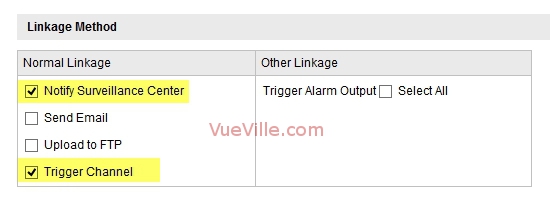
    2. In each of your cameras’ motion alert settings pages, make sure ‘Notify Surveillance Centre’ is checked.
      For example, Basic Event > Motion Detection
      Set up alarm push notifications for your Hikvision IP camera - Image 1 - VueVille.com
    3. Network > uPNP should also be enabled.
      Set up alarm push notifications for your Hikvision IP camera - Image 2 - VueVille.com
    4. Also go to Network > NAT and make sure: ‘Enable Port mapping’ is checked.
      Set up alarm push notifications for your Hikvision IP camera - Image 3 - VueVille.com
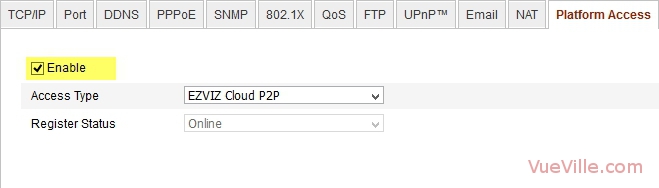
    5. Network > Platform access should be checked.
      Set up alarm push notifications for your Hikvision IP camera - Image 4 - VueVille.com

      NOTE: You do not need DDNS enabled.

    3. On your smartphone:

    1. Download and install the iVMS-4500 HD app from the Android Google Play Store or iOS App Store.
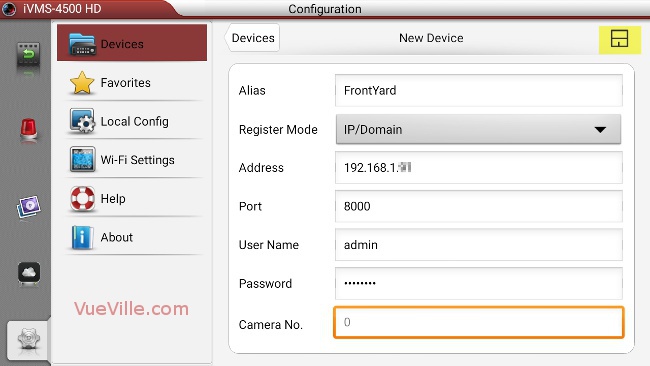
    2. Adding your cameras to the app.Click on the settings tab and select ‘Devices’.
      Set up alarm push notifications for your Hikvision IP camera - Image 5 - VueVille.com
      Click the + button at the top right to start adding your camera.Fill in all the fields. Use the IP address and server ports that you have configured for your camera. The default server port is 8000, so unless you have changed it yourself, you should use 8000. Save your setting by touching the save button at the top right.
      Set up alarm push notifications for your Hikvision IP camera - Image 6 - VueVille.com
      When you have added the first camera, the screen should look like this:
      Set up alarm push notifications for your Hikvision IP camera - Image 7 - VueVille.com

      Add all your cameras one by one.


      Set up alarm push notifications for your Hikvision IP camera - Image 8 - VueVille.com

    3. Go to the Push Notifications tab. You will see the cameras that you have added here with a toggle next to each one.
      Set up alarm push notifications for your Hikvision IP camera - Image 9 - VueVille.com
      Move each toggle to the right to activate alarm push notifications for each camera.
      Set up alarm push notifications for your Hikvision IP camera - Image 10 - VueVille.com

    4. Test by setting off the motion detection.

    5. You should see a notification like this within 1-5 seconds.

    Set up alarm push notifications for your Hikvision IP camera - Image 11 - VueVille.com
    Set up alarm push notifications for your Hikvision IP camera - Image 12 - VueVille.com


    Congratulations, you have now set up alarm push notifications on your smartphone. Also, if you have set up the port forwarding rules correctly on your router, you should receive push notifications outside your local network as well, i.e on the Wide Area Network (WAN).

    Troubleshooting

    If you do not get push notifications when the motion alarm is set off, try the following:

    • Make sure the account you are using to set up the camera in iVMS-4500 HD is an administrator account.
    • Uninstall the iVMS-4500 HD app, re-install the app and then try the setup steps above.

    If you face any problems or difficulties, please tell us through the comment field below. We love hearing from you!

    [text-blocks id=”earnings-disclaimer-incl-hivision-dahua”]

  • Best IP Camera 2016 Recommendations

    Best IP Camera 2016 Recommendations

    [wpsm_box type=”yellow” float=”none” text_align=”left”]

    The latest version of this guide is now available separately for outdoor and indoor IP cameras!
    [/wpsm_box]

    Yes I admit it, I am crazy about DIY home security. When I started researching home security and IP cameras, my goal was to find the best solutions to keep my family and home safe and secure. What started out as market research has turned into my passion and this blog!

    From my experience of trying to make sense of it all, choosing the right security camera can seem very difficult. But it is something that we just can’t afford to get wrong, is it? So I strongly recommend taking the time to research and understand the various options you have before spending your hard earned money. I have taken all my notes and condensed it into this single buying guide which I hope you will find helpful.

    My top 3 recommendations for outdoor security cameras are:

    • View [easyazon_link identifier=”B01BN1FEQE” locale=”US” tag=”vueville.com-eaz-afold-bipc16-20″]Amcrest IP2M-842EB[/easyazon_link] on Amazon
    • View [easyazon_link identifier=”B00PBXZVBE” locale=”US” tag=”vueville.com-ref-20″]Hikvision DS-2CD2132F-IWS[/easyazon_link] on Amazon, and
    • View [easyazon_link identifier=”B00RL2FZF0″ locale=”US” tag=”vueville.com-ref-20″]Hikvision DS-2CD2332-I[/easyazon_link] on Amazon.

    View my top recommendation for an indoor security camera on Amazon: [easyazon_link identifier=”B0145OQTPG” locale=”US” tag=”vueville.com-eaz-afold-bipc16-20″]Amcrest IP2M-841B[/easyazon_link].

    [wpsm_titlebox title=”Contents” style=”3″][contents h2][/wpsm_titlebox]

    Best Outdoor IP Camera 2016 Recommendations: Summary

    [table id=33 responsive=scroll/]

    As part of a well-planned security system, outdoor security cameras are an effective deterrent against would-be intruders and, if God forbid the worst happens, immensely helpful in assisting the police tracking down troublemakers. Surveillance cameras are not just for companies and large organisations anymore. You can get yourself a good High Definition IP camera (also called a network camera) for not much money. Indeed, its never been better for those who are interested in home security without paying a monthly fee.

    Many of these IP cameras work perfectly fine on their own without an NVR (Network Video Recorder) as they have built-in recording capabilities. They can also be easily integrated into either dedicated NVRs or PCs running surveillance software such as BlueIris.

    How this list is structured

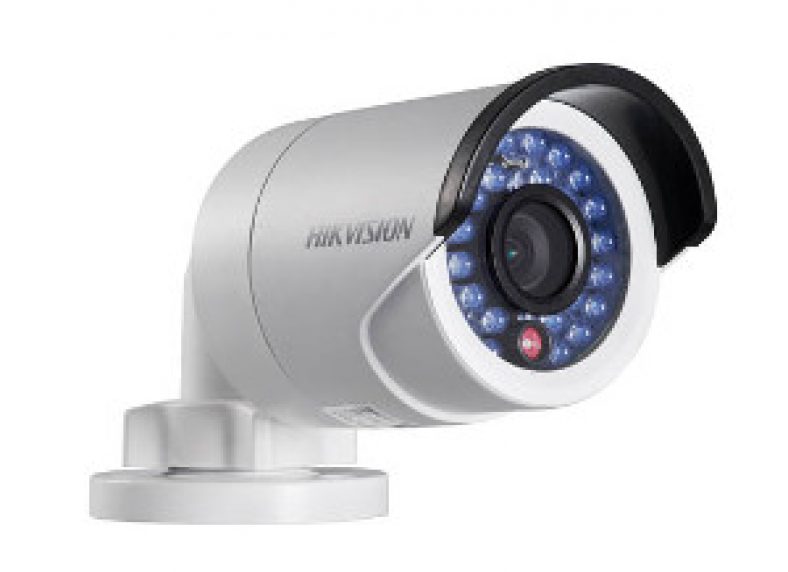
    There are so many ways of categorising IP cameras – we have chosen form factor as we believe this is one of the first decisions to make while choosing an IP camera. Bullet style, dome style or mini-dome, this will depend primarily on the location of installation and how visible you want the camera to be.

    Bullet style camera

    The typical CCTV camera look which is not discreet and serves as a visible deterrent. Very flexible as it can be aimed after installation. However, it is not resistant to vandalism.

    Best value: Amcrest IP2M-842E

    [wpsm_column size=”one-half”]
    [easyazon_image align=”center” height=”300″ identifier=”B01BN1FEQE” locale=”US” src=”https://www.vueville.com/wp-content/uploads/2016/12/41eRFhB2BCyL.jpg” tag=”vueville.com-eaz-bipc16-20″ width=”300″]
    [/wpsm_column]

    [wpsm_column size=”one-half” position=”last”]
    [wpsm_titlebox title=”Features” style=”3″]

    • 2MP (1080p) CMOS image sensor
    • 72° Viewing Angle
    • 30m (98 feet) IR range
    • Ethernet port with Power over Ethernet (PoE)
    • ONVIF and RTSP protocols supported
    • IP67 weatherproof rating

    [/wpsm_titlebox]

    [/wpsm_column]

    [wpsm_column size=”one-half”][wpsm_pros title=”PROS:”]

    • Very good video quality with 1080p Full HD resolution
    • SD card slot, PoE, WiFi optional
    • Simply superb value

    [/wpsm_pros][/wpsm_column][wpsm_column size=”one-half” position=”last”][wpsm_cons title=”CONS:”]

    • No audio/alarm connections

    [/wpsm_cons][/wpsm_column]

    [easyazon_link identifier=”B01BN1FEQE” locale=”US” tag=”vueville.com-eaz-bipc16-20″]View on Amazon[/easyazon_link]

    This excellent little IP camera from Amcrest is hands-down the best value IP camera we could find. Don’t waste your time, money, and sanity buying cheap knock-offs for a few dollars less than this camera. On the hardware front, this Amcrest camera seems to be a rebranded Dahua which is great because Dahua is one of the top security camera manufacturers in the world. It supports PoE and this is our recommended way of powering the camera and data communication (use a PoE switch like this one). Amcrest software is very professional, and simply works. The other strong reason to go with Amcrest is their extensive US and European support networks. Check out our Amcrest Camera Guide to learn more about who Amcrest are and why we love their cameras.

    If you prefer having the Wifi option as well, the Amcrest IP2M-842B is also available.

    Great value: Hikvision DS-2CD2032F-IW (Also re-branded as Swann)

    [wpsm_column size=”one-half”][easyazon_image align=”center” height=”300″ identifier=”B017C53TI0″ tag=”vueville.com-ref-20″ locale=”US” src=”https://www.vueville.com/wp-content/uploads/2015/11/Hikvision-DS-2CD2032-I-300p.jpg” width=”300″][/wpsm_column]

    [wpsm_column size=”one-half” position=”last”]
    [wpsm_titlebox title=”Features” style=”3″]

    • 3MP CMOS image sensor
    • Up to 79° Viewing Angle
    • 30m (98 feet) IR range
    • Ethernet port with Power over Ethernet (PoE), Wi-Fi
    • On-board storage (SD card)
    • ONVIF and RTSP protocols supported
    • IP66 weatherproof rating

    [/wpsm_titlebox]

    [/wpsm_column]

    [wpsm_column size=”one-half”][wpsm_pros title=”PROS:”]

    • 3MP, excellent image quality
    • SD card slot & WiFi
    • Superb value

    [/wpsm_pros][/wpsm_column][wpsm_column size=”one-half” position=”last”][wpsm_cons title=”CONS:”]

    • No audio/alarm connections

    [/wpsm_cons][/wpsm_column]

    [easyazon_link identifier=”B017C53TI0″ locale=”US” tag=”vueville.com-ref-20″]View on Amazon[/easyazon_link]

    Hikvision is a manufacturer that many of us venturing into home security may not have heard of. However, rest assured this company has produced some brilliant cameras and this little bullet camera has been one of their best-selling ever. Have a look at our Hikvision product guide to learn more about their product range.

    As our first IP camera purchase, we were surprised at how much camera you get for the money with the DS-2CD2032F-IW. With a 3MP Sony sensor, it has very good image quality, both during the day and at night. The full metal body is of solid construction and comes with a choice of lens sizes. The Sony image sensor contributes to stellar low light performance. Adding just a network storage location lets you use the built-in NVR feature if you are aiming at a single-camera setup initially. While it has POE and an SD card slot, it does not have audio or alarm features. Also available is the DS-2CD2032-I which is slightly cheaper at as it doesn’t have an SD card slot or WiFi. If you need higher resolution, there is a 4MP model available. See how you can set up motion detection alerts for any Hikvision camera.

    Great value: Dahua IPC-HFW4300S (Also re-branded as Lorex)

    [wpsm_column size=”one-half”][easyazon_image align=”center” height=”300″ identifier=”B00MUMRJMI” locale=”US” tag=”vueville.com-ref-20″ src=”https://www.vueville.com/wp-content/uploads/2015/11/Dahua-IPC-HFW4300S-300p.jpg” width=”300″][/wpsm_column]

    [wpsm_column size=”one-half” position=”last”]
    [wpsm_titlebox title=”Features” style=”3″]

    • 3MP CMOS image sensor
    • Up to 97.6° Viewing Angle
    • 30m (98 feet) IR range
    • Ethernet port with Power over Ethernet (PoE)
    • ONVIF and RTSP protocols supported
    • IP66 weatherproof rating

    [/wpsm_titlebox]

    [/wpsm_column]

    [wpsm_column size=”one-half”][wpsm_pros title=”PROS:”]

    • 3MP, good image quality
    • Good value

    [/wpsm_pros][/wpsm_column][wpsm_column size=”one-half” position=”last”][wpsm_cons title=”CONS:”]

    • No audio/alarm connections
    • No SD card slot

    [/wpsm_cons][/wpsm_column]

    [easyazon_link identifier=”B00MUMRJMI” locale=”US” tag=”vueville.com-ref-20″]View on Amazon[/easyazon_link]

    Dahua is another respected manufacturer of high quality surveillance equipment. The 3MP Dahua IPC-HFW4300S is similar to the Hikvision DS-2CD2032-I above in technical specifications with POE and no audio or alarm connections, but is considerably longer in size. Even though it uses a different ‘Aptina’ sensor, image quality is very close too, with the Hikvision said to have the edge. The Dahua however has been reported to have slightly better low light performance. The eco-sensor lets the camera operate with just 5.5W of power vs. 7.5W of the Hikvision bullet. Both cameras have been reviewed highly favourably by users on the popular internet forums, so the buying decision can really be boiled down to the rest of your CCTV landscape and price. Also consider the IPC-HFW5300C which adds a 2.7-12mm varifocal lens, audio/alarm connections and an SD card slot.

    Full-featured: Hikvision DS-2CD2632F-IS

    [wpsm_column][easyazon_image align=”center” height=”300″ identifier=”B00GFFPFEU” locale=”US” src=”https://www.vueville.com/wp-content/uploads/2015/11/Hikvision-DS-2CD2632F-IS-300p.jpg” width=”300″ tag=”vueville.com-ref-20″][/wpsm_column]

    [wpsm_column size=”one-half” position=”last”]
    [wpsm_titlebox title=”Features” style=”3″]

    • 3MP CMOS image sensor
    • 2.8-12mm varifocal zoom lens
    • 105.2°-31.9° Viewing Angle
    • 30m (98 feet) IR range
    • Ethernet port with Power over Ethernet (PoE)
    • On-board storage (SD card)
    • ONVIF and RTSP protocols supported
    • IP66 weatherproof rating

    [/wpsm_titlebox]

    [/wpsm_column]

    [wpsm_column size=”one-half”][wpsm_pros title=”PROS:”]

    • 3MP, excellent image quality
    • Varifocal lens
    • Audio and alarm connections
    • SD card slot

    [/wpsm_pros][/wpsm_column][wpsm_column size=”one-half” position=”last”][wpsm_cons title=”CONS:”]

    • None

    [/wpsm_cons][/wpsm_column]

    [easyazon_link identifier=”B00GFFPFEU” locale=”US” tag=”vueville.com-ref-20″]View on Amazon[/easyazon_link]

    This 3MP Hikvision model has a unique feature – it has variable focal lengths from 2.8mm to 12mm. While this gives you immense flexibility in camera placement and testing, it does however push the price up but the camera remains great value at current prices. POE, audio and alarm inputs and onboard storage are standard.

    High-end: Vivotek IB8168

    [wpsm_column][easyazon_image align=”center” height=”300″ identifier=”B00LC7OLIW” locale=”US” src=”https://www.vueville.com/wp-content/uploads/2015/11/Vivotek-IB8168-300p.jpg” width=”300″ tag=”vueville.com-eaz-bipc16-20″][/wpsm_column]

    [wpsm_column size=”one-half” position=”last”]
    [wpsm_titlebox title=”Features” style=”3″]

    • 2MP CMOS image sensor
    • 97° Viewing Angle
    • Ethernet port with Power over Ethernet (PoE)
    • On-board storage (SD card)
    • ONVIF and RTSP protocols supported
    • IP66 weatherproof rating

    [/wpsm_titlebox]

    [/wpsm_column]

    [wpsm_column size=”one-half”][wpsm_pros title=”PROS:”]

    • Superior image quality
    • SD card slot

    [/wpsm_pros][/wpsm_column][wpsm_column size=”one-half” position=”last”][wpsm_cons title=”CONS:”]

    • No audio or alarm connections
    • No InfraRed night vision

    [/wpsm_cons][/wpsm_column]

    [easyazon_link identifier=”B00LC7OLIW” locale=”US” tag=”vueville.com-eaz-bipc16-20″]View on Amazon[/easyazon_link]

    Vivotek is a Taiwanese brand and as such their cameras are priced higher than the Chinese manufacturers such as Hikvision or Dahua. There is a large range of cameras available from this high quality manufacturer. The Vivotek IB8168 is a 2MP model with POE and a built-in SD card slot. A 3MP version is also available, the Vivotek IP8371E model which boasts 30fps at 3MP resolution which is uncommon.

    Also consider: Amcrest Qcam 3MP Bullet

    [easyazon_image align=”center” height=”300″ identifier=”B014E995K8″ locale=”US” src=”https://www.vueville.com/wp-content/uploads/2015/11/Amcrest-Qcam-3MP-Bullet-300p.jpg” width=”300″ tag=”vueville.com-eaz-bipc16-20″]

    [wpsm_column size=”one-half”][wpsm_pros title=”PROS:”]

    • Good reviews from users
    • Amcrest is on the Blueiris compatibility list

    [/wpsm_pros][/wpsm_column][wpsm_column size=”one-half” position=”last”][wpsm_cons title=”CONS:”]

    • No audio or alarm connections
    • No SD card slot

    [/wpsm_cons][/wpsm_column]

    [easyazon_link identifier=”B014E995K8″ locale=”US” tag=”vueville.com-eaz-bipc16-20″]View on Amazon[/easyazon_link]

    Amcrest is an American company from the same team that founded the popular Foscam brand. So these guys are not exactly new to the CCTV game and are already creating a name for themselves with excellent customer service and support. The Amcrest Qcam 3MP bullet has very positive reviews on Amazon.

    Dome style cameras

    These cameras are designed to be vandal-proof and are also a good deterrent.

    Best value: Hikvision DS-2CD2132F-I(W)(S)

    [easyazon_image align=”center” height=”300″ identifier=”B00QTMBIHM” locale=”US” src=”https://www.vueville.com/wp-content/uploads/2015/11/Hikvision-DS-2CD2132F-IS-300p.jpg” width=”300″ tag=”vueville.com-ref-20″]
    [wpsm_column size=”one-half”][wpsm_pros title=”PROS:”]

    • 3MP, good image quality
    • Audio & alarm connections
    • Onboard storage

    [/wpsm_pros][/wpsm_column][wpsm_column size=”one-half” position=”last”][wpsm_cons title=”CONS:”]

    • Image quality not as good as the Hikvision bullet
    • IR bleed experienced by some users

    [/wpsm_cons][/wpsm_column]

    [easyazon_link identifier=”B00QTMBIHM” locale=”US” tag=”vueville.com-ref-20″]View on Amazon[/easyazon_link]

    A dome camera is ideal for areas that may be vulnerable to vandals/damage. The DS-2CD2132F-IS dome comes in two flavours, with and without WiFi. However, we do not recommend using the optional WiFi as it is less reliable than a wired ethernet connection and prone to dropped frames. This camera has POE, onboard SD storage, audio and alarm inputs/outputs. Image quality is nearly as good as the Hikvision DS-2CD2032-I bullet above, but there is a noticeable difference. Some users had reported IR bleed in this model’s predecessor but our extensive testing reveals that this is no longer an issue. See how you can set up motion detection alerts for any Hikvision.

    Great value: Dahua IPC-HDBW4300E

    [easyazon_image align=”center” identifier=”B00KMDIEXK” locale=”US” src=”https://www.vueville.com/wp-content/uploads/2015/11/Dahua-IPC-HDBW4300E-300p.jpg” tag=”vueville.com-ref-20″]
    [wpsm_column size=”one-half”][wpsm_pros title=”PROS:”]

    • 3MP, good image quality
    • Audio & alarm connections
    • Onboard storage
    • Energy-efficient

    [/wpsm_pros][/wpsm_column][wpsm_column size=”one-half” position=”last”][wpsm_cons title=”CONS:”]

    • Image quality reportedly not as good as the Hikvision dome

    [/wpsm_cons][/wpsm_column]

    [easyazon_link identifier=”B00KMDIEXK” locale=”US” tag=”vueville.com-ref-20″]View on Amazon[/easyazon_link]

    This 3MP Dahua has good image quality and supports POE and audio/alarm connections. It also has a local storage option in the form of an SD card slot. It is also very efficient and consumes just 4W in operation vs. the 7.5W of the Hikvision dome. Also consider the Dahua IPC-HDBW5300 which has a 2.7-12mm varifocal lens.

    Full-featured: Vivotek FD8167 SNV

    [easyazon_image align=”center” height=”300″ identifier=”B00QR6RQGM” locale=”US” src=”https://www.vueville.com/wp-content/uploads/2015/11/Vivotek-FD8167-300p.jpg” width=”300″ tag=”vueville.com-eaz-bipc16-20″]

    [wpsm_column size=”one-half”][wpsm_pros title=”PROS:”]

    • Superior image quality
    • PIR motion sensor
    • Varifocal lens
    • Audio & alarm connections
    • 30m IR range
    • Onboard storage

    [/wpsm_pros][/wpsm_column][wpsm_column size=”one-half” position=”last”][wpsm_cons title=”CONS:”]

    • None

    [/wpsm_cons][/wpsm_column]

    [easyazon_link identifier=”B00QR6RQGM” locale=”US” tag=”vueville.com-eaz-bipc16-20″]View on Amazon[/easyazon_link]

    The 2MP Vivotek FD8167 has two very interesting features – firstly, it is an outdoor camera that has a built-in PIR sensor. This means you can avoid one of the biggest hassles with automatic motion detection – false positives. Using the PIR sensor should greatly reduce false notifications and thus make it likelier that you will pay attention to motion detection alerts. Of course you can modify any camera with an alarm input to achieve the same result but its just easier if it has this function out of the box. Secondly, it is varifocal (2.8mm – 12mm), greatly increasing the flexibility of installation location and it supports POE and audio/alarm connections as standard. The SNV models such as this one, have increased IR range of up to 30 metres.

    High-end: Axis M3005-V

    [easyazon_image align=”center” height=”300″ identifier=”B00BFCSDKG” locale=”US” src=”https://www.vueville.com/wp-content/uploads/2015/11/Axis-M3005-V-300p.jpg” width=”300″ tag=”vueville.com-eaz-bipc16-20″]

    [wpsm_column size=”one-half”][wpsm_pros title=”PROS:”]

    • Superior image quality
    • Audio alarm connections
    • Onboard storage, supports edge recording

    [/wpsm_pros][/wpsm_column][wpsm_column size=”one-half” position=”last”][wpsm_cons title=”CONS:”]

    • None

    [/wpsm_cons][/wpsm_column]

    [easyazon_link identifier=”B00BFCSDKG” locale=”US” tag=”vueville.com-eaz-bipc16-20″]View on Amazon[/easyazon_link]

    Axis is the Swedish company that invented the network camera in 1996. As it is a European company, you can expect prices to be higher but what sets Axis apart from the Asian manufacturers is the quality of their products and their global support network. The Axis M3005-V is a 2MP camera with a tiny footprint, POE and a built-in SD card for storage.

    Turret/Mini-dome style cameras

    The best of both worlds – easy to aim and set up, and somewhat resistant to vandalism.

    Best value: Hikvision DS-2CD2332-I

    [easyazon_image align=”center” height=”300″ identifier=”B00RL2FZF0″ locale=”US” src=”https://www.vueville.com/wp-content/uploads/2015/11/Hikvision-DS-2CD2332-I-300p.jpg” width=”300″ tag=”vueville.com-ref-20″]

    [wpsm_column size=”one-half”][wpsm_pros title=”PROS:”]

    • Great image quality
    • Bright EXIR LEDs

    [/wpsm_pros][/wpsm_column][wpsm_column size=”one-half” position=”last”][wpsm_cons title=”CONS:”]

    • No audio/alarm features
    • No onboard storage

    [/wpsm_cons][/wpsm_column]

    [easyazon_link identifier=”B00RL2FZF0″ locale=”US” tag=”vueville.com-ref-20″]View on Amazon[/easyazon_link]

    Turret or mini-dome style cameras have the advantage of being able to use EXIR LEDs instead of the classic ring style LEDs. EXIR LEDs last longer and are brighter thus contributing to the higher IR ranges on these models. This 3MP turret is a big favourite for its great value and small size. It supports POE but does not have audio, alarm connections or any on-board storage.

    Great value: Dahua IPC-HDW4300C

    [easyazon_image align=”center” height=”300″ identifier=”B00HG10XHQ” locale=”US” src=”https://www.vueville.com/wp-content/uploads/2015/11/Dahua-IPC-HDW4300C-300p.jpg” width=”300″ tag=”vueville.com-ref-20″]

    [wpsm_column size=”one-half”][wpsm_pros title=”PROS:”]

    • Good image quality
    • Bright EXIR LEDs
    • Built-in microphone
    • Low power consumption

    [/wpsm_pros][/wpsm_column][wpsm_column size=”one-half” position=”last”][wpsm_cons title=”CONS:”]

    • No alarm features
    • No onboard storage
    • Max. bitrate only 8Mbps

    [/wpsm_cons][/wpsm_column]

    [easyazon_link identifier=”B00HG10XHQ” locale=”US” tag=”vueville.com-ref-20″]View on Amazon[/easyazon_link]

    This 3MP Dahua is similar to the Hikvision DS-2CD2332-I turret above but has a built-in mic as well which is great if you need the audio feature. It also claims to use just 4.5W of power vs. the Hikvision’s 7.5W. However, it supports only a rather average maximum bitrate of 8Mbps vs. the 16Mbps of the Hikvision.

    Full-featured: Hikvision DS-2CD2532F-I(W)(S)

    [easyazon_image align=”center” height=”300″ identifier=”B00XBJBRKE” locale=”US” src=”https://www.vueville.com/wp-content/uploads/2015/11/Hikvision-DS-2CD2532F-IS-300p.jpg” width=”300″ tag=”vueville.com-ref-20″]

    [wpsm_column size=”one-half”][wpsm_pros title=”PROS:”]

    • Extremely compact and discreet
    • Very good low-light performance
    • SD card slot

    [/wpsm_pros][/wpsm_column][wpsm_column size=”one-half” position=”last”][wpsm_cons title=”CONS:”]

    • Weak IR LED illumination

    [/wpsm_cons][/wpsm_column]

    [easyazon_link identifier=”B00XBJBRKE” locale=”US” tag=”vueville.com-ref-20″]View on Amazon[/easyazon_link]

    This 3MP camera has a very discreet look and very good low light performance. It is perfect for those locations where you don’t want your camera to stick out like a sore thumb. It supports POE and also has an SD card slot for internal storage.

    High-end: Vivotek FD8166

    [easyazon_image align=”center” height=”300″ identifier=”B00E1SWMKS” locale=”US” src=”https://www.vueville.com/wp-content/uploads/2015/11/Vivotek-FD8166-300p.jpg” width=”300″ tag=”vueville.com-eaz-bipc16-20″]

    [wpsm_column size=”one-half”][wpsm_pros title=”PROS:”]

    • Extremely small footprint
    • Very good low-light performance
    • Built-in microphone
    • SD card slot

    [/wpsm_pros][/wpsm_column][wpsm_column size=”one-half” position=”last”][wpsm_cons title=”CONS:”]

    • No alarm features
    • No on-board IR LEDs

    [/wpsm_cons][/wpsm_column]

    [easyazon_link identifier=”B00E1SWMKS” locale=”US” tag=”vueville.com-eaz-bipc16-20″]View on Amazon[/easyazon_link]

    This Vivotek camera comes with a 2MP sensor and is highly rated for its low light performance. It is also difficult to spot due to its tiny footprint of just 90 millimetres. It supports POE, has an SD card slot for internal storage and even manages a built-in microphone!

    Indoor security camera

    These are designed to be used in indoor locations and may not be waterproof or weather-resistant. They also tend to have 2 way audio and PIR based motion detection.

    Best Value: Amcrest ProHD 1080p Pan-Tilt Indoor Security Camera

    [easyazon_image align=”center” height=”300″ identifier=”B0145OQTPG” locale=”US” src=”https://www.vueville.com/wp-content/uploads/2015/12/Amcrest-ProHD-IP2M-841-Wireless-Indoor-Pan-Tilt-IP-Security-Camera.jpg” width=”600″ tag=”vueville.com-eaz-bipc16-20″]

    [wpsm_column size=”one-half”]
    [wpsm_pros title=”PROS:”]

    • Good image quality and 1080p resolution
    • Very clear and loud two-way audio with mic and speaker built-in
    • WiFi and RJ-45 Ethernet port
    • IR Leds provide night vision capability
    • 360 degree Pan-Tilt feature
    • Support for SD card, NAS, NVR, FTP and Cloud storage locations
    • Very good value for money

    [/wpsm_pros][/wpsm_column]

    [wpsm_column size=”one-half” position=”last”]
    [wpsm_cons title=”CONS:”]

    • Doesn’t have Power over Ethernet feature
    • Smartphone apps could be better – free Amcrest apps lack basic features such as push notifications

    [/wpsm_cons][/wpsm_column]

    [easyazon_link identifier=”B0145OQTPG” locale=”US” tag=”vueville.com-eaz-bipc16-20″]Check Price on Amazon[/easyazon_link]

    The Amcrest IP2M-841B did very well in our hands-on review and I like it so much that it is now serving as our full-time baby monitor. It has a network port, WiFi, built-in InfraRed LEDs for very good night vision, loud and clear 2-way audio with mic and speaker, built-in SD card local storage, and very good low-light performance. A non-WiFi PoE-enabled IP2M-841EB version is also available.

    Read our full review of this wonderful IP camera below:
    [wpsm_top postid=1461]

    Great Value: Hikvision DS-2CD2432F-I(W)

    [easyazon_image align=”center” height=”300″ identifier=”B00JWCV9CU” locale=”US” src=”https://www.vueville.com/wp-content/uploads/2015/11/Hikvision-DS-2CD2432F-IW-300p.jpg” width=”300″ tag=”vueville.com-ref-20″]

    [wpsm_column size=”one-half”][wpsm_pros title=”PROS:”]

    • Great image quality
    • Good low-light performance
    • Bright EXIR LED
    • Built-in microphone and speaker
    • SD card slot
    • PIR sensor
    • Alarm In/Out connections
    • True 2-way audio (full-duplex)

    [/wpsm_pros][/wpsm_column][wpsm_column size=”one-half” position=”last”][wpsm_cons title=”CONS:”]

    • No Pan-Tilt-Zoom

    [/wpsm_cons][/wpsm_column]

    [easyazon_link identifier=”B00JWCV9CU” locale=”US” tag=”vueville.com-ref-20″]View on Amazon[/easyazon_link]

    This 3MP Hikvision cube is the best balance of image quality, features and price for an indoor IP camera. It has POE, WiFi, built-in EXIR LEDs for IR illumination, true 2-way audio with speaker, built-in SD storage, a PIR sensor for accurate motion detection, good low-light performance and looks good too. A non-WiFi enabled DS-2CD2432F-I version is also available in the US, but is only marginally cheaper.

    Full-featured: Hikvision DS-2CD2432F-I(W)

    The Hikvision DS-2CD2432F-I(W) above has all the features you will ever need for an indoor camera and so gets this title as well.

    Also consider: Samsung SmartCam HD Pro / SNH-P6410BN

    [easyazon_image align=”center” height=”300″ identifier=”B00J38NVHE” locale=”US” src=”https://www.vueville.com/wp-content/uploads/2015/11/Samsung-SNH-P6410BN-300p.jpg” width=”300″ tag=”vueville.com-eaz-bipc16-20″]

    [wpsm_column size=”one-half”][wpsm_pros title=”PROS:”]

    • Good image quality
    • Built-in microphone and speaker
    • SD card slot
    • 128 degree wide-angle lens
    • Push notifications on mobile app

    [/wpsm_pros][/wpsm_column][wpsm_column size=”one-half” position=”last”][wpsm_cons title=”CONS:”]

    • Default remote monitoring cloud based
    • No PIR sensor
    • Not POE enabled
    • No alarm connections
    • Audio is only one-way at a time (half-duplex)
    • 11W power consumption is high

    [/wpsm_cons][/wpsm_column]

    [easyazon_link identifier=”B00J38NVHE” locale=”US” tag=”vueville.com-eaz-bipc16-20″]View on Amazon[/easyazon_link]

    This 2MP Samsung camera is the consumer electronics giant’s first foray into home security and in our opinion is one of the better mainstream options. It should have good daytime image quality based on the Sony 2MP sensor, and supports 2-way audio with a built-in mic and speaker just like the Hikvision. It has an SD card slot for local storage and built-in IR illumination, so night visibility should not be compromised. POE would have been a nice to have but is not critical considering it is an indoor camera. There is also no PIR sensor which the Hikvision has. It should be noted that the default remote monitoring website is set up on Samsung’s servers so is not great from a security and privacy standpoint. However, integration with 3rd party NVRs is possible and this camera is listed on BlueIris Software’s compatibility list.

    High-end: Axis M1025

    [easyazon_image align=”center” height=”300″ identifier=”B00K8UIHW0″ locale=”US” src=”https://www.vueville.com/wp-content/uploads/2015/11/Axis-M1025-300p.jpg” width=”300″ tag=”vueville.com-eaz-bipc16-20″]

    [wpsm_column size=”one-half”][wpsm_pros title=”PROS:”]

    • Excellent image quality
    • Great low-light performance
    • Built-in HDMI port
    • SD card slot
    • True 2-way audio (full-duplex)

    [/wpsm_pros][/wpsm_column][wpsm_column size=”one-half” position=”last”][wpsm_cons title=”CONS:”]

    • No PIR sensor
    • No alarm connections
    • No on-board IR LEDs

    [/wpsm_cons][/wpsm_column]

    [easyazon_link identifier=”B00K8UIHW0″ locale=”US” tag=”vueville.com-eaz-bipc16-20″]View on Amazon[/easyazon_link]

    The Axis M1025 cube camera sports a 2MP sensor giving upto 1080p Full HD resolution and has an SD card slot as well. An interesting feature is the on-board mini HDMI port that lets you hook up the camera directly to your HDTV.

    What about Dropcam/Nest etc.?

    Dropcam, Arlo (a Netgear brand), Nest, Oco etc. are not our first choice because they are mostly designed to tie you into their monthly cloud recording/home monitoring plans. So while they may seem cheaper initially, the operating costs add up quickly. These devices may be simpler to set up and maintain as most of them run off the cloud, so may be the best solution for those who want a plug and play option. But if you are prepared for a slightly more hands-on experience, we think more robust, standalone, local-recording solutions that are in your full control and ensure total privacy are the way to go (anything you put on the cloud is open to hacking and potential misuse – remember the iCloud hack or the ransomware attacks?)

    If you must however go for one of these mainstream solutions, make sure you go for one that offers the local storage option instead of a pure cloud storage approach. We echo the advice in the articles above.

    Here is a quick overview of the most popular cloud based security cameras:

    [wpsm_box type=”dashed_border” float=”none” text_align=”left”]
    [wpsm_column size=”two-third”]
    Dropcam (now acquired by Nest):

    Local storage: No, cloud storage only (Paid subscription required for video archives of any length)

    Highest resolution: 1080p

    Subscription: Paid subscription required per camera for video archives

    [/wpsm_column]
    [wpsm_column size=”one-third” position=”last”]
    [easyazon_image align=”center” height=”150″ identifier=”B00WBJGUA2″ locale=”US” src=”https://www.vueville.com/wp-content/uploads/2015/11/DropCam-PRO-150p.jpg” width=”150″ tag=”vueville.com-eaz-bipc16-20″]View on Amazon[/wpsm_column]
    [/wpsm_box]

    [wpsm_box type=”dashed_border” float=”none” text_align=”left”]
    [wpsm_column size=”two-third”]
    Oco:

    Local storage: No, cloud storage only (Paid subscription required for video archives of any length)

    Highest resolution: 720p

    Subscription: Paid subscription required for video archives.

    [/wpsm_column]
    [wpsm_column size=”one-third” position=”last”]
    [easyazon_image align=”center” height=”150″ identifier=”B0108N1Y2Q” locale=”US” src=”https://www.vueville.com/wp-content/uploads/2015/11/Oco-Camera-150p.jpg” width=”150″ tag=”vueville.com-eaz-bipc16-20″]
    View on Amazon
    [/wpsm_column]

    [/wpsm_box]

    [wpsm_box type=”dashed_border” float=”none” text_align=”left”]
    [wpsm_column size=”two-third”]
    Arlo (battery powered cameras from Netgear):

    Local storage: No, cloud storage only (Paid subscription required for video archives)

    Highest resolution: 720p

    Subscription: Paid subscription required per camera for video archives.

    [/wpsm_column]
    [wpsm_column size=”one-third” position=”last”]
    [easyazon_image align=”center” height=”150″ identifier=”B00QH0Q8IA” locale=”US” src=”https://www.vueville.com/wp-content/uploads/2015/11/Arlo-camera-150p.jpg” width=”150″ tag=”vueville.com-eaz-bipc16-20″]
    View on Amazon
    [/wpsm_column]

    [/wpsm_box]

    [wpsm_box type=”dashed_border” float=”none” text_align=”left”]
    [wpsm_column size=”two-third”]
    Belkin Netcam:

    Local storage: No, cloud storage only (Paid subscription required for video archives)

    Highest resolution: 720p

    Subscription:Paid subscription required per camera for video archives.

    [/wpsm_column]
    [wpsm_column size=”one-third” position=”last”]
    [easyazon_image align=”center” height=”150″ identifier=”B009AR2MQO” locale=”US” src=”https://www.vueville.com/wp-content/uploads/2015/11/Belkin-Netcam-150p.jpg” width=”150″ tag=”vueville.com-eaz-bipc16-20″]
    View on Amazon
    [/wpsm_column]

    [/wpsm_box]

    Choosing the best IP camera for your needs

    The myriad of IP camera brands, models and jargon can trip up even the most determined shopper, but we are here to help. Your choice of a camera depends on the area you want to observe, the location of installation, and specific features required such as onboard storage, motion detection method, audio etc.

    In any case the camera should produce video footage that is good enough to positively identify a suspect – the threshold for a positive identification required by the police and courts is much higher than what you might assume it to be.

    There are a few minimum requirements for an IP camera if you want a good quality system that can easily identify a suspect:

    Why these particular IP Cameras?

    Best IP Camera 2016 Recommendations - VueVille.com

    We have deliberately avoided the hundreds of dodgy brands that make up the ‘most popular’ lists of Amazon and the like, for one simple reason – when you are spending your hard earned money on something to protect your family and your home, you want it to be rock solid when it comes to reliability and performance.

    What you do not want is having to spend countless hours setting it up, or troubleshooting to get it up and running only to then experience unreliable performance. An IP camera should mostly be a set and forget item in your network. It needs to give you the confidence that it’s running in the background and will pay for itself, if God forbid, you need to provide video evidence to the police.

    If you are currently using a generic IP camera, you have probably not yet experienced the incredible power and advanced features that quality IP cameras bring. Many of us have gone down that route, trying something cheap and cheerful only to find that for some things in life you get what you pay for.

    So we recommend only reliable manufacturers with a track record of quality products. We have used some of these IP cameras, and our recommendations are backed up by the real life experience of thousands of users on the popular Internet forums.

    Technical terms or IP Camera Jargon

    Here’s a quick overview of the technical terms you will find in this article:

    IP camera: Internet Protocol or network camera as opposed to an analog camera.

    Megapixels (MP) : A measure of resolution, we recommend going for at least 2MP (1080p), and 3MP is quickly becoming very popular as prices are steadily falling. Even 4MP cameras are now available at affordable prices but we suggest 3MP as the optimum balance of detail and storage requirements.

    Frames Per Second (FPS): The higher the FPS, smoother the motion will be. Most cameras offer 20fps at 3MP and 30fps at 2MP resolution. We recommend you set your cameras to record at a minimum of 10 fps to capture adequate detail.

    POE-enabled: Power over Ethernet, the recommended way to provide power and data connection to the camera over a regular ethernet cable. The easiest way to achieve this is by using a POE enabled switch such as the highly recommended TP-Link TL-SG1008P 8-port gigabit switch we reviewed this year. This saves you having to run a separate power cable and thus improves reliability and troubleshooting.

    Lens focal length (mm): The focal length of the lens which is expressed in millimetres (mm) affects the angle of the coverage area. For example the standard lens is 4mm, 2.8mm is great for wide-angle and 6mm onwards is great for a zoomed-in view. Of course some cameras have variable focal lengths (varifocal) and hence give the greatest flexibility but at added cost.

    PIR sensor: Passive Infrared sensor (PIR) – a method of detecting changes in heat in a scene and thus detecting motion. The advantage is that it is far more accurate than image based motion detection, and thus cuts down the number of false alerts.

    Network Video Recorder: A device that records IP camera streams usually to its build-in hard drive(s). The main advantage of using an NVR is that it enables you to record your cameras as well as bring all your cameras together in a single multi-channel live-view screen that you can access locally within your network or remotely.

    Is there an alternative to cloud connected cameras that can still be accessed over the Internet?

    Definitely and that’s precisely what we have at our home. We have a few Hikvision IP cameras hooked up to a TP-Link TL-SG1008P 8-port gigabit POE switch. These cameras are individually set up to send email alerts on motion detection. We also have a QNAP TS-231+ Network Attached Storage system running Surveillance Station that records these IP cameras 24/7 365 days a year.

    For enhanced security, we remotely access our home network only over a VPN connection – the QNAP NAS acts as a VPN server. You can also set up a VPN server on your router (such as the Asus RT-AC68U) if it supports this function. When we are away from home, our Android phones, tablets and Windows laptops can connect to the QNAP over VPN and so access the entire home network including the Hikvisions. This lets me access a multi-channel live view of all our cameras (either via the QNAP’s Android app or any other Android IP camera app such as our personal choice tinyCamMonitor Pro). This system is secure and reliable. We can optionally back up the recordings to the cloud.

    The NAS and VPN are optional, you could simply port forward your IP cameras to your router and achieve the same multi-channel view on your phone or computer. However anybody on the Internet could easily attempt a brute force hack attempt on your IP cameras. Our own IP cameras were attacked in this manner and that’s why we got the QNAP NAS with a view to securely remote access our home network and IP cameras. Read more about our DIY home security setup here.

    We hope this IP camera roundup has helped you to choose the best IP security camera for your needs. If you have any questions at all, please leave a comment below. We would love to hear from you!

    A quick note: Notice the lack of ads on our blog? This article contains links to Amazon instead. Reason is I don’t like ads and I’m sure you don’t either but we still have to pay the bills. Moreover linking to Amazon ensures a distraction-free experience for you, my dear reader. So if you click on one of these links and then purchase something from Amazon, I will receive a fee for referring you to Amazon. This goes towards the costs of hosting and running this website and does not affect you in any way, promise! Thanks for your understanding and I hope I have been of some help to you today!
  • Set up motion detection email alerts on your Hikvision camera

    Set up motion detection email alerts on your Hikvision camera

    June 2022 Update: The Gmail method for sending email notifications has stopped working, so I have fully updated & revised this article to use the free Outlook.com web mail service instead.

    This tutorial will show you how to set up motion detection email alerts for your Hikvision cameras. You can use these settings even if you use the camera with a Hikvision NVR.

    [wpsm_titlebox title=”Contents” style=”main”][contents h2][/wpsm_titlebox]

    [text-blocks id=”earning-disclaimer”]

    Ensure your camera’s internet connection is setup correctly

    Your camera needs some information so that it can connect to the internet and send the email alert out. If your camera is already set up on your network as per the Hikvision user manual, and you are able to live-view it from the mobile app, you can skip this section.

    If you have DHCP ticked (see screenshot below), the camera will have already figured out all the required details. If so leave everything at the default values.

    If you do not know your network’s IPv4 details, click here to learn how to obtain these details. I have highlighted the important bits in the screenshot below.

    Hikvision Motion Detection Email Alerts Gmail - Network TCPIP Settings - VueVille
    Click to enlarge

    Ensure motion detection is turned on

    With your favourite web browser (I recommend Chrome as it works well with Hikvision without installing any plug-ins), login to your camera using its IP address as the URL. Follow this how-to guide to set up your desired motion detection pages in your camera’s web interface.

    Turn on email alerts

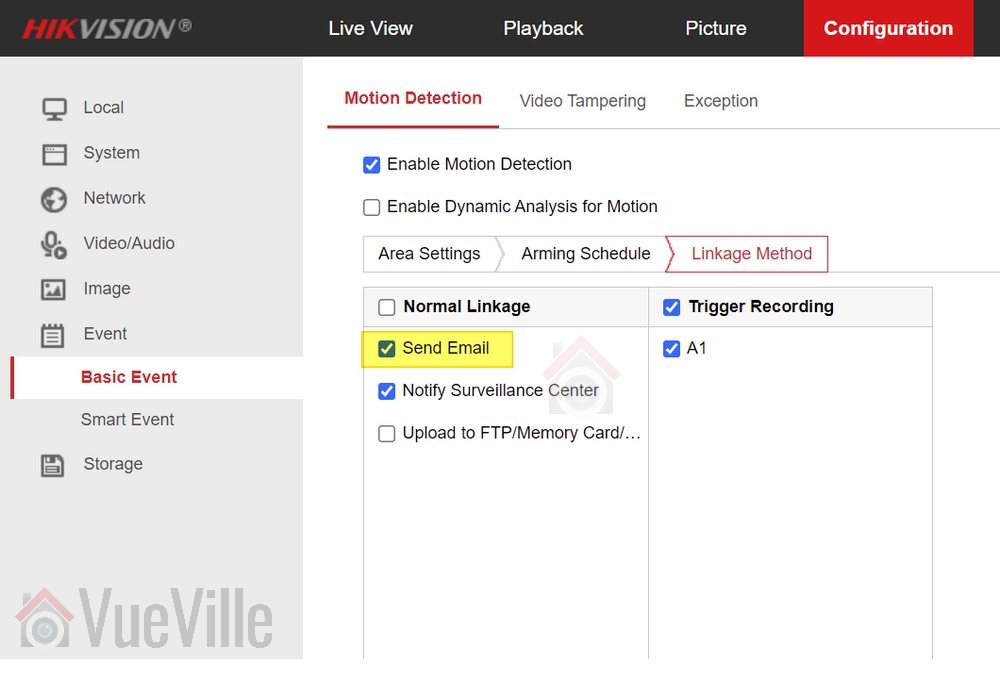
    Step 1: Make sure email alerts are turned on in each of your motion detection settings pages (Motion Detection, Video Tampering, Face Detection, Line Crossing Detection or Intrusion Detection) as shown below:

    Hikvision Motion Detection Email Alerts Gmail - Basic Event Linkage - VueVille
    Click to enlarge

    Configure your email account from which the camera will send email notifications

    We will use Microsoft’s free and unlimited Outlook.com as our mail server for the camera to use while sending email notifications.

    After signing up for a new free account, follow the steps below to obtain the email server settings that we will need for the next section.

    Step 2: Log in to your outlook account and click on the Settings icon (gear wheel) at the top right of the screen

    Step 3: In the pane that slides out from the right, click on “View all Outlook settings”

    Click to enlarge

    Step 4: Then navigate to Mail >Sync Email and note the SMTP settings highlighted in the screenshot below

    Click to enlarge

    Configure your email settings in the camera

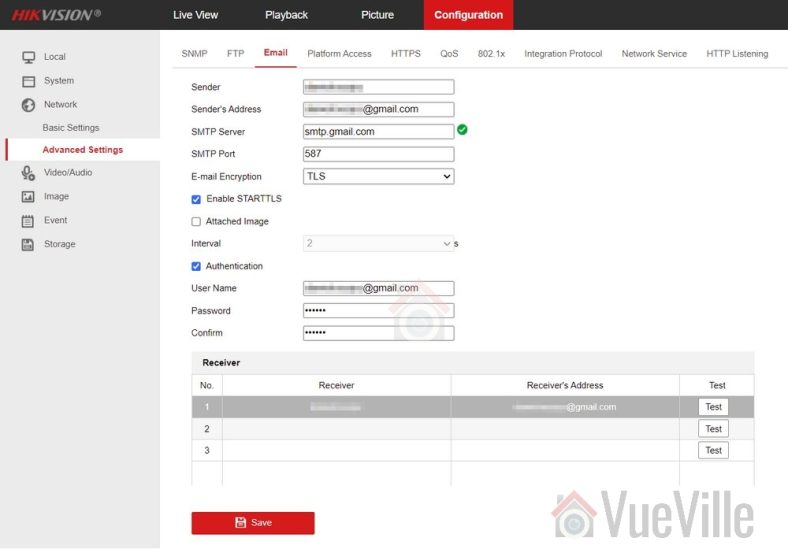
    Next we need to configure the camera as the email ‘sender’- it will use the email account you configured above to send the email alert to a ‘receiver’ account. So the ‘sender’ is the camera and the receiver is the email address(es) that you want to receive the alerts on. Follow the steps below to configure your camera:

    Step 5: Click on the configuration tab on the top menu bar.

    Step 6: Then navigate to Network and click on ‘Advanced Settings‘ (older cameras have a slightly different menu structure but should have the same settings)

    Step 7: Choose the email tab

    Step 8: Refer to the screenshot above to fill out this section. Enter the login details of your Outlook account – this is the sender account. Enter the ‘receiver’ account details – this is where the email alerts will be received. I am using my personal Yahoo email address in the screenshot above. Tick ‘Attached Image’ if you would like snapshots of the motion detected as well.

    Test your settings

    Step 9: Click the Test button. You should see the “Testing Succeeded” message and receive a test email at the ‘receiver’ address(es).

    If not, you need to ensure that all settings such as TCP/IP and email settings are entered correctly as in the screenshots above.

    Save your settings

    Step 10: Finally save your settings by clicking the Save button.

    Now test your email alerts by intentionally setting off the motion detection of your camera. You should get an email alert within 60 seconds.

    Troubleshooting

    You may occasionally find that you no longer receive alerts. This could be because of two reasons:

    • Most email providers like Gmail/Yahoo may automatically mark the alerts as spam and move these emails to the Junk folder – it will treat the sender address as a suspicious sender due to repeated motion detection email alerts being sent day in and day out. Simply choose the option to treat the ‘sender’ address as a trusted email address and this behaviour should stop.
    • A misconfiguration in your motion detection settings could trigger a large burst of notification emails in a very short span of time. While I have not experienced it personally, free email service providers may not like a barrage or incessant stream of notifications, and may temporarily stop accepting email relay requests from your camera. A premium service like Sendinblue that will not throttle or limit email delivery in this manner.
  • Hikvision Network Cameras Guide 2018

    Hikvision Network Cameras Guide 2018

    Network or IP security cameras

    A network camera (often called an IP camera) is basically a CCTV or security camera that has a computer built-in. Most network cameras can independently monitor, detect and send (push) notifications to computers in a home network, or on the Internet, mobile phones, smart phones or any email address. Some can also record footage locally to SD cards or to Network Attached Storage (NAS) drives, upload snapshots to FTP and much more. In a sense they perform the function of a camera and Digital Video Recorder (DVR) or Network Video Recorder (NVR) combination.

    [wpsm_toplist]

    [text-blocks id=”4426″ slug=”earnings-disclaimer-incl-hivision-dahua”]

    Hikvision – who are they?

    [easyazon_image align=”center” height=”400″ identifier=”B017C53TI0″ tag=”vueville.com-eaz-20″ locale=”US” src=”https://www.vueville.com/wp-content/uploads/2015/02/HikvisionPressRelease30092013.jpg” width=”600″]

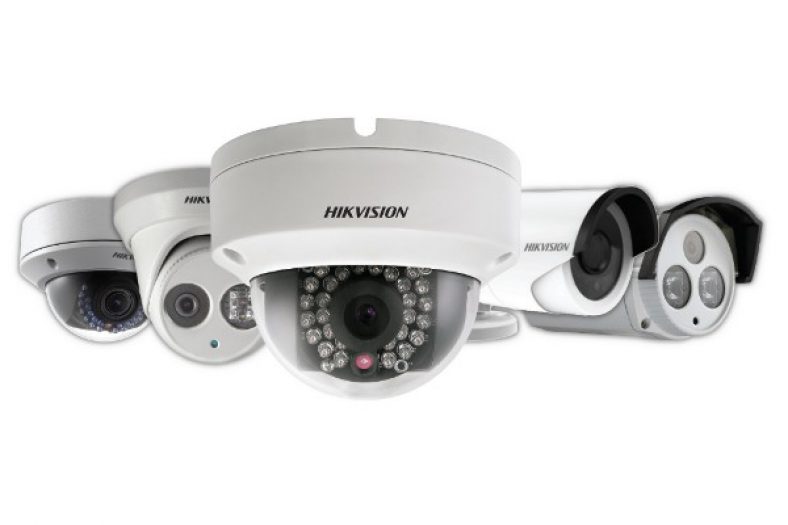
    Hangzhou Hikvision Digital Technology Co. Ltd. popularly known as simply Hikvision, is a Chinese surveillance product company started in 2001. It is listed on the Shenzhen Stock Exchange. It claims to be the world’s largest supplier of video surveillance products and solutions including security cameras. Indeed, many of the popular security camera brands (such as Swann and older Lorex) are rebranded Hikvision products. Hikvision is a name that is quickly becoming popular in the home security and surveillance market owing mainly to their inexpensive but reliable and high performance network (or IP) security cameras and Network Video Recorders (NVR). In a crowded market with names such as Dahua and Foscam, Hikvision stands out as a great first choice for a network camera.

    Network camera range

    Hikvision divides their network cameras into three product lines, rather interestingly called 2-Line, 4-Line and 6-Line. Please note that these terms have nothing to do with the analog resolution term ‘lines’ (TVL). Pan-Tilt-Zoom (PTZ) camera models are not included in the scope of this guide, as they are more expensive and probably not of interest to the average homeowner.

    What can these cameras do? As a standalone device, they do not need a computer to function. So if you are looking for an inexpensive, simple, energy bill friendly CCTV solution that you can monitor through email, FTP, or from your smartphone, without having to run a computer 24/7 the Hikvision cameras are perfect.

    Model naming convention

    The full Hikvision IP camera naming convention is:
    ‘DS-2CD’ ‘1234’ F/H/WD – I (A) (H) (P) (S) (W) (Z)

    • A fixed prefix:
      • ‘DS-’, then
      • ‘2CD’, then
    • 4 digits:
      • product line number 2,4,or 6
      • a digit from 0 to 5 representing the type of IP camera.
      • a digit representing the number of megapixels.
      • a digit representing – currently unknown.
    • The next set of alphabets of F, H or WD indicate the presence of certain features:
      • F indicates Flash memory. This means that the model has the on-board flash storage option. Remember you will have to add a suitable SD-Card.
      • H indicates a built-in heater.
      • WD indicates Wide Dynamic Range (WDR).
    • The suffices are:
      • I indicates a true IR cut filter with auto day/night switch.
      • A indicates Auto back focus.
      • H indicates HD resolution (1080p).
      • P indicates P-iris.
      • S indicates Sound or what Hikvision calls Smart Audio Detection – 2 way audio using either inputs or a mic and a built-in speaker as in some indoor models.
      • W indicates WiFi.
      • Z indicates a Motorized VF lens.
      • The last digit indicates the range of the camera infrared LEDs. Model specific details can be found below.

    For the Hikvision NVR model naming convention, check our detailed NVR Buying Guide.

    Product lines

    We have grouped Hikvision’s network camera range so that you can easily find the model you are looking for.

    2-Line

    Fixed focus / Standard IR LED

    [table id=2 responsive=scroll /]

    Fixed focus / EXIR LED

    [table id=3 responsive=scroll /]

    As one of our readers pointed out, the last digit in the DS-2CD2T32-I3 / DS-2CD2T32-I5 / DS-2CD2T32-I8 models represents the claimed range of the infrared LEDs:
    I3 = 30 metres
    I5 = 50 metres
    I8 = 80 metres

    Variable focus / Standard IR LED

    [table id=4 responsive=scroll /]

    4-Line

    Box camera

    [table id=5 responsive=scroll /]

    Bullet camera

    [table id=7 responsive=scroll /]

    Indoor Dome / Standard IR LED

    [table id=6 responsive=scroll /]

    Outdoor Dome / Standard IR LED

    [table id=8 responsive=scroll /]

    6-Line

    Ultra lowlight

    [table id=9 responsive=scroll /]

    Where can I buy them?

    Hikvision network cameras have good reviews on the Internet and we you can check out our reviews of the Hikvision 2CD-2132F-IS and the Hikvision 2CD-2542FWD-IS. The cameras are officially allowed to be sold via designated distributors only, however it is often cheaper to source them directly from China via AliExpress or via Amazon.

    Amazon

    [easyazon_link keywords=”hikvision” locale=”US” tag=”vueville.com-eaz-20″]Check price on your local Amazon site[/easyazon_link]

    As always on an online marketplace, please ensure you are buying from a genuine seller.

    More resources

    Full product catalogue (PDF)
    Hikvision Web catalogue